The best Kaseya alternatives in 2026

Looking for an alternative to Kaseya? Check out the RMM tools comparison below to see Kaseya pricing, key features to consider, and why TeamViewer ONE might be a superior alternative for secure and scalable IT management.

The best Kaseya alternatives in 2026

Looking for an alternative to Kaseya? Check out the RMM tools comparison below to see Kaseya pricing, key features to consider, and why TeamViewer ONE might be a superior alternative for secure and scalable IT management.

Comparison

The top 11 Kaseya alternatives to consider in 2026

(Data as of  May 2026)

Evaluating remote management alternatives to Kaseya?
Here is how the leading solutions compare and what to consider before making your decision.

Kaseya VSA

TeamViewer ONE

ConnectWise RMM

NinjaOne

Atera

N-able N-central

Datto RMM

Syncro

ManageEngine RMM Central

LogMeIn Resolve

Jira Service Management

Microsoft Intune

Core features

Endpoint management, PSA, patch management

Remote access, RMM, endpoint management, digital employee experience (DEX), real‑time insights, AI‑assisted automation, proactive issue detection and remediation

Remote monitoring, task automation, scripting

Cloud RMM, patching, backup, scripting

RMM, PSA, helpdesk, patch management

Remote monitoring, patch management, network tracking

Remote management, integrated backup, business continuity

RMM, PSA, built-in billing

Endpoint monitoring, patch deployment, network management

Remote desktop access, file sharing

Helpdesk ticketing, ITSM, service workflows

Endpoint, app, and device management

Devices supported

Windows, macOS, Linux

Windows, macOS, Linux, Android, iOS, and ChromeOS with cross-platform remote access

Windows, macOS, Linux

Windows, macOS, Linux

Windows, macOS, Linux

Windows, macOS, Linux

Windows, macOS

Windows, macOS

Windows, macOS, Linux

Windows, macOS, limited mobile

Browser-based only

Windows, macOS, iOS, Android

Security and compliance

2FA, encryption, HIPAA, GDPR

AES-256, zero-trust architecture, conditional access, 2FA, SSO, SOC 2, SOC 3, HIPAA, GDPR

2FA, encryption, HIPAA, GDPR

2FA, encryption, HIPAA, GDPR

2FA, encryption, HIPAA, GDPR, SOC 2

2FA, encryption, HIPAA, GDPR

2FA, encryption, HIPAA, GDPR

2FA, encryption, HIPAA, GDPR

2FA, encryption, HIPAA, GDPR

Basic encryption, 2FA, HIPAA, GDPR

Role-based access, audit logging, GDPR

Conditional access, HIPAA, GDPR

Pricing model

Custom quote

Endpoint-based, flexible licensing

Custom quote

Per device

Per technician

Custom quote

Contract minimum

Per user

Per device and technician

Per seat

Atlassian licensing model

Microsoft licensing

Support and SLA

Around-the-clock support with SLA coverage

Global support across 30 or more languages, enterprise SLAs, and dedicated success managers

24/7 support with SLA options

Support available via email, chat, and phone

Support via email, chat, and a self-service knowledge base

Around-the-clock support with SLA coverage

24/7 support with SLA coverage

Support available via email and chat

Around-the-clock support

Support limited to standard business hours

Community forums with limited direct support options

Tiered support through Microsoft

Why look for a Kaseya alternative?

Kaseya VSA covers the essentials: remote monitoring, patch management, endpoint visibility, and automation. But the right tool is about more than features. For a growing number of MSPs and IT teams, a few recurring pain points are pushing them to look elsewhere.

Frequent concerns

Users describe Kaseya's customer support as slow to respond and difficult to escalate. Tickets taking days or weeks to resolve is a pattern that creates real operational risk for MSPs whose business depends on reliable vendor support. This is among the most frequently cited reasons for switching. (Source: G2, Capterra, Capterra)

Kaseya's extensive feature set comes with a demanding onboarding process. Users report that the platform can feel overwhelming. Teams without dedicated technical resources to invest in configuration can struggle to get full value from the platform. (Source: Capterra)

Users report that negotiated rates, bundling requirements, and multi-year contract structures make it difficult to predict total cost of ownership before committing. The cost can be difficult to justify, particularly for smaller teams working with tight budgets. (Source: Capterra, Capterra)

Since Kaseya acquired Datto in 2022, users report growing uncertainty around the product roadmap and increasing pressure to adopt bundled Kaseya products. Promised feature parity between VSA and Datto RMM has not always been delivered. (Source: G2, Reddit)

TeamViewer ONE brings together remote access, device management, AI-driven digital experience monitoring, and no-code automation in a single proactive IT platform. Where Kaseya users struggle with slow support response times, unclear pricing structures, and a demanding onboarding process, TeamViewer ONE is built for fast time to value, with scalable endpoint-based pricing that grows with your environment.

With native support for Windows, macOS, Linux, Android, iOS, ChromeOS, Raspberry Pi, embedded systems, and industrial IoT environments, TeamViewer ONE covers technology fleets that Kaseya VSA simply cannot match. Beyond remote access, it includes fully integrated RMM capabilities covering asset management, device monitoring, patch management, endpoint protection, backup, and mobile device management. These capabilities are available within one unified platform and expand as your operational needs grow. There is no platform migration pressure, no forced bundling, and no surprise licensing requirements of the kind that Kaseya users report.

Enterprise-grade security, including AES-256 encryption, conditional access, comprehensive audit logging, and a zero-trust architecture, is built into every connection. With over 600,000 customers worldwide, global support in more than 30 languages, enterprise SLAs, and dedicated success managers, TeamViewer ONE delivers the vendor reliability that Kaseya support has failed to provide.
ConnectWise RMM is a cloud-native RMM platform used by MSPs for remote monitoring, task automation, and scripting. It is commonly chosen by teams already working within the ConnectWise ecosystem.

That said, setup is demanding and time-consuming. The interface can feel clunky for newer users, and reporting relies on a separate third-party platform rather than being built directly into the product (Source: G2). Device support is limited to Windows, macOS, and Linux, with no coverage for mobile, IoT, or embedded systems. Pricing is high-end with a custom quote model.

For teams that need broader device compatibility, native remote access, and enterprise-grade security without the configuration overhead, TeamViewer ONE is the stronger choice.

NinjaOne is a cloud-native RMM platform commonly used by MSPs for endpoint management and routine IT operations. It is often considered by teams evaluating standalone RMM software for managing device environments.

Nevertheless, the platform has notable limitations. Dashboard customization is limited, and reporting options lack the depth that larger or more complex environments require. (Source: Capterra) Pricing is not publicly listed, which makes it harder to forecast costs before committing (Source: Capterra). Device support does not extend beyond Windows, macOS, and Linux, meaning teams managing mobile devices, IoT, or embedded systems will quickly hit a ceiling.

For organizations that need broader device compatibility, enterprise-grade security with conditional access and zero-trust architecture, and AI-powered monitoring built into a single platform, TeamViewer ONE is the more complete choice.

Atera is an IT management platform built for small IT teams and MSPs handling service operations and device management. Teams that want to manage multiple IT workflows from a single interface often put it on their shortlist.

Where Atera shows its limits is at scale. Reviewers note that reporting and customization feel restricted, and that gaps become more noticeable as environments grow (Source: Capterra). Advanced capabilities do not match what larger platforms offer.

Teams that need broader device compatibility, deeper security controls such as conditional access and zero-trust architecture, and a platform that scales without hitting capability ceilings will find TeamViewer ONE a stronger long-term investment.

N-able N-central is an RMM platform that MSPs use to support client IT environments. Teams managing devices, monitoring systems, and handling routine IT operations across customer sites evaluate it as an option.

That said, the platform comes with a notable learning curve. Multiple reviewers point out that initial setup and policy configuration take considerable time, and that the interface can feel cluttered and difficult to navigate at scale (Source: G2). Pricing is high-end with a custom quote model, and device support does not extend to mobile, IoT, or embedded systems.

For teams that need a more intuitive platform with native remote access, broader device compatibility, and enterprise-grade security built in from day one, TeamViewer ONE is the more complete and future-proof choice.

Datto RMM is a cloud-based RMM platform that MSPs use to manage client IT environments. It comes up regularly when teams are evaluating options for device management, system monitoring, and IT operations across customer sites.

The trade-offs are worth noting. Initial setup and customization require significant time and effort before the platform delivers full value, and the web remote feature has been flagged for latency issues by multiple users (Source: Capterra, Capterra). Device support is limited to Windows and macOS, and pricing uses a contract minimum model that can be difficult to forecast. Since Kaseya acquired Datto in 2022, some users have also reported growing uncertainty around support quality and product direction.

Teams looking for broader device compatibility, native remote access, and a unified platform that covers the full IT management stack will find TeamViewer ONE a stronger fit.

Syncro is an IT management platform commonly used by small MSPs to manage service operations and client environments. Teams looking to handle multiple MSP workflows from a single platform often include it in their evaluation.

Where Syncro shows its limits is beyond small team environments. Reporting capabilities are basic, and the interface requires customization effort to get the most out of it. Some users also report occasional reliability issues with remote access sessions and background tools (Source: Capterra). Device support covers only Windows and macOS.

For teams that need enterprise-grade security, broader device compatibility, and a platform built to grow with their organization, TeamViewer ONE offers significantly more depth without the trade-offs.

IT teams use ManageEngine RMM Central to support endpoint management and routine IT operations. Managing devices, monitoring systems, and supporting internal IT environments are the primary reasons teams evaluate it.

The limitations become visible during setup. Initial configuration and onboarding are time-consuming, the interface can slow down with larger device inventories, and advanced reporting features are locked behind higher-tier licenses (Source: Capterra).

For teams that need a faster path to productivity, native remote access, and enterprise-grade security without the configuration overhead, TeamViewer ONE is the stronger choice.

LogMeIn Resolve is a remote support platform commonly used by IT teams to access devices and support end users. Remote troubleshooting and service desk workflows are the main reasons it comes up during software evaluations.

However, support quality is a consistent pain point. Users report that response times can stretch from days to weeks, with little to no communication about ticket status in the meantime (Source: G2). Pricing is also a recurring concern, with multiple users describing the platform as expensive and some reporting significant price increases at renewal (Source: Capterra).

For teams that need reliable, enterprise-grade remote access combined with broader device support and predictable licensing, TeamViewer ONE is the stronger choice.

Software, DevOps, and IT teams use Jira Service Management to manage service requests and internal workflows. Structured ticketing, service management, and cross-team coordination are the typical drivers when teams add it to their evaluation list.

The trade-offs are significant for teams coming in fresh. The interface is frequently described as complex and unintuitive, and setup requires considerable time and technical effort, especially for teams without dedicated administrators (Source: Capterra). The platform also has no native remote access or device management capabilities, which means it cannot replace a dedicated RMM solution.

For teams that need remote access, endpoint management, and IT automation in a single platform, Jira Service Management is simply not built for that purpose. TeamViewer ONE covers those needs while also integrating natively with Jira for ticketing workflows.

Microsoft Intune is an endpoint management platform used by organizations to manage devices, applications, and security settings within Microsoft-based environments.

But the platform comes with a significant learning curve. Users consistently note that initial configuration and navigation are challenging without prior experience, and setup can be a complex and time-consuming process (Source: Capterra).

For teams that need a platform they can get up and running quickly, with native remote access and broad device compatibility beyond the Microsoft ecosystem, TeamViewer ONE is the more practical choice.

Looking beyond traditional remote monitoring? Here's why TeamViewer ONE leads the evolution

TeamViewer ONE offers capabilities that go well beyond what most Kaseya alternatives provide, and it does so within a single, integrated platform that is intuitive to use from day one.

  • One platform, no tool sprawl

    TeamViewer ONE is not a collection of modules bolted together. Remote access, device management, monitoring, patch management, endpoint protection, backup, mobile device management, and DEX analytics all live in the same environment. 

    It also integrates natively with Microsoft 365, ServiceNow, Salesforce, Splunk, and more than 25 other leading enterprise platforms. As your organization grows, you activate capabilities within TeamViewer ONE rather than migrating to a new platform.

  • Real-time DEX monitoring and proactive prevention

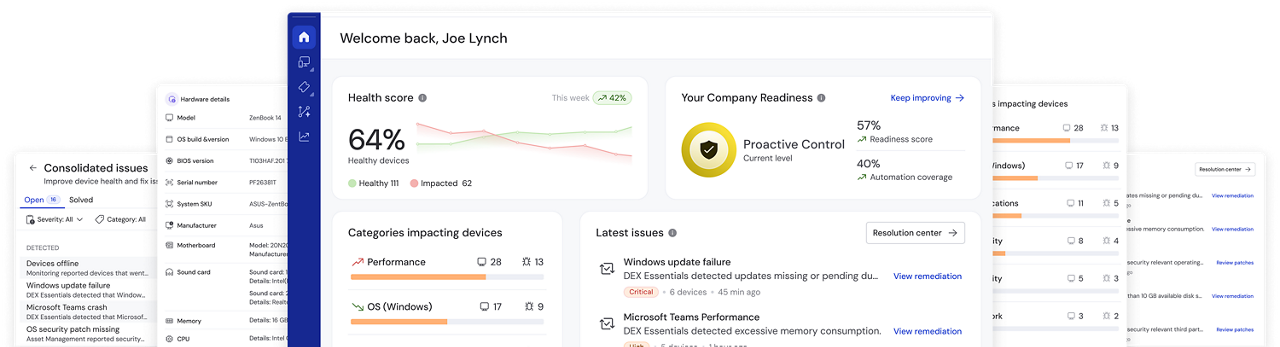
    TeamViewer ONE tracks the experience employees have with their devices and applications in real time. It surfaces telemetry on endpoint performance, application behavior, and network conditions, giving IT teams a clear picture of what is actually affecting productivity. Crucially, it identifies anomalies before they become incidents. IT teams can act on early warning signals rather than waiting for a service desk ticket to arrive.

    This shift from reactive to proactive reduces downtime, lowers ticket volume, and keeps employees productive.

  • AI-powered troubleshooting, documentation and scripting

    TeamViewer ONE’s built-in AI agent, Tia, uses device data, session insights, and historical context to help detect and diagnose issues across managed endpoints. It provides real-time, context-aware recommendations during support sessions—guiding technicians with relevant insights and proven resolutions.

    Tia also helps turn proven fixes into reusable scripts, allowing teams to standardize remediation and reduce repetitive manual work.

    Many alternatives in this comparison provide more limited AI-driven assistance or rely more heavily on manual troubleshooting.

  • Native remote access across every device

    TeamViewer's remote access is not bolted on through a third-party integration. It is native, cross-platform, and built on a global network of over 1,400 routers that deliver high-quality connections even in low-bandwidth environments.

    TeamViewer ONE supports Windows, macOS, Linux, Android, iOS, ChromeOS, Raspberry Pi, embedded systems, and industrial IoT devices. No other platform in this comparison covers this breadth. 

  • Enterprise-grade security, built in from day one

    All TeamViewer connections are protected by end-to-end AES-256 encryption. The security architecture is built on zero-trust principles.

    Conditional access, comprehensive audit logging, 2FA, and SSO are included as standard features. BYOC gives security-focused organizations additional control. 

TeamViewer certifications

Having concerns with TeamViewer? Here's the truth.

TeamViewer's pricing reflects what you actually get: enterprise-grade security, native remote access, AI-powered monitoring, and no-code automation in a single platform. Flexible, endpoint-based licensing means you pay for what your team needs today, while the platform scales with you as your requirements grow. Combining multiple lower-cost tools to achieve the same result typically adds up to more in total.

TeamViewer connects directly with the PSA and CRM tools your team already relies on, including Microsoft 365, ServiceNow, and Salesforce. Rather than replacing working systems with a compromised all-in-one alternative, TeamViewer gives you best-in-class remote access and IT management that fits naturally into your existing workflows.

TeamViewer is built for fast time to value. One-click connections, drag-and-drop session management, and an intuitive interface mean teams are productive from day one, without weeks of onboarding. The pricing is scalable, endpoint-based, and aligned with your IT environment. 

Absolutely. TeamViewer combines quick deployment, flexible licensing, compliance-ready security, and proactive monitoring in a platform that grows with your organization. You get enterprise-level capabilities without the overhead that typically comes with them, making it a practical and future-proof choice for SMBs and growing IT teams alike.

TeamViewer is more than an IT management solution. For SMBs and enterprises alike, it is a foundation for building a more resilient, proactive, and scalable digital workplace.

Reasons to choose TeamViewer ONE

  • Trusted global leader in remote support

    The future isn’t built on scattered tools and reactive support—it’s proactive and deeply integrated. With TeamViewer ONE, your IT team becomes a force multiplier that unites breakthrough DEX capabilities and TeamViewer’s legendary remote connectivity solutions to create the first unified digital workplace platform.

  • Enterprise-grade security

    TeamViewer goes to great lengths ensuring best-in-class security and privacy for millions of users worldwide. TeamViewer ONE is secured by end-to-end 256-bit AES encryption, two-factor authentication (2FA), and other industry-grade security features, including conditional access and single sign-on (SSO).

Top-rated, award-winning software solution

Frequently asked questions (FAQ)

The strongest Kaseya alternatives in 2026 are TeamViewer ONE, NinjaOne, ConnectWise RMM, Atera, and Datto RMM. TeamViewer ONE stands out for combining remote access, endpoint management, DEX monitoring, AI-powered automation, and proactive issue prevention in a single platform. The right choice depends on your team size, device environment, and whether you need full IT operations management or a more narrowly focused RMM tool.

For most IT teams, TeamViewer ONE provides a strong balance of scalability, security, and ease of deployment. Its unified platform combining remote access, endpoint management, and automation makes it suitable for organizations managing growing and distributed device environments.

Yes. TeamViewer provides onboarding support to help teams transition from existing RMM platforms. Device policies, monitoring configurations, and automation setups can be rebuilt within the TeamViewer environment. As with any platform migration, planning for a parallel-running period helps ensure continuity. TeamViewer's support team is available to guide you through the process at the right pace for your organization.

Migration timelines depend on the size of your environment and the complexity of your current configuration. Small teams can typically complete a transition within a few weeks. Larger environments with extensive automation workflows and a high number of managed endpoints may take longer. TeamViewer's onboarding resources and support team are available to help you plan and execute the switch at the pace that works for your organization.