TeamViewer's pricing reflects enterprise-grade security and universal device coverage that SMB-focused tools simply can't match. With flexible licensing options and modular pricing, you pay for what you need while getting future-proof capabilities that protect your investment as you grow.
Comparison
The top 12 ConnectWise alternatives to consider in 2026
(Data as of May 2026)
Considering remote management alternatives to ConnectWise? Here's how they compare, and what to keep in mind when making your decision.
Why look for ConnectWise alternatives?
ConnectWise RMM offers robust automation and scripting for established MSPs, but the complexity and cost are difficult to justify for many teams. Real users highlight four recurring pain points:
Getting started with ConnectWise requires significant time investment. Multiple users report that the platform is difficult to navigate for new team members, slowing down onboarding and day-to-day operations. (Source: G2)
The built-in reporting tools offer limited customization, making it hard to generate detailed or cross-client insights without significant manual effort. (Source: Capterra)
Core patching workflows lack granularity. Users cannot recall individual patches or push a single update to one specific client, creating gaps in patch control across diverse environments. (Source: Capterra)
NinjaOne provides standard RMM functionality featuring basic automation tools and patch management support for Windows, macOS systems and Linux. It’s suitable for routine tasks, including device monitoring, software deployment, and script deployment operations.
However, organizations frequently face constraints when requiring full-scale professional services automation capabilities or broad third-party integrations (Source: Capterra). Companies considering between NinjaOne vs ConnectWise will discover that NinjaOne's integration framework tends to be more limited than competitors such as TeamViewer ONE, which may impact overall workflow optimization.
Atera provides an integrated RMM and PSA platform with per-technician pricing, aimed at small IT teams and MSPs. The platform combines remote monitoring, patch management, and ticketing functionality in a single interface designed for basic remote control tasks.
While sufficient for basic IT management, Atera falls short when businesses need advanced security features, comprehensive device coverage, or sophisticated reporting capabilities (Source: Capterra). Organizations deciding between Atera vs ConnectWise should keep in mind that Atera's focus on affordability means fewer enterprise-grade integrations and limited support for non-traditional devices like embedded systems, industrial IoT, or mobile devices.
Kaseya VSA is a remote connection software that combines RMM and PSA capabilities with patch management and automation features for Windows, macOS, and Linux environments.
At the same time, Kaseya's steep learning curve and complex interface might not be the best option for lean IT teams (Source: Research.com). Users also report deployment challenges and lengthy setup processes that can delay time-to-value, contrasting sharply with TeamViewer's straightforward approach.
N-able supports remote monitoring and comprehensive patch management for MSPs and IT teams requiring detailed system oversight for primarily desktop environments.
However, businesses often encounter challenges when seeking user-friendly interfaces, streamlined deployment, or cost-effective licensing models (Source: G2). N-able's focus on traditional RMM functionality means limited support for modern device ecosystems like mobile platforms, embedded systems, and IoT devices, while its moderate ease-of-use ratings reflect the technical expertise required for effective implementation and daily operations.
Datto RMM offers backup integration and business continuity features, providing monitoring and data protection capabilities across supported platforms.
With that being said, users highlight the tool's expensive pricing and complex deployment that can strain budgets and resources (Source: Software Advice). While Datto offers solid traditional RMM features, it lacks proactive IT management features, compared to solutions like TeamViewer ONE.
Syncro provides built-in billing and PSA capabilities for managed service providers, designed for small MSP operations with basic reporting needs.
At the same time, users find that the platform lacks advanced security features and comprehensive device coverage (Source: Capterra). Syncro's focus on traditional MSP functions doesn't address modern digital experience management needs.
ManageEngine RMM delivers features with monitoring capabilities across Windows, macOS, and Linux, offering integration with Active Directory and SIEM solutions.
However, ManageEngine is also known for its complex setup and resource-intensive deployment that demand significant technical expertise (Source: Capterra). The platform's complexity and high resource consumption contrast with more intuitive solutions, such as TeamViewer ONE.
LogMeIn Resolve is an IT management platform that combines remote access, RMM, patch management, helpdesk ticketing, and basic automation. It is commonly used by small IT teams and MSPs managing Windows, macOS, and Android environments.
However, businesses encounter limitations when requiring comprehensive device management, advanced security features, or cost-effective scaling options (Source: G2). Organizations seeking ConnectWise alternatives find that LogMeIn's expensive per-seat pricing model and limited support hours create operational constraints compared to solutions like TeamViewer with 24/7 global coverage.
Jira Service Management is known for its ITSM capabilities, workflow automation, and ticketing functionality designed for structured service desk operations. The platform integrates with the rest of the Atlassian ecosystem, providing incident management, change tracking, and knowledge base features for organizations already using Atlassian tools.
However, businesses encounter significant gaps when requiring actual remote access capabilities, comprehensive device management, or solutions beyond pure service desk functionality (Source: Capterra). Jira Service Management's focus on ticketing workflows means no support for direct device access, cross-platform connectivity, or real-time troubleshooting capabilities, while its ecosystem lock-in restricts integration flexibility that modern IT teams require for complete endpoint management and hands-on technical support.
Microsoft Intune provides mobile device management and application deployment capabilities with integrations across the Microsoft ecosystem. The platform is designed for organizations already invested in Microsoft infrastructure and licensing.
However, businesses encounter restrictions when requiring true cross-platform flexibility, comprehensive non-Windows device support, or solutions beyond the Microsoft ecosystem (Source: Capterra). Organizations seeking Microsoft Intune alternatives find that the platform's Windows-centric approach and cloud-dependent performance create operational constraints compared to universal solutions like TeamViewer ONE.
Ivanti delivers endpoint management and security capabilities with ITSM functionality designed for large enterprise environments. The platform provides automated patching, asset tracking, and security compliance features for organizations requiring detailed control across their IT infrastructure.
However, users report resource-intensive deployment, steep learning curve, and higher pricing plans among the platform's disadvantages (Source: Capterra). Ivanti's limited integration ecosystem and complex setup processes restrict agility that modern IT teams require for rapid deployment and intuitive daily operations across diverse technical environments.
Here's what TeamViewer ONE customers are saying
Looking beyond traditional remote monitoring?
Most IT teams aren't short on tools. They're short on answers. TeamViewer ONE replaces the patchwork of reactive point solutions with a single platform that detects issues earlier, fixes them faster, and prevents them from coming back.
Here's why TeamViewer leads the evolution
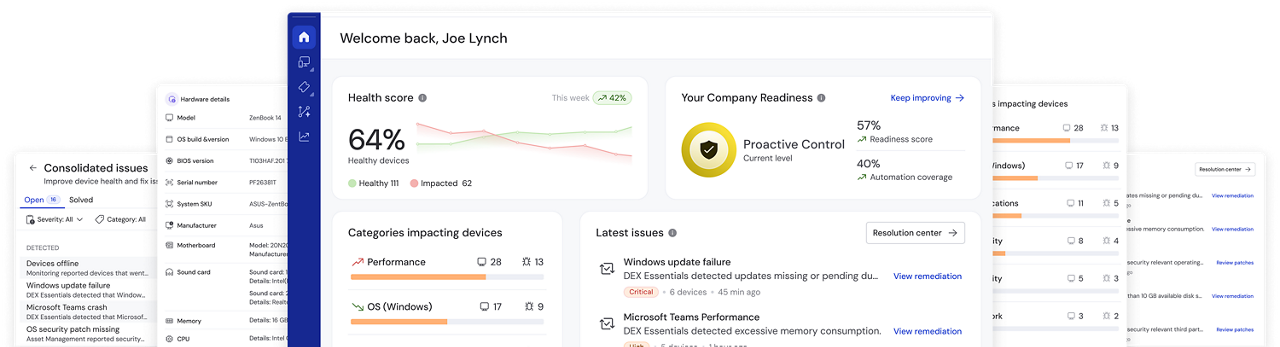
TeamViewer ONE identifies trends and anomalies across your device fleet in real time. Instead of waiting for users to report problems, IT teams can act on early signals before anything breaks. That shift from reactive support to proactive operations is what sets TeamViewer ONE apart from traditional RMM platforms.
Tia, the TeamViewer Intelligent Agent, helps IT teams troubleshoot faster by querying the environment and accelerating root cause analysis during support sessions. AI-powered Session Insights automatically document each session and surface patterns across the fleet, cutting down on the manual work that follows every ticket.
TeamViewer ONE ships with thousands of prebuilt, no-code remediations that trigger automatically based on real-time insights. Teams can build policy-based workflows without writing a single line of code. Recurring issues get resolved without tickets, and IT capacity shifts toward work that actually moves the business forward.
Device metrics tell you what's happening to machines. TeamViewer ONE's DEX layer tells you what that means for people. By combining endpoint telemetry with employee sentiment data, IT teams can see where digital friction is hurting productivity, prioritize what matters most, and measure whether fixes actually improved the experience.
Every connection is protected by AES-256 encryption, zero-trust architecture, conditional access, 2FA, and SSO. HIPAA, GDPR, and SOC 2 compliance are covered out of the box, without additional configuration or third-party tools.
With over 600,000 customers across more than 100 countries, TeamViewer ONE is backed by global support in 30+ languages, enterprise SLAs, and dedicated success managers. The platform scales from hundreds of endpoints to tens of thousands without adding operational complexity.
Concerns with TeamViewer? Let’s address them!
Let's clear up the biggest misconceptions and questions about TeamViewer and show you why it remains one of the top alternatives to ConnectWise.
TeamViewer ONE includes native backup capabilities through TeamViewer Backup, which lets you manage, schedule, and monitor cloud-based endpoint backups directly from the unified dashboard. For PSA, TeamViewer ONE integrates seamlessly with the tools your team already uses, including ServiceNow, Salesforce, and Microsoft 365, so you keep your existing workflows without replacing systems that already work.
TeamViewer provides AES-256 encryption, conditional access controls, comprehensive audit logging, and full HIPAA, GDPR, and SOC 2 compliance with security-first architecture across all device types.
TeamViewer offers universal device coverage including mobile and industrial systems, real-time DEX analytics, enterprise-grade security, and modular flexibility that competitors simply can't match.
Bottom line
TeamViewer remains one of the best options for SMBs.
For SMBs and enterprises alike, TeamViewer is more than an IT management solution. It’s a foundation for digital transformation.
Experience award-winning software for secure remote access and support
Frequently asked questions (FAQ)
TeamViewer ONE includes native backup capabilities through TeamViewer Backup, which lets you manage, schedule, and monitor cloud-based endpoint backups directly from the unified dashboard. For PSA, TeamViewer ONE integrates seamlessly with the tools your team already uses, including ServiceNow, Salesforce, and Microsoft 365, so you keep your existing workflows without replacing systems that already work.
TeamViewer provides AES-256 encryption, conditional access controls, comprehensive audit logging, and full HIPAA, GDPR, and SOC 2 compliance with security-first architecture across all device types.
TeamViewer offers universal device coverage including mobile and industrial systems, real-time DEX analytics, enterprise-grade security, and modular flexibility that competitors simply can't match.