

TeamViewer vs. ManageEngine
Why choose TeamViewer ONE over ManageEngine
A unified, cloud-native platform that helps IT move from reactive support to proactive digital workplace operations. Get started with TeamViewer ONE today!
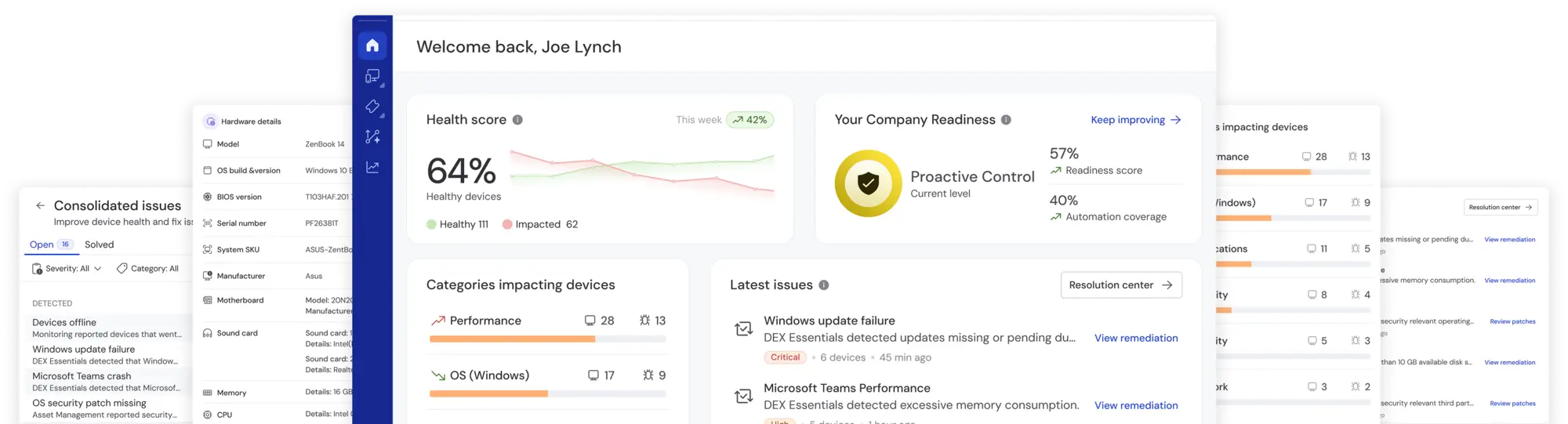
Prioritizing experience-led, autonomous IT operations
As organizations grow, IT environments require more than just IT management suites made up of multiple modules and tools. They need a unified platform that helps guide the IT maturity journey from reactive, to proactive, to predictive.
TeamViewer ONE provides enterprise-grade digital employee experience (DEX) automation and remediation in a unified, cloud-native platform. With predefined one-click fixes and automated workflows, it reduces support tickets and eliminates manual monitoring.
Whether managing 500 or 500,000 endpoints, TeamViewer ONE scales securely while reducing operational complexity, helping IT teams move from reactive support to proactive operations.
Get started with TeamViewer ONE today!
Where TeamViewer ONE wins
TeamViewer ONE is designed for organizations prioritizing automation-first IT operations, digital employee experience, and simplified platform architecture.

TeamViewer ONE provides cloud-native, edge-enabled architecture built for real-time remediation and proactive operations. It combines remote connectivity, DEX insights, automation, and endpoint protection in a single environment. In comparison, ManageEngine’s suite follows a more legacy, modular architecture, delivering cloud/client-server components across multiple tools. Organizations must assemble workflows across separate modules instead of operating within a unified platform.

TeamViewer ONE includes deep DEX automation with predefined remediations, business impact dashboards, and experience metrics. These capabilities help IT detect and resolve issues earlier, reducing manual monitoring and support tickets. Comparatively, ManageEngine offers predefined fixes across its modules, but automation workflows are often spread across separate tools and configurations, requiring additional effort to achieve similar proactive remediation.

TeamViewer ONE incorporates AI workflows, leveraging the TeamViewer Intelligent Agent (Tia) to troubleshoot during remote sessions. Complementing this, AI-powered session documentation delivers clear, consistent records that accelerate and improve troubleshooting in future remote sessions. ManageEngine’s AI capabilities are distributed across multiple modules, such as ServiceDesk, Analytics, and OpManager. As a result, teams often must interact with AI features across separate tools rather than a single efficient operational workflow.

Endpoint protection is available as an add-on for TeamViewer ONE. ManageEngine offers a similar add-on for endpoint protection through its Endpoint Central module.
Feature comparison
TeamViewer ONE vs. ManageEngine
| TeamViewer ONE | ManageEngine | |||
|---|---|---|---|---|
| Endpoint-based pricing |  | | ||
| Unified platform | | Unified, cloud-native platform |  | Modular suite requiring teams to assemble workflows across separate tools |
| Real-time remediation | | | Policy, event-based | |
| Built-in remote support and access | | Covers all major operating systems and device types | | Remote support available through separate module |
| Digital employee experience (DEX) | | Strong DEX insights and automation with pre-built remediations, business impact dashboard, and experience metrics | | DEX Manager Plus provides basic DEX capabilities |
| Automation and remediation | | | Additional setup needed to automate workflows across modules | |
| AI capabilities | | Included in all packages, automatic session documentation and in-session troubleshooting using real-time device data and historical session data | | AI capabilities distributed across products |
| Endpoint protection | | Add-on powered by Malwarebytes | | Included in broader endpoint management suite |
| IT asset management (ITAM) | | Included in TeamViewer ONE Advanced package, covering lifecycle management, software deployment, and license/version tracking | | |
| Patch management and software deployment | | Included in TeamViewer ONE Advanced | | Software deployment, patching through Endpoint Central with broad OS support |
| Backup and recovery | | | ||
| Analytics and reporting | | DEX-focused dashboards (insights, remediation, business impact) | |
What makes TeamViewer ONE special

Get live telemetry on endpoints and apps. Flag anomalies instantly and use trends to fine-tune IT resources for stellar speed, stability, and uptime.

Replace manual checks with zero-touch compliance. Automate OS updates, security patches, and configs to keep every device in policy—no exceptions, no drift.

Automate scans for missing patches, weak settings, and old software. Stop risky behaviors, enforce encryption, and generate audit-ready reports.

Combine telemetry and surveys to reveal IT’s human impact. Fix slow logons and failing devices before they frustrate users and harm productivity.

Ready to transform how you support digital work?
Explore what’s possible when everything you need is in one place. Let’s talk about why TeamViewer ONE is a great choice for your business.
Why choose TeamViewer ONE

All your IT essentials—one groundbreaking platform
With TeamViewer ONE, you shape a smarter, more resilient IT organization with a platform that delivers enterprise-grade remote support, endpoint visibility, real-time monitoring, AI insights, and automated remediation to fix issues before they arise. Whether you manage 500 or 500,000 devices, it keeps work flowing, captures user sentiment, and scales without limit.
Top-rated, award-winning software solution



Compare. Decide. Upgrade.
Speak to one of our experts and see why TeamViewer ONE is the clear choice over ManageEngine.