• Contact Sales
    • Open web app
    • Management Console
    • Ticket
    • Customer Portal
TeamViewer
  • Personal use and SMB TeamViewer Remote

    Fast and secure remote access and IT support.

    Learn more

    • Remote support Deliver instant, secure support
    • Remote management Monitor and manage devices
    View plans and pricing

    Enterprise TeamViewer Tensor

    Remote connectivity built for secure operations.

    Learn more

    • Remote IT support Secure, flexible, integrated
    • Operational technology Remote shop floor access

    Real-time troubleshooting TeamViewer DEX

    Resolve issues before they affect users.

    Learn more

    • Endpoint Troubleshooting Identify and resolve issues
    • Endpoint Automation Automate routine IT tasks

    Connected worker TeamViewer Frontline

    Drive efficiency with industrial augumented reality.

    Learn more

    • Logistics and warehousing Hands-free material handling
    • Training and onboarding Fast onboarding and upskilling
    AI capabilities as seen in the TeamViewer client

    TeamViewer ONE

    Get the full power of TeamViewer, unified in one platform.

    • Learn more

    Key integrations

    • Microsoft Intune

    • ServiceNow

    • Freshworks

    • Jira

    • Salesforce

    • Slack

    • Microsoft Teams

    View all integrations
  • TeamViewer ONE Platform

    Proactively manage and optimize your digital workplace combined in one platform.

    • For lean IT teams Proactive device management
    • Frictionless experience Smooth and uninterrupted digital experience
    • Seamless IT operations Proactive remediations and exceptional service
    • Talk to our team Ready to transform?
    Explore the platform

    Core capabilities

    • TeamViewer AI
    • Digital Employee Experience
    • Remote support and control
    • Asset and patch management
    View all capabilities

    Gartner Report 2026

    TeamViewer named a leader in DEX

    TeamViewer named a Leader in 2026 Gartner® Magic Quadrant™ DEX tools.

    Key integrations

    • Microsoft Intune

    • ServiceNow

    • Freshworks

    • Jira

    • Salesforce

    • Zendesk

    • Slack

    • Microsoft Teams

    View all integrations
  • Popular use cases Most popular TeamViewer use cases

    • Remote access and support Manage people, devices, and applications – from anywhere.
    • Digital employee experience (DEX) Proactively solve IT issues before they impact productivity.

    Other use cases Popular solutions for further use cases

    • Remote access Improve access with secure connection
    • Remote control Control device platform-independent
    • Remote desktop Enhance productivity from anywhere
    • Wake-on-LAN Enable remote device activation
    • Screen sharing Real-time visual communication
    • Smart Service Streamline after-sales operations

    By need Popular solutions for different requirements

    • Personal use Access devices from anywhere
    • Small businesses Simplify remote access and support
    • Large businesses Scale and secure enterprise IT
    • Freelancers and digital nomads Work securely from any location
    • Managed service providers Manage and maintain client IT
    • OEMs Streamline support and operations
    • Non-profit and education 30% discount on TeamViewer technology

    By industries Popular solutions sorted by industry

    • Automotive
    • Agriculture
    • Logistics
    • Manufacturing
    • Retail
    • Healthcare
    • Financial services
    • Federal

    Talk to our sales team

    Need help choosing the right solution, placing and order, or upgrading your license?

    • Talk to us
  • Enterprise
  • Find out more about TeamViewer

    • About TeamViewer Connecting people, places, and things securely.
    • Contact support Browse support articles or contact our team.
    • Become a partner Join our global partner TeamUP program
    • Success stories Explore results achieved by TeamViewer customers.
    INSIGHT

    How Tia helps IT teams turn fixes into reusable scripts

    Resources

    • News and insights
    • Success stories
    • Events and webinars
    • Trust Center
    • Why TeamViewer

    Partner

    • Become a partner
    • Find a partner
    • Integration partners

    Support

    • Contact support
    • Guides and manuals
    • Knowledge Base
    • System status
    • Custom modules
    • For developers
    • Community

    Company

    • About TeamViewer
    • Careers
    • Investors
    • Newsroom
    • Leadership
    • Sports partnerships
    • Sustainability and CSR
    • Corporate Governance
  • Pricing
  • Free Download

Knowledge Base

  • TeamViewer ONE
  • TeamViewer Remote
  • TeamViewer (Classic)
  • TeamViewer Tensor
  • TeamViewer Tensor (Classic)
  • TeamViewer Frontline
  • Other products
Back to support overview
  • Get started with your TeamViewer ONE license
  • Understanding the Home Dashboard in TeamViewer ONE
  • Company Readiness in TeamViewer ONE
  • New navigation experience in TeamViewer ONE
  • Create and run remediation scripts from Session Insights with SCALE
  • Unified policies in TeamViewer ONE
  • Unified policies in TeamViewer ONE

    Last Modified: Jun 24, 2026

Unified Policies provides a single, streamlined way to configure and enforce settings across TeamViewer ONE. Instead of managing separate policy types for different modules, admins create one policy and assign it to device groups. Currently, this includes both TeamViewer and Patch Management settings. This new feature helps to reduce setup time and ongoing administration tasks.

This article applies to all TeamViewer ONE Standard and Advanced license holders.

Note: The Patching section of the Unified Policy is available only to TeamViewer ONE Advanced licenses.

Requirements

In order to utilize the Unified Policies feature in TeamViewer ONE, please ensure the following:

  • At least one device group is ready for assignment.
  • The Manage Policies permission is enabled for your account (Company Admin or custom roles with the Manage Policy permission enabled).
  • The Policy assignment (administration) permission is activated on the target group.
  • The devices within the group are set to inherit policies from the group level. This is done via rollout setup or device-level inheritance settings.

How to create a Unified Policy

Creating a Unified Policy for TeamViewer ONE is performed in TeamViewer Remote or the web app. Please follow the steps below:

1. Navigate to Policies: Go to Admin → Devices → Policies
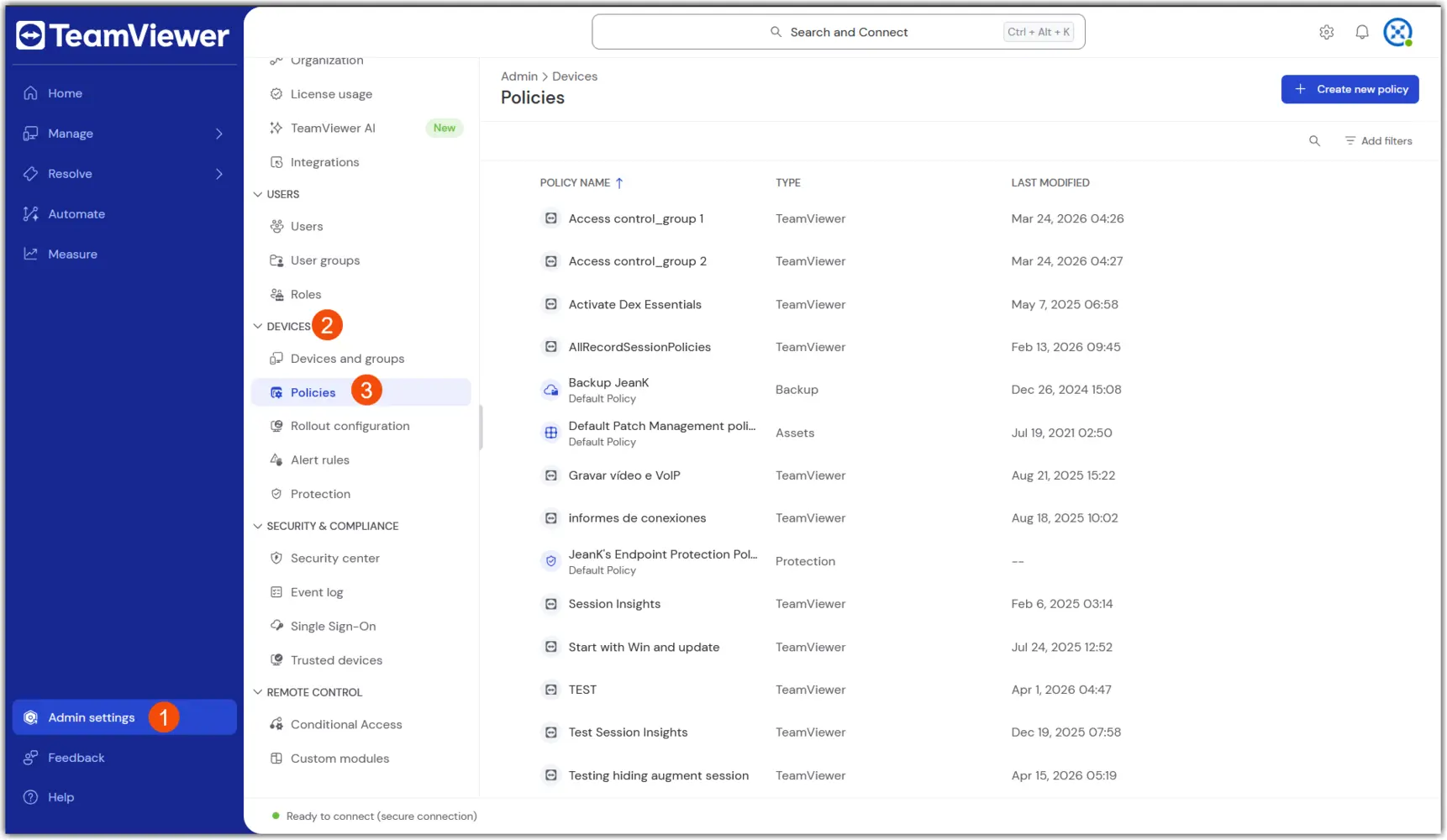
2. Select Create new policy in the upper right corner, and select the Unified Policy flow.

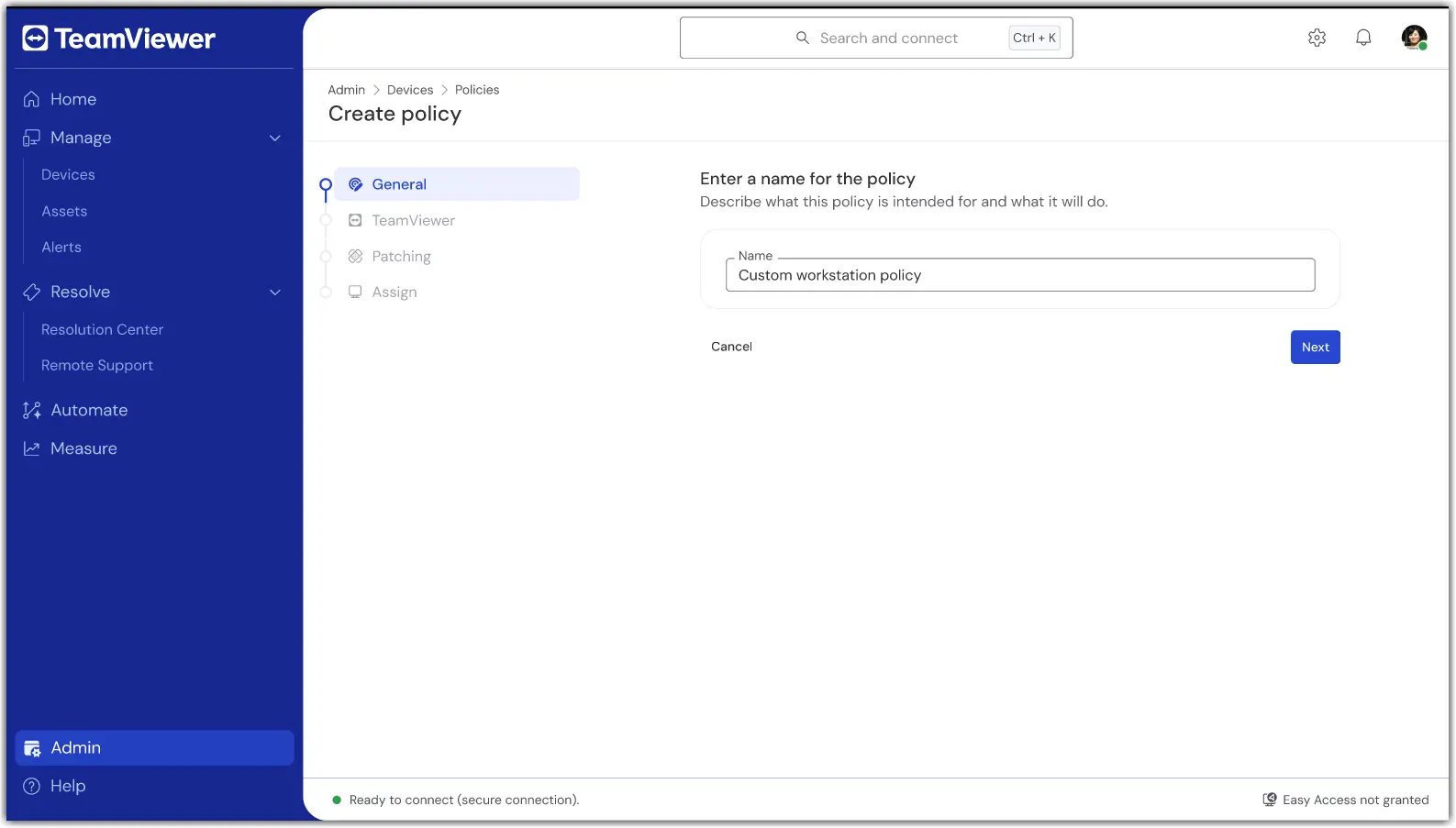
3. In the first section, General, enter a name for the policy.
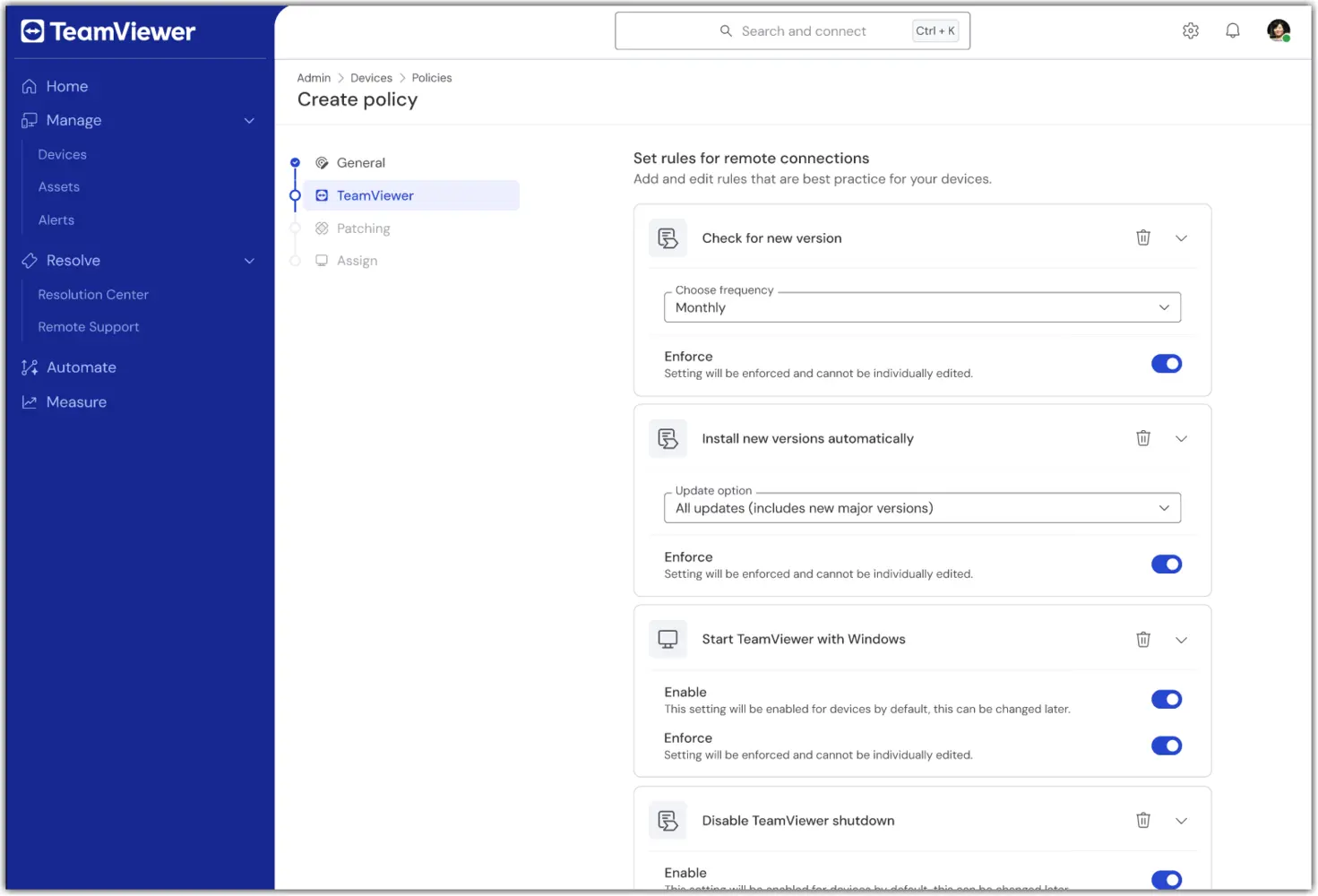
4. In the TeamViewer section of the policy creation, configure the desired remote/client settings (e.g., security, connection behavior).
5. In the Patching section of the policy creation, configure the desired asset inventory and patching preferences (e.g., approval, scheduling).
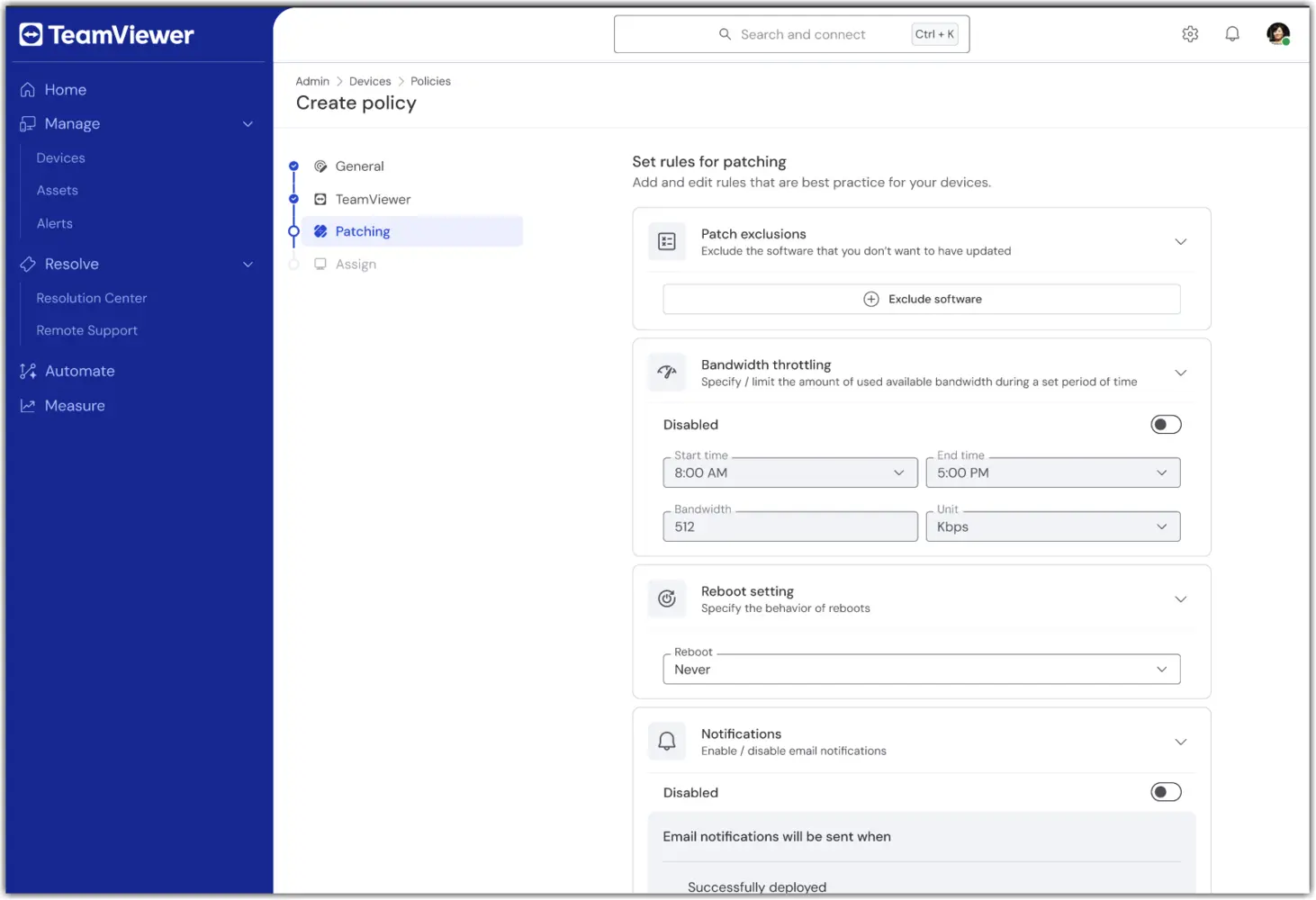
Note: The Patching section of the Unified Policy is available only to TeamViewer ONE Advanced licenses.

6. In the Assign section, select one or more device groups to receive the Unified Policy.
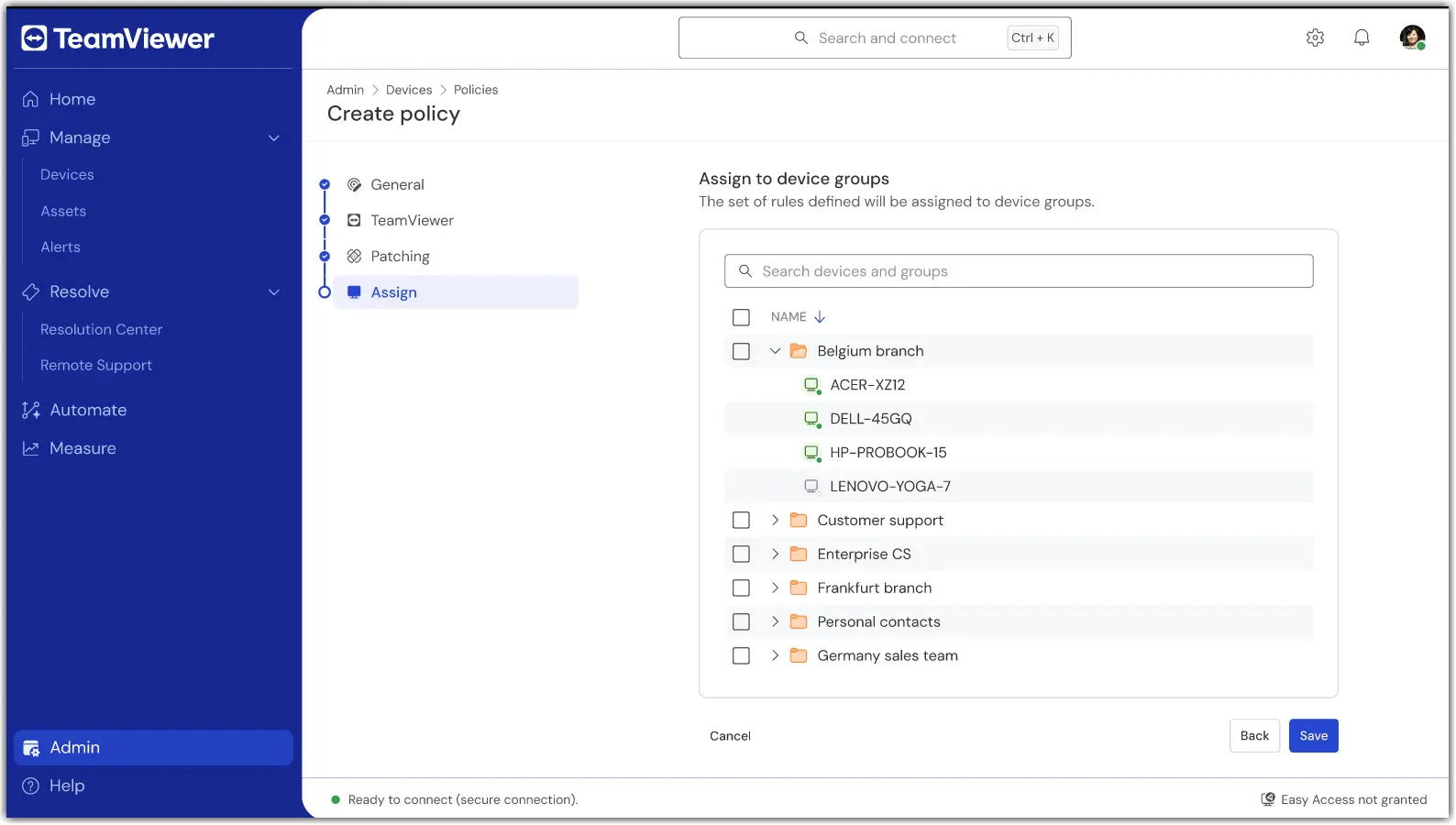
7. Once done, confirm the settings and apply. Assignment occurs as part of saving.

Once saved, your group(s) will now use a single policy for TeamViewer and Patching modules.

How to assign or change an assignment

To add or remove device groups to a Unified Policy, open the policy and select Edit.

In the event a device needs to be assigned to a different Unified Policy, move the device from its current group to the device group with the Unified Policy assigned to it.

Troubleshooting

A device did not apply the policy.

  • Verify the device belongs to a group with the Unified Policy assigned.

  • Confirm the device is set to inherit from its group.

  • Check the device connectivity status and wait for the next online sync.

I don’t see Unified Policies.

  • Confirm your license is TeamViewer ONE Standard or Advanced.

  • Ask your admin to verify your role includes the Manage Policies permissions.

  • If you utilized older TeamViewer Policies, please ensure they have been deleted. Unified Policies will not appear if older TeamViewer Policies are present.

Conflicting assignments or multiple groups.

  • Review your group model. If needed, move devices to the intended policy group.

Please choose your region

Selecting a region changes the language and/or content on teamviewer.com


SUGGESTED REGION

  • Americas

    • Americas - English
    • América Latina - Español
    • Brasil - Português
    • Canada - English
    • Canada - Français
    • United States - English
  • Asia Pacific

    • Asia Pacific - English
    • Australia - English
    • 中国 - 中⽂(简体)
    • 香港 - 繁體中文
    • India - English
    • 日本 - ⽇本語
    • New Zealand - English
    • 대한민국 - 한국어
    • 台灣-繁體中文
    • ประเทศไทย - ภาษาไทย
  • Commonwealth of Independent States

    • CIS - English
    • СНГ - Русский
  • Europe

    • Europe - English
    • Belgique - Français
    • België - Nederlands
    • Bulgaria - English
    • Croatia - English
    • Cyprus - English
    • Czechia - Čeština
    • Denmark - English
    • Deutschland - Deutsch
    • España - Español
    • Estonia - English
    • Finland - English
    • France - Français
    • Greece - English
    • Ireland - English
    • Italia - Italiano
    • Latvia - English
    • Liechtenstein - Deutsch
    • Liechtenstein - Français
    • Liechtenstein - Italiano
    • Lithuania - English
    • Luxembourg - Français
    • Magyarország - Magyar
    • Malta - English
    • Nederland - Nederlands
    • Norway - English
    • Österreich - Deutsch
    • Polska - Polski
    • Portugal - Português
    • Romania - English
    • Schweiz - Deutsch
    • Suisse - Français
    • Svizzera - Italiano
    • Slovakia - English
    • Slovenia - English
    • Sweden - English
    • Türkiye - Türkçe
    • United Kingdom - English
  • Middle East Africa

    • Middle East Africa - English
    • Middle East Africa - Français
  • Products
    • TeamViewer Remote
    • TeamViewer Tensor
    • TeamViewer DEX
    • TeamViewer Frontline
    • Pricing
  • ONE Platform
    • TeamViewer ONE
    • Capabilities
    • Talk to our team
  • Solutions
    • By Industries
    • By Use Cases
    • By Roles
    • Enterprise
  • Partner
    • Become a partner
    • Find a partner
    • Existing Partner Login
    • Integration partners
  • Resources
    • News and insights
    • Success stories
    • Events and webinars
    • Trust Center
    • Why TeamViewer
  • Support
    • Contact support
    • Guides and manuals
    • Knowledge Base
    • System status
    • Custom modules
    • For developers
    • Community
  • Company
    • About TeamViewer
    • Careers
    • Investors
    • Newsroom
    • Leadership
    • Sports partnerships
    • Sustainability and CSR
    • Corporate Governance
  • Additional Links
    • Contact Sales
    • TeamViewer User Focus Program
    • Make work work better
    • Research Projects
    • Newsletter
  • Product Descriptions
  • Imprint
  • Contact
  • EULA / DPA
  • Privacy and Cookies
Cookie Settings