
insights
Zero trust remote access: Secure connectivity for modern IT
Explore how zero trust remote access limits lateral movement, protects sensitive systems and secures user access across devices and locations.
Zero trust remote access: A modern approach to secure connectivity
In today’s distributed work environments, the traditional idea of trusted networks no longer applies. With users connecting from anywhere, on any device, organizations need a new approach to keep systems secure. That’s where zero trust remote access (ZTRA) comes in. By shifting focus from location to identity and context, it helps reduce risk and control access more precisely.
In this article, you will learn what zero trust remote access means, how it differs from broader zero trust network access solutions, and why traditional VPNs can no longer keep up. You'll also explore the key principles of this model, including identity verification, device health checking, and least-privilege access. Finally, we’ll show how companies can apply these principles with solutions like TeamViewer Remote to support secure, scalable operations.
What is zero trust remote access?
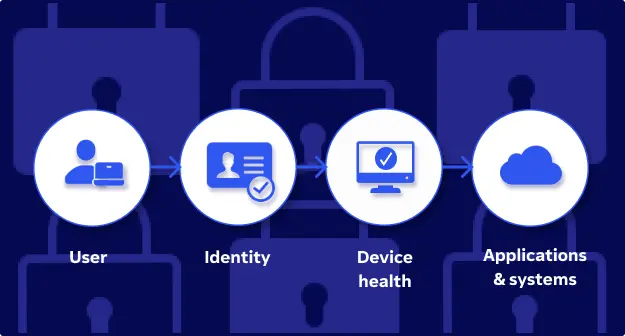
Zero trust remote access (ZTRA) is a security approach that verifies every access request based on identity, device health, and context. Instead of trusting users simply because they are inside the network, this model enforces continuous validation at every step. It helps organizations reduce risk, protect sensitive systems, and support flexible work environments.
From perimeter security to identity-first access
Traditional network security relied on a strong perimeter. Users and devices were trusted once inside, and internal movement was rarely monitored. However, this model was not designed for today’s decentralized IT landscapes. Remote work, cloud adoption, and mobile devices have dissolved the traditional perimeter and exposed its limitations.
Zero trust replaces this outdated model with an identity-first strategy. Every connection is treated as untrusted until it is verified. This shift helps IT teams limit attack surfaces, control lateral movement, and gain visibility into remote sessions.
“Never trust, always verify”
At the core of zero trust security lies a single principle: “Never trust, always verify.” It means that no user or device gets access without meeting strict authentication, authorization, and device compliance checks. Continuous verification ensures that access stays secure, even if user credentials are compromised or devices fall out of compliance.
This approach supports a more resilient and scalable remote access strategy, especially in industries with high compliance requirements such as healthcare, finance, and the public sector.
Why traditional VPNs and legacy remote access are no longer enough
For years, Virtual Private Networks (VPNs) and Legacy Remote Access tools were the standard for connecting users to corporate resources. They created a secure tunnel between the user and the internal network, assuming that once someone was inside, they could be trusted. This assumption no longer holds true.
Modern IT environments are dynamic, and threats are constantly evolving. As remote and hybrid workforces grow, organizations face new challenges that traditional solutions were never designed to handle.
While external threats remain a concern, organizations must also look inward. Misconfigured security settings, human error, and even insider threats are very real risks that traditional solutions fail to address.
Risk of lateral movement
VPNs often grant broad access once a user is inside the network. If compromised, attackers can move laterally and reach systems far beyond their initial entry point. This makes threat containment harder and slows down response efforts.
Credential misuse and lack of visibility
Stolen login data remains one of the most common attack methods. Legacy Remote Access tools rarely offer real-time monitoring or meaningful insight into who accessed what, when, and how. This lack of visibility leaves IT teams blind to suspicious activity.
A workforce that’s everywhere
Remote work is no longer the exception. Employees, partners, and contractors now connect from multiple locations and devices. Traditional tools were never built to handle this complexity securely or at scale.
How zero trust remote access solves these challenges
Zero trust remote access replaces broad, implicit access with identity- and context-based verification. It limits each session to specific applications or systems, reducing lateral movement and overall risk. Every login is continuously authenticated, and all sessions are logged for visibility and compliance. Whether users are working from managed laptops or mobile devices on the road, ZTRA helps organizations deliver secure access without compromising performance or flexibility.


The 5 core pillars of zero trust remote access
Zero trust remote access is a complete shift in how access is granted, managed, and monitored. Instead of assuming trust based on location or device, access decisions rely on real-time identity and context signals. This section highlights the five core principles that define a strong zero trust and secure remote access strategy.
1. Identity verification
Every session starts with confirming who is trying to connect. Strong identity verification goes beyond usernames and passwords. It uses methods like multi-factor authentication (MFA) to validate the user and reduce the risk of credential-based attacks. Without verified identity, no access is granted.
2. Device health checking
Even if a user is verified, the device they are using must also meet security requirements. Device health checks evaluate whether the system is up to date, properly configured, and free of known vulnerabilities. This prevents compromised or non-compliant endpoints from becoming entry points into your network.
3. Least-privilege access
Users should only be allowed to access the resources they absolutely need. This principle limits the impact of potential breaches and helps enforce compliance. By assigning the minimum required permissions, organizations reduce risk and ensure that sensitive systems are only available to authorized personnel.
4. Session logging and auditing
Visibility is critical in modern IT environments. zero trust remote access solutions provide detailed session logs and audit trails that show who accessed what, when, and from where. This information supports compliance requirements and helps security teams detect unusual behavior early.
5. Microsegmentation
Traditional network models grant broad access once a user is inside. Microsegmentation takes a different approach by dividing the network into isolated zones. Each session is limited to a specific resource or application. Even if a session is compromised, lateral movement is blocked, and the overall risk is contained.

Authenticate users with MFA and SSO before granting access.

Only allow compliant, secure devices to connect.

Limit users to the minimum resources they need.

Track who accessed what, when, and from where.

Isolate systems to block lateral movement during breaches.
Solutions like TeamViewer Remote support these pillars by integrating identity controls, secure device checks, and granular access permissions into a single platform. For IT leaders managing remote or hybrid environments, this architecture offers a secure foundation for long-term scalability.
Difference between zero trust remote access (ZTRA) and zero trust network access (ZTNA)
Both zero trust remote access (ZTRA) and zero trust network access (ZTNA) are built on the same foundation: never trust by default, always verify. However, they differ in scope, implementation, and use case. Understanding these differences helps IT decision-makers choose the right strategy for their infrastructure.
ZTRA focuses on securing individual remote sessions. It grants access to specific devices or applications based on verified identity and context. This makes it especially well-suited for IT support teams, managed service providers, and small to medium-sized businesses.
ZTNA, in contrast, is designed for broader network access. It replaces traditional VPNs with a policy-driven access layer that sits in front of all enterprise resources. This is ideal for organizations managing large user bases and complex cloud or hybrid environments.
Here is a quick overview of how the two approaches compare:
| Feature | ZTRA | ZTNA | |
|---|---|---|---|
Access model | Remote session–based | Full network control | |
Focus | Device or session-level access | Application or network-level access | |
Identity-first authentication | Yes | Yes | |
Best suited for | SMBs, IT support, service providers | Enterprises with complex infrastructures | |
Implementation complexity | Lightweight and fast to deploy | Higher effort, broad architectural impact | |
Example solution | TeamViewer Remote | Platform-based ZTNA solutions |
In short, ZTRA is ideal for organizations that need to support secure, fast, and flexible remote sessions—without exposing the broader network. ZTNA is better suited for enterprises that require a full-scale replacement for legacy VPNs and traditional network access models.
Both models are part of a broader zero trust architecture and can be combined to create layered, context-aware defenses across your IT environment.
Benefits of implementing ZTRA with TeamViewer Remote
Adopting zero trust remote access is a strategic step toward modernizing your security posture and managing access in a distributed, cloud-driven world. With TeamViewer Remote, organizations can implement ZTRA efficiently by combining usability, flexibility and enterprise-grade security controls. This helps protect sensitive resources from unauthorized access.
Platform-agnostic connectivity
One of the key strengths of TeamViewer is platform independence. Whether your users work on Windows, Linux, macOS, or mobile devices, TeamViewer Remote offers consistent security and functionality across environments.
This flexibility is especially important for organizations with mixed infrastructure or BYOD (Bring Your Own Device) policies. It also simplifies secure remote support and enables IT teams to respond quickly, regardless of the user’s platform or location.
Built-in security features
TeamViewer Remote includes essential features that support a strong zero trust security model, such as:
Two-factor authentication (2FA) to verify user identity
Session logging for visibility into user and device activity
Unattended access with strict access policies and full auditing
These capabilities provide the control and transparency needed to manage secure connections in real time while supporting compliance with internal and industry-wide security standards.
Seamless integration into your zero trust IT strategy
ZTRA is not a standalone solution. It is part of a larger zero trust architecture. TeamViewer Remote integrates smoothly into existing security frameworks and identity providers, supporting conditional access and centralized access management.
Benefits of ZTRA with TeamViewer Remote

Set user, group, or device-level permissions. Enforce least-privillege access to reduce risk.

Secure connections across Windows, macOS, Linux, and mobile. Ideal for mixed setups and BYOD.

Includes 2FA, session logging, and policy-based unattended access for full visibility and compliance.

Fits into your existing zero trust strategy with support for identity providers and conditional access.
By combining remote access functionality with identity-first security, TeamViewer empowers IT leaders to build a cohesive and future-ready approach to access control. This is especially relevant for industries where securing unmanaged devices, protecting valuable data, and maintaining regulatory compliance are business-critical.
ZTRA use cases by industry
Zero trust remote access is not a one-size-fits-all approach. It adapts to specific operational needs, security policies, and compliance requirements across industries. By verifying access based on identity, device health, and context, ZTRA enables secure access to critical resources, even in complex or regulated environments.
Managed Service Providers (MSPs)
For MSPs, managing access across multiple client environments can be a logistical and security challenge. Traditional access models often require full network access, increasing the risk of misconfigurations or data exposure.
ZTRA allows MSPs to connect directly to individual systems without exposing the broader network. Access is based on verified identity and device status, reducing risk and supporting transparent, session-level control. With TeamViewer Remote, MSPs can deliver secure and efficient support while maintaining full oversight.
IT helpdesks
Internal IT helpdesks are often responsible for supporting a wide variety of devices, locations, and user profiles. In many cases, remote users rely on unmanaged devices or access from untrusted networks. Legacy tools are not built to handle this complexity with sufficient security.
ZTRA ensures that each support session is verified, scoped, and monitored. This approach improves visibility, reduces internal risk and supports compliance across diverse device environments, even in complex IT landscapes.
Healthcare IT compliance
Healthcare organizations face some of the strictest compliance requirements in the world, particularly when it comes to protecting patient data. At the same time, their teams often include remote employees and mobile caregivers who need real-time access to clinical systems and records.
ZTRA ensures that only verified users and trusted devices access sensitive systems. Session recording and policy-based controls help meet standards like HIPAA and GDPR, while maintaining the flexibility needed for secure remote care.
Future of remote access: Why ZTRA is the standard going forward
Traditional models that rely on implicit trust or static access rules are no longer enough to protect corporate networks from evolving threats. Zero trust remote access is emerging as the new standard. It is designed for flexibility, compliance, and control in an increasingly complex digital world.
Meeting regulatory compliance standards
Regulatory frameworks such as HIPAA, GDPR, and other industry-specific data protection laws require organizations to enforce strict access control, auditability, and data privacy. ZTRA supports these requirements by applying identity-first access policies, maintaining full visibility into user access, and logging user and device activity in real time. Unlike legacy systems, ZTRA enables organizations to limit access to sensitive data without sacrificing operational speed or user experience.
Supporting cloud-first IT infrastructures
As many organizations move away from on-premises environments and adopt cloud-first strategies, remote access must evolve to support new architectures. ZTRA fits naturally into zero trust architectures, enabling secure connections to private apps, SaaS platforms, and hybrid environments without relying on a central data center.
Managing user and device sprawl
Today’s workplace includes remote employees connecting from various locations and often using unmanaged devices. This complexity introduces risk if not properly secured.
ZTRA helps organizations regain control through policy-based access rules that adapt to user roles, device status, and location. Every connection is continuously verified, creating a scalable and secure framework for managing remote access.
Forward-thinking organizations are adopting this approach not just to reduce risk, but to gain the security advantages that support innovation. Solutions like TeamViewer Remote, when integrated into a broader zero trust strategy, make this shift more accessible across all business sizes.
Start a free trial with TeamViewer Remote
If you're ready to modernize your remote access strategy with zero trust principles, now is the time to act. Discover how your team can benefit from identity-based access, granular permission settings, and real-time session visibility.