

Bridging the iOS mobile support gap with Visual Guidance
Don't limit your remote support to screen sharing and voice guidance: With Visual Guidance you can provide precise, step-by-step visual assistance for iPhones and iPads—available exclusively with TeamViewer QuickSupport.
Transforming IT support for iPhones and iPads

Provide precise instructions using a small screen-within-a-screen on the end user’s device.
Enable the end user to follow the exact steps of your supporter in real time to avoid miscommunication and frustration.
Seamlessly connect from Windows, macOS, or a web browser.
Conserve network resources with on-device rendering.
Support users worldwide, including in the EU.
Supporting iOS devices remotely has long been a challenge. Unlike other platforms, Apple does not allow third parties to remotely control its devices. IT support professionals are left relying on voice guidance and screen sharing, which can be ineffective—especially for users with limited technical literacy. Miscommunication leads to wasted time, mistakes, frustration, and higher support costs.
- Increased time spent resolving basic issues
- Higher costs due to inefficiency
- Frustrated customers due to unclear guidance
Visual Guidance: The smart workaround for iOS support
With Visual Guidance, IT support staff can overcome the iOS support gap. This feature creates a small, interactive screen-within-a-screen on the end user’s device showing what the supporter is doing in real time. End users can see exactly what actions to take on their own device, eliminating guesswork and significantly improving the support experience.
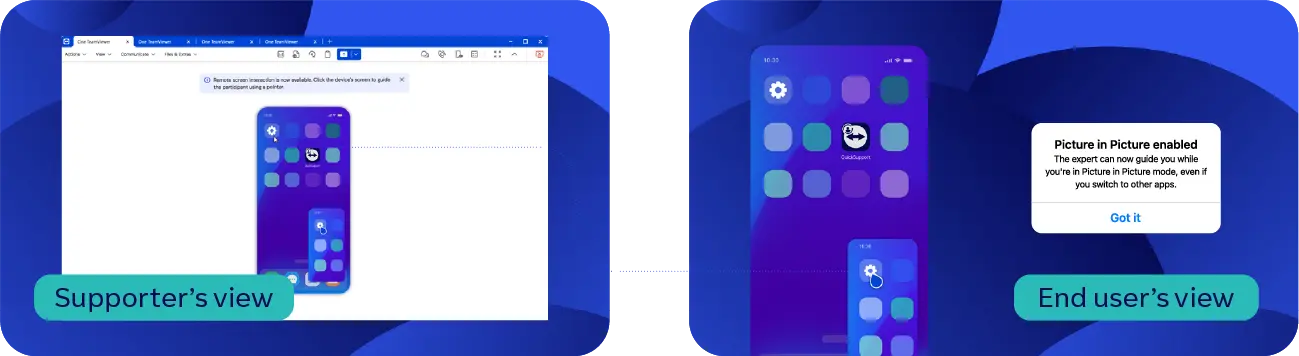

Quickly identify and resolve problems with minimal back-and-forth.

Clear visual guidance leads to happier, more confident users.

Reduce time spent on repetitive explanations and miscommunication.

Connect to iOS devices from any platform for maximum convenience and flexibility.

Simplify complex tasks to reduce the need for additional support staff.
Программное обеспечение для обычных пользователей и компаний, отмеченное множеством наград


Transform your iOS support experience
Deliver superior remote support with Visual Guidance, included free in the TeamViewer QuickSupport app. Break down communication barriers, resolve issues faster, and increase your customer satisfaction.
Download the free QuickSupport app today and experience the difference!