Lean IT teams know the pattern all too well: the same endpoint issues trigger a steady stream of tickets, context-switching, and frustrated colleagues. Even when each case gets resolved, reactive work carries a hidden cost—lost time, uneven service quality, and an inconsistent digital employee experience (DEX).
That’s why proactive IT management matters. Not as a vague ambition, but as a repeatable way of working: spot early signs of trouble, fix issues before they interrupt people, and show clear progress over time. That shift depends on two capabilities many teams struggle to combine at scale: endpoint visibility that reveals what’s changing across devices, and automation and remediation that resolves common problems without waiting for a ticket.
The right solution brings those capabilities together in a closed loop. It helps IT teams see issues forming across endpoints, prioritize what will impact users most, remediate with automation, and prove outcomes through analytics that connect IT work to business impact. This is proactive IT in action: measurable, scalable, and designed for teams that need efficiency without sacrificing reliability.
In this article:
- What proactive IT looks like when it works
- The real enemy: Digital friction and endpoint blind spots
- Proactive IT in action: The TeamViewer ONE closed-loop model
- What to automate first: High-impact ticket preventers
- Measuring proactive IT: What to track to prove outcomes
- Proactive and reactive: Resilience when the unexpected hits
- Conclusion: Make proactive IT measurable, not aspirational What proactive IT looks like when it works
What proactive IT looks like when it works

Proactive IT shifts the center of gravity from “fix it after it breaks” to “prevent it before it disrupts work.” In practical terms, this means anticipating and addressing potential issues before they escalate into user-impacting problems and support tickets.
Of course, reactive IT still matters. Unexpected incidents happen, systems fail, and people need help. But when reactive support becomes the default operating mode, IT teams spend more time catching up than improving the environment.
A proactive approach changes that by focusing on:
- Continuous monitoring and analysis to detect anomalies and friction early
- Identifying potential issues using analytics to spot drift before it becomes disruption
- Automated remediation and prevention measures to resolve common issues quickly
- Proactive maintenance and updates that reduce failure rates and security exposure
That list sounds straightforward, but many organizations struggle to implement it because the work lives in disconnected tools and processes. Monitoring shows symptoms. Ticketing captures outcomes after users feel the pain. Automation exists, but not always in the flow of day-to-day endpoint management. The result is data without action, and action without proof.
The real enemy: Digital friction and endpoint blind spots
Most IT problems don’t announce themselves as major outages. They show up as small, repeated interruptions that erode productivity and trust. Things like a device slowing after an update, storage problems causing apps to crash, or simple inconsistencies in the performance of remote work.
In isolation, these issues look minor. You might not even notice them. But at scale, they’re a steady tax on IT and on employees.
And the core challenge is visibility. If IT teams can’t see endpoint health and experience signals in time, they can’t prevent friction. They can only respond to what gets reported.
Your goal with proactive IT management is not “more monitoring.” It’s actionable endpoint visibility: the right signals, in context, with a path to remediation.
Proactive IT in action: The TeamViewerONE closed-loop model
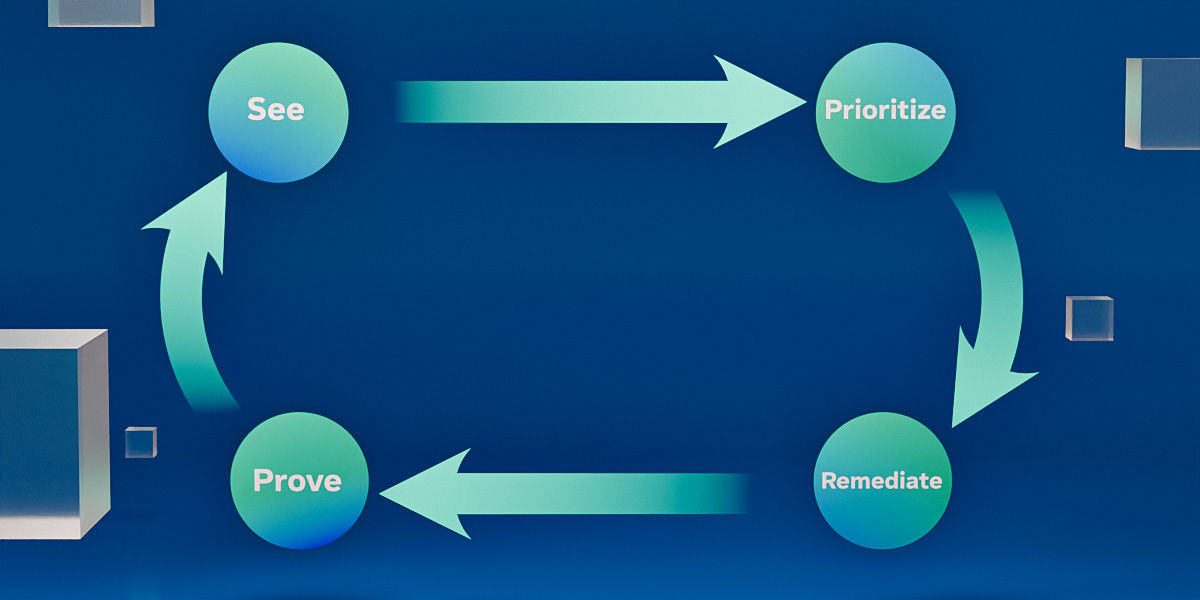
TeamViewer ONE enables proactive IT by consolidating monitoring, automation, and analytics into a repeatable operating model: see → prioritize → remediate → prove.
1) See: Endpoint visibility that captures early warning signals
Proactive IT starts with understanding what’s happening across endpoints continuously, and not just when a user complains.
Continuous monitoring and analysis help teams detect anomalies and irregularities that signal potential issues. The aim is to surface drift early, before it becomes disruption.
What matters here is breadth (coverage across devices) and relevance (signals tied to employee impact, not noise).
2) Prioritize: Focus on what will affect people and risk
Not every alert deserves the same response. Proactive IT management needs prioritization that answers two questions: First, will this issue interrupt work soon? And second, does this issue increase security or compliance risk?
Advanced analytics and predictive insights can help teams detect drift and identify issues before they affect the user. The practical win is reducing so-called alert fatigue and targeting the issues that drive the most tickets and frustration.
3) Remediate: Automation and remediation to prevent tickets
This is where proactive IT becomes tangible: resolving issues without requiring a person to raise a ticket and without consuming support capacity.
Automation tools can resolve problems without human intervention for quick and efficient issue management. Let’s say a critical service stops running. Automation can detect the issue and restore the service within seconds, preventing disruptions.
That is the heart of automation and remediation: consistent fixes, delivered early, with minimal manual effort.
4) Prove: Business impact analytics that show progress
A proactive approach needs proof. Otherwise, it becomes invisible work that competes with urgent tickets.
Proactive IT aims to reduce support desk costs and improve end-user experience, resulting in more efficient operations and better productivity. TeamViewer ONE positions proactive IT as measurable and scalable through business impact analytics. Meaning IT can demonstrate outcomes, not just activity.
What to automate first: High-impact ticket preventers
For most lean IT teams, the fastest path to value is preventing the issues that generate the most tickets and interruptions. Start small and target patterns.
Here are five practical “first automations” to prioritize:
- Critical services and agents that stop running
Automate detection and restart to avoid widespread disruptions. - Endpoint hygiene issues that degrade performance over time
Identify drift early via continuous monitoring and address it before users notice. - Updates, maintenance, and reboot strategy gaps
Regular updates and a good reboot strategy support security and stability. - Compliance drift and configuration inconsistencies
Detect deviations and remediate automatically where safe and well-defined. - Repeatable “known fixes”
When the same root cause appears repeatedly, it’s time to codify the fix.
One useful guardrail: If you cannot confidently describe the remediation steps and expected outcome, don’t automate it yet. Start with the predictable, high-volume problems and expand once your team trusts the system.
Measuring proactive IT: What to track to prove outcomes

The benefits of proactive IT are numerous: reduced downtime, lower ticket volumes, cost savings, greater security, increased productivity, and better decision-making. But most organizations struggle to translate those benefits into a measurement model that helps IT show progress.
Here’s a practical set of metrics to use:
- Ticket deflection: incidents avoided through automated remediation
- Help desk volume trend: reduction in recurring categories over time
- Time-to-resolution: faster remediation when issues do occur (MTTR trend)
- Endpoint health/compliance: percentage of endpoints in a “healthy” state
- Security posture signals: reduction in high-risk drift and faster remediation windows
- DEX indicators: fewer disruptions and repeated complaints, more stability for end users
It’s important to note that the goal isn’t perfect measurement on day one. It’s to establish a baseline, pick a few metrics that align to real pain points, and report improvements consistently.
Proactive and reactive: Resilience when the unexpected hits
No proactive program can prevent every incident. There will always be times—the 2024 CrowdStrike outage comes to mind—when there’s no choice but to be reactive.
That point matters, especially when leaders ask, “If we invest in proactive IT, will we still have outages?” The honest answer: yes. But proactive IT reduces the everyday friction that drains capacity, so teams can respond faster and more effectively when a major incident happens.
A proactive approach supports resilience by:
- Keeping endpoints healthier and more consistent day to day
- Detecting widespread drift earlier through continuous monitoring
- Using automation and remediation to execute repeatable fixes quickly
- Providing analytics to understand scope and impact, and to prioritize response
Think of proactive IT as the discipline that protects your response budget. When teams spend less time on preventable tickets, they preserve attention for the high-severity events that demand human judgemen
Conclusion: Make proactive IT measurable, not aspirational
Proactive IT matters because it reduces friction and improves reliability for employees while lowering operational load for IT. The organizations that do it best treat it as an operating model: see, prioritize, remediate, and prove—then repeat.
TeamViewer ONE positions proactive IT as actionable and scalable by all the capabilities IT needed to prevent common issues and improve DEX. Using it, teams will be able to do what they really need to do: prevent issues altogether and show undeniable impact.

Take the next step toward proactive IT
Explore how modern IT teams detect issues earlier, automate resolution, and move from reactive support to digital workplace maturity.
Explore more insights
-
Remote working is here to stay. In this guest post, our Chief Information Security Officer Robert Haist explores this new frontier, and what you can do to navigate its security challenges.
-
Shadow IT is not a new concept. But, with the increase in remote working and device diversity, it is becoming a much more urgent theme.
-
Why unifying your IT platform is the most practical way to reduce risk, prevent audit failures, and restore confidence