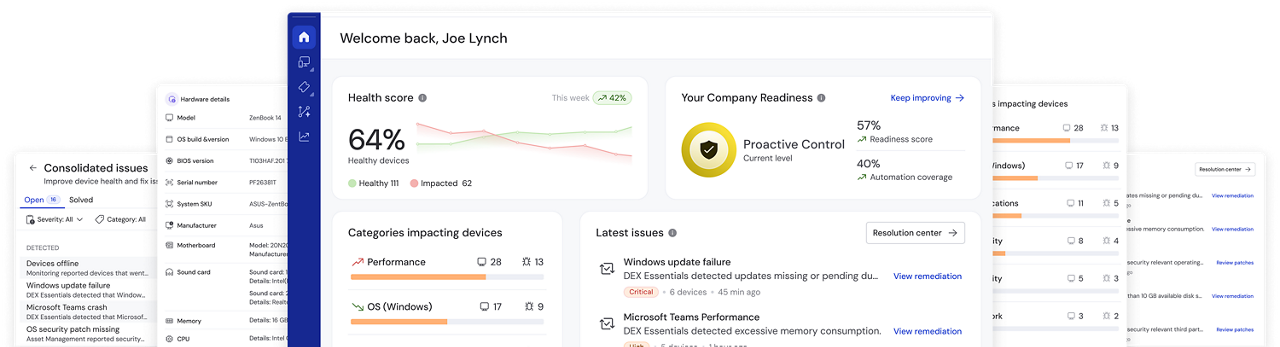
TeamViewer ONE includes native remote access, DEX, AI, and automation in the base platform, where most alternatives sell those as separate products or higher tiers. Endpoint-based licensing means you pay for devices under management, with volume discounts as you scale. Assembling the same capability from several vendors usually costs more in licenses and in the hours spent keeping them connected.
Comparison
The top 9 N-able alternatives to consider in 2026
(Data as of July 2026)
When you're comparing N-able alternatives for IT management, focus on pricing model, native remote support, automation depth, DEX, AI capabilities, device coverage, and security certifications. These are the criteria that separate a shortlist contender from an option that may not align with your organization's requirements.
Across the tools compared here, a clear pattern shows up. Most remote monitoring and management software treats DEX and AI as separate products, add-ons, or leaves them out entirely. TeamViewer ONE includes both natively, alongside remote access and automation, in one platform.
Why look for an N-able alternative?
N-able N-central covers the RMM fundamentals: remote monitoring, patch management, asset tracking, and policy-based automation. For MSPs running large multi-tenant environments, that depth has real value. It also has a cost, and the same six limitations show up again and again across verified reviews on G2 and Capterra.
N-central's feature density is its selling point and its biggest friction point. One G2 reviewer describes how features are buried in layers of menus. Others describe the platform as intricate, with a steep learning curve for new users. Teams without a dedicated N-central specialist struggle to reach full value. (Source: G2, Capterra)
Setup and policy configuration are repeatedly described as slow. A reviewer on G2 recalls an implementation that turned into a drawn-out ordeal with very little vendor guidance, followed by slow support during the critical ramp-up window. Another notes that dashboard loads and remote tasks slow down noticeably in larger environments. (Source: G2, Capterra)
Support responsiveness is one of the most repeated frustrations. Reviewers describe response times as inconsistent, with occasional delays in escalating issues to someone who can resolve them, and follow-ups that sometimes take longer than expected, particularly during time-sensitive situations. (Source: Capterra, Capterra)
Where N-central falls short as a modern RMM platform
N-central's biggest gap is no native DEX layer, so device telemetry never connects to user impact. Its AI is tied to guidance, not remediation. Automation follows a reactive model, triggered only after an alert fires. And the platform itself is fragmented, spread across separate products. Teams outgrowing basic monitoring and looking for a unified, proactive platform should consider an alternative to N-able.
ConnectWise RMM is a cloud-native RMM platform built on the Asio architecture, used mainly by MSPs already invested in the ConnectWise product family for monitoring, scripting, and task automation.
Where it falls short: Remote control is not native. It arrives through ScreenConnect, which means another product to license and administer. Reviewers on G2 consistently describe the interface as difficult to navigate and setup as time-consuming. Reporting runs through a separate third-party platform rather than the product itself. Device support stops at Windows, macOS, and Linux, with nothing for mobile, IoT, or embedded environments. There is no DEX layer, so technical alerts never connect to user impact.
Consider something else if you need broad device coverage, reporting inside the platform you already pay for, or a shorter path from purchase to productivity. TeamViewer ONE delivers native cross-platform remote access and built-in analytics without the configuration overhead.
Kaseya VSA is an RMM and endpoint management platform positioned inside a wider portfolio that includes Datto and IT Glue.
Where it falls short: Capabilities are spread across products, so even with integrations your team still moves between systems to finish a workflow. Interface complaints are persistent: one Capterra reviewer describes the platform as feeling like software from the mid-1990s, and another reports that Live Connect is often unstable on remote connections (Source: Capterra, Capterra). On G2, a reviewer questions the platform's development trajectory outright. Support responsiveness and multi-year contract terms come up repeatedly, as does pricing opacity. There is no native DEX layer and AI assistance is not connected to remediation.
Consider something else if you want predictable licensing, a modern interface, and one system rather than a portfolio. TeamViewer ONE consolidates the same functions into a single console with endpoint-based pricing.
Atera is an IT management platform aimed at small IT teams and MSPs that want RMM, PSA, and helpdesk functions in one subscription.
Where it falls short: Atera has no native remote access. It depends on third-party integrations such as Splashtop, AnyDesk, ScreenConnect, and even TeamViewer. Security capability arrives largely through marketplace add-ons. Reviewers on Capterra note that reporting and customization feel restricted, and that the gaps widen as environments grow. Deeper remediation requires scripting and manual setup. Per-technician pricing looks attractive early but scales with headcount rather than with the environment you manage.
Consider something else if you are past the small-team stage, manage regulated data, or need remote access that is part of the product rather than plugged into it.
NinjaOne is a cloud-native RMM used mostly by MSPs for endpoint management, patching, and routine IT operations.
Where it falls short: Dashboard and reporting customization are limited, a point raised repeatedly across Capterra reviews, with users asking for more flexibility in both areas. Device coverage stops at Windows, macOS, Linux, Android, and iOS, with no support for ChromeOS, Raspberry Pi, or industrial IoT. Remediation is script based rather than no-code, so proactive fixes still require someone to write and maintain the script. AI is limited to patch-related insights, with no experience monitoring or DEX layer connecting device data to user impact.
Consider something else if you manage device types beyond Windows, macOS, Linux, Android, and iOS, need client-ready reporting out of the box, or want automated remediation that isn't tied to writing scripts.
Datto RMM is a cloud RMM platform used by MSPs for device management and monitoring across client sites, now part of the Kaseya portfolio.
Where it falls short: Remote access reliability is the most frequently cited complaint across G2 reviews, with connections that can take a minute or two to establish, a real problem when a technician has someone waiting on the phone. Reviewers also point to slow performance managing endpoints and difficulty setting up custom monitors. Contract minimum pricing adds another layer of friction, making costs harder to forecast before you commit.
Consider something else if remote session speed and reliability are a priority, or if predictable pricing matters more than deep patch and script customization.
Syncro combines RMM and PSA functions in one subscription and is used mainly by small MSPs handling monitoring, ticketing, and billing from a single console.
Where it falls short: Reporting is the most frequently cited gap. Reviewers on Capterra and TrustRadius describe reports as lacking polish and flexibility, with limited control over fields, filters, and layouts. Advanced scripting and automation are shallower than in dedicated RMM platforms. Device coverage is limited to Windows and macOS. Per-user pricing means costs track technician headcount rather than the environment.
Consider something else if you are scaling past a small team, need client-ready reporting, or manage anything outside Windows and macOS.
ManageEngine RMM Central supports endpoint management and routine IT operations for internal IT teams, sitting within ManageEngine's wider product suite.
Where it falls short: The architecture is modular and largely legacy in design. Workflows have to be assembled across Endpoint Central, OpManager, ServiceDesk, and DEX Manager Plus rather than run in one place. Remote support arrives through a separate module. AI features are distributed across products, so teams interact with them in different tools instead of one workflow. Reviewers on Capterra report time-consuming initial configuration, interface slowdown with larger device inventories, and advanced reporting locked behind higher-tier licenses.
Consider something else if you want a genuinely unified console, faster time to value, and remediation that does not require stitching modules together.
LogMeIn Resolve is a remote support and IT management platform that bundles ticketing, patch management, remote access, and basic RMM capabilities into one product.
Where it falls short: G2's own aggregated review summary independently describes the platform as complex and technical, requiring real training to use effectively, at odds with its SMB-friendly positioning. Reviewers on TrustRadius separately report connection reliability issues, including slow sessions and frequent disconnections on lower-bandwidth connections, along with pricing seen as less competitive than alternatives.
Consider something else if support responsiveness matters during outages, or if you want RMM capability without the learning curve.
Why TeamViewer ONE is the strongest N-able alternative
Businesses outgrowing basic remote monitoring capabilities might prefer TeamViewer to other alternatives. TeamViewer ONE combines remote connectivity, digital employee experience management (DEX), endpoint monitoring, automation, and AI-powered workflows in a single platform. Backed by enterprise-grade security and universal device coverage, it delivers a comprehensive solution that scales with business needs.
Key advantages of TeamViewer ONE
Remote access, monitoring, patch management, asset management, endpoint protection, backup, mobile device management, and DEX analytics live in one cloud-native environment. It also connects natively to Microsoft 365, ServiceNow, Salesforce, Splunk, Jira, Intune, and more than 25 other enterprise platforms. As you grow, you switch capabilities on rather than migrating to a new product.
This is where TeamViewer truly separates from traditional RMM software tools like N-able. Integrated DEX capabilities combine endpoint monitoring, actionable insights, automated remediation, and validation reporting, helping IT teams proactively detect and resolve issues before they impact employees.
No-code, out-of-the-box remediations resolve recurring problems automatically. Automated patch and compliance checks keep every device in policy without a manual pass, so drift gets caught and corrected rather than discovered during an audit. New automations can be built in natural language in seconds.
By linking telemetry to trends, TeamViewer ONE flags anomalies, a slow logon pattern, a device with declining performance, a security setting drifting out of policy, before they turn into a ticket. Fixes happen ahead of the employee noticing, not after they've already lost the time. Ticket volume falls because the underlying causes get eliminated, not because tickets get closed faster.
TeamViewer ONE embeds AI directly into daily operations. Tia, the TeamViewer Intelligent Agent, helps IT teams troubleshoot faster by surfacing root causes from real-time device data and historical sessions. Session Insights automatically documents every session, turning resolved issues into reusable automations instead of one-off fixes.
Remote control is part of the platform, not a third-party dependency. It spans Windows, macOS, Linux, Android, iOS, ChromeOS, Raspberry Pi, embedded systems, and industrial IoT. No other platform in this comparison matches that breadth.
AES-256 end-to-end encryption, zero-trust architecture, conditional access, audit logging, 2FA, and SSO are standard, with SOC 2, SOC 3, HIPAA, and GDPR compliance behind them.
TeamViewer backs its platform with support in more than 30 languages, enterprise SLAs, and dedicated success managers, serving more than 620,000 customers worldwide.
Ready to move past N-able?
TeamViewer ONE customers report fewer security incidents and meaningfully faster issue resolution by catching problems before they turn into tickets. Book a consultation and see what that looks like across your own stack, your endpoint mix, and where automation and DEX would remove the most work.
Common questions about switching to TeamViewer ONE
Changing your IT management software is a serious decision. Here's the honest truth about common concerns and why TeamViewer remains one of the best alternatives to N-able.
TeamViewer ONE integrates directly with the PSA, ITSM, and CRM systems your team already uses, including ServiceNow, Jira, Salesforce, and Microsoft 365. Rather than replacing working systems with a compromised all-in-one, it plugs best-in-class endpoint management into the workflows you have.
It is designed for lean teams specifically. One-click connections, drag-and-drop session management, and no-code automation mean people are productive on day one rather than after a configuration project. Automations are written in plain language, so you do not need a scripting specialist on staff.
No. Standard and Advanced packages serve teams starting at 100 managed endpoints, and Enterprise adds capabilities such as DEX scoring, Microsoft 365 monitoring, employee sentiment, and application experience management for large, distributed estates. Growing organizations get enterprise-grade capability without enterprise-grade overhead.
Yes. Monitoring, patch management, software deployment, asset lifecycle management, endpoint protection, backup, and mobile device management are all covered. The difference is that they run alongside DEX and AI in the same platform, so remediation is driven by insight instead of by alert queues.
Top-rated, award-winning software solution

Frequently asked questions (FAQ)
N-able uses quote-based, per-device pricing, with features like patch management and automation gated behind higher tiers. Alternatives vary: some charge per technician or per user, others per device with volume discounts. TeamViewer ONE uses endpoint-based pricing with core capabilities included by default, not sold as separate add-ons.
RMM software for managed service providers needs multi-tenancy, patching at scale, and client-ready reporting. Most platforms deliver monitoring but leave remote access, security, and backup to add-ons. The best RMM software for MSPs keeps those in one console so margins are not eaten by tool sprawl.
Yes. Device policies, monitoring configurations, and automation setups can be rebuilt inside TeamViewer ONE with onboarding support from the TeamViewer team. Running both platforms in parallel for a short period keeps coverage continuous while your team validates policies and alerting thresholds.
Timelines depend on endpoint count and how much custom automation you have built. Smaller environments typically complete a transition in a few weeks. Larger estates with extensive scripted workflows take longer. TeamViewer onboarding resources and support help you plan the sequence.
Internal IT teams are measured on employee productivity, not ticket throughput. The best IT management software for them connects device telemetry to user impact and fixes causes automatically. TeamViewer ONE was built for exactly that, which is why lean internal teams choose it over MSP-oriented RMM tools.