
TeamViewer AI security, privacy, and customer control

TeamViewer AI capabilities follow shared security and data-handling principles, implemented through product-specific platform services.
Admins control rollout, access, feature availability, and user permissions through platform-specific settings, policies, permissions, and role-based controls. Where AI-supported workflows can trigger actions, execution is governed through administrative controls and approval steps where required.
Third-party AI services are used in a controlled manner under defined conditions documented in the Trust Centre. AI-supported outputs and actions are governed through defined workflows, permissions, and auditability controls.
AI workflows are designed to process only the data needed for the specific capability, with privacy protections such as anonymization applied where applicable.
Data is protected through encryption in transit and at rest, supported by controlled key management and secure processing boundaries.
TeamViewer AI is delivered across multiple product environments. For detailed security information, refer to the relevant platform-specific documentation below.
Security and data-handling information for TeamViewer AI workflows across documentation, troubleshooting, and scripting in TeamViewer Remote, Tensor, and TeamViewer ONE.
Compare the purpose, data inputs, outputs, and governance controls of each AI feature.

See how data is processed, protected, and controlled within each AI feature.

Policy-controlled session summaries, protected end to end with anonymization and encryption.
(Click image to enlarge)
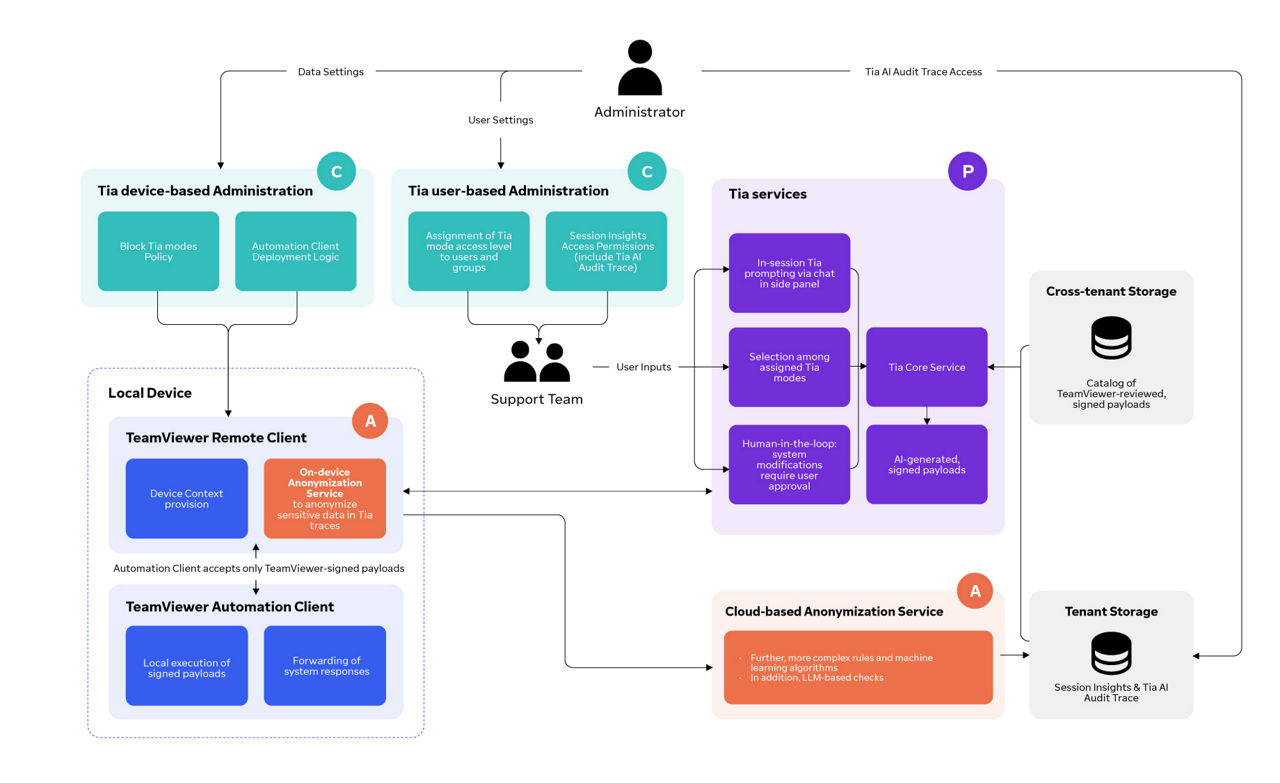
Mode-controlled troubleshooting with read-only diagnosis, governed remediation, user approval, and audit traceability.
(Click image to enlarge)
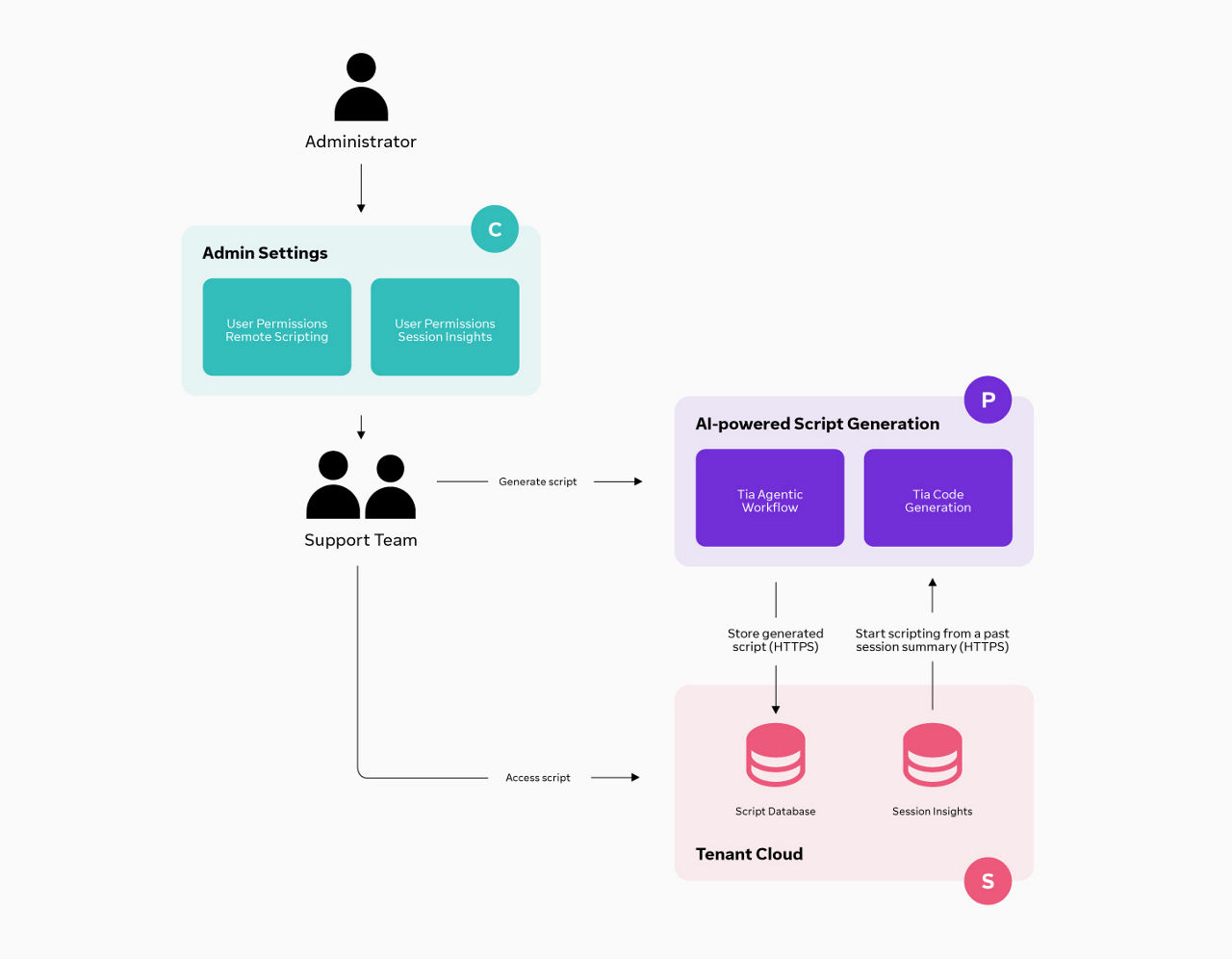
Script drafts are generated, stored, and executed through permission-controlled workflows.
(Click image to enlarge)
Administrators control AI rollout and access through settings, permissions, and policies. Data collected and processed depends on the AI workflow:
AI data is processed according to the workflow. Session Insights data is first captured and anonymized on the TeamViewer client using a rule-based anonymization layer, with additional anonymization in cloud-based services. Tia troubleshooting uses controlled inputs based on assigned mode, user permissions, and endpoint eligibility. Advanced troubleshooting actions run locally through the TeamViewer Automation Client on eligible managed endpoints, while remote connectivity continues to use the existing TeamViewer connectivity architecture. AI-assisted scripting uses prompts and optional Session Insights context to generate script drafts.
Yes. TeamViewer uses third-party LLM services (Azure OpenAI and Google Gemini) under defined conditions to deliver AI outputs. For Session Insights, data is anonymized before broader processing, and the workflow uses encrypted transport (HTTPS/TLS).
TeamViewer third-party sub-processor details and terms are available here:
https://media.teamviewer.com/is/content/teamviewergmbh/teamviewer/central-image-hub/pdf/en/teamviewer-third-party-terms-en.pdf
Yes.
Session Insights and Tia use a public key obtained by the client over HTTPS. The corresponding private key is stored in encrypted form and additionally safeguarded by a key held in a certified Hardware Security Module (HSM). Before use, the private key is securely unwrapped within the HSM, and all HSM operations are fully audited.
We store tenant data for the duration of your contract, unless you choose to delete it beforehand. Customers can delete stored AI-related artifacts, such as Session Insights and scripts, in bulk at any time via administrative controls.
Upon termination of the contract, customers can export or extract their data in accordance with applicable requirements, including the EU Data Act where relevant. After termination, TeamViewer will handle remaining data according to the agreed retention and deletion process, subject to applicable legal and contractual retention requirements.
Data is anonymized on-device before broader processing and undergoes additional anonymization in cloud-based systems. Before and after cloud-based processing services are used, data remains handled in encrypted form. Any decrypted processing is limited to what is technically necessary to generate the requested output, and data is not retained in decrypted form beyond service delivery. For Tia troubleshooting, advanced diagnostic and remediation actions run locally through the TeamViewer Automation Client on eligible managed endpoints. TeamViewer AI Security stance 14 Datasheet System responses are forwarded back into the Tia workflow and recorded through Tia Traces.
No. TeamViewer does not use customer data to train AI models. If we ever consider using fully anonymized data to train our AI models, this would only be done with strict safeguards, clear transparency, and updates to our documentation and applicable terms before any change takes effect.
Any such change would be reflected in our documentation and applicable terms.
Do you have more questions about TeamViewer AI security and privacy? See the full FAQ page to learn more.
Security and data-handling information for TeamViewer AI workflows across insights, automation, and reporting in TeamViewer DEX and ONE Enterprise.
Compare the purpose, data inputs, outputs, and governance controls of each AI workflow.
Follow how data is processed, protected, and controlled throughout each AI workflow.

(Click image to enlarge)

(Click image to enlarge)
(Click image to enlarge)
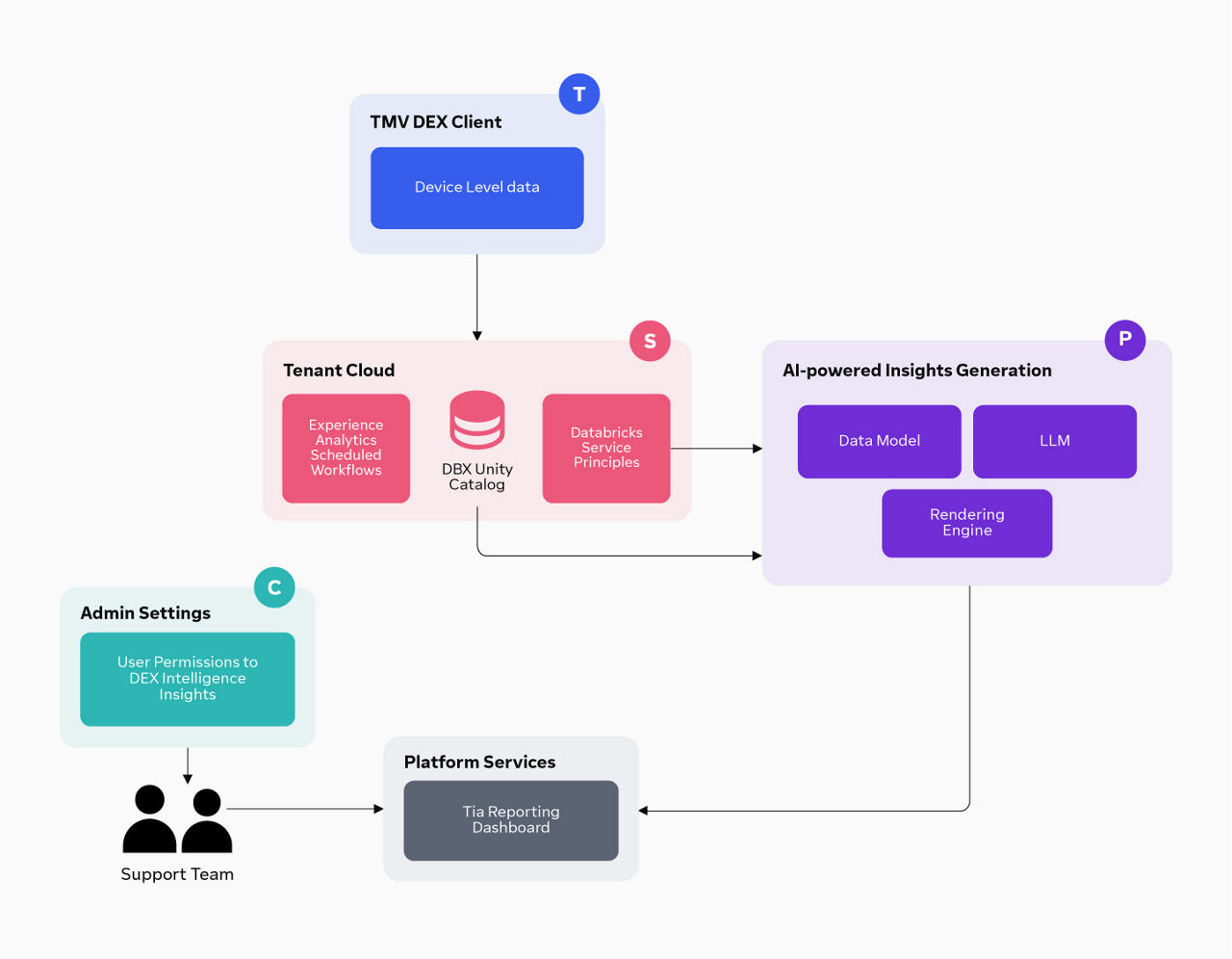
DEX Intelligence Insights processes device-level experience signals collected from endpoints and integrated systems. This includes telemetry related to performance, reliability, responsiveness, and failures across devices, operating systems, applications, and networks. These signals are normalized and enriched with contextual metadata before being analyzed to generate insights.
DEX Intelligence Insights uses authenticated and encrypted pipelines for data ingestion and processing. Prior to interact with LLM-powered components, data is subject to tenant-level minimisation and anonymization measures. Insights are stored in the platform and accessed through role-based controls and integrations.
No. Customer data processed by TeamViewer DEX AI features is not used to train TeamViewer AI models.
Data processed solely for the purpose of delivering the requested functionality, such as generating insights, script drafts, or reporting outputs, and is handled within the controls described in this document.
TeamViewer does not use customer data to build or contribute to shared or cross-customer AI models.
No. Data is not sent to LLM services in raw form. Prior to any AI processing, data undergoes tenant-level minimization and anonymisation measures to reduce exposure of sensitive or identifiable information.
Access to DEX Intelligence Insights is governed through role-based access controls (RBAC). Permissions define which user can view dashboards, analytics outputs, and insights based on their roles and responsibilities.
Access to DEX Hub and the Tia Script Builder is governed through admin settings and role-based permissions. Users require the Solutions Core role to access these capabilities.
DEX Hub provides a central place to create, store, and reuse automations. It includes an AI-powered code builder that translates plain-language requests into script drafts, and a shared library where automations, scripts, and packs can be stored and managed.
DEX Hub stores automation content in the tenant-scoped cloud storage, including:
This content is managed through the DEX Library, Script Database, and Script Dashboard.
No. DEX Hub can generate script drafts but does not execute them automatically. Access and execution are governed through role-based controls and automation workflows.
TeamViewer DEX AI data is stored in Microsoft Azure regions (EU-27, UK, US and CA). Processing and analytics are performed using Azure-hosted services, including Databricks, withing TeamViewer-managed environments.
Data is encrypted in transit and at rest using industry-standard mechanisms (e.g., TLS for data in transit and AES‑256 for data at rest). In addition, DEX Intelligence Insights uses authenticated and encrypted pipelines for ingestion and processing.
TeamViewer DEX AI uses LLM services hosted by Azure OpenAI under Microsoft’s published terms and documentation. These services operate in declared regions ( EU-27, UK,US and CA) and are integrated in accordance with TeamViewer’s data protection and security standards.
A shared data platform is logically segmented using tenant-specific schemas and filtered views. Access is controlled via dedicated service principals. For reporting, access is enforced through RBAC for feature access and ABAC for data-level filtering, with scoped session tokens for secure, tenant-specific access.
TeamViewer DEX AI includes end-to-end traceability capabilities, including AI & human decision tracking, signing & execution tracking, and an immutable audit log to support compliance reviews, security audits, and oversight.
TeamViewer DEX AI Services are regulated by the AI specific terms set out in Section B.7 of the End User License Agreement (EULA) (here). AI features may include third party AI models or technologies and its usage is subject to their terms in the then-current version available at AI-terms.
Furthermore, the use of the TeamViewer DEX AI Services must comply with the Acceptable Use Policy provided at the same link.