13 best MSP software platforms for 2026

It's 2 a.m. and your phone buzzes. A client's server is down, and their business continuity is on the line. Three hours later, a different client reports their backup failed overnight. By noon, you're fielding support tickets from six companies while trying to deploy security patches across 400 client endpoints. Your client roster has doubled, but your team hasn't. 

You need MSP software that fits your operational, security, and scalability requirements.

This guide compares 13 leading MSP software platforms for 2026, evaluating each one on the criteria that actually decide a shortlist: pricing model, native remote support, automation depth, digital employee experience (DEX), AI, device coverage, and security.

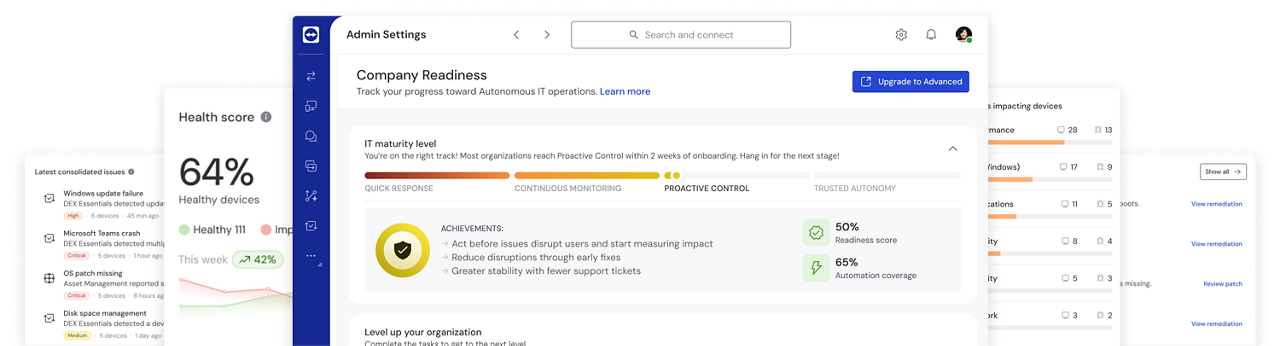
DEX features as seen in the TeamViewer client

What is remote access software and what to look for?

MSP software is a unified platform that helps managed service providers (MSPs) remotely monitor, manage, and support client IT infrastructures. It combines remote monitoring and management (RMM), professional services automation (PSA), remote access, and help desk capabilities into one system.

The shift to remote work has made these tools essential. MSPs now support employees working from home offices, coffee shops, and distributed locations worldwide. Teams that once managed on-site infrastructures now handle diverse, geographically scattered environments. That makes comprehensive MSP software critical for staying competitive and meeting client expectations.

These platforms let MSPs track device health, deploy patches, automate maintenance tasks, and resolve support tickets without being physically present. The goal is simple: improve operational efficiency while reducing manual work and boosting profitability.

What to look for in MSP tools

Choosing the right MSP software means evaluating a handful of key features that directly shape your service delivery and your margins.

Features

Remote monitoring and management (RMM) is the foundation of any MSP platform. Look for real-time monitoring of servers, workstations, network devices, and endpoints, with customizable alerting that flags issues before they reach users.

Strong RMM capabilities include:

  • Automated patch management
  • System health tracking
  • Performance metrics
  • Ability to execute scripts remotely

The best MSP software platforms support unattended access, so you can fix problems outside business hours without client intervention.

You can't manage what you can't see. Look for platforms that automatically discover and inventory hardware and software across every client environment, then keep that inventory current as devices, licenses, and warranties change.

Strong ITAM capabilities include tracking device lifecycle from deployment to retirement, flagging software nearing end of license or end of support, and surfacing warranty status before a hardware failure catches you off guard. This matters for more than housekeeping. Accurate asset data feeds directly into patch prioritization, security audits, and the budget conversations you have with clients about refresh cycles.

Security is the baseline expectation for every MSP client. Your software should provide end-to-end encryption, two-factor authentication (2FA), and role-based access controls to help protect sensitive data.

Compliance features matter too, especially for MSPs serving healthcare, finance, or legal sectors. Assess whether the provider offers features, contractual commitments, and independent reports relevant to applicable requirements, such as HIPAA, GDPR, and SOC 2, together with appropriate audit logging. Conditional access policies add another layer by restricting connections based on user location, device status, or time of day.

Automation changes how MSPs operate by removing repetitive manual work. Depending on its configuration and licensed features, a platform may help automate routine maintenance, backup scheduling, software deployment, and alert responses.

AI takes this further. Predictive analytics identify patterns and prevent issues before they surface. Session insights can document support interactions automatically, analyze recurring problems, and suggest proven fixes. This may reduce administrative work and support more consistent service delivery.

Pay close attention to where AI sits in the product. In several platforms, AI is bolted onto scripting or patching alone. The value for an MSP comes when AI connects to remediation and to what your clients' employees actually experience.

Device monitoring tells you a laptop is running slowly. DEX tells you which employee is affected, how often it's happening, and whether it's costing them productive time. That distinction matters more than it sounds, because most RMM platforms stop at the device and never connect the dots to the person using it.

Look for platforms that combine endpoint telemetry with real experience signals, things like logon times, app responsiveness, and recurring friction points, then translate that into a clear picture of business impact. The strongest DEX capabilities let you catch and fix problems before an employee notices them, which means fewer tickets and a service story you can actually bring to a client renewal conversation.

MSPs need centralized management to segregate and manage multiple client environments without mixing client data or configurations. Look for platforms that support multi-tenancy with clear client separation, customizable branding, and individual security policies.

The ability to switch between client dashboards quickly, generate per-client reports, and apply different service levels is what makes scaling your MSP business manageable.

Your MSP software should connect with the tools you already use. Native integrations with PSA platforms, ticketing systems like ServiceNow and Jira, and CRM solutions like Salesforce remove manual data entry, centralize management, and help ensure accurate billing across every client contract.

API support covers the custom integrations that off-the-shelf connectors miss. The fewer tools your team jumps between, the faster they work.

Comparison

Top 13 MSP software tools

Data as of September 2026, subject to change.

Here's how the leading MSP platforms compare in 2026. The criteria below are the ones that separate a genuine shortlist contender from a tool that will slow you down at scale.

TeamViewer ONE

NinjaOne

Kaseya VSA

ConnectWise RMM

Atera

N-able N-central

SuperOps

Datto RMM

Syncro

ManageEngine RMM Central

LogMeIn Resolve

Naverisk

Pulseway

Pricing model

Endpoint-based

Per device, quote-based

Endpoint-based, quote

Endpoint-based

Per technician

Quote, per device

Per technician

Quote-based, contract minimums

Per user

Per device and technician

Per seat

Per device or seat

Per endpoint, tiered

Platform architecture

Unified, cloud-native

Cloud-native

Ecosystem (VSA, Datto, IT Glue)

Asio, multi-product

Cloud RMM/PSA with marketplace add-ons

Ecoverse ecosystem, multi-product

Cloud-native RMM/PSA

Cloud RMM, Kaseya portfolio

Combined RMM/PSA

Modular suite

Unified RMM, remote access, MDM

All-in-one, cloud or self-hosted

Cloud RMM, mobile-first console

Multi-tenancy

Native, per-client policies, branding, and SSO/2FA enforcement

Native, per-client branding and dashboards

Multi-client segregation via VSA workspaces

Native, built for the ConnectWise partner ecosystem

Multi-client dashboards under per-technician model

Native, granular per-client permissions

Native, per-client dashboards

Native, via Kaseya portfolio account structure

Native, per-client accounts

Multi-client via modular console, less unified

Multi-client account and site structure

Native, client-based structure

Multi-client via groups and sites

Native remote support

Native, built in

Native, built in

Via Live Connect

Via ScreenConnect

Via AnyDesk, Splashtop, or third party

Via Take Control module

Bundled Splashtop on unified tiers

Web Remote

Built in (Splashtop bundled)

Separate module

Native, built in

Via bundled third-party remote control

Built in for Windows and macOS

Endpoint monitoring & patching

Included (Advanced)

Yes

Core feature

Yes

Yes

Yes, gated by tier

Yes

Yes

Yes

Via Endpoint Central

Yes

Yes

Yes

Automation & remediation

No-code, insight-driven, real time

Script-based

Script and policy

Script and policy

Codeless via AI agents

Script and policy, alert-triggered

Script-based with AI assist

Script-based

Script-based

Native automation, module-dependent

Codeless

Script-based

Script-based

DEX

Included platform-wide

None

None

None

None

None native

None

None

None

DEX Manager Plus add-on

None

None

None

AI capabilities

Tia troubleshooting, Session Insights, AI-assisted scripting, in every package

Patch Intelligence AI

Kaseya Intelligence, ticket triage

AI-assisted scripting

AI Copilot and end-user self-service agent

N-zo assistant

Monica AI for alerts and scripts

Cooper Copilot (mainly in Autotask PSA)

Limited

Distributed across products

AI Virtual Technician, AI scripting, session notes

Limited to ticket/email sentiment scoring

Limited

ITAM

Included (Advanced)

Yes

Via ecosystem

Via integrations

Basic

Yes

Basic

Basic

Basic

Yes

Yes

Yes

Yes

Endpoint protection

Add-on (Malwarebytes)

Third-party EDR integrations

Add-on integrations

Add-on

Marketplace

AV/EDR add-ons

Marketplace

Add-on

Marketplace

Native EDR via Endpoint Central

Antivirus oversight

Via integrations

Add-on (Bitdefender, Webroot)

Backup & recovery

Add-on

Add-on (Dropsuite)

Via integrations

Yes

Via integrations

Cove, sold separately

Via integrations

Integrated

Via integrations

Yes

None

Included data protection

Basic add-on

Analytics & reporting

DEX dashboards, business impact

Limited customization

Dashboards, PSA workflows

Dashboards, third-party reporting

Mostly operational

Limited

Limited

Standard dashboards

Limited

Gated by tier

Fleet reporting, session summaries

Basic

Standard reports

PSA/ticketing integrations

Native integrations with ServiceNow, Jira, Salesforce, Microsoft 365, Intune, and 25+ platforms

Built-in ticketing; full PSA needs a separate tool

Integrates with Kaseya BMS, IT Glue, and third-party PSA

Deep integration with ConnectWise PSA/Manage

Built-in PSA: ticketing, billing, and time tracking

Via third-party PSA integrations

Built-in PSA, unified with RMM in one codebase

Integrates with Autotask PSA and the Kaseya portfolio

Built-in PSA: ticketing and billing combined with RMM

Integrates with ManageEngine ServiceDesk Plus and third-party PSA

Built-in ticketing; connects to external PSA via integrations

Built-in PSA and ticketing combined with RMM

Basic built-in service desk; deeper PSA needs a separate tool

Security & compliance

AES-256, zero trust, Conditional Access, SSO, SOC 2/3, HIPAA, GDPR, ISO 27001

AES-256, SOC 2 Type II, HIPAA, GDPR

2FA, encryption, HIPAA, GDPR

2FA, encryption, HIPAA, GDPR

2FA, encryption, HIPAA, GDPR, SOC 2

AES-256, SOC 2, HIPAA, GDPR

2FA, encryption, SOC 2, GDPR

2FA, encryption, HIPAA, GDPR

2FA, encryption, HIPAA, GDPR

2FA, encryption, HIPAA, GDPR

Zero trust, encryption, 2FA

2FA, encryption, GDPR

2FA, encryption, GDPR

Devices supported

Windows, macOS, Linux, Android, iOS, ChromeOS, Raspberry Pi, embedded, IoT

Windows, macOS, Linux, Android, iOS

Windows, macOS, Linux

Windows, macOS, Linux

Windows, macOS, Linux

Windows, macOS, Linux, iOS, Android

Windows-first, macOS and Linux lighter

Windows, macOS, Linux

Windows, macOS

Windows, macOS, Linux

Windows, macOS, iOS, Android, ChromeOS

Windows, macOS, Linux

Windows, macOS, limited Linux, mobile MDM

Support & SLA

30+ languages, enterprise SLAs, dedicated success managers

Tiered vendor support

Tiered, multi-year contracts common

Partner and vendor support

Included, scales with technician count

Tiered vendor support

Vendor support, smaller team

Kaseya support, paid onboarding

Included, small-team focus

Tiered, config-heavy setup

Tiered support

24/7 global support

Tiered support

What it is: TeamViewer ONE is a unified, cloud-native platform combining remote connectivity, RMM, DEX, automation, and AI in one console.

Who it is for: MSPs that want a single platform across every client environment instead of stitching together separate point solutions per account. It suits providers supporting mixed fleets, regulated clients, or distributed workforces, and lean teams that need to grow their book of business without growing headcount at the same rate.

What you get:

  • One platform instead of a stack: Native remote access, RMM, DEX, and AI in one console, spanning Windows, macOS, Linux, Android, iOS, ChromeOS, Raspberry Pi, and industrial IoT, the widest device coverage in this comparison
  • Clean multi-client separation: Multi-tenancy with SSO and enforced 2FA, so every client is managed from one console without mixing data or configurations
  • Faster repeat fixes: Session Insights, powered by AI agent Tia, summarizes sessions and turns proven fixes into reusable scripts, cutting repeat-ticket resolution time
  • Problems caught before they're tickets: Real-time DEX telemetry and no-code remediations flag slow logons, failing devices, and policy drift before employees notice
  • Full RMM depth, ready to scale: IT asset management and patch management in the Advanced package; backup included, endpoint protection as a Malwarebytes add-on
  • Evidence for client conversations: Maturity dashboards and ROI reporting capabilities give account managers hard numbers to bring into QBRs and renewals, not anecdotes
  • Security your clients can audit: AES-256 encryption, zero trust, and Conditional Access, backed by SOC 2, SOC 3, HIPAA, GDPR, and ISO/IEC 27001
  • Fits into your existing stack: Native integrations with Microsoft Intune, Salesforce, ServiceNow, Jira, and Microsoft 365, plus the TeamUp MSP Partner Program for service development support

TeamViewer was named a Leader in the 2026 Gartner Magic Quadrant for DEX Management Tools and serves more than 620,000 customers worldwide.

What it is: A cloud-native endpoint management platform combining RMM, patch management, with a native PSA module covering billing, ticketing, documentation, and asset tracking.

Who it is for: MSPs who want monitoring, patching, and basic business operations under one vendor, especially teams outgrowing a manual, spreadsheet-driven service model.

What you get:

  • Real-time monitoring across Windows, macOS, Linux, Android, and iOS
  • Patch Intelligence AI that flags risky updates before deployment
  • Native PSA covering billing, ticketing, documentation, and asset tracking, connecting technical work directly to contracts and time tracking
  • Endpoint and SaaS backup through Dropsuite

Where it falls short:

  • Dashboard and reporting customization draw repeated complaints on Capterra, with users wanting more control over both
  • The bundled ticketing handles basic queues but not deeper project or SLA tracking, so growing MSPs sometimes add a dedicated PSA anyway
  • Device coverage stops short of ChromeOS, Raspberry Pi, and industrial IoT
  • AI capability is limited to patch-related insights, with no layer connecting device health to the employee experience

What it is: An RMM and endpoint management product sitting inside a larger Kaseya portfolio alongside Datto and IT Glue.

Who it is for: MSPs already running other Kaseya-family products who want patch management and multi-client segregation under one vendor.

What you get:

  • Patch management and endpoint monitoring included as a core feature
  • Antivirus deployment and network discovery
  • Scripting-based automation for routine tasks
  • Optional connections to Datto and IT Glue for backup and documentation

Where it falls short:

  • Functionality is split across separate products, so technicians often move between systems to finish one workflow, even with integrations in place
  • Capterra reviewers describe the interface as dated and report instability in Live Connect remote sessions
  • Support responsiveness and multi-year contract terms are recurring frustrations (G2, Capterra)
  • No native DEX layer connecting device alerts to user impact

What it is: A cloud RMM built on ConnectWise's Asio architecture, focused on monitoring, scripting, and task automation.

Who it is for: MSPs already standardized on other ConnectWise products who want their RMM inside the same ecosystem.

What you get:

  • Customizable monitoring and alerting
  • Automation workflows for maintenance tasks
  • Asset discovery and inventory
  • Integration with the broader ConnectWise suite

Where it falls short:

  • Remote control isn't native, it runs through ScreenConnect, a separate license to manage
  • G2 reviewers describe the interface as difficult to navigate and setup as time-consuming
  • Reviewers on Capterra cite poor customer support as recurring cons
  • Reporting lives in a third-party platform rather than the tool itself
  • Device support tops out at Windows, macOS, and Linux
  • No DEX layer linking alerts to the people affected by them

What it is: A subscription IT management platform bundling RMM, PSA, and help desk functions, priced per technician.

Who it is for: Small MSPs and lean internal IT teams that want ticketing and monitoring without a lengthy rollout.

What you get:

  • Remote access via bundled or third-party tools
  • Automated alerting and patch scheduling
  • A client self-service portal
  • Time and billing tools built into the subscription

Where it falls short:

  • No native remote access; relies on integrations with AnyDesk, Splashtop, ScreenConnect, or TeamViewer, adding licensing and configuration overhead
  • Security largely comes from marketplace add-ons rather than the core platform
  • Capterra reviewers note that reporting and customization feel restrictive as environments grow
  • Deeper remediation still requires manual scripting
  • Per-technician pricing climbs with headcount rather than environment size

What it is: A long-running RMM platform inside N-able's Ecoverse family, deployable in the cloud or on-premises with multi-tenant support.

Who it is for: MSPs running large, complex environments who want deep configuration control, including the option to self-host.

What you get:

  • Automation workflows and patch management
  • Reporting across managed devices
  • Multi-tenant structure for managing many clients from one console
  • Choice of cloud or on-premises deployment

Where it falls short:

  • G2 reviewers describe features buried under layers of menus and a steep learning curve
  • Capterra reviews report drawn-out implementations and dashboards that slow at scale
  • Support doesn't always respond quickly when it matters, per Capterra reviewers
  • Full patch management and automation functionality sits behind a pricier license tier
  • No native DEX layer, and automation only triggers after an alert has already fired

What it is: A cloud-native platform built to run RMM and PSA in one codebase, with an AI assistant called Monica handling alerts, tickets, and scripting.

Who it is for: Small to mid-sized MSPs, typically in the 5-to-25-technician range, who want one modern tool rather than a legacy RMM paired with a separate PSA.

What you get:

  • Unified ticketing and monitoring in one codebase
  • Monica AI for alert triage and suggested remediation scripts
  • Agentless and agent-based device discovery
  • A growing integration library for security and accounting tools

Where it falls short:

  • Remote access rides on bundled Splashtop or separate integrations rather than a native capability
  • G2's own aggregated review tags flag missing features, integration issues, and access limitations as some of the most repeated complaints
  • Capterra reviewers describe reporting and customization as limited compared to more mature platforms, with some saying they had to work around the software rather than configure it to fit
  • There's no DEX layer connecting alerts to user experience

What it is: A cloud RMM for managing devices across client sites, now part of the Kaseya portfolio, with backup sold as an add-on.

Who it is for: MSPs applying bulk changes across large device counts, especially those already using other Kaseya or Datto products.

What you get:

  • Automation for bulk endpoint changes
  • Remote control and alerting
  • Reporting dashboards
  • Integration with the wider Kaseya and Datto ecosystem

Where it falls short:

  • Remote session reliability is the complaint that comes up most on G2, with connections sometimes taking a minute or more to establish while a client waits on the phone
  • Capterra reviews cite a shortage of built-in scripts and onboarding costs that aren't tailored to the client environment
  • Contract minimums make budgeting harder to predict
  • The deepest AI capabilities sit in Autotask's PSA solution, not Datto RMM itself, and there's no DEX layer

What it is: A combined RMM and PSA platform priced per user, built for monitoring, ticketing, and billing.

Who it is for: Small MSPs that want business operations and device monitoring under one subscription rather than licensing them separately.

What you get:

  • Scripting and automation tools
  • Customizable alerts
  • Built-in ticketing and billing
  • Asset tracking bundled into the same product

Where it falls short:

  • Reporting is the gap reviewers mention most, with Capterra and TrustRadius describing limited control over fields, filters, and layout
  • Scripting and automation don't run as deep as dedicated RMM platforms
  • Device support is limited to Windows and macOS
  • Per-user pricing scales with technician count instead of environment size
  • AI capability is minimal, and there's no DEX layer

What it is: An RMM module inside ManageEngine's broader modular product suite, covering endpoint management and routine IT operations.

Who it is for: Internal IT teams and MSPs willing to assemble capability across multiple ManageEngine modules for broader OS coverage.

What you get:

  • Patch management and asset discovery
  • Network monitoring capabilities
  • Access to a wider product family, including ServiceDesk and OpManager

Where it falls short:

  • Workflows get assembled across Endpoint Central, OpManager, ServiceDesk, and DEX Manager Plus instead of running in one place
  • Remote support lives in its own separate module
  • Capterra reviewers report time-consuming initial setup
  • Interface slows down as device counts grow
  • Advanced reporting is locked behind higher license tiers

What it is: A remote support and IT management platform bundling ticketing, patch management, remote access, and mobile device management under a zero-trust security model.

Who it is for: MSPs and internal teams that want remote support and lightweight RMM in a single subscription.

What you get:

  • Multi-platform remote access
  • Integrated ticketing and patch automation
  • Endpoint compliance tools
  • Mobile device management in the same product

Where it falls short:

  • G2 reviewers are split: while some praise the interface as intuitive, others describe the platform as complex and technical enough to require real training
  • TrustRadius reviewers report connection reliability issues, including slow sessions and dropped connections on weaker networks
  • No backup and recovery
  • No DEX layer
  • Per-seat pricing scales with team size rather than devices managed

What it is: An RMM and service desk platform that includes data protection, available cloud-hosted or self-hosted.

Who it is for: Very small MSPs looking for basic monitoring, ticketing, and patching without a large software bill.

What you get:

  • Real-time monitoring and integrated ticketing
  • Patch automation and asset tracking
  • Free data protection included in the base product
  • Choice of cloud-hosted or self-hosted deployment

Where it falls short:

  • Remote control depends on bundled third-party tools rather than a native capability
  • Capterra reviewers describe parts of the interface as hard to navigate and cite slow connection times
  • Several reviewers describe the platform as adequate for very small MSPs but say they outgrew it
  • Microsoft 365 and Entra ID integration is limited
  • No DEX
  • AI is limited to ticket and email sentiment scoring, with nothing tied to device health or remediation

What it is: A mobile-first RMM priced per endpoint, combining monitoring, patching, mobile device management, and basic backup.

Who it is for: Windows-heavy MSPs and IT teams that want to monitor and remediate issues from a phone while away from a desk.

What you get:

  • Real-time alerts and patch scheduling
  • Scripting for routine tasks
  • Bitdefender and Webroot integration
  • A mobile app built as a full management console rather than an afterthought

Where it falls short:

  • Capterra reviewers point out there's no graphical remote desktop for Linux
  • Core functions are split across a web interface, a separate remote desktop app, and a dashboard app
  • Scripting is described as less capable than competing RMM tools
  • Pricing is reported to climb steeply once endpoints and MDM are added

How to choose the best MSP management software

Selecting the best MSP software means finding the platform that helps you optimize service delivery while balancing your current needs with future growth plans. Consider the following steps.

  • Step 1: Define your needs and goals

    Start by identifying your pain points and business objectives.

    • Do you need better automation to reduce manual work?
    • Are you struggling with multi-client management?
    • Is security compliance keeping you up at night?

    Document your must-have features versus nice-to-have capabilities. Consider your client base, the types of devices you support, and any industry-specific compliance requirements. Understanding these factors upfront helps you filter options quickly.

  • Step 2: Evaluate the software

    Compare platforms based on the criteria that matter most to your MSP. Test how each solution handles remote access speed, automation capabilities, and reporting flexibility.

    Pay attention to the user interface. If your technicians find it confusing, adoption will suffer and productivity will drop. Check whether the platform supports all the operating systems and devices your clients use. Verify that security features meet your compliance requirements.

  • Step 3: Consider vendor support and reputation

    Research each vendor's track record for reliability, uptime, and customer support. Read reviews from other MSPs about their experiences with:

    • Implementation
    • Ongoing support
    • How vendors handle issues

    Strong vendor support becomes critical when you're troubleshooting problems or scaling your operations. Look for vendors with active user communities, comprehensive documentation, and responsive support teams.

  • Step 4: Test and evaluate

    Never commit to a platform without testing it first. Request demos and free trials to evaluate performance with real-world scenarios.

    Involve your technical team in the evaluation process. Have them test common workflows, remote access sessions, and automation capabilities. Collect feedback about ease of use, speed, and any limitations they discover. This hands-on testing reveals issues that product descriptions and sales presentations often miss.

Why businesses choose TeamViewer over other MSP providers

TeamViewer ONE stands out in a crowded market by solving the problems remote-first MSPs actually face day to day.

Benefits

This is where TeamViewer ONE pulls furthest ahead of competitors. Powered by Tia, TeamViewer's AI agent, Session Insights automatically summarizes every support session and surfaces the remediation steps that actually worked, then turns those proven fixes into reusable scripts technicians can apply the next time the same issue shows up, on any client's devices.

This means less time re-diagnosing the same recurring issue across different client environments, faster resolution for new technicians who don't yet have years of tribal knowledge, and a growing library of institutional fixes that gets more valuable with every session logged.

Layered on top, AI-driven predictive monitoring and DEX capabilities flag problems before they generate a ticket, shifting MSPs from reactive firefighting to proactive maintenance, which directly reduces ticket volume and improves client satisfaction scores.

Most RMM tools show you device metrics. TeamViewer ONE shows you who is losing time, how often, and what to fix first. Telemetry connects directly to user impact, and no-code remediations resolve recurring problems automatically. New automations can be built in plain language in seconds, with no scripting specialist required.

Automated patch and compliance checks keep every device in policy without a manual pass, so configuration drift gets caught and corrected instead of discovered during an audit.

TeamViewer works seamlessly across Windows, macOS, Linux, Android, iOS, Raspberry Pi, and IoT devices. This universal compatibility means you can support any client environment without worrying about platform limitations.

Other competitors offer less seamless IoT coverage or might be able to support desktop-devices-only environments, forcing MSPs to use multiple tools or leave certain devices unmanaged. TeamViewer's comprehensive device support simplifies your tech stack and ensures consistent service delivery.

Comprehensive security measures are non-negotiable for MSPs. TeamViewer provides 256-bit AES encryption, conditional access controls, comprehensive audit logs, and enforced two-factor authentication as standard features.

The platform maintains HIPAA, GDPR, and SOC 2/3 compliance certifications, giving you the documentation needed for audits and client security reviews. TeamViewer offers stronger HIPAA compliance than competitors, like Kaseya VSA. This security-first approach protects both your MSP and your clients from breaches and compliance violations.

TeamViewer has proven itself in demanding enterprise environments. With over 620,000 customers worldwide, TeamViewer has a track record of delivering premium solutions for business demands. This global trust extends to MSPs managing critical infrastructure where reducing downtime is essential and outages aren't acceptable.

The platform's reliability track record means fewer support escalations, consistent performance, and the confidence that your remote access tool won't become a liability during critical support situations.

TeamViewer ONE offers faster setup and a more intuitive interface than heavyweight platforms like ConnectWise or N-central. Less time learning the tool means more time solving client problems.

A streamlined interface reduces training costs and speeds up onboarding for new technicians, which matters when your team is growing and your clients aren't waiting.

TeamViewer ONE connects natively with the PSA, ITSM, and CRM platforms you already run, including ServiceNow, Jira, Salesforce, Microsoft 365, and Microsoft Intune. Context from AI-summarized sessions carries straight into your service desk instead of getting lost between tools.

Through the TeamUp MSP Partner Program, you also get service development frameworks, readiness assessments, enhanced support SLAs, and go-to-market tools. Support is available in more than 30 languages, with enterprise SLAs and dedicated success managers behind it.

Real-world results: How Yammm boosted IT support efficiency by 25%

To see these capabilities in action, look at Yammm, a 15-person managed services provider based in Houston that supports clients across Houston, Chicago, Oklahoma City, and beyond.

The challenge

Documentation was Yammm's biggest bottleneck. With a small team supporting multiple clients, recurring issues often went unresolved simply because nobody had a consistent record of what fixed them before. Knowledge lived in individual technicians' heads rather than anywhere the whole team could access it, which slowed onboarding and made service quality dependent on which tech picked up the ticket.

The solution

Yammm rolled out TeamViewer AI and made Session Insights mandatory across the team. Every support session is now automatically summarized, building a shared knowledge base that's available to every technician from day one, including brand-new hires supporting clients with niche, unfamiliar setups.

The results

  • 25% faster resolution on recurring issues
  • 5 to 10 minutes saved per client interaction on documentation alone
  • 25 to 50 hours saved per month on manual documentation, across a 15-person team
  • Stronger audit readiness, thanks to consistent, automatically generated session records
  • Consistent service quality regardless of which technician handles a client's issue

Yammm's Co-President Michael Welter noted the knowledge base has cut mentorship time and let new hires support complex clients almost immediately. The team is now exploring using the same AI-driven insights for security anomaly detection and compliance auditing.

Why this matters for MSPs

Yammm's results are a direct illustration of the Session Insights advantage covered above: it's not just a convenience feature, it measurably shrinks the time technicians spend on documentation and repeat troubleshooting, while making service quality less dependent on any one person's tenure or memory. For an MSP juggling multiple client accounts with a lean team, that combination of hours saved and consistency gained goes straight to margin.

FAQ

MSP software is a unified platform that helps managed service providers remotely monitor, manage, and support client IT infrastructures, combining RMM, PSA, remote access, and help desk capabilities.

Yes, most MSP software includes hardware monitoring capabilities that track server health, network device performance, storage capacity, temperature sensors, and other physical infrastructure metrics in real time.

Start with a pilot migration for one client, test all critical workflows, train your team thoroughly, run parallel systems briefly, then gradually migrate remaining clients while documenting lessons learned.

AI-driven tools automate session documentation, predict potential failures before they occur, analyze recurring issues, suggest fixes, and provide actionable insights that help MSPs deliver proactive rather than reactive support.

Pricing models vary by provider: per device, per technician, per user, or tiered packages. Most offer subscription-based billing with different feature levels and volume discounts for larger deployments.