• ติดต่อทีมขาย
    • Open web app
    • Management Console
    • Ticket
    • Customer Portal
TeamViewer
  • Personal use and SMB TeamViewer Remote

    Fast and secure remote access and IT support.

    Learn more

    • การสนับสนุนระยะไกล ให้การสนับสนุนได้อย่างปลอดภัยในทันที
    • การจัดการระยะไกล ควบคุมและจัดการอุปกรณ์
    View plans and pricing

    Enterprise TeamViewer Tensor

    Remote connectivity built for secure operations.

    Learn more

    • สนับสนุนด้านไอทีระยะไกล ปลอดภัย อิสระ รวมในตัว
    • เทคโนโลยีเพื่อการดำเนินงาน การเข้าถึงชั้นร้านค้าที่อยู่ไกล

    Real-time troubleshooting TeamViewer DEX

    Resolve issues before they affect users.

    Learn more

    • การแก้ไขอุปกรณ์ปลายทาง ระบุและแก้ไขปัญหา
    • การทำให้อุปกรณ์ปลายทางทำงานโดยอัตโนมัติ ทำให้งานไอทีประจำวันทำงานโดยอัตโนมัติ

    Connected worker TeamViewer Frontline

    Drive efficiency with industrial augumented reality.

    Learn more

    • โลจิสติกส์และคลังสินค้า การจัดการวัสดุแบบแฮนด์ฟรี
    • การฝึกอบรมและการฝึกเริ่มต้นทำงาน การแนะนำวิธีทำงานและการเพิ่มทักษะอย่างรวดเร็ว
    AI capabilities as seen in the TeamViewer client

    TeamViewer ONE

    Get the full power of TeamViewer, unified in one platform.

    • Learn more

    Key integrations

    • Microsoft Intune

    • ServiceNow

    • Freshworks

    • Jira

    • Salesforce

    • Slack

    • Microsoft Teams

    View all integrations
  • TeamViewer ONE Platform

    Proactively manage and optimize your digital workplace combined in one platform.

    • สำหรับทีมไอทีแบบคล่องตัว การจัดการอุปกรณ์เชิงรุก
    • ประสบการณ์ที่ไม่สะดุด ประสบการณ์ดิจิทัลที่ราบรื่นและไม่หยุดชะงัก
    • การทำงานด้านไอทีอย่างไร้รอยต่อ การแก้ไขเชิงรุกและบริการเหนือชั้น
    • พูดคุยกับทีมของเรา พร้อมจะเปลี่ยนหรือยัง
    Explore the platform

    Core capabilities

    • TeamViewer AI
    • Digital Employee Experience
    • การสนับสนุนและควบคุมจากระยะไกล
    • การจัดการสินทรัพย์และแพตช์
    View all capabilities

    Gartner Report 2026

    TeamViewer named a leader in DEX

    TeamViewer named a Leader in 2026 Gartner® Magic Quadrant™ DEX tools.

    Key integrations

    • Microsoft Intune

    • ServiceNow

    • Freshworks

    • Jira

    • Salesforce

    • Zendesk

    • Slack

    • Microsoft Teams

    View all integrations
  • Popular use cases Most popular TeamViewer use cases

    • การเข้าถึงและการสนับสนุนจากระยะไกล จัดการผู้คน อุปกรณ์ และแอปพลิเคชันต่างๆ ได้จากทุกที่
    • Digital employee experience (DEX) แก้ไขปัญหาไอทีในเชิงรุกได้ก่อนที่จะส่งผลกระทบต่อประสิทธิภาพ

    Other use cases Popular solutions for further use cases

    • การเข้าถึงระยะไกล ปรับปรุงการเข้าถึงระยะไกลด้วยการเชื่อมต่อที่ปลอดภัย
    • การควบคุมระยะไกล ควบคุมอุปกรณ์ที่ไม่ต้องพึ่งพาแพลตฟอร์ม
    • เดสก์ท็อประยะไกล เพิ่มประสิทธิภาพการทำงานได้จากทุกที่
    • Wake-on-LAN เปิดใช้งานอุปกรณ์ได้จากระยะไกล
    • การแชร์หน้าจอ การสื่อสารด้วยภาพแบบเรียลไทม์
    • บริการ Smart Service ทำให้งานบริการหลังการขายคล่องตัว

    By need Popular solutions for different requirements

    • การใช้ส่วนบุคคล เข้าถึงอุปกรณ์ได้จากทุกที่
    • ธุรกิจขนาดเล็ก ทำให้การเข้าถึงและการสนับสนุนระยะไกลง่ายขึ้น
    • ธุรกิจขนาดใหญ่ ปรับขนาดไอทีระดับองค์กรและทำให้ปลอดภัย
    • ฟรีแลนซ์และผู้ใช้ดิจิทัลทำงานได้จากทุกที่ ทำงานอย่างปลอดภัยจากที่ใดก็ได้
    • ผู้ให้บริการที่มีการจัดการ จัดการและรักษาไอทีของไคลเอ็นต์
    • OEM ปรับปรุงการสนับสนุนและการดำเนินการ
    • องค์กรไม่แสวงหากำไรและการศึกษา ส่วนลด 30% สำหรับเทคโนโลยี TeamViewer

    By industries Popular solutions sorted by industry

    • ยานยนต์
    • เกษตรกรรม
    • โลจิสติกส์
    • อุตสาหกรรมการผลิต
    • การค้าปลีก
    • สุขภาพ
    • Financial services
    • Federal

    Talk to our sales team

    Need help choosing the right solution, placing and order, or upgrading your license?

    • Talk to us
  • สำหรับองค์กร
  • Find out more about TeamViewer

    • เกี่ยวกับ TeamViewer เชื่อมต่อผู้คน สถานที่ และสิ่งต่างๆ ได้อย่างปลอดภัย
    • ติดต่อฝ่ายสนับสนุน เรียกดูบทความสนับสนุนหรือติดต่อทีมงานของเรา
    • มาเป็นพาร์ทเนอร์ เข้าร่วมโปรแกรมพาร์ทเนอร์ระดับโลกของเรา TeamUP
    • เรื่องราวความสำเร็จ สำรวจผลลัพธ์ที่ลูกค้า TeamViewer ได้รับ
    INSIGHT

    How Tia helps IT teams turn fixes into reusable scripts

    Resources

    • ข่าว & ข้อมูลเชิงลึก
    • ข่าวสารและข้อมูลเชิงลึก
    • เรื่องราวความสำเร็จ
    • ศูนย์ความน่าเชื่อถือ

    Partner

    • มาเป็นพาร์ทเนอร์
    • ค้นหาพาร์ทเนอร์
    • พันธมิตรด้านการบูรณาการ

    Support

    • ติดต่อฝ่ายสนับสนุน
    • คำแนะนำและคู่มือ
    • ฐานความรู้
    • สถานะระบบ
    • โมดูลที่กำหนดเอง
    • สำหรับนักพัฒนา
    • ชุมชน

    Company

    • เกี่ยวกับ TeamViewer
    • อาชีพ
    • นักลงทุน
    • ห้องข่าวสาร
    • ความเป็นผู้นำ
    • พาร์ทเนอร์ด้านกีฬา
    • ความยั่งยืนและ CSR
    • การกำกับดูแลกิจการ
  • ราคา
  • ดาวน์โหลดฟรี

Knowledge Base

  • TeamViewer ONE
  • TeamViewer Remote
  • TeamViewer (Classic)
  • TeamViewer Tensor
  • TeamViewer Tensor (Classic)
  • TeamViewer Frontline
  • Other products
Back to support overview
  • Get started with your TeamViewer ONE license
  • Understanding the Home Dashboard in TeamViewer ONE
  • Company Readiness in TeamViewer ONE
  • New navigation experience in TeamViewer ONE
  • Create and run remediation scripts from Session Insights with SCALE
  • Unified policies in TeamViewer ONE
  • Unified policies in TeamViewer ONE

    Last Modified: 24 มิ.ย. 2026

Unified Policies provides a single, streamlined way to configure and enforce settings across TeamViewer ONE. Instead of managing separate policy types for different modules, admins create one policy and assign it to device groups. Currently, this includes both TeamViewer and Patch Management settings. This new feature helps to reduce setup time and ongoing administration tasks.

This article applies to all TeamViewer ONE Standard and Advanced license holders.

Note: The Patching section of the Unified Policy is available only to TeamViewer ONE Advanced licenses.

Requirements

In order to utilize the Unified Policies feature in TeamViewer ONE, please ensure the following:

  • At least one device group is ready for assignment.
  • The Manage Policies permission is enabled for your account (Company Admin or custom roles with the Manage Policy permission enabled).
  • The Policy assignment (administration) permission is activated on the target group.
  • The devices within the group are set to inherit policies from the group level. This is done via rollout setup or device-level inheritance settings.

How to create a Unified Policy

Creating a Unified Policy for TeamViewer ONE is performed in TeamViewer Remote or the web app. Please follow the steps below:

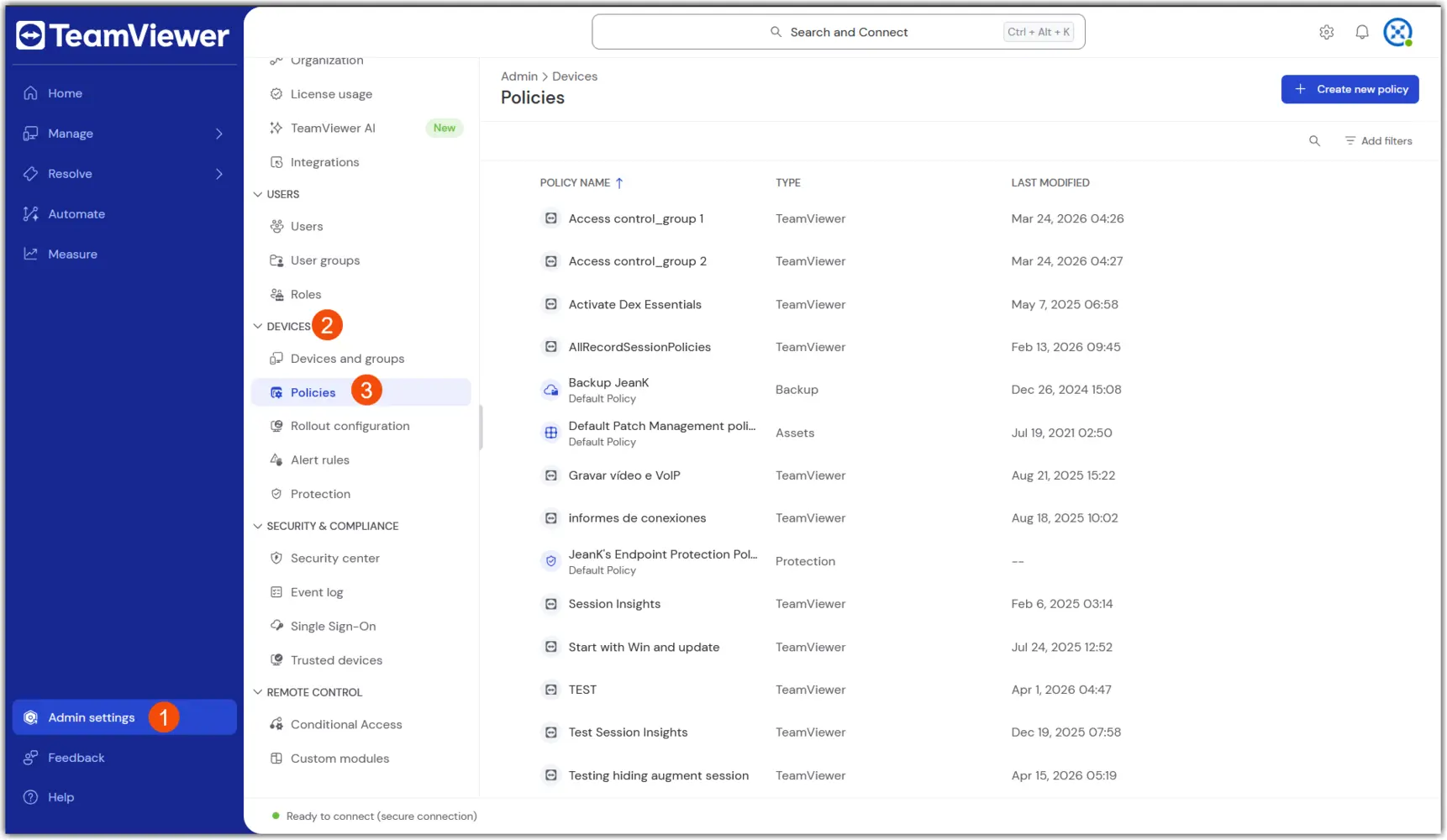
1. Navigate to Policies: Go to Admin → Devices → Policies

2. Select Create new policy in the upper right corner, and select the Unified Policy flow.

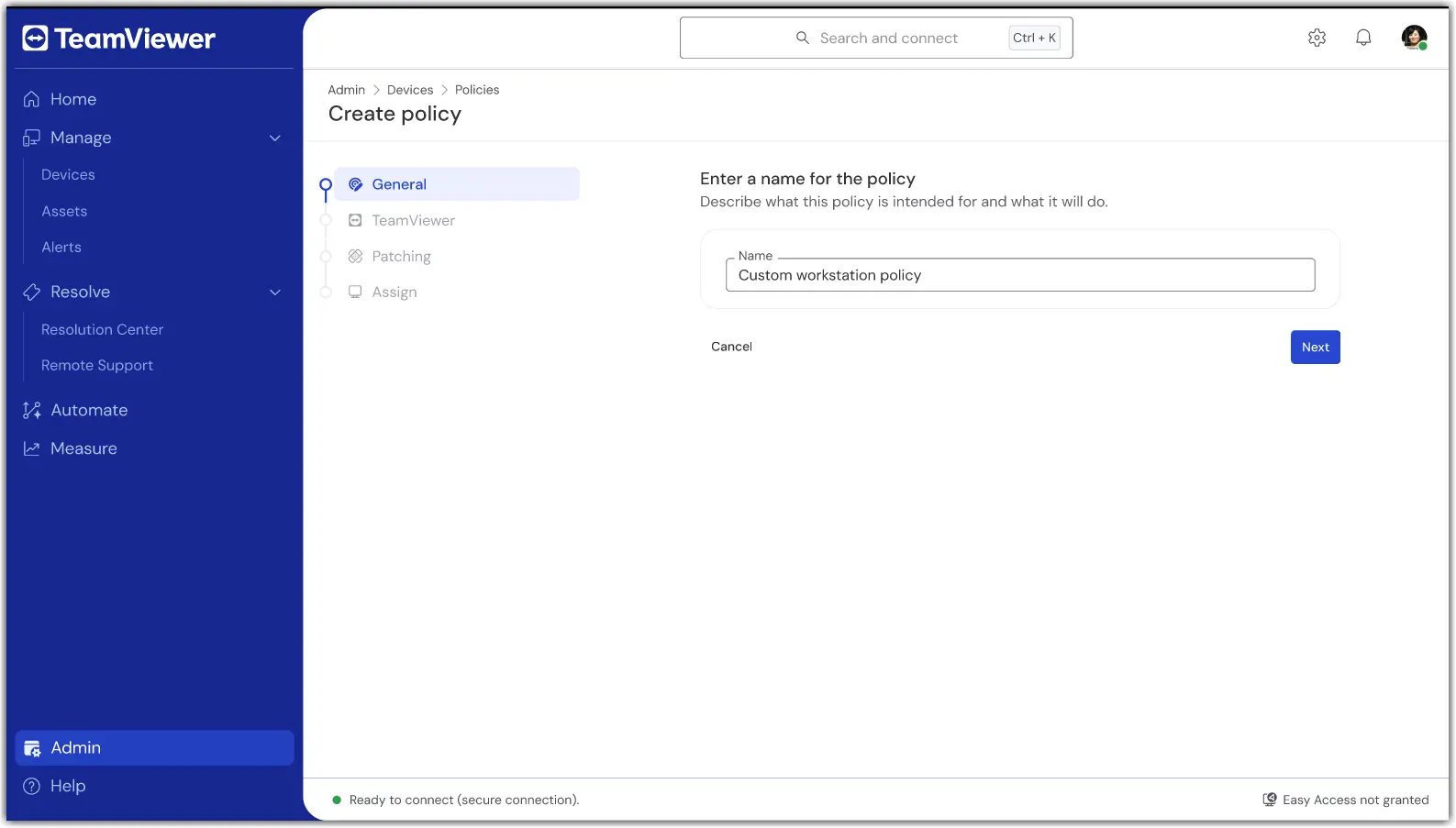
3. In the first section, General, enter a name for the policy.

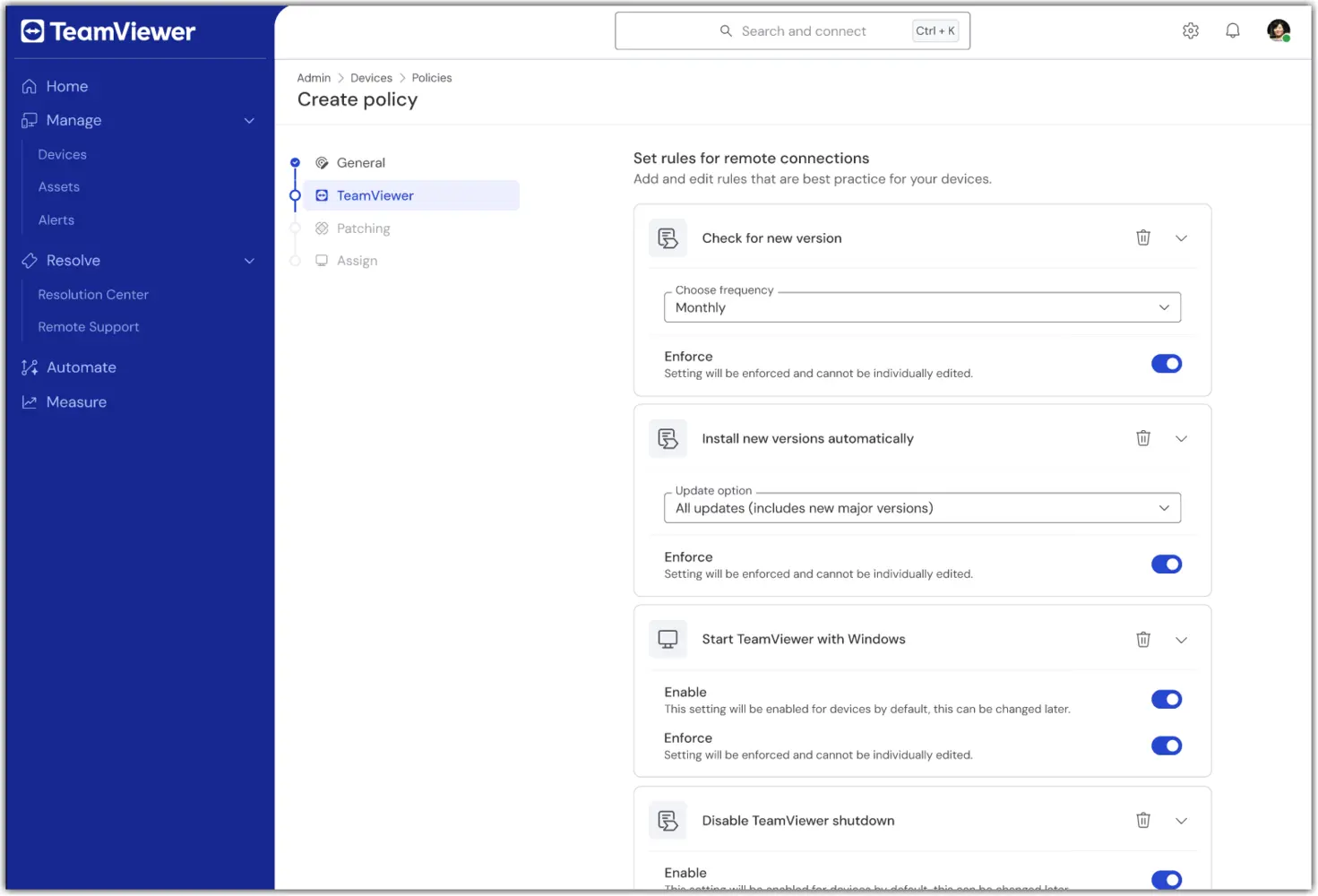
4. In the TeamViewer section of the policy creation, configure the desired remote/client settings (e.g., security, connection behavior).
5. In the Patching section of the policy creation, configure the desired asset inventory and patching preferences (e.g., approval, scheduling).
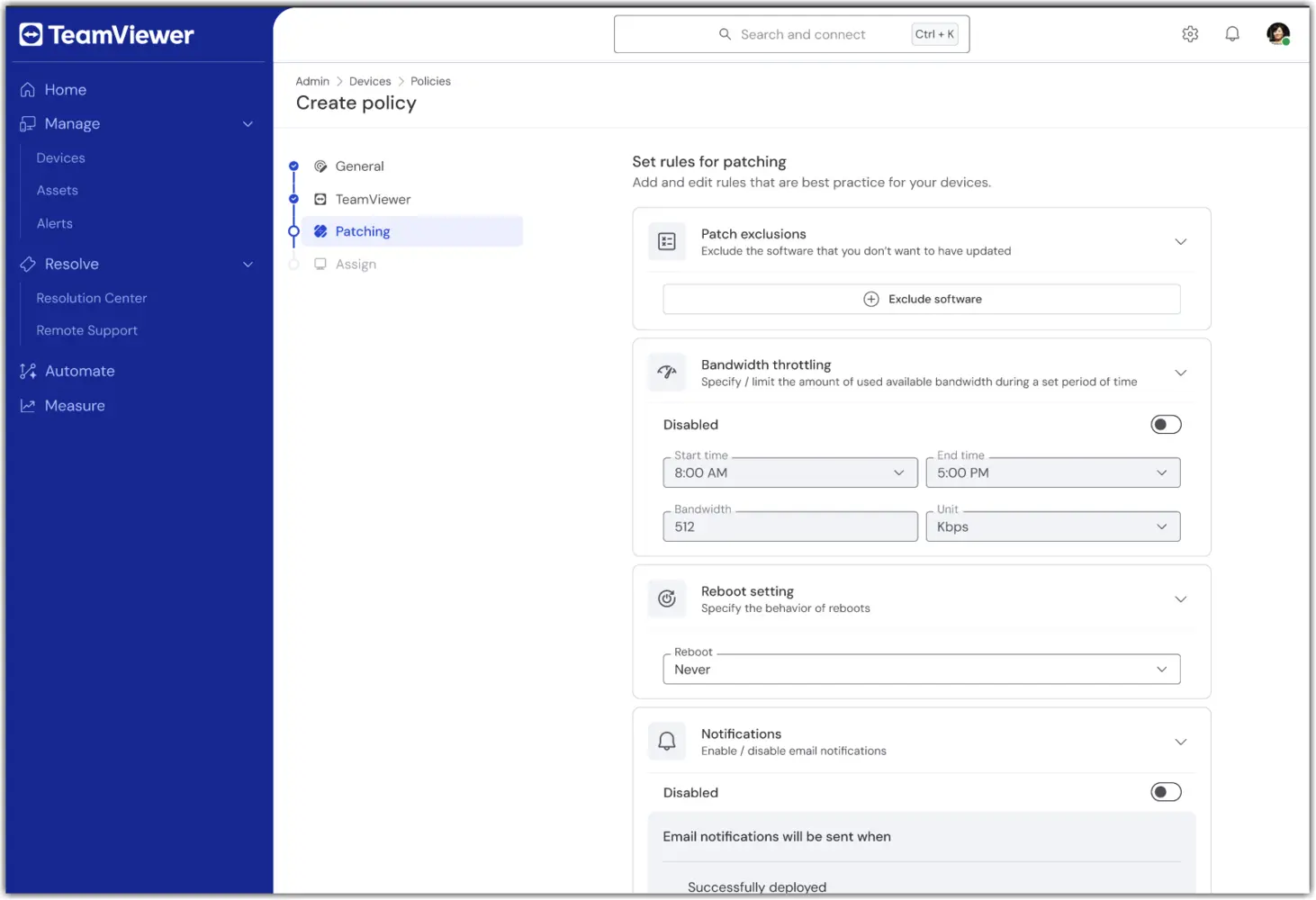
Note: The Patching section of the Unified Policy is available only to TeamViewer ONE Advanced licenses.

6. In the Assign section, select one or more device groups to receive the Unified Policy.
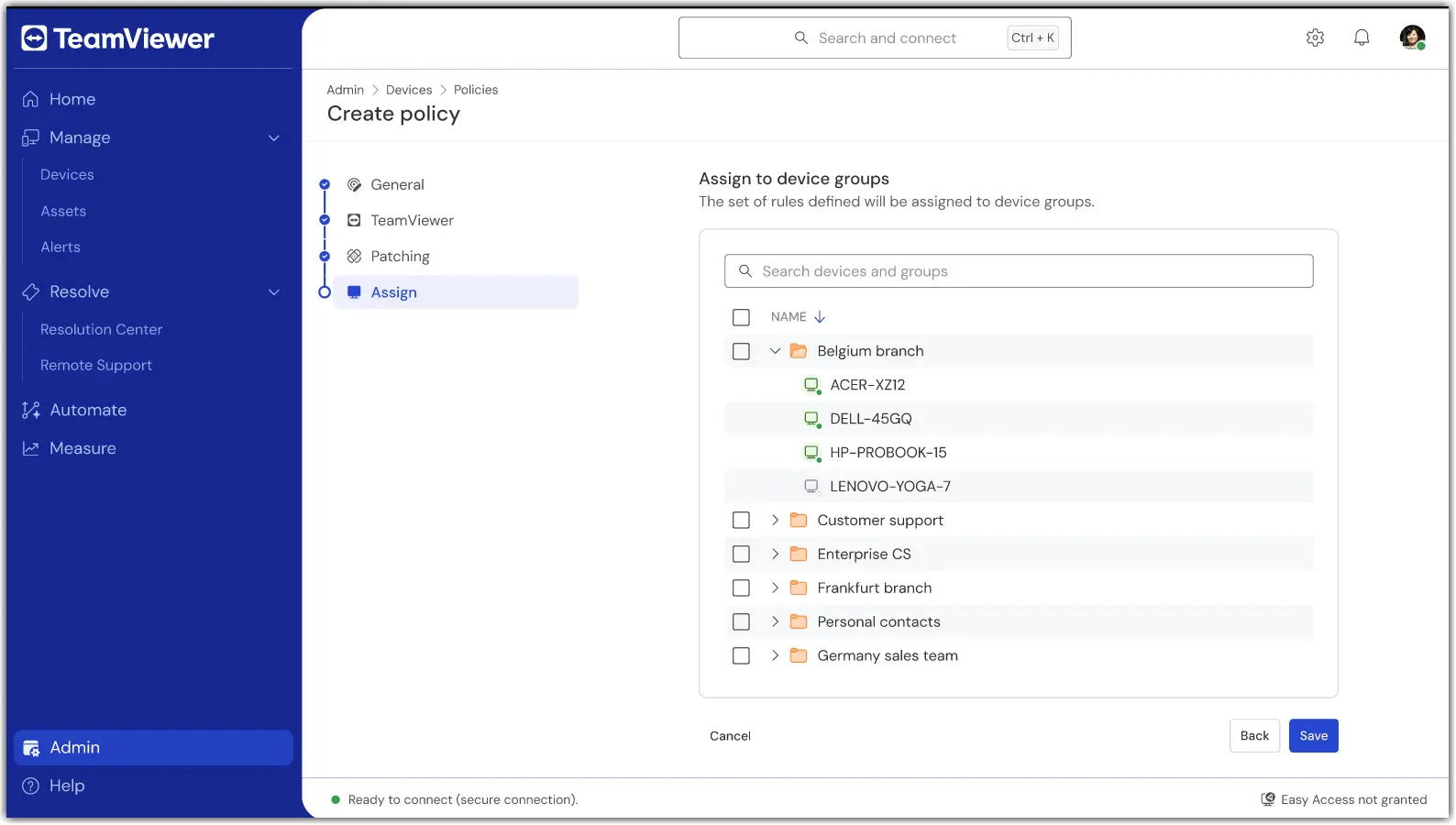
7. Once done, confirm the settings and apply. Assignment occurs as part of saving.

Once saved, your group(s) will now use a single policy for TeamViewer and Patching modules.

How to assign or change an assignment

To add or remove device groups to a Unified Policy, open the policy and select Edit.

In the event a device needs to be assigned to a different Unified Policy, move the device from its current group to the device group with the Unified Policy assigned to it.

Troubleshooting

A device did not apply the policy.

  • Verify the device belongs to a group with the Unified Policy assigned.

  • Confirm the device is set to inherit from its group.

  • Check the device connectivity status and wait for the next online sync.

I don’t see Unified Policies.

  • Confirm your license is TeamViewer ONE Standard or Advanced.

  • Ask your admin to verify your role includes the Manage Policies permissions.

  • If you utilized older TeamViewer Policies, please ensure they have been deleted. Unified Policies will not appear if older TeamViewer Policies are present.

Conflicting assignments or multiple groups.

  • Review your group model. If needed, move devices to the intended policy group.

Please choose your region

Selecting a region changes the language and/or content on teamviewer.com


SUGGESTED REGION

  • Americas

    • Americas - English
    • América Latina - Español
    • Brasil - Português
    • Canada - English
    • Canada - Français
    • United States - English
  • Asia Pacific

    • Asia Pacific - English
    • Australia - English
    • 中国 - 中⽂(简体)
    • 香港 - 繁體中文
    • India - English
    • 日本 - ⽇本語
    • New Zealand - English
    • 대한민국 - 한국어
    • 台灣-繁體中文
    • ประเทศไทย - ภาษาไทย
  • Commonwealth of Independent States

    • CIS - English
    • СНГ - Русский
  • Europe

    • Europe - English
    • Belgique - Français
    • België - Nederlands
    • Bulgaria - English
    • Croatia - English
    • Cyprus - English
    • Czechia - Čeština
    • Denmark - English
    • Deutschland - Deutsch
    • España - Español
    • Estonia - English
    • Finland - English
    • France - Français
    • Greece - English
    • Ireland - English
    • Italia - Italiano
    • Latvia - English
    • Liechtenstein - Deutsch
    • Liechtenstein - Français
    • Liechtenstein - Italiano
    • Lithuania - English
    • Luxembourg - Français
    • Magyarország - Magyar
    • Malta - English
    • Nederland - Nederlands
    • Norway - English
    • Österreich - Deutsch
    • Polska - Polski
    • Portugal - Português
    • Romania - English
    • Schweiz - Deutsch
    • Suisse - Français
    • Svizzera - Italiano
    • Slovakia - English
    • Slovenia - English
    • Sweden - English
    • Türkiye - Türkçe
    • United Kingdom - English
  • Middle East Africa

    • Middle East Africa - English
    • Middle East Africa - Français
  • ผลิตภัณฑ์
    • TeamViewer Remote
    • TeamViewer Tensor
    • TeamViewer DEX
    • TeamViewer Frontline
    • ราคา
  • แพลตฟอร์ม ONE
    • TeamViewer ONE
    • ความสามารถ
    • พูดคุยกับทีมของเรา
  • โซลูชัน
    • ตามอุตสาหกรรม
    • ตามกรณีการใช้งาน
    • ตามบทบาท
    • สำหรับองค์กร
  • พันธมิตร
    • มาเป็นพาร์ทเนอร์
    • ค้นหาพาร์ทเนอร์
    • พันธมิตรด้านการบูรณาการ
  • ทรัพยากร
    • ข่าวสารและข้อมูลเชิงลึก
    • เรื่องราวความสำเร็จ
    • ศูนย์ความน่าเชื่อถือ
  • การสนับสนุน
    • ติดต่อฝ่ายสนับสนุน
    • คำแนะนำและคู่มือ
    • ฐานความรู้
    • สถานะระบบ
    • โมดูลที่กำหนดเอง
    • สำหรับนักพัฒนา
    • ชุมชน
  • บริษัท
    • เกี่ยวกับ TeamViewer
    • อาชีพ
    • นักลงทุน
    • ห้องข่าวสาร
    • ความเป็นผู้นำ
    • พาร์ทเนอร์ด้านกีฬา
    • ความยั่งยืนและ CSR
    • การกำกับดูแลกิจการ
  • ลิงก์เพิ่มเติม
    • ติดต่อฝ่ายขาย
    • TeamViewer User Focus Program
    • Make work work better
    • จดหมายข่าว
  • ข้อตกลงการใช้งาน (EN)
  • Product Descriptions
  • ประทับ
  • นโยบายความเป็นส่วนตัว (EN)
  • ติดต่อ
Cookie Settings