• Kontaktujte prodejní tým
    • Open web app
    • Management Console
    • Ticket
    • Customer Portal
TeamViewer
  • Personal use and SMB TeamViewer Remote

    Fast and secure remote access and IT support.

    Learn more

    • Vzdálená podpora Poskytujte okamžitou a bezpečnou podporu
    • Vzdálená správa Monitorujte a spravujte zařízení
    View plans and pricing

    Enterprise TeamViewer Tensor

    Remote connectivity built for secure operations.

    Learn more

    • Vzdálená IT podpora Bezpečná, flexibilní, integrovaná
    • Operační technologie Vzdálený přístup do dílny

    Real-time troubleshooting TeamViewer DEX

    Resolve issues before they affect users.

    Learn more

    • Řešení problémů koncových bodů Identifikujte a řešte problémy
    • Automatizace koncových bodů Automatizujte rutinní IT úkoly

    Connected worker TeamViewer Frontline

    Drive efficiency with industrial augumented reality.

    Learn more

    • Logistika a sklady Manipulace s materiálem bez použití rukou
    • Školení a nástup do zaměstnání Rychlý nástup do zaměstnání a zvyšování kvalifikace
    AI capabilities as seen in the TeamViewer client

    TeamViewer ONE

    Get the full power of TeamViewer, unified in one platform.

    • Learn more

    Key integrations

    • Microsoft Intune

    • ServiceNow

    • Freshworks

    • Jira

    • Salesforce

    • Slack

    • Microsoft Teams

    View all integrations
  • TeamViewer ONE Platform

    Proactively manage and optimize your digital workplace combined in one platform.

    • Pro štíhlé IT týmy Proaktivní správa zařízení
    • Bezproblémová zkušenost Plynulý a nerušený digitální zážitek
    • Bezproblémové IT operace Proaktivní nápravná opatření a výjimečný servis
    • Promluvte si s naším týmem Připraveni na změnu?
    Explore the platform

    Core capabilities

    • TeamViewer AI
    • Digital Employee Experience
    • Vzdálená podpora a řízení
    • Správa aktiv a záplat
    View all capabilities

    Gartner Report 2026

    TeamViewer named a leader in DEX

    TeamViewer named a Leader in 2026 Gartner® Magic Quadrant™ DEX tools.

    Key integrations

    • Microsoft Intune

    • ServiceNow

    • Freshworks

    • Jira

    • Salesforce

    • Zendesk

    • Slack

    • Microsoft Teams

    View all integrations
  • Popular use cases Most popular TeamViewer use cases

    • Vzdálený přístup a podpora Spravujte lidi, zařízení a aplikace – odkudkoli.
    • Digital employee experience (DEX) Proaktivně řešte problémy týkající se IT, než začnou mít dopad na produktivitu.

    Other use cases Popular solutions for further use cases

    • Vzdálený přístup Zlepšete přístup pomocí zabezpečeného připojení
    • Vzdálené řízení Ovládejte zařízení bez ohledu na platformu
    • Vzdálená plocha Zvyšujte produktivitu odkudkoli
    • Wake-on-LAN Povolte vzdálenou aktivaci zařízení
    • Sdílení obrazovky Vizuální komunikace v reálném čase
    • Smart Service Zjednodušte poprodejní operace

    By need Popular solutions for different requirements

    • Osobní použití Přístup k zařízením odkudkoliv
    • Malé podniky Zjednodušte vzdálený přístup a podporu
    • Velké podniky Rozšiřujte a zabezpečte podnikové IT
    • Freelanceři a digitální nomádi Pracujte bezpečně z jakéhokoli místa
    • Poskytovatelé spravovaných služeb Spravujte a udržujte klientské IT
    • OEM Zjednodušte podporu a provoz
    • Neziskové a vzdělávací organizace 30% sleva na technologii TeamViewer

    By industries Popular solutions sorted by industry

    • Automobilový průmysl
    • Zemědělství
    • Logistika
    • Výroba
    • Maloobchod
    • Zdravotní péče
    • Financial services
    • Federal

    Talk to our sales team

    Need help choosing the right solution, placing and order, or upgrading your license?

    • Talk to us
  • Pro firmy
  • Find out more about TeamViewer

    • O společnosti TeamViewer Bezpečné propojení lidí, míst a věcí.
    • Kontaktovat podporu Prohlédněte si články podpory nebo kontaktujte náš tým.
    • Staňte se partnerem Připojte se k našemu globálnímu partnerskému programu TeamUP.
    • Příklady úspěšného využití Prozkoumejte výsledky, kterých dosáhli zákazníci TeamViewer.
    INSIGHT

    How Tia helps IT teams turn fixes into reusable scripts

    Resources

    • Novinky a postřehy
    • Novinky a statistiky
    • Příklady úspěšného využití
    • Trust Center

    Partner

    • Staňte se partnerem
    • Vyhledat partnera
    • Partneři pro integraci

    Support

    • Kontaktovat podporu
    • Návody a příručky
    • Informační databáze
    • Stav systému
    • Přizpůsobené moduly
    • Pro vývojáře
    • Komunita

    Company

    • O společnosti TeamViewer
    • Kariéra
    • Investoři
    • Vedení
    • Pro média
    • Partnerství ve sportu
    • Udržitelnost a CSR
    • Správa a řízení společnosti
  • Ceny
  • Stažení zdarma

Knowledge Base

  • TeamViewer ONE
  • TeamViewer Remote
  • TeamViewer (Classic)
  • TeamViewer Tensor
  • TeamViewer Tensor (Classic)
  • TeamViewer Frontline
  • Other products
Back to support overview
  • Get started with your TeamViewer ONE license
  • Understanding the Home Dashboard in TeamViewer ONE
  • Company Readiness in TeamViewer ONE
  • New navigation experience in TeamViewer ONE
  • Create and run remediation scripts from Session Insights with SCALE
  • Unified policies in TeamViewer ONE
  • Unified policies in TeamViewer ONE

    Last Modified: 24. 6. 2026

Unified Policies provides a single, streamlined way to configure and enforce settings across TeamViewer ONE. Instead of managing separate policy types for different modules, admins create one policy and assign it to device groups. Currently, this includes both TeamViewer and Patch Management settings. This new feature helps to reduce setup time and ongoing administration tasks.

This article applies to all TeamViewer ONE Standard and Advanced license holders.

Note: The Patching section of the Unified Policy is available only to TeamViewer ONE Advanced licenses.

Requirements

In order to utilize the Unified Policies feature in TeamViewer ONE, please ensure the following:

  • At least one device group is ready for assignment.
  • The Manage Policies permission is enabled for your account (Company Admin or custom roles with the Manage Policy permission enabled).
  • The Policy assignment (administration) permission is activated on the target group.
  • The devices within the group are set to inherit policies from the group level. This is done via rollout setup or device-level inheritance settings.

How to create a Unified Policy

Creating a Unified Policy for TeamViewer ONE is performed in TeamViewer Remote or the web app. Please follow the steps below:

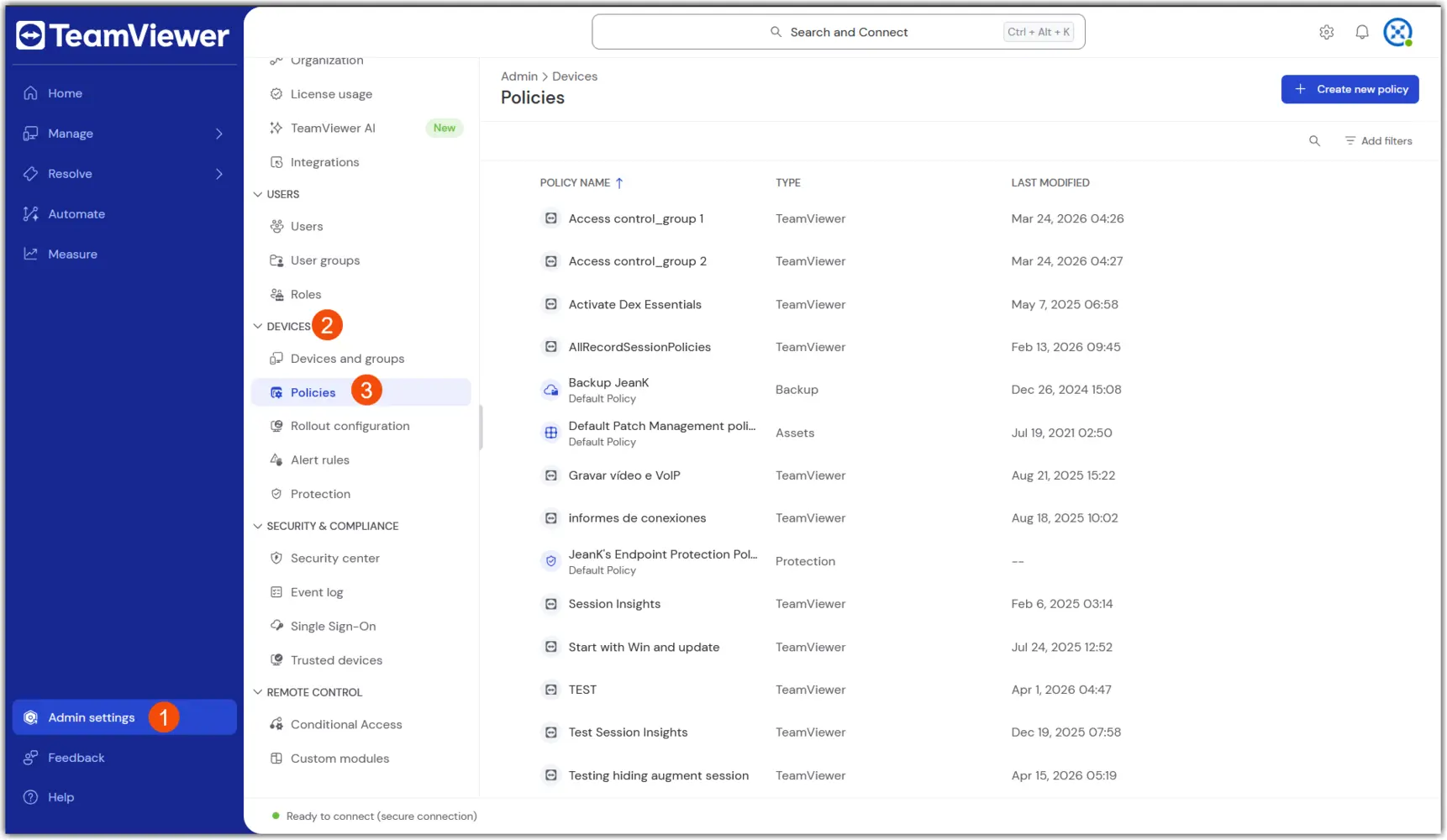
1. Navigate to Policies: Go to Admin → Devices → Policies

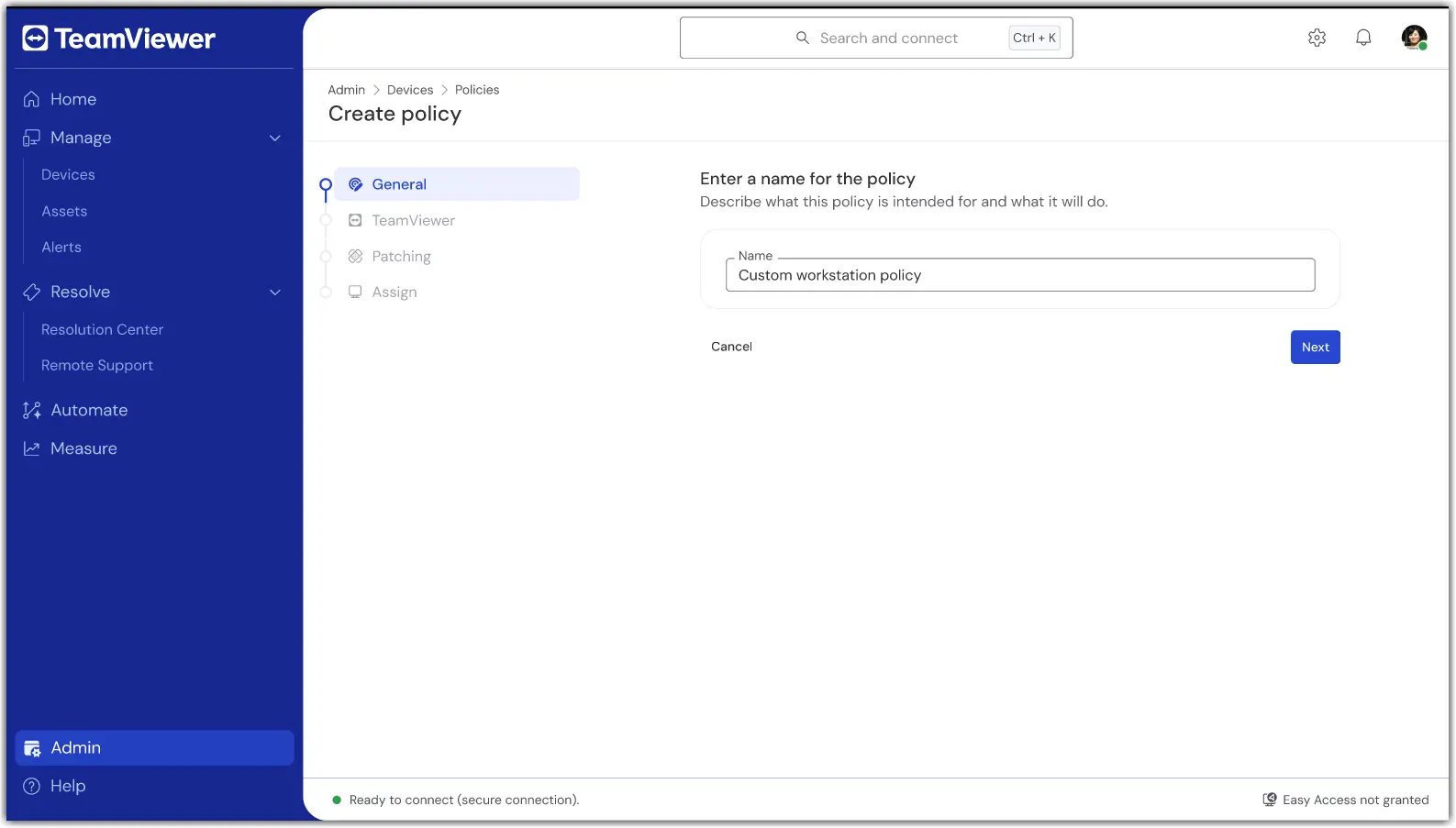
2. Select Create new policy in the upper right corner, and select the Unified Policy flow.

3. In the first section, General, enter a name for the policy.

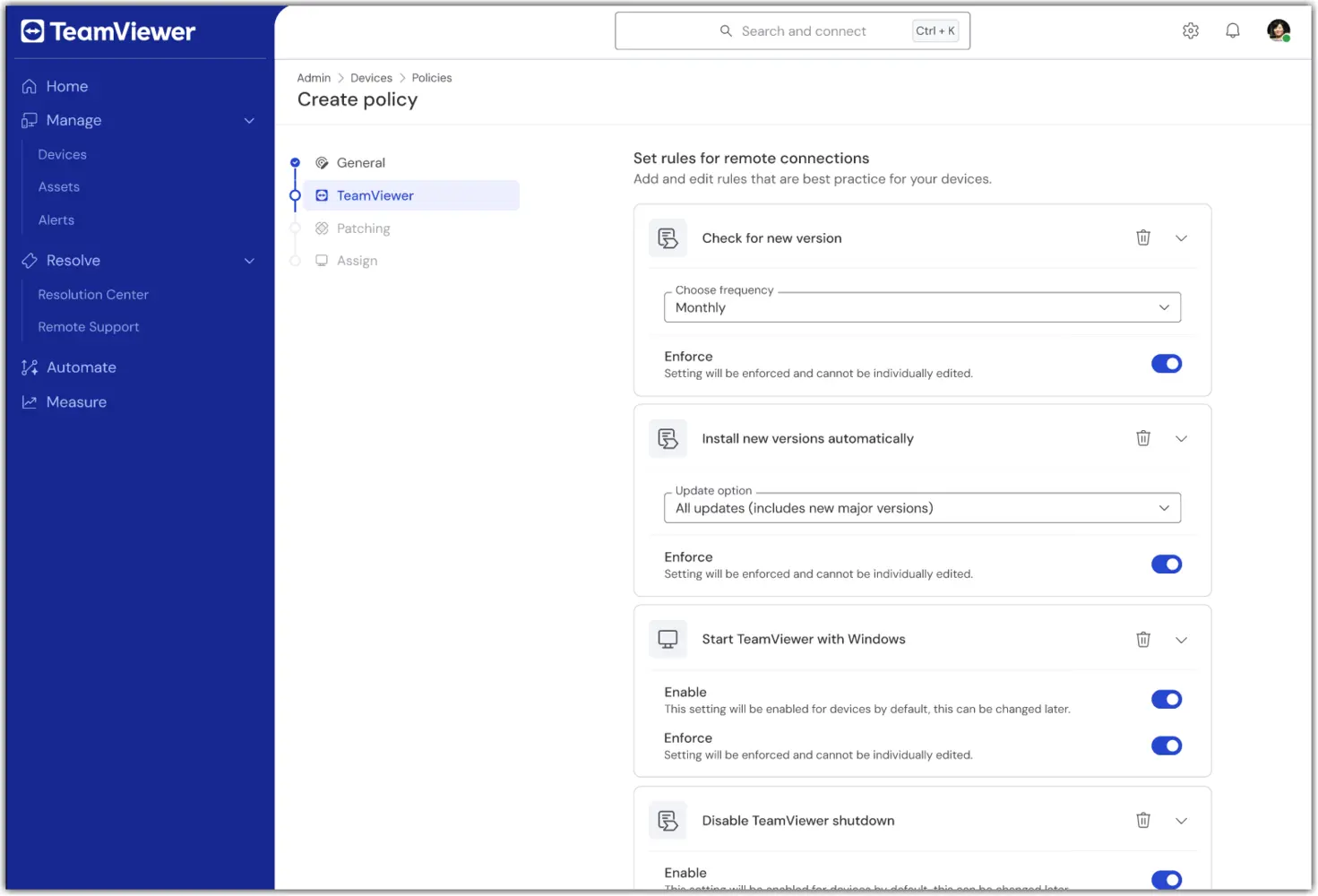
4. In the TeamViewer section of the policy creation, configure the desired remote/client settings (e.g., security, connection behavior).
5. In the Patching section of the policy creation, configure the desired asset inventory and patching preferences (e.g., approval, scheduling).
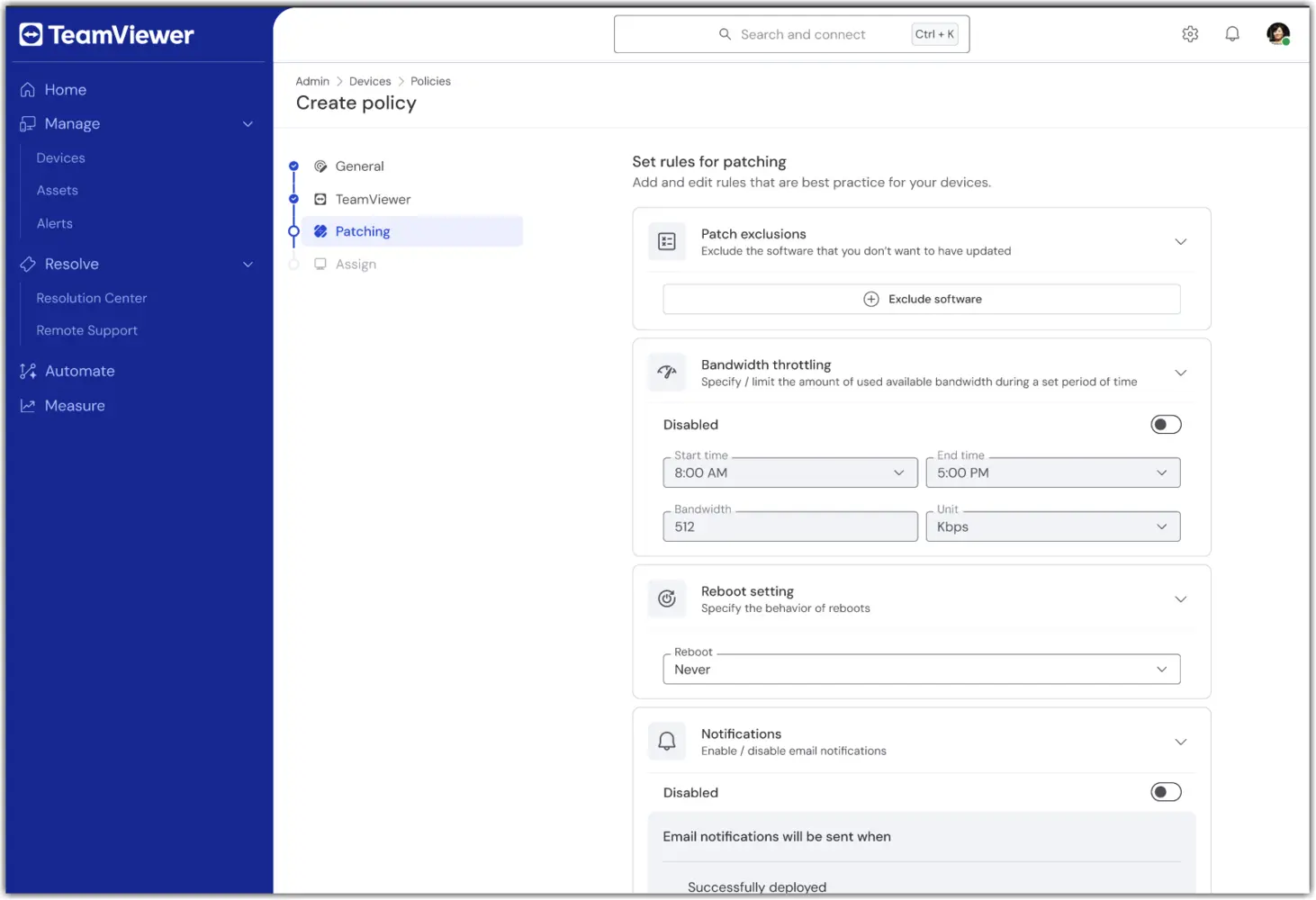
Note: The Patching section of the Unified Policy is available only to TeamViewer ONE Advanced licenses.

6. In the Assign section, select one or more device groups to receive the Unified Policy.
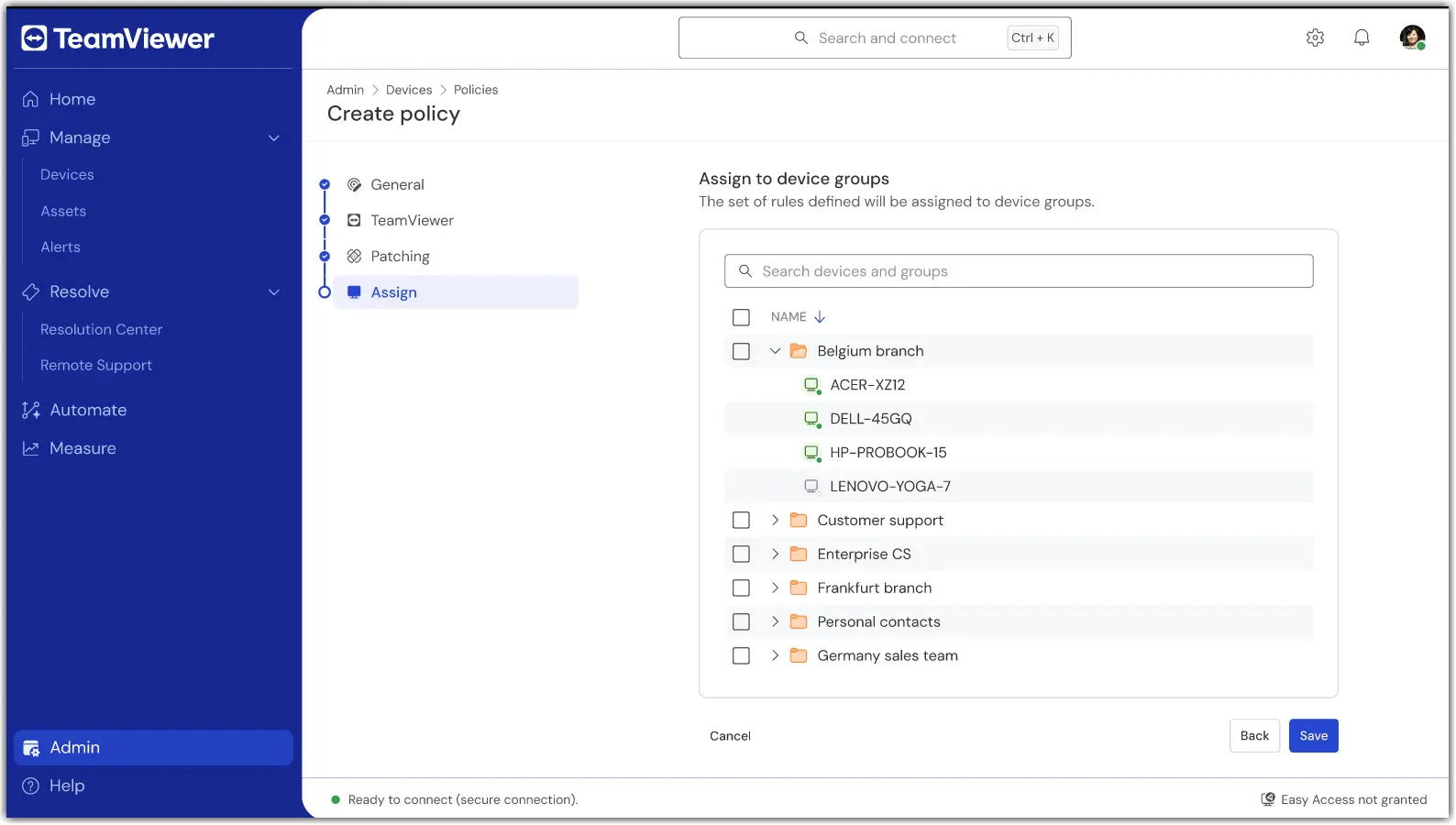
7. Once done, confirm the settings and apply. Assignment occurs as part of saving.

Once saved, your group(s) will now use a single policy for TeamViewer and Patching modules.

How to assign or change an assignment

To add or remove device groups to a Unified Policy, open the policy and select Edit.

In the event a device needs to be assigned to a different Unified Policy, move the device from its current group to the device group with the Unified Policy assigned to it.

Troubleshooting

A device did not apply the policy.

  • Verify the device belongs to a group with the Unified Policy assigned.

  • Confirm the device is set to inherit from its group.

  • Check the device connectivity status and wait for the next online sync.

I don’t see Unified Policies.

  • Confirm your license is TeamViewer ONE Standard or Advanced.

  • Ask your admin to verify your role includes the Manage Policies permissions.

  • If you utilized older TeamViewer Policies, please ensure they have been deleted. Unified Policies will not appear if older TeamViewer Policies are present.

Conflicting assignments or multiple groups.

  • Review your group model. If needed, move devices to the intended policy group.

Please choose your region

Selecting a region changes the language and/or content on teamviewer.com


SUGGESTED REGION

  • Americas

    • Americas - English
    • América Latina - Español
    • Brasil - Português
    • Canada - English
    • Canada - Français
    • United States - English
  • Asia Pacific

    • Asia Pacific - English
    • Australia - English
    • 中国 - 中⽂(简体)
    • 香港 - 繁體中文
    • India - English
    • 日本 - ⽇本語
    • New Zealand - English
    • 대한민국 - 한국어
    • 台灣-繁體中文
    • ประเทศไทย - ภาษาไทย
  • Commonwealth of Independent States

    • CIS - English
    • СНГ - Русский
  • Europe

    • Europe - English
    • Belgique - Français
    • België - Nederlands
    • Bulgaria - English
    • Croatia - English
    • Cyprus - English
    • Czechia - Čeština
    • Denmark - English
    • Deutschland - Deutsch
    • España - Español
    • Estonia - English
    • Finland - English
    • France - Français
    • Greece - English
    • Ireland - English
    • Italia - Italiano
    • Latvia - English
    • Liechtenstein - Deutsch
    • Liechtenstein - Français
    • Liechtenstein - Italiano
    • Lithuania - English
    • Luxembourg - Français
    • Magyarország - Magyar
    • Malta - English
    • Nederland - Nederlands
    • Norway - English
    • Österreich - Deutsch
    • Polska - Polski
    • Portugal - Português
    • Romania - English
    • Schweiz - Deutsch
    • Suisse - Français
    • Svizzera - Italiano
    • Slovakia - English
    • Slovenia - English
    • Sweden - English
    • Türkiye - Türkçe
    • United Kingdom - English
  • Middle East Africa

    • Middle East Africa - English
    • Middle East Africa - Français
  • Produkty
    • TeamViewer Remote
    • TeamViewer Tensor
    • TeamViewer DEX
    • TeamViewer Frontline
    • Ceny
  • Platforma ONE
    • TeamViewer ONE
    • Funkce
    • Promluvte si s naším týmem
  • Řešení
    • Podle odvětví
    • Podle případů použití
    • Podle rolí
    • Pro firmy
  • Partneři
    • Vyhledat partnera
    • Staňte se partnerem
    • Partneři pro integraci
  • Zdroje
    • Novinky a statistiky
    • Příklady úspěšného využití
    • Trust Center
  • Podpora
    • Kontaktovat podporu
    • Návody a příručky
    • Informační databáze
    • Stav systému
    • Přizpůsobené moduly
    • Pro vývojáře
    • Komunita
  • Společnost
    • O společnosti TeamViewer
    • Kariéra
    • Investoři
    • Vedení
    • Pro média
    • Partnerství ve sportu
    • Udržitelnost a CSR
    • Správa a řízení společnosti
  • Doplňující Odkazy
    • Kontaktovat prodejní oddělení
    • TeamViewer User Focus Program
    • Make work work better
    • Elektronický zpravodaj
  • Smlouva EULA (EN)
  • Product Descriptions
  • Údaje o společnosti
  • Zásady ochrany osobních údajů (EN)
  • Kontakt
Cookie Settings