Knowledge Base
Discovery Mini
Ultima modifica: 28 feb 2024
The Sensor ID Discovery Mini (also referred to as Partitalia Scanner) is a RFID reading device worn on the arm wrist. Its functionality is very similar to the xBand. It offers two buttons, one of which is freely customizable, and a vibration motor but no further sensorics.
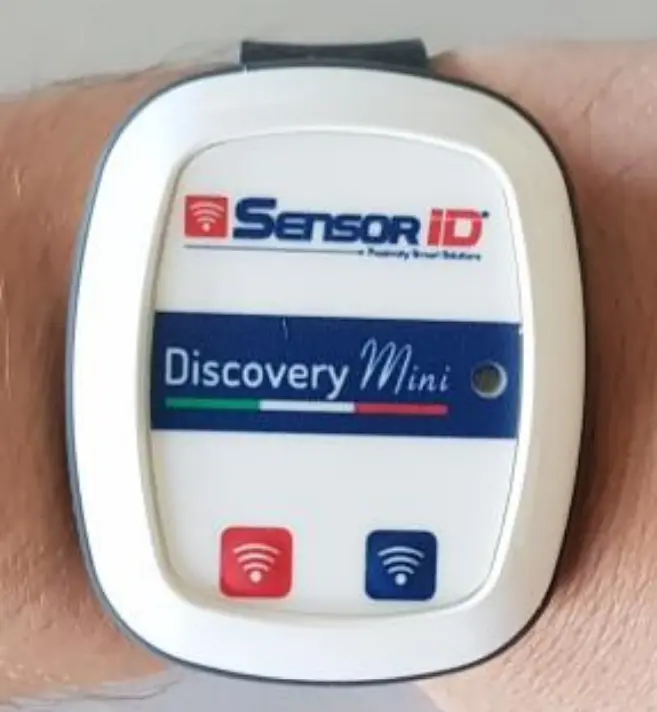
Turning the Scanner On and Off
To turn the Scanner On press the red button (left). The LED will flash red and the scanner will vibrate once.
To turn the Scanner Off press and hold the red button until the red LED turns off.
Battery and Charging
If the battery charge gets reaches 5%, the LED will light up red. It must be charged wirelessly, e.g. by a Anker PowerWave Pad.
Pairing
Contact your Customer Success Manager to pair the reader.
Initial Config
Input...Bluetooth...Devices:
    DiscoveryMini:
        Driver: de.ubimax.android.core.util.bluetooth.handler.discovery.DiscoveryMiniGattConnectionHandler
        Name: D-mini.*
        Type: XBand
        Config:
          InitialReaderPower: 1
          InitialReaderSensitivity: 1
          InitialReaderDistance: 1
          InitialReaderTimeout: 2
          ReadAsHex: true
          ObserveBattery: true
          ObserveBatteryDelay: 60000
          Feedback: true
          RSSIFeedback: true
          ButtonCommand: INFO
Above can be seen the default config of the device. It uses its own Handler due to a custom communication protocol. Further configuration parameters are explained beneath.
| Configuration Key | Accepts | Description |
|---|---|---|
ReadAsHex | boolean | If true, the scanner excepts the content of a scanned RFID tag to be encoded in hexadecimal. The resulting scan will be decoded. If false, the scanner will produce unencoded (raw) scans. |
ObserveBattery | boolean | If ture, the scanner will periodically write the current percentage of the battery capacity in a context variable battery_status_percent under the extdevices domain (as does the xBand). |
ObserveBatteryDelay | int | Sets the delay between periodic reads of the battery capacity. |
Feedback | boolean | If true, the scanner will vibrate on every successful scan. |
RSSI Feedback | boolean | If true, every scan will contain the RSSI value (currently only logged). |
InitialReaderDistance | int (0-20) | Sets the maximal distance to accept the tag reading |
InitialReaderTimeout | int (0-65535) | Sets time same tag scan gets ignored, if recognized again. 0 - disables that functionality 1 - code will be passed, every second if in reach |
InitialReaderPower | int (0-10) | Sets the RF power emitted by the reader on initial connect. |
InitialReaderSensitivity | int (0-10) | Sets the RF input gain of the reader on initial connect |
Button Command | String | If not empty, the right (blue) button will invoke the set command as an InputEvent using the device external_device |
Control via workflow
Just as the xBand, the reader can be controlled via the workflow action "send_bluetooth_device_commands" (SendBluetoothDeviceCommands). Refer to the implemented commands in the following table.
| Configuration Key | Accepts | Description |
|---|---|---|
P - POWER | int (1-100) | Sets the current RF power emitted by the reader to the given percentage. |
S - SENSITIVITY | int (1-100) | Sets the current RF input gain of the reader to the given percentage. |
V - VIBRATION | boolean | If true, the scanner will vibrate on every successful scan. |
Z - DISCONNECT | - | Disconnects the reader from the host device. |
D - DISTANCE | int (1-20) | Sets the maximal distance to accept the tag reading |
T - READ_TIMEOUT | int (0-65535) | Sets time after which the same tag scan gets ignored, if rescanned again. 0 - disables that functionality 1 - code will be passed, every second if in reach |
F - FEEDBACK | single | <send_external_device commands id="send_external_device_correct"> <commands> <param ="FEEDBACK">single</paran> </commands> </send_external_device_commands> |
F - FEEDBACK | triple | <send_external device commands id="send_external_device_negative"> <commands> <param ="FEEDBACK">trible</paran> </commands> </send_external_device_commands> |
Example
<actions>
    <send_external_device_commands id="send_external_device_power">
            <commands>
                <param name="P">80</param>
            </commands>
    </send_external_device_commands>
</actions>