

TeamViewer vs. NinjaOne
Why choose TeamViewer ONE over NinjaOne
Connect with, manage, and support devices anywhere with TeamViewer’s secure remote technology. Get started with TeamViewer today!
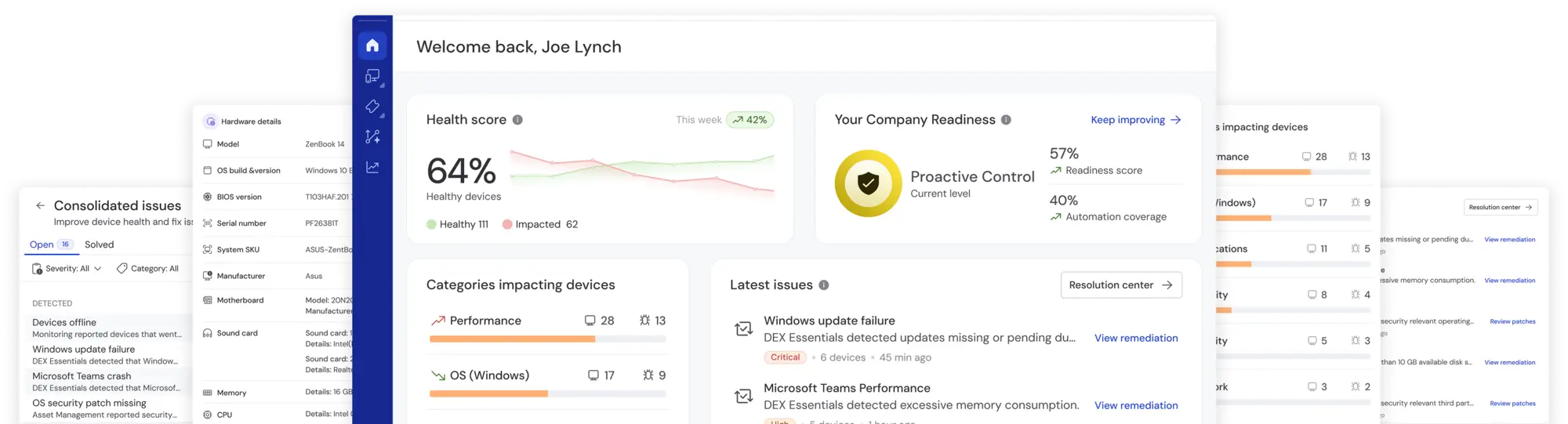
Move beyond reactive IT operations
Traditional remote monitoring and management (RMM) platforms struggle to keep up with today’s complex IT environments. Monitoring devices and automating responses is no longer enough to understand how issues affect employees.
TeamViewer ONE provides a unified, cloud-native platform that combines remote connectivity, digital employee experience (DEX), automation, and AI. It helps IT teams resolve issues faster, identify patterns, uncover root causes, and prevent disruptions before they affect productivity.
With prebuilt remediations, automated workflows, and real-time insights, IT teams can reduce ticket volumes, eliminate repetitive work, and shift from reactive support to proactive digital workplace operations.
Whether managing hundreds or thousands of endpoints, TeamViewer ONE scales securely while simplifying operations and improving employee experience.
Get started with TeamViewer ONE today!
Where TeamViewer wins
TeamViewer ONE brings together everything you need to support a modern digital workplace—securely, proactively, and at scale. Built for IT teams that do more with less.

TeamViewer ONE provides secure, industry-leading remote access built directly into the platform—eliminating the need for external integrations. This ensures seamless support across all devices, including headless and IoT systems. In contrast, NinjaOne often relies on third-party tools like Splashtop for remote access, which can introduce additional complexity and potential compatibility issues.

With AI-powered insights, TeamViewer ONE proactively identifies and resolves performance issues across applications, devices, and networks—before they impact users. NinjaOne offers robust system monitoring but lacks the AI-driven analytics that provide deeper visibility into user experience and predictive issue resolution.

TeamViewer ONE enables IT teams to automate routine tasks without scripting, instead using intuitive, prebuilt workflows. This approach reduces manual effort, accelerates response times, and ensures automatic future fixes if issues reoccur. While NinjaOne supports automation, it often requires scripting knowledge, which can be a barrier for teams without dedicated development resources.

TeamViewer ONE includes tools for capturing employee feedback and analyzing user sentiment. This allows IT teams to assess and improve the digital experience proactively. NinjaOne does not natively offer employee sentiment analysis, limiting visibility into user satisfaction and engagement. TeamViewer ONE is purpose-built to enhance both digital workplace and employee experiences. NinjaOne is built for basic endpoint management.

TeamViewer ONE delivers advanced security features such as role-based access controls, conditional access, comprehensive audit logs, and compliance-ready reporting. This is essential for organizations with stringent regulatory requirements. While NinjaOne offers solid security measures, TeamViewer ONE's built-in compliance and auditing capabilities provide an added layer of assurance for enterprise environments.
Feature comparison
TeamViewer ONE vs. NinjaOne
(Data as of May 2025)
| TeamViewer ONE | NinjaOne | |
|---|---|---|
| Remote access |
|
|
| Cross-platform support |
|
|
| Mobile device remote access and support |
|
|
| Security and compliance |
|
|
| Remote monitoring and management |
|
|
| OS and third-party patching |
|
|
| Hardware and software inventory |
|
|
| AI-powered experience monitoring |
|
|
| Architecture |
|
|
| No-code remediation |
|
|
| Real-time remediation |
|
|
| In-session remote support automation |
|
|
| Session recording and audit |
|
|
| AI-powered insights and remediation recommendations |
|
|
| IoT/OT support |
|
|
| Integrations |
|
|
 Native, cross-platform
 iOS and Android devices support screen sharing only
What makes TeamViewer ONE special

Get live telemetry on endpoints and apps. Flag anomalies instantly and use trends to fine-tune IT resources for stellar speed, stability, and uptime.

Replace manual checks with zero-touch compliance. Automate OS updates, security patches, and configs to keep every device in policy—no exceptions, no drift.

Automate scans for missing patches, weak settings, and old software. Stop risky behaviors, enforce encryption, and generate audit-ready reports.
Combine telemetry and surveys to reveal IT’s human impact. Fix slow logons and failing devices before they frustrate users and harm productivity.

Ready to transform how you support digital work?
Explore what’s possible when everything you need is in one place. Let’s talk about why TeamViewer ONE is a great choice for your business.
Why choose TeamViewer ONE


Predict. Prevent. Perform.
One platform, full visibility, total control
See why customers choose TeamViewer ONE over NinjaOne.
All your IT essentials. One groundbreaking platform.
With TeamViewer ONE, you shape a smarter, more resilient IT organization with a platform that delivers enterprise-grade remote support, endpoint visibility, real-time monitoring, AI insights, and automated remediation to fix issues before they arise. Whether you manage 500 or 500,000 devices, it keeps work flowing, captures user sentiment, and scales without limit.
Top-rated, award-winning software solution




Compare. Decide. Upgrade.
Get a tailored walkthrough of why TeamViewer wins over NinjaOne.
