
Knowledge Base
Multitenancy
Last Modified 2026. 5. 29.
TeamViewer Tensor (Classic) enables medium-and large-sized enterprises to manage licenses easily and efficiently across their organization. Multitenancy ensures that central IT departments can eliminate the complexity of managing separate licenses for their local and regional IT, saving time and effort.
Get one singular view of all TeamViewer Tensor (Classic) licenses that are being used in your central organizational unit, as well as satellite organization units that are separated by business unit, function, geography, time zone, and so on.
Multitenancy ensures that central IT has a better overview of existing licenses and provides features to further optimize the use of TeamViewer Tensor (Classic) enabling secure and scalable support experiences for employees and associated business units.
- Track, monitor, and control Tensor license usage across your central and satellite organizations.
- Use Multitenancy to scale your support experiences in a cost-efficient and optimal manner.
- Streamline license management and prevent over- and under-utilization of your existing Tensor licenses with Multitenancy.
- Help central IT administrators to easily manage, consolidate, or separate users, devices, and groups based on the needs and requirements of the business.
This article applies to TeamViewer customers with an Enterprise/Tensor license.
Note: The multitenancy setup is not shared between MCO(Tensor Classic) and TeamViewer Tensor. To use multitenancy across both products simultaneously, you must configure it separately in each instance.
Requirements
To use TeamViewer Multitenancy, you need
- An activated Tensor license for your TeamViewer account.
- Your TeamViewer account needs to be the company administrator role of your company
More information about how to activate your license: Activate your Tensor license
More information about the TeamViewer company profile: All about the TeamViewer company profile
Create your organization
To create your organization, please follow the instructions in the video below:
Alternatively, you can also follow our step-by-step guide here:
1) Log in to the Management Console: https://login.teamviewer.com/.
2) Click Multitenancy in the left navigation bar.
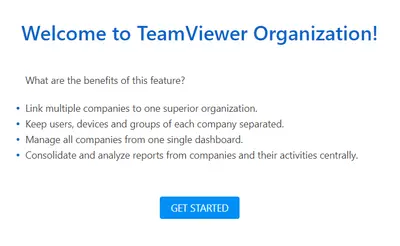
3) Click the GET STARTED button.
4) Enter the name of your superior organization or parent company.
5) Press Next.
6) Select a company administrator from the drop-down list and click the + button, if you want to add company administrators as organization administrators.
7) Click Done.
You have successfully created your organization/parent company.
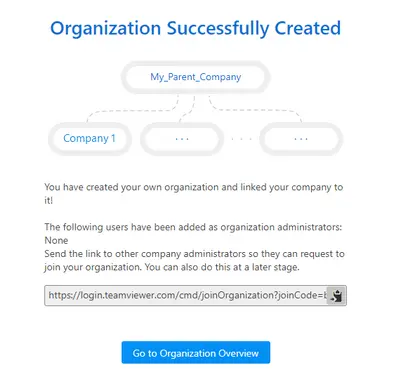
8) Click the Go to Organization Overview button to see the overview page.
Invite companies to join your organization
1) Log in to the Management Console as an organization administrator.
2) Click the Multitenancy tab on the left navigation menu.
You can now see the overview page.
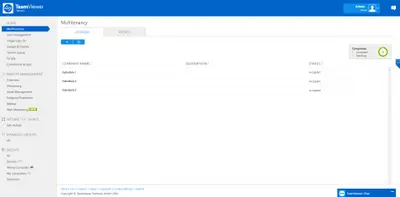
3) Click the + button on the top left side of the page.
You can now see the Join Organization link.
4) Copy the link and send it to other company administrators via email.
Join a parent company/organization
If you want to join an organization with your company, you need to get a Join Organisation link from an organization administrator (see the previous chapter) and you need to be a company administrator. Then the following steps need to be done:
1) Click the joining link.
You can see the organization name and a description text field.
2) Optional: Enter your contact details (e.g., email address) in the text field so that organization administrators can contact you.
Note: Each company can only join one parent company/organization.
Add more administrators to the parent company/organization
1) As an administrator of the organization, click the Setting icon at the top of the Overview page.
2) On the Organization management page open the Multitenancy administration management tab.
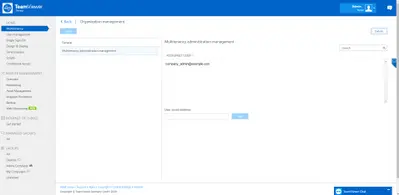
3) Add other users’ email addresses who have company administrator roles in a company of the organization.

4) Save the changes.
Organization administrators that have been successfully added can access the Multitenancy feature via the Management Console.
Note: The added organization administrator needs a Tensor agent or Tensor Remote Worker assigned to their account in order to have access to the parent company/organization.
Get license reports of the companies that joined the parent company
Organization administrators can see an overview of the joined companies’ licenses.
1) As an administrator of the parent company/organization, open the REPORTS tab at the top of the Overview page
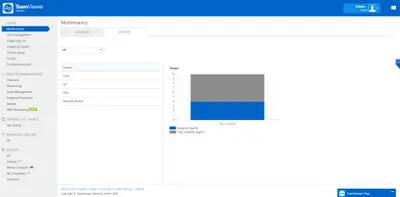
2) Set up the proper filter.
3) Check out single license states or a cumulative result of all license states.