• Contatta il team vendite
    • Apri web app
    • Management Console
    • Ticket
    • Portale Cliente
TeamViewer
  • Uso privato e SMB TeamViewer Remote

    Accesso remoto sicuro e supporto IT.

    Scopri di più

    • Supporto remoto Supporto remoto istantaneo
    • Gestione remota Monitoraggio e gestione dei dispositivi
    Vedi piani e prezzi

    Enterprise TeamViewer Tensor

    Connettività remota per operazioni in sicurezza.

    Scopri di più

    • Supporto remoto IT Sicuro, flessibile, integrato
    • Operational technology Accesso remoto ai reparti produttivi

    Risoluzione dei problemi TeamViewer DEX

    Risolvi le problematiche prima che impattino gli utenti.

    Scopri di più

    • Endpoint Troubleshooting Identifica e risolvi ogni problema
    • Endpoint Automation Automatizza le attività di routine

    Lavoratori connessi TeamViewer Frontline

    Aumenta l'efficienza con la nostra realtà aumentata industriale.

    Scopri di più

    • Logistica e stoccaggio Gestione hands-free del lavoro
    • Training e formazione Formazione e upskilling facilitati
    Funzionalità AI nel client TeamViewer

    TeamViewer ONE

    Sfrutta il pieno potenziale di TeamViewer, in un'unica piattaforma.

    • Scopri di più

    Integrazioni chiave

    • Microsoft Intune

    • ServiceNow

    • Freshworks

    • Jira

    • Salesforce

    • Slack

    • Microsoft Teams

    Vedi tutte le integrazioni
  • Piattaforma TeamViewer ONE

    Gestisci e ottimizza proattivamente il tuo ambiente di lavoro digitale da una singola piattaforma.

    • Per team IT moderni Gestione proattiva dei dispositivi
    • Esperienza intuitiva Esperienza digitale fluida e senza interruzioni
    • Operazioni IT senza limitazioni Risoluzioni proattive dei problemi e servizi d'eccezione
    • Parla con il nostro team Pronto per la trasformazione?
    Scopri la piattaforma

    Funzionalità chiave

    • TeamViewer AI
    • Digital Employee Experience
    • Supporto e controllo remoto
    • Gestione delle risorse e delle patch
    Vedi tutte le funzionalità

    Gartner Report 2026

    TeamViewer premiato come leader DEX

    TeamViewer premiato come leader del Gartner® Magic Quadrant™ 2026 per gli strumenti DEX.

    Integrazioni chiave

    • Microsoft Intune

    • ServiceNow

    • Freshworks

    • Jira

    • Salesforce

    • Zendesk

    • Slack

    • Microsoft Teams

    Vedi tutte le integrazioni
  • Casi d'uso popolari

    • Accesso e supporto remoto Gestione di utenti, dispositivi e applicazioni, da ovunque.
    • Digital Employee Experience (DEX) Risolvi ogni problema IT prima che impatti sulla tua produttività.

    Altri casi d'uso

    • Accesso remoto Migliora il tuo accesso con connessioni in sicurezza
    • Controllo remoto Controlla dispositivi remoti tra diversi sistemi operativi
    • Desktop remoto Resta produttivo da ovunque tu sia
    • Wake-on-LAN Avvia da remoto i dispositivi
    • Condivisione schermo Comunicazione visiva in tempo reale
    • Smart Service Semplifica i tuoi servizi post-vendita

    Per necessità Soluzioni popolari per diversi team

    • Uso privato Accedi da ovunque ai tuoi dispositivi
    • Piccole imprese Semplifica accesso e supporto remoto
    • Grandi imprese Scala in sicurezza la tua gestione IT
    • Managed service providers Gestisci e mantieni i tuoi client IT
    • OEM Semplifica operazioni e supporto
    • Istruzione e aziende non-profit 30% di sconto sulle tecnologie TeamViewer

    Per settore Soluzioni poplari divise per settore

    • Automotive
    • Agricoltura
    • Logistica
    • Manifattura
    • Retail
    • Sanità
    • Banche e finanza

    Parla con il nostro team

    Hai bisogno di supporto nel trovare la soluzione ideale per te, inserire un ordine o effettuare un upgrade?

    • Parla con noi
  • Clienti enterprise
  • Scopri di più su TeamViewer

    • A proposito di TeamViewer Connettere persone, luoghi e dispositivi, in piena sicurezza.
    • Contatta il supporto Consulta i nostri articoli di supporto oppure contatta il nostro team.
    • Diventa partner Unisciti al nostro partner program TeamUP.
    • Storie di successo Scopri i risultati dei clienti TeamViewer.
    NEWS

    TeamViewer rileva una rapida adozione della propria offerta AI tra i clienti.

    Risorse

    • Blog
    • Storie di successo
    • Eventi e webinar
    • Trust Center

    Partner

    • Diventa partner
    • Trova un partner
    • Partner di integrazione

    Supporto

    • Contatta il supporto
    • Guide e manuali
    • Base di conoscenze
    • Stato del sistema
    • Personalizza i moduli
    • Per gli sviluppatori
    • Community

    Azienda

    • A proposito di TeamViewer
    • Lavora con noi
    • Investitori
    • News
    • Leadership
    • Sport partnership
    • Sostenibilità e CSR
    • Governo d'impresa
  • Prezzi
  • Download gratuito

Knowledge Base

  • TeamViewer ONE
  • TeamViewer Remote
  • TeamViewer (Classic)
  • TeamViewer Tensor
  • TeamViewer Tensor (Classic)
  • TeamViewer Frontline
  • Other products
Back to support overview
  • What is TeamViewer Tensor?
  • Get started
    • Activate your Tensor license
    • Activate your Tensor Access license
    • Activate a license or an add-on as a tenant manager
    • Enable the new UI for your company
    • Customize the navigation for user groups in TeamViewer Tensor
  • Company, device and user management
    • Control the user interface
    • Multitenancy
    • Distribute your Tensor license
    • Assign a device manually to your company
    • User groups
    • Manage device groups on company level
    • Custom QuickSupport for mobile
    • Audio and video forwarding
  • Conditional Access
    • Get started with Conditional Access
    • Conditional Access in a Multitenancy organization
    • Hybrid Conditional Access
    • Approval option: Enforce approval for devices receiving a connection
    • Feature option: Define in-session permissions
    • Time option: Restrict or allow access for a specific time slot
    • Pre-approved access
    • Best practices for network configuration in a Conditional Access environment
  • Security
    • Auditability / Event Log
    • Provide in-session chat transcripts for integrations
    • Bring your own certificate
    • Security key redirection
    • Record TeamViewer sessions and upload them to your cloud storage
  • SSO
    • Single Sign-On (SSO)
    • Single Sign-On for Microsoft Entra ID
    • Single Sign-On for Active Directory Federation Services (ADFS)
    • Single Sign-On for Centrify
    • Single Sign-On for Google Workspace
    • Single Sign-On for Okta
    • Single Sign-On for OneLogin
    • Add users to SSO exclusion list
    • Set up your SSO inclusion list
    • Enable account activation emails for Single Sign-On
  • Integrations
    • Microsoft Entra ID Integration - SCIM Configuration
    • Microsoft Teams Integration - Installation and User Guide
    • Okta Integration - SCIM Configuration
    • Getting started with the Windows LAPS integration in TeamViewer Tensor
    • Launch remote access directly from Intune with the TeamViewer Intune Connect integration
    • Synchronize your Intune environment in TeamViewer with the Intune Device Sync integration
  • Agentless Access
    • Set up an access gateway in TeamViewer
    • Create an access endpoint in TeamViewer
  • Audio and video forwarding

    Ultima modifica: 28 lug 2026

TeamViewer Tensor's audio and video forwarding feature lets you use your local microphone and camera during a remote session. By forwarding your selected audio and video devices to the remote computer, you can join meetings and use communication applications as if you were sitting at the remote device.

This article applies to TeamViewer ONE users and TeamViewer Tensor users on the following licenses: Tensor, Tensor Light Agent, Tensor Support & Tensor Support Concurrent, and TeamViewer ONE.

Requirements

Before utilizing audio and video forwarding, make sure the following conditions are met:

  • The device is associated with your TeamViewer Tensor license.
  • The remote device is running the full version of TeamViewer or TeamViewer Host.
  • Connection to the remote device is made via Easy Access.
  • A microphone and/or camera is available and functioning on your local device.

How audio and video forwarding works

When activated, TeamViewer Tensor checks the remote device to verify whether the appropriate virtual drivers are installed. If they are not found, TeamViewer Tensor automatically installs the required virtual devices. This allows your selected audio and video devices to be used by the remote machine in meetings or other communication applications. By default, the pre-selected audio and video devices in TeamViewer Tensors settings (LOCATION) are shared. If different audio or video devices should be used instead, you can change the configuration in the Configure audio/Configure video menus provided.

How to enable audio and video forwarding

  1. Start a remote connection to a supported device via Easy Access.
  2. In the session toolbar, enable audio forwarding, video forwarding, or both.
  3. If TeamViewer does not detect the required virtual drivers on the remote device, allow the installation to complete.
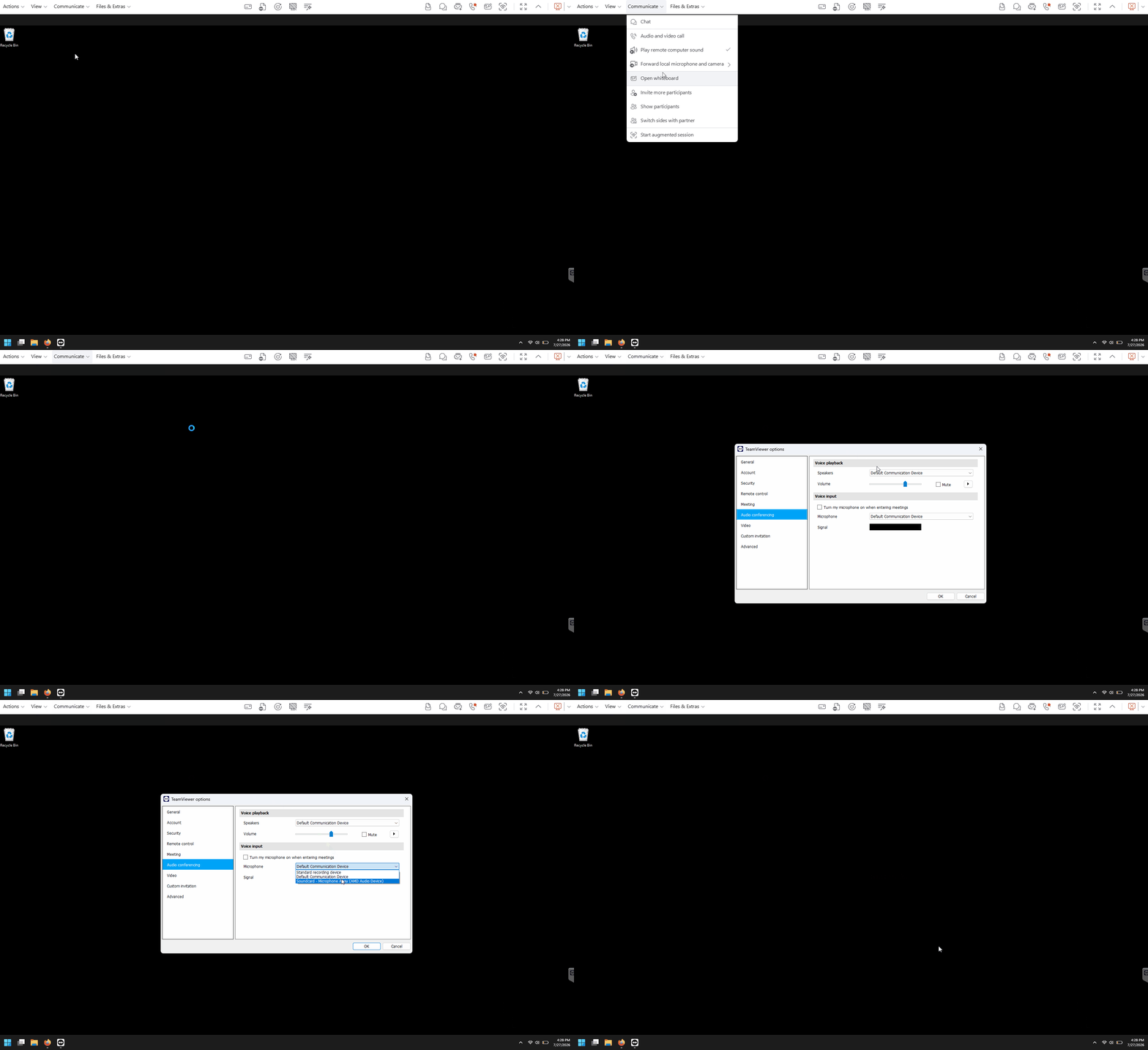
  4. To change the microphone forwarded by TeamViewer, select the Configure Microphone option, and choose the desired input device.
  5. To change the camera forwarded by TeamViewer, select the Configure Camera option and choose the desired video device.
  6. Open the desired meeting or communication application on the remote device.
  7. Select the TeamViewer virtual microphone and/or TeamViewer virtual camera in the application's audio and video settings.
  8. Verify that the remote application receives audio and video from your local devices.
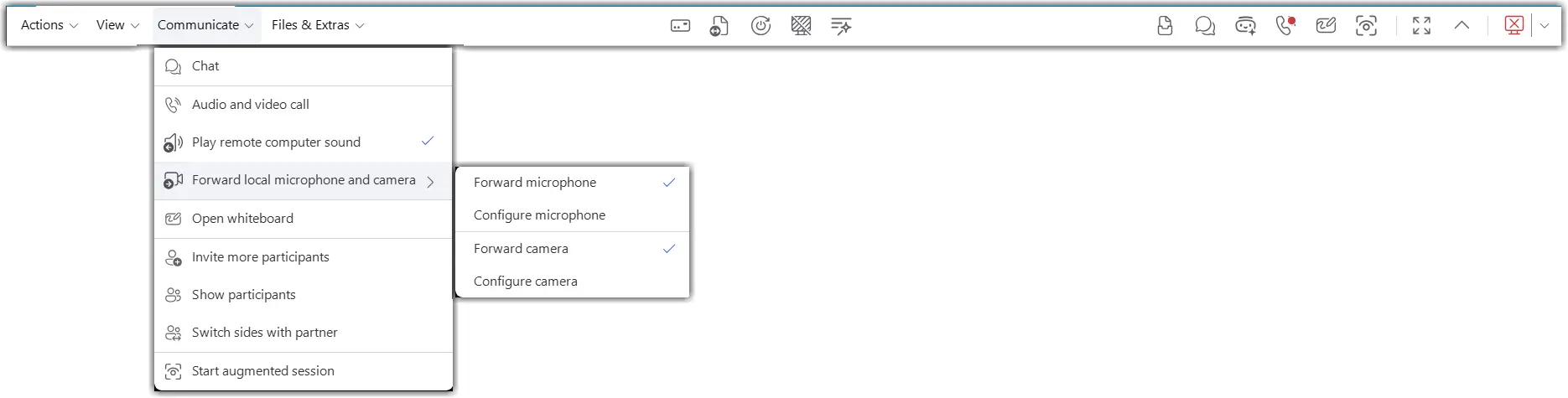
How to change the forwarded audio/camera devices

  1. While in the remote session, open the audio or video forwarding settings from the session toolbar.
  2. Select a different local microphone or camera.
  3. Confirm the selection.
  4. Test the device in the remote application.
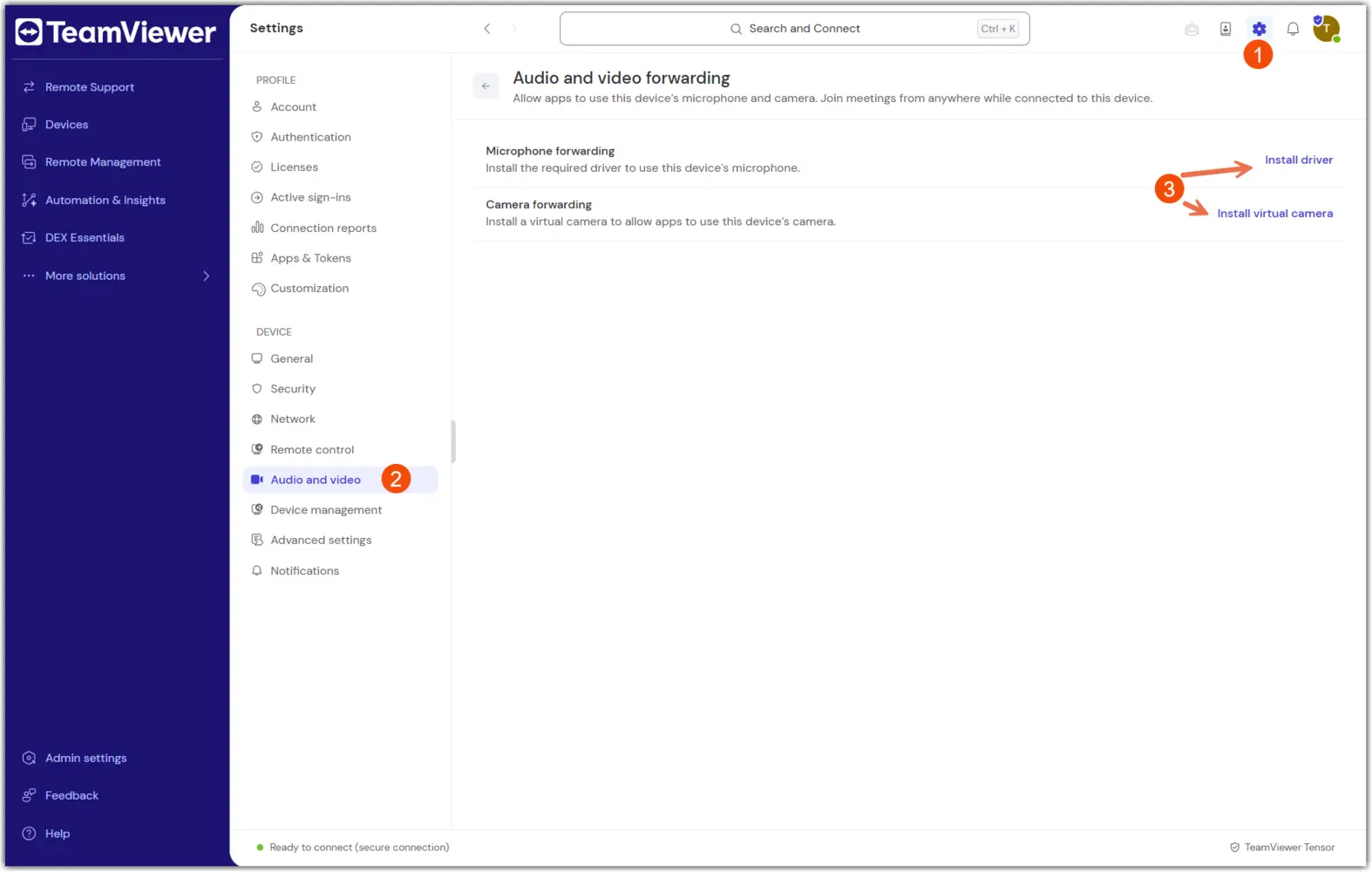
How to manually install or uninstall the forwarding drivers

In TeamViewer Remote:

  1. Open TeamViewer settings on the remote device.
  2. Navigate to the audio and video forwarding driver section.
  3. Install or uninstall the virtual audio and camera drivers as needed.
  4. Confirm the change.
  5. Restart the remote session if required.
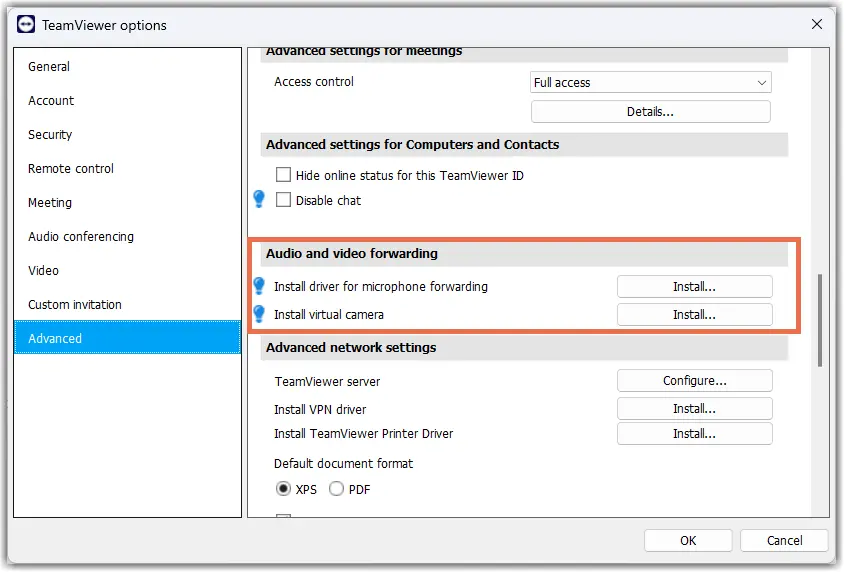
In TeamViewer (Classic):

  1. Open TeamViewer Advanced settings: Extras → Options → Advanced → Show advanced.
  2. Navigate to the Audio and video forwarding section.
  3. Install or uninstall the virtual audio and camera drivers as needed.
  4. Confirm the change.
  5. Restart the remote session if required.
How to install the forwarding audio driver via MSI

The forwarding drivers can also be installed via MSI, using the following commands:

msiexec /i TeamViewer_Full.msi INSTALLVIRTUALAUDIO=1
msiexec /i TeamViewer_Host.msi INSTALLVIRTUALAUDIO=1

Scegli la tua regione

La selezione di una regione cambia la lingua e/o il contenuto di teamviewer.com


REGIONE SUGGERITA

  • Americas

    • Americas - English
    • América Latina - Español
    • Brasil - Português
    • Canada - English
    • Canada - Français
    • United States - English
  • Asia Pacific

    • Asia Pacific - English
    • Australia - English
    • 中国 - 中⽂(简体)
    • 香港 - 繁體中文
    • India - English
    • 日本 - ⽇本語
    • New Zealand - English
    • 대한민국 - 한국어
    • 台灣-繁體中文
    • ประเทศไทย - ภาษาไทย
  • Commonwealth of Independent States

    • CIS - English
    • СНГ - Русский
  • Europe

    • Europe - English
    • Belgique - Français
    • België - Nederlands
    • Bulgaria - English
    • Croatia - English
    • Cyprus - English
    • Czechia - Čeština
    • Denmark - English
    • Deutschland - Deutsch
    • España - Español
    • Estonia - English
    • Finland - English
    • France - Français
    • Greece - English
    • Ireland - English
    • Italia - Italiano
    • Latvia - English
    • Liechtenstein - Deutsch
    • Liechtenstein - Français
    • Liechtenstein - Italiano
    • Lithuania - English
    • Luxembourg - Français
    • Magyarország - Magyar
    • Malta - English
    • Nederland - Nederlands
    • Norway - English
    • Österreich - Deutsch
    • Polska - Polski
    • Portugal - Português
    • Romania - English
    • Schweiz - Deutsch
    • Suisse - Français
    • Svizzera - Italiano
    • Slovakia - English
    • Slovenia - English
    • Sweden - English
    • Türkiye - Türkçe
    • United Kingdom - English
  • Middle East Africa

    • Middle East Africa - English
    • Middle East Africa - Français
  • Prodotti
    • TeamViewer Remote
    • TeamViewer Tensor
    • TeamViewer DEX
    • TeamViewer Frontline
    • Prezzi
  • Piattaforma ONE
    • TeamViewer ONE
    • Funzionalità
    • Parla con il nostro team
  • Soluzioni
    • Per settore
    • Per caso d'uso
    • Per ruolo
    • Clienti enterprise
  • Partner
    • Diventa partner
    • Trova un partner
    • Partner di integrazione
  • Risorse
    • Blog
    • Storie di successo
    • Trust Center
  • Supporto
    • Contatta il supporto
    • Guide e manuali
    • Base di conoscenze
    • Stato del sistema
    • Personalizza i moduli
    • Per gli sviluppatori
    • Community
  • Aziende
    • A proposito di TeamViewer
    • Lavora con noi
    • Investitori
    • News
    • Leadership
    • Sport partnership
    • Sostenibilità e CSR
    • Governo d'impresa
  • Link aggiuntivi
    • Contatta il team vendite
    • TeamViewer User Focus Program
    • Migliora te stesso
    • Newsletter
  • EULA (EN)
  • Product Descriptions
  • Imprint
  • Privacy Policy (EN)
  • Contatto
Impostazioni dei cookie