• 联系销售人员
    • Open web app
    • Management Console
    • Ticket
    • Customer Portal
TeamViewer
  • Personal use and SMB TeamViewer Remote

    Fast and secure remote access and IT support.

    Learn more

    • 远程支持 提供即时安全支持
    • 远程管理 监控和管理设备
    View plans and pricing

    Enterprise TeamViewer Tensor

    Remote connectivity built for secure operations.

    Learn more

    • 远程 IT 支持 安全、灵活、集成
    • 运营技术 远程车间访问

    Real-time troubleshooting TeamViewer DEX

    Resolve issues before they affect users.

    Learn more

    • 终端设备故障排查 识别并解决问题
    • 终端设备自动化 实现日常 IT 任务自动化

    Connected worker TeamViewer Frontline

    Drive efficiency with industrial augumented reality.

    Learn more

    • 物流与仓储 免手持物料处理
    • 培训与入职指导 快速入职与技能提升
    AI capabilities as seen in the TeamViewer client

    TeamViewer ONE

    Get the full power of TeamViewer, unified in one platform.

    • Learn more

    Key integrations

    • Microsoft Intune

    • ServiceNow

    • Freshworks

    • Jira

    • Salesforce

    • Slack

    • Microsoft Teams

    View all integrations
  • TeamViewer ONE Platform

    Proactively manage and optimize your digital workplace combined in one platform.

    • 面向精益 IT 团队 主动式设备管理
    • 顺畅的体验 顺畅、无中断的数字体验
    • 无缝 IT 运营 主动修复和出众服务
    • 咨询 TeamViewer 团队 准备好转型了吗?
    Explore the platform

    Core capabilities

    • TeamViewer AI
    • 数字化员工体验
    • 远程支持与控制
    • 资产和补丁管理
    View all capabilities

    Gartner Report 2026

    TeamViewer named a leader in DEX

    TeamViewer named a Leader in 2026 Gartner® Magic Quadrant™ DEX tools.

    Key integrations

    • Microsoft Intune

    • ServiceNow

    • Freshworks

    • Jira

    • Salesforce

    • Zendesk

    • Slack

    • Microsoft Teams

    View all integrations
  • Popular use cases Most popular TeamViewer use cases

    • 远程访问和支持 无论何时何地,都能轻松管理人员、设备及应用。
    • 数字化员工体验 (DEX) 提前化解 IT 问题,避免影响工作效率。

    Other use cases Popular solutions for further use cases

    • 远程访问 通过安全连接提升访问体验
    • 远程控制 跨平台控制设备
    • 远程桌面 随时随地提升工作效率
    • LAN 唤醒 启用远程设备激活
    • 屏幕共享 实时视觉沟通
    • Smart Service 简化售后运营

    By need Popular solutions for different requirements

    • 个人非商业用途 随时、随地访问设备
    • 小型企业 简化远程访问和支持
    • 大型企业 扩展并保障企业 IT 安全
    • 托管服务提供商 管理并维护客户 IT
    • OEM 简化支持和运营
    • 非营利组织与教育 TeamViewer 技术立享 30% 折扣

    By industries Popular solutions sorted by industry

    • 汽车
    • 农业
    • 物流
    • 制造业
    • 零售
    • 医疗保健

    Talk to our sales team

    Need help choosing the right solution, placing and order, or upgrading your license?

    • Talk to us
  • 大型企业入口
  • Find out more about TeamViewer

    • 关于TeamViewer 安全连接人员、场所和设备。
    • 获取支持 浏览文章或联系支持团队。
    • 成为合作伙伴 加入 TeamViewer 全球 TeamUP 合作伙伴计划。
    • 成功案例 了解TeamViewer 客户的成功案例。
    INSIGHT

    How Tia helps IT teams turn fixes into reusable scripts

    Resources

    • 新闻与洞察信息
    • 成功案例
    • 信任中心

    Partner

    • 成为合作伙伴
    • 查找合作伙伴
    • 集成合作伙伴

    Support

    • 获取支持
    • 指南与手册
    • 知识库
    • 系统状态
    • 自定义模块
    • 面向开发者
    • 社区

    Company

    • 关于TeamViewer
    • 招贤纳士
    • 投资者
    • 新闻中心
    • 公司领导层
    • 体育领域合作
    • 可持续发展与企业社会责任
    • 公司治理
  • 定价
  • 免费下载

知识库

  • TeamViewer ONE
  • TeamViewer Remote
  • TeamViewer (Classic)
  • TeamViewer Tensor
  • TeamViewer Tensor (Classic)
  • TeamViewer Frontline
  • Other products
返回支持概述
  • 激活您的 TeamViewer ONE 许可证
  • 了解 TeamViewer ONE 中的 Home Dashboard
  • TeamViewer ONE 中的公司准备度
  • TeamViewer One 新增导航体验
  • 从 会话数据分析 中使用 SCALE 创建并运行修复脚本
  • TeamViewer ONE 中的统一策略
  • TeamViewer ONE 中的统一策略

    上次修改时间: 2026年7月4日

统一策略 为 TeamViewer ONE中设置和执行提供了一种简单、简化的方式。管理员无需为不同模块管理不同的策略类型,而是创建一个策略并将其分配给设备组。目前,这包括 TeamViewer和补丁管理设置。这一新功能有助于减少设置时间和持续的管理任务。

本文适用于所有TeamViewer ONE标准版和高级版许可证持有者。

注意: 统一策略中的补丁部分仅对TeamViewer ONE高级许可开放。

要求

为了使用 TeamViewer ONE 中的 统一策略 功能,请确保以下内容:

  • 至少有一个设备组已准备好分配。
  • 你的账户(公司管理员或启用“管理策略”权限的自定义角色)已启用“管理策略”权限。
  • 目标组激活了 策略分配(管理)权限 。
  • 组内的设备被设置为继承组级的策略。这可以通过部署设置或设备级继承设置来实现。

如何创建统一政策

TeamViewer ONE 的 统一策略 创建可在 TeamViewer Remote 或网页应用中完成。请按照以下步骤操作:

1. 导航到策略: 前往管理员→设备→策略
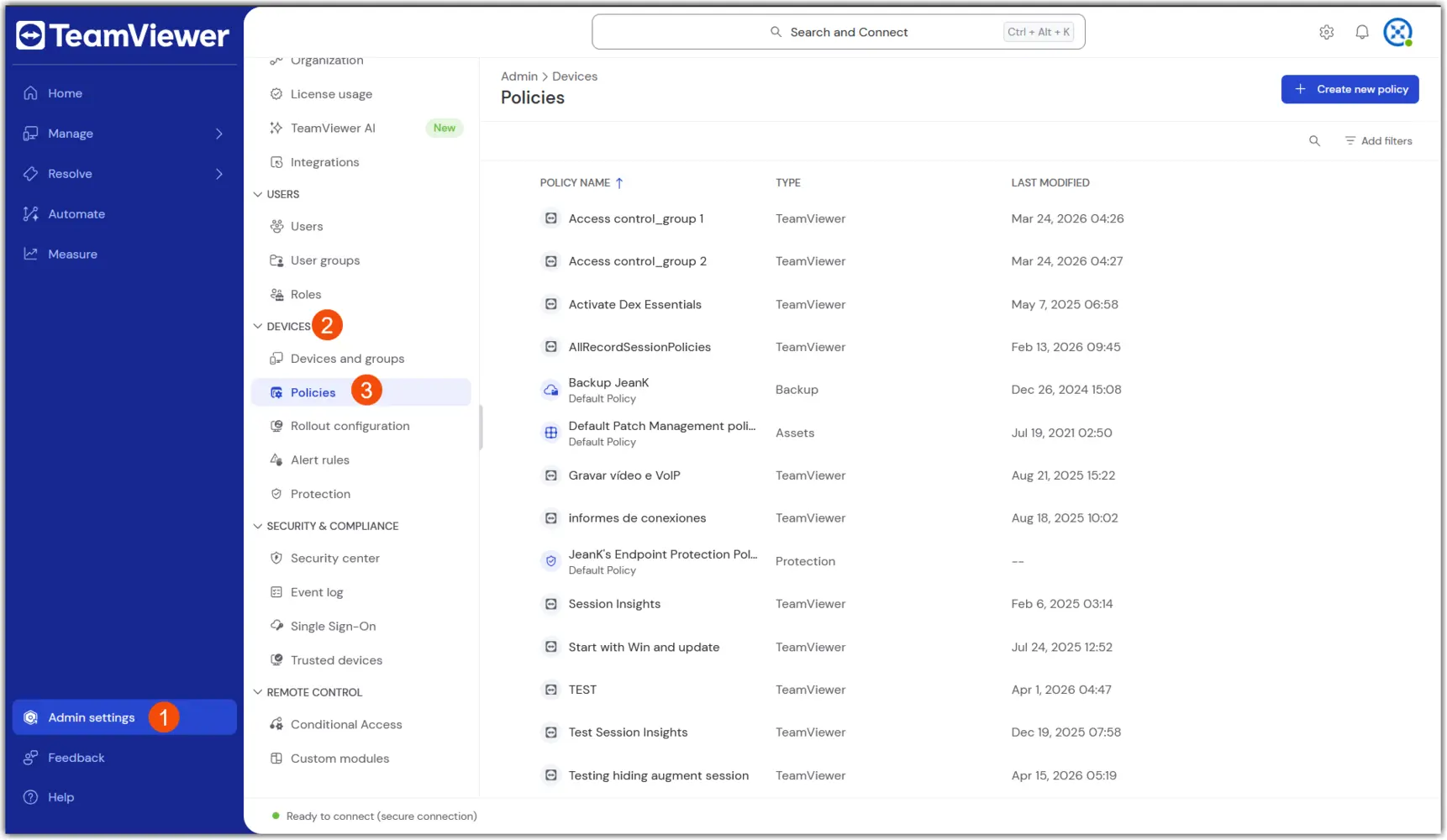
2. 在右上角选择 “创建新策略 ”,然后选择 统一策略 流程。

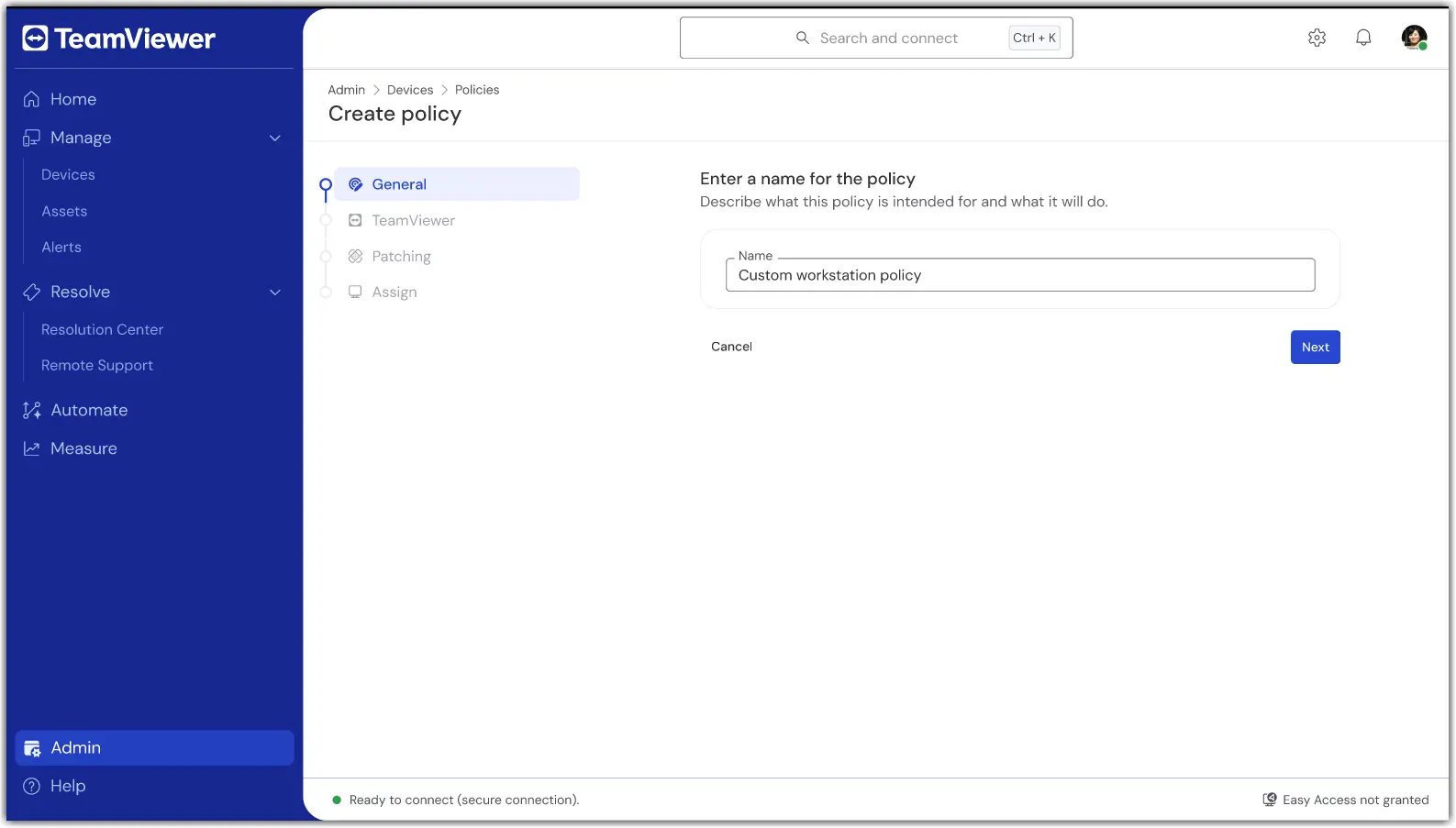
3. 在第一部分“ 通用”中,输入 保单名称。

4. 在策略创建的 TeamViewer 部分,配置所需的 远程/客户端设置 (例如安全性、连接行为)。
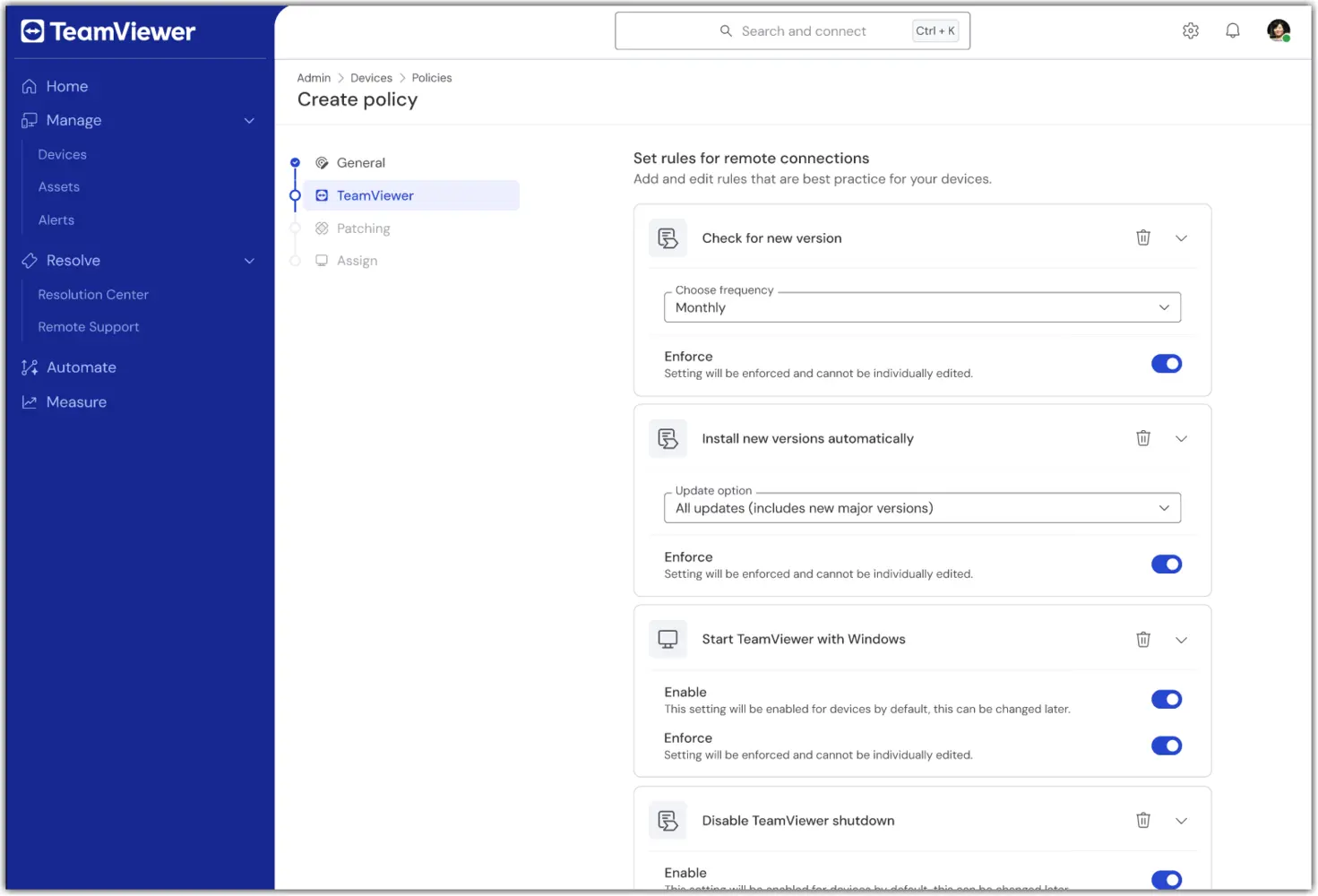
5. 在策略创建的 补丁 部分,配置 所需的 资产库存和补丁偏好 (例如,批准、调度)。
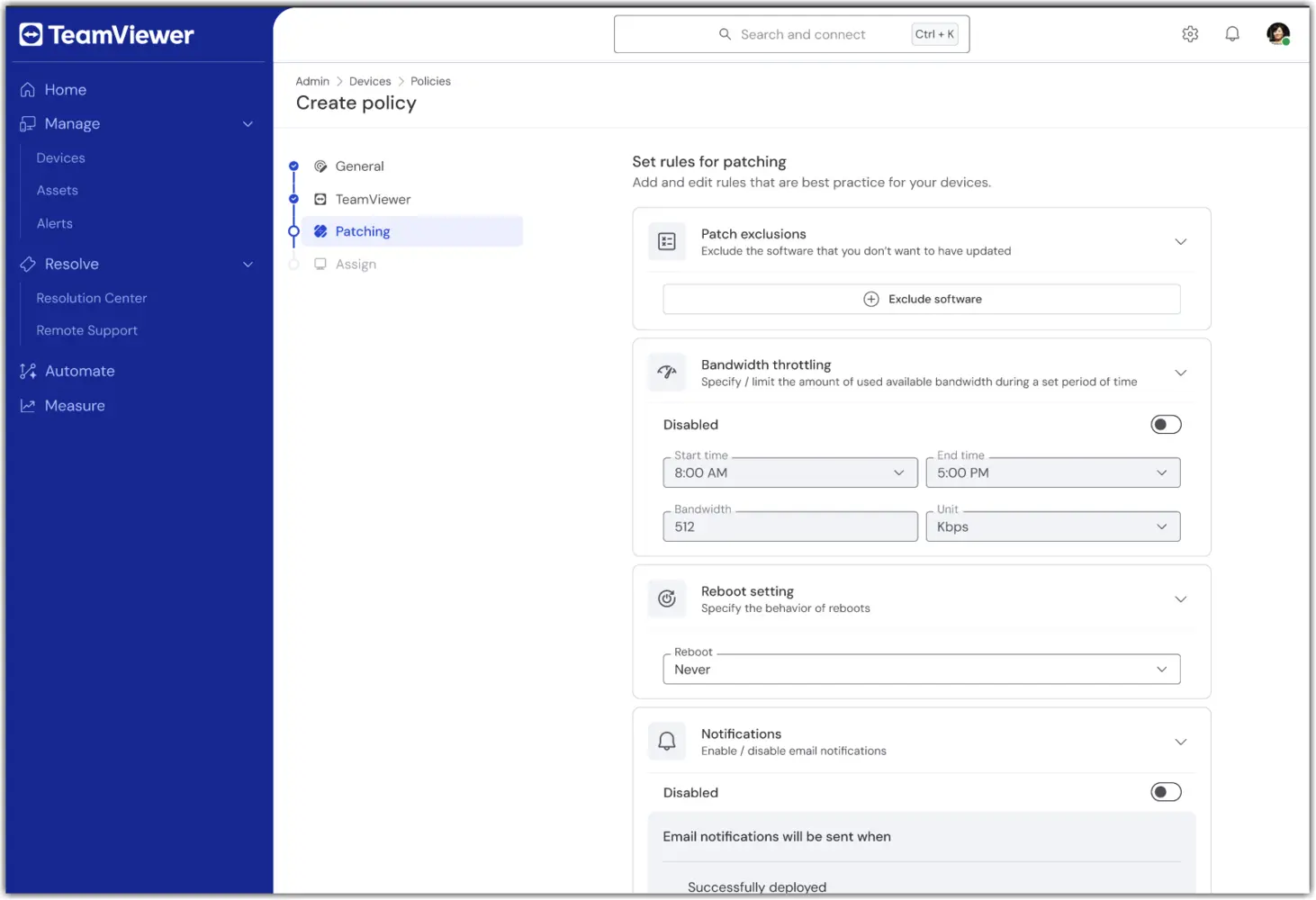
注意: 统一策略 中的 补丁部分仅对TeamViewer ONE高级许可开放。

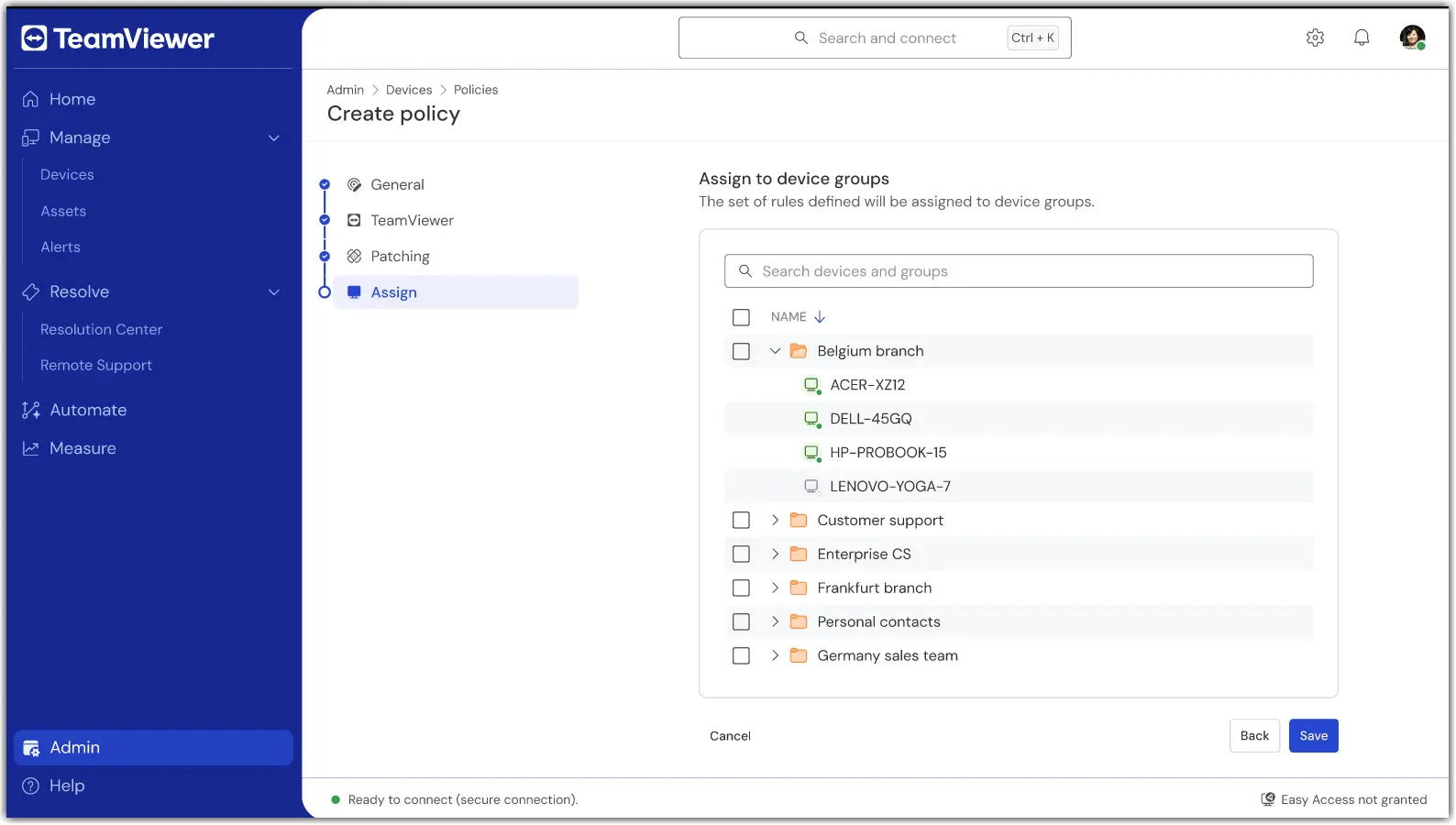
6. 在 分配 部分,选择一个或多个 设备组 以接收 统一策略。

7. 完成后, 确认设置并应用。转让是储蓄的一部分。

保存后, 你的组将使用一个统一的 TeamViewer 和 补丁 模块策略。

如何分配或更改分配

要添加或移除设备组到统一策略, 请打开策略并选择 编辑。

如果设备需要分配到不同的 统一策略,请将设备从当前组移动到分配统一 策略 的设备组。

故障排除

设备没有应用该策略。

  • 确认设备属于分配了 统一策略 的组。

  • 确认设备是否设置为继承其组。

  • 检查设备连接状态,等待下一次在线同步。

我没看到统一策略。

  • 请确认您的许可证是 TeamViewer ONE STANDARD或Advanced。

  • 请让你的管理员确认你的角色 是否包含管理策略权限。

  • 如果您使用了较旧的TeamViewer政策,请确保它们已被删除。如果存在较旧的TeamViewer策略, 统一策略 将不会出现。

分配冲突或多个小组。

  • 回顾你的组设置。如有需要,将设备移至目标策略组。

Please choose your region

Selecting a region changes the language and/or content on teamviewer.com


SUGGESTED REGION

  • Americas

    • Americas - English
    • América Latina - Español
    • Brasil - Português
    • Canada - English
    • Canada - Français
    • United States - English
  • Asia Pacific

    • Asia Pacific - English
    • Australia - English
    • 中国 - 中⽂(简体)
    • 香港 - 繁體中文
    • India - English
    • 日本 - ⽇本語
    • New Zealand - English
    • 대한민국 - 한국어
    • 台灣-繁體中文
    • ประเทศไทย - ภาษาไทย
  • Commonwealth of Independent States

    • CIS - English
    • СНГ - Русский
  • Europe

    • Europe - English
    • Belgique - Français
    • België - Nederlands
    • Bulgaria - English
    • Croatia - English
    • Cyprus - English
    • Czechia - Čeština
    • Denmark - English
    • Deutschland - Deutsch
    • España - Español
    • Estonia - English
    • Finland - English
    • France - Français
    • Greece - English
    • Ireland - English
    • Italia - Italiano
    • Latvia - English
    • Liechtenstein - Deutsch
    • Liechtenstein - Français
    • Liechtenstein - Italiano
    • Lithuania - English
    • Luxembourg - Français
    • Magyarország - Magyar
    • Malta - English
    • Nederland - Nederlands
    • Norway - English
    • Österreich - Deutsch
    • Polska - Polski
    • Portugal - Português
    • Romania - English
    • Schweiz - Deutsch
    • Suisse - Français
    • Svizzera - Italiano
    • Slovakia - English
    • Slovenia - English
    • Sweden - English
    • Türkiye - Türkçe
    • United Kingdom - English
  • Middle East Africa

    • Middle East Africa - English
    • Middle East Africa - Français
  • 产品
    • TeamViewer Remote
    • TeamViewer Tensor
    • TeamViewer DEX
    • TeamViewer Frontline
    • 定价
  • ONE 平台
    • TeamViewer ONE
    • 功能
    • 咨询 TeamViewer 团队
  • 解决方案
    • ‌按行业划分
    • ‌按用例划分
    • ‌按角色划分
    • 大型企业入口
  • 合作伙伴
    • 成为合作伙伴
    • 查找合作伙伴
    • 集成合作伙伴
  • 资源
    • 新闻与洞察信息
    • 成功案例
    • 信任中心
  • 支持
    • 获取支持
    • 指南与手册
    • 知识库
    • 系统状态
    • 自定义模块
    • 面向开发者
    • 社区
  • 公司简介
    • 关于TeamViewer
    • 招贤纳士
    • 投资者
    • 新闻中心
    • 公司领导层
    • 体育领域合作
    • 可持续发展与企业社会责任
    • 公司治理
  • 附加链接
    • 联系销售人员
    • TeamViewer User Focus Program
    • Make work work better
    • 简报
  • 最终用户许可协议 (EN)
  • Product Descriptions
  • 隐私政策
  • 版权标记
  • 联系方式
  • 沪ICP备19008471号-1
Cookie Settings