
知识库
Grab remote screen for Qt Applications
上次修改时间: 2026年5月8日
📌Note: The code for the remote screen SDK is moved to https://github.com/teamviewer/iotagentsdk. Further updates and documentation can be found on GitHub.
TeamViewer provides the option to access the content of the screen of a custom Qt Application on the Edge Device. This is realized through the TeamViewer Remote Screen SDK. This SDK is directly linked to the application and so enables the connection to the TeamViewer Embedded Agent on the edge device and so to the TeamViewer Cloud.
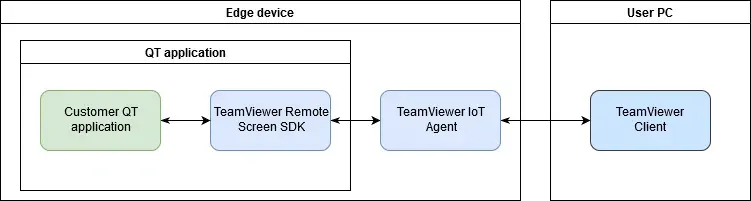
The TeamViewer Remote Screen SDK is released under MIT License allowing an easy integration of our source code.
To create Qt applications Qt licenses are needed.
What you will need
Make sure that you have prepared the following points:
- A valid license for TeamViewer 14 (or newer).
- The edge device is set up with a TeamViewer Embedded Agent.
- There must be a Qt application running on the edge device and this application must be accessible so the remote screen SDK can be linked to it.
- The edge device should either be configured to display the user interface via a framebuffer (see Set up the Remote Screen via X11) or is capable enough to send its image data to the SDK.
- Advanced knowledge of Linux systems, programming Qt applications, and the TeamViewer Remote Screen SDK.
- Access the Edge Device via Remote Terminal.
Software dependencies
For building the whole package the following libraries and tools need to be installed:
- cmake (3.5 or newer)
- Compiler tool chain with support for C++14 (like GCC or Clang)
- Google Protocol Buffers library (3.0 and newer)
- Google gRPC library (1.20 or newer)
- zlib (needed by gRPC
- Qt 5 (5.3 or newer)
On debian systems (Version 10) the following development packages are used for building:
- cmake
- build-essential or g++
- libgrpc++-dev
- protobuf-compiler-grpc
- libprotobuf-dev
- protobuf-compiler
- qtbase5-dev
- qtdeclarative5-dev
Download the TeamViewer Remote Screen SDK
- Embedded Agents with version 2.15.10 or higher, please use https://download.teamviewer-iot.com/remoteScreenSDK/TVRemoteScreenSDK_2.1.10.zip
- Embedded Agents with a lower version, please use https://download.teamviewer-iot.com/remoteScreenSDK/TVRemoteScreenSDK_1.1.40.zip
Extract the SDK in a suitable folder on the edge device.
Hardware requirements
- The edge device meets all System Requirements.
- 30 MB free disk space or more
- systemd software suite
- glibc-utils package (Version 2.17 newer)
- Linux 2.6.27 kernel
Qt Application with the remote screen SDK
To build the remote screen SDK make sure that all required libraries and dependencies are installed and available.
Access the edge device remotely (Access the Edge Device via Remote Terminal).
Build the SDK
1. Create and navigate to the build directory. In the terminal type in the following commands and press return:
mkdir build
cd build
2. Run cmake. In the terminal type in the following command and press return. Replace path (PATH) with the path where your previously extracted SDK is located.
cmake PATH
3. Run make. In the terminal type in the following command and press return.
make
After building the package there should be two binaries:
libTVQtRC.so– integration plugin, used by a Qt application for providing Remote Screen capabilitiesqt_simulate– an example application showing the basic usage of the plugin
Installation for Development
The SDK can also be installed to be used in a development environment.
Run make. In the terminal type in the following command and press return.
sudo make install
The default installation prefix for cmake is /usr/local. After installation there are two projects installed:
- TVRemoteScreenSDK – The Qt plugin (
/lib/lbTVQtRC.so) along with the public headers (/include/*.h). - TVRemoteScreenSDKCommunication – The public C++ API used by the plugin. This API is independent of Qt and can be used together with any other framework.
To install the SDK into a custom prefix override CMAKE_INSTALL_PREFIX when configuring the SDK before building. For example:
cmake -DCMAKE_INSTALL_PREFIX=
Configuration settings
Configuration of the TeamViewer Embedded Agent
The TeamViewer Embedded Agent needs then to be configured to remote control an external application. This configuration involves also specifying a so-called Image Grab Strategy. The agent tells the application in what way it expects image updates.
In the terminal type in the following commands and press return.
sudo teamviewer-iot-agent configure set EnableRemoteScreen 1
sudo teamviewer-iot-agent configure set RemoteScreenChannels "EAP"
That the value in escaped double quotes (“) can vary from user case. The values could be:
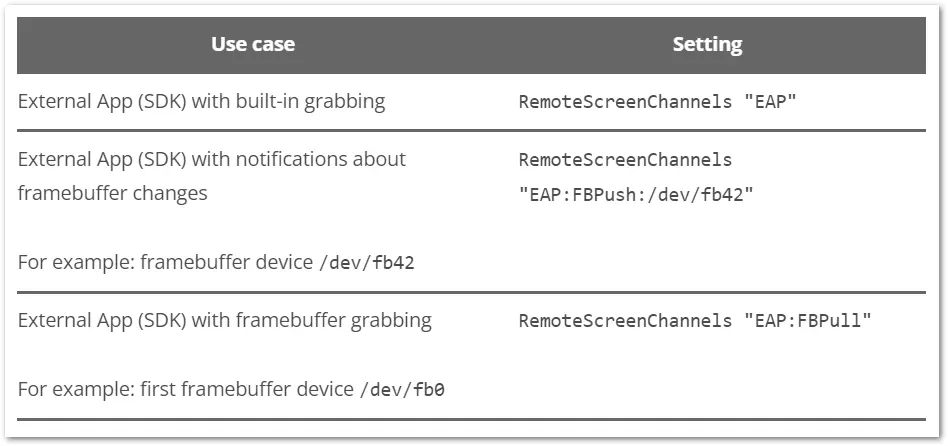
The TeamViewer Embedded Agent currently supports the following strategies:
- The application provided (default when setting the remote screen channel to
EAP)- The application (or the Qt plugin) is grabbing internally and send resulting images to the TeamViewer Embedded Agent.
- Linux frame buffer device continuous (called
FrameBuffer-Pullor the channel settingFBPull)- This repeatedly copies the contents of a Linux frame buffer device regardless of any actual image changes.
- Linux frame buffer device with notifications (called
FrameBuffer-Pullor the channel settingFBPull)- This copies the contents of a Linux frame buffer device when the external application notifies the agent to do so.
After starting the agent its API for remote screen is now available and can be used by the Qt plugin.
Further configuration
After installing the TeamViewer Embedded Agent it creates a system group called tv_api. Every application that wants to communicate with the agent needs to run under a user that is part of the before mentioned system group.
Add the current user to group tv_api. In the terminal type in the following commands and press return.
usermod -a -G tv_api $USER
For more information about the different channel configurations and their use, see Set up the Remote Screen via Framebuffer.
Example application
In the package for the SDK is an example application included. This example show the basic operations of the SDK and how to integrate the plugin into a Qt Quick based application. It requires Qt 5.3 with the modules Qt Quick 2.3 and Qt Quick Window 2.0 to run.
On debian based distributions the following packages are required to run:
- qml-module-qtquick2
- qml-module-qtquick-window2
To start the example application:
- Open the Build directory using the graphical interface
- Locate the qt_simulate
- execute the qt_simulate
With the example application, one can also test and see the basic operations:
- connectivity to the agent: the circle on the top left corner is green when the Embedded Agent is available (this does not indicate network connectivity)
- set the control mode:
Set Full Control(image updates and input),Set View Only(image updates, no input),Disable Remote Control(no image updates, no input) - terminate all incoming TeamViewer sessions: Terminate TeamViewer Session is only enabled if there is at least one active remote control session. By clicking, it terminates all incoming sessions and the button is disabled afterward.
- mouse and keyboard input testing
- rudimentary animation testing
Troubleshoot
Contact TeamViewer Embedded Support ⟨iot-support@teamviewer-iot.com⟩ if you encounter problems when using the remote screen SDK.
Inverted Colors
On some ARM-based devices, the colors may seem inverted or appear wrong on the client’s side.
Screen refresh
When the RemoteScreenChannels setting is configured with EAP:FBPush, it may happen that the client picture is sometimes not refreshed appropriately during a TeamViewer session. Resizing the window will force an update and will display the actual content of the application in the client window.
For more information about the different channel configurations and their use, see Set up the Remote Screen via Framebuffer.