
Knowledge Base
Security Statement - How secure is TeamViewer?
Last Modified: May 29, 2026
TL;DR - Executive Summary on TeamViewer Safety
All TeamViewer versions use full encryption. Encryption is based on 4096bit RSA private/public key exchange and 256 Bit AES session encryption. This uses the same security level as https/SSL and is considered completely safe by today's standards.
The key exchange also guarantees that the data transfer is completely encrypted from client to client and that any routers or servers in between (including our routers) are unable to read or analyze the data stream.
Security and privacy have always been a top priority during development.
We invite you to visit our Security Handbook.
Introduction
This technical security document is for IT professionals, network administrators and security departments who want an overview of TeamViewer security standards and protocols. Please feel free to share this document with your customers and colleagues to address their security questions.
TeamViewer: The Company and Software
About TeamViewer
TeamViewer is a leading global technology company that provides a connectivity platform to remotely access, control, manage, monitor, and repair devices of any kind – from laptops and mobile phones to industrial machines and robots. Although TeamViewer is free of charge for private use, it has around 630,000 subscribers and enables companies of all sizes and from all industries to digitalize their business-critical processes through seamless connectivity. Against the backdrop of global megatrends like device proliferation, automation and new work, TeamViewer proactively shapes digital transformation and continuously innovates in the fields of Augmented Reality, Internet of Things and Artificial Intelligence. Since the company’s foundation in 2005, TeamViewer’s software has been installed on more than 2.5 billion devices around the world. The company is headquartered in Goppingen, Germany, and employs more than 1,400 people globally.
Fundamentals of TeamViewer Security
Our customers provide spontaneous support over the internet, accessing unattended computers (e.g. providing remote support for servers) and host online meetings. Depending on the configuration, TeamViewer can be used to remotely control the mouse and keyboard of another computer in real time, as though you were accessing it in person. If a Windows, Mac, or Linux administrator logs in to a remote computer, that person will be granted administrator rights to that computer as well. Clearly, using this powerful functionality over the internet must be protected with stringent security protocols. As such, we put security at the center of everything we do by engineering our software by security by design. Our goal is to ensure access to computers is safe. Your security is our highest priority: users only trust secure solutions and we’re fully committed to providing secure solutions to sustain long-term business success.
Quality Management
Security management is inconceivable without an established quality management system. TeamViewer GmbH is a leading global vendor in the market with an ISO 9001 certified quality management system (QMS). Our quality management follows internationally recognized standards and is reviewed by external audits on an annual basis.
Information Security
TeamViewer deploys industry leading cyber security resources both internally and externally. Absolutely no expenses are spared as we are fully dedicated to ensuring the best possible protection of our IT infrastructure. Our 24/7 Security Operations Center (SOC) monitors TeamViewer’s system landscape in real-time. A Computer Security Incident Response Team (CSIRT) is poised to respond to any threat. TeamViewer annually conducts external audits against various compliance frameworks, such as ISO 27001, HIPPA Hi-Tech, SOC2 Type2/SOC3, TISAX, and ISO 9001.
Data Centers and Backbone
To provide the best possible security and availability of TeamViewer services, all TeamViewer servers are located in data centers which are compliant with ISO 27001, leveraging multi-redundant carrier connections and redundant power supplies. Furthermore, only industry-grade hardware is used and all servers that store sensitive data are located in Germany or Austria. Being ISO 27001-certified means that personal access control, video camera surveillance, motion detectors, 24/7 monitoring, and on-site security personnel ensure access to the data center is only granted to authorized persons, guaranteeing the best possible hardware and data security. There is also a detailed identification check at the single point-of-entry of the data centers. Additionally, TeamViewer’s Information Security Management System (ISMS) itself is ISO27001 certified.
References
Leading global enterprises across industries — such as financial services, healthcare, government, and other sectors with highly sensitive data — leverage TeamViewer for secure remote access and support, customer engagement, IoT, and industrial augmented reality solutions. To see how your peers have used TeamViewer in their organizations, explore our customer success stories, available on our website at teamviewer.com/en/success-stories/.
Software Development
Secure Software Development Lifecycle (S-SDLC) TeamViewer follows a strict Secure Software Development Life Cycle (S-SDLC) throughout all phases of our products’ lifecycle which also includes a hardened and audited software development pipeline. Most importantly. we perform design, architecture and implementation reviews including attack surface analysis and threat modeling where identified risks are being prioritized and product security requirements are derived from. We also enforce code reviews, unit and integration tests and all code changes require code owners’ approval.
Security Testing / SAST / DAST / SCA
We apply static and dynamic application security testing (SAST/DAST) and take care of our software’s dependencies by using software composition analysis (SCA). There is also a significant and segmented automation environment that is used to ensure our quality assurance can also be handled programmatically and in an automated fashion.
Security Penetration Testing
Both TeamViewer infrastructure and the TeamViewer software are subject to penetration testing. TeamViewer conducts multiple external white and black/grey box tests of all products annually. The tests are performed by independent companies, specialized in testing. TeamViewer has partnered with multiple class leading testing firms, such as Black Hills Information Security, Blaze, Recurity, Securitum, and XMCO.
Code Signing
All of our software is signed via DigiCert Code Signing. Consequently, the publisher of the software is always readily identifiable. If the software has been changed afterward, the digital signature automatically becomes invalid. Code Signing allows for endpoint security tools to actively validate if the software is genuine and our software uses this as a selfcheck mechanism to validate only genuine copies can run, if this check fails the software will exit. This allows for programmatic protection and alerting for our customers. Build in antitampering, the software itself does have the ability to self-check on start the certificate and signature validity of all its components and it fails to run if inconsistencies are found.
Vulnerability Disclosure Program
Every customer, user, researcher, partner and any other person that interacts with TeamViewer’s products and services is encouraged to report identified vulnerabilities and errors they identify in our products and services. vdp.teamviewer.com/p/Send-a-report
Certified Numbering Authority (CNA)
TeamViewer is a CNA for Common Vulnerabilities and Exposures (CVE) issuances against all TeamViewer products. This is a key measure of accurate risk assessment of all CVE’s that may be issued against TeamViewer products. TeamViewer works diligently to partner with researchers and organizations to correctly report and disclose issues as a CNA. TeamViewer demonstrates mature vendor vulnerability management practices, and this highlights our commitment to cybersecurity to all our customers.
Product Security Features
Remote Connections and Sessions
When establishing a remote session, TeamViewer determines the optimal connection type. After the handshake via our master servers, a direct connection via User Datagram Protocol (UDP) or Transmission Control Protocol (TCP) is established in 70 percent of all cases—even behind standard gateways, NATs, and firewalls. The rest of the connections are routed through our highly redundant router network via TCP or HTTP-tunneling. That means you don’t have to open any ports in order to use TeamViewer. As described later in the “Legacy Connections” section, not even TeamViewer — as the operator of the routing servers — can read the encrypted traffic.
Modern TLS 1.3 mutually authenticated session handshake
Starting with TeamViewer version 15.73 and later, session authentication and attestation use mutually authenticated TLS 1.3. This protocol provides Perfect Forward Secrecy (PFS) through modern Diffie-Hellman key exchange mechanisms. After the secure handshake is completed, session data remains protected using AES‑256‑GCM encryption.
During connection establishment, both communicating clients verify each other’s identity using certificates issued by the TeamViewer master cluster. This process ensures that endpoints authenticate the TeamViewer infrastructure before any sensitive data is exchanged.
Private keys never leave the client device. As a result, neither TeamViewer routing servers nor any intermediary systems can decrypt the end‑to‑end encrypted session traffic.
Remote session traffic between endpoints is protected using end‑to‑end encryption, ensuring that only the communicating devices can decrypt the transmitted data.
Legacy Connections
TeamViewer sessions are secured using RSA 4096 public/private key exchange and AES 256-bit encryption. This technology is used in a comparable form for HTTPS/TLS and is considered completely safe by today’s standards. As the private key never leaves the client computer, this ensures that the interconnected computers, including the TeamViewer routing servers, cannot decipher the data stream. The most recent versions also support perfect forward secrecy on key agreements. Each TeamViewer client has a certificate of the master cluster, enabling it to verify certificates of the TeamViewer system. These certificates are used in handshakes between participants in the TeamViewer network. See Figure 1 for a simplified overview of the handshake key exchange.
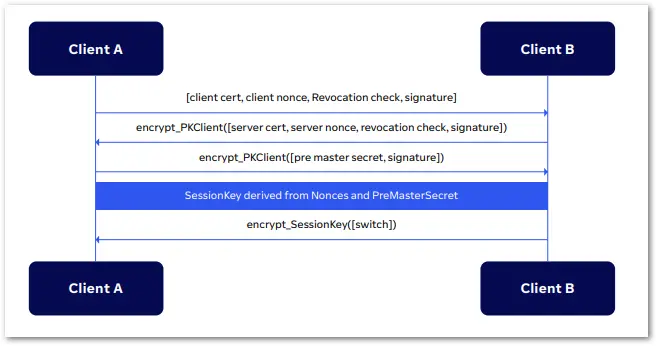
Figure 1: The session key derived from this handshake is used to encrypt the communication between parties using AES.
Password Authentication
Using the Secure Remote Password (SRP) protocol version 6, no password equivalent data is shared during the TeamViewer password authentication process. Only a password verifier is stored on the local computer. For more details, refer to the “TeamViewer Account” section.
Validation of TeamViewer IDs
TeamViewer IDs are based on various hardware and software characteristics and are automatically generated by TeamViewer. The TeamViewer servers check the validity of these IDs.
Brute-Force Protection
In the context of computer security, a brute-force attack is a trial-and-error method to guess a password that is protecting a resource. With the growing computing power of standard computers, the time needed for guessing long passwords has been increasingly reduced. As a defense against brute-force attacks, TeamViewer exponentially increases the required wait time between failed password attempts. For example, it takes 17 hours for 24 failed attempts. The required wait time between logins is only reset after successfully entering the correct password. TeamViewer not only has a mechanism in place to protect its customers from attacks from one specific computer, but also from attackers controlling a large number of computers trying to access a specific target computer (e.g. using a botnet).
TeamViewer Account
TeamViewer accounts are hosted on dedicated TeamViewer servers. For information on access control, please refer to the “Data Center and Backbone” section. For authentication, the Secure Remote Password protocol (SRP) version 6 is used. This protocol combines the advantages of conventional ways of password storage. We do not store any information on our servers that could be used by an unauthorized third party to authenticate on behalf of the given account. Additionally, passwords are never sent to our servers during the authentication. Rather, TeamViewer uses a unique verification process, valid for a single authentication run only, which can’t be reused again. Data stored in the account — such as passwords, keys, and chat logs — are encrypted using a combination of RSA and AES, where the root key for the encryption is derived from the user’s password. This ensures that anyone without the password can’t access the data stored in the account.
Management Console
The TeamViewer Management Console is a web-based platform for user management, connection reporting, and managing Computers and Contacts. It is hosted in ISO 27001-certified, HIPAA compliant data centers. All data transfer is through a secure channel using TLS (Transport Layer Security) encryption, the standard for secure internet network connections. Sensitive data is stored RSA/AES 256-bit encrypted. It uses the same encryption and authentication mechanisms as those described for TeamViewer accounts.
Policy-Based Settings
From within the TeamViewer Management Console, users are able to define, distribute, and enforce setting policies for the TeamViewer software installations on devices that belong specifically to them. Setting policies are digitally signed by the account that generates them. This ensures that the only account permitted to assign a policy to a device is the account to which the device belongs. Application Security Settings in TeamViewer BlockList and AllowList Especially when TeamViewer is used for unattended computer maintenance and support (i.e., no connection partner is at the remote computer to accept incoming connection requests), AllowList adds more security. Adding TeamViewer IDs or accounts to your AllowList enables you to limit the number of people who can access specified machines to the explicit named IDs or accounts. Moreover, even if a password is lost or compromised, unauthorized third parties still won’t be able to access the device. The restrictions can either be made to allow only specific TeamViewer IDs or TeamViewer accounts to access the computer remotely. AllowLists can be managed using the Policies described in the “Management Console” section. The BlockList lets you prevent certain partners or devices from establishing a connection to your computer. TeamViewer accounts or TeamViewer IDs on the BlockList can’t connect to your computer.
Note: You will still be able to set up outgoing TeamViewer sessions with partners on the BlockList.
Chat
Chat messages and their history are end-to-end encrypted, stored in the TeamViewer account using RSA/AES as described in the “TeamViewer Account” section. Only participants in a chatroom or 1:1 chat can access the messages and history.
No Stealth Mode
There is no function that enables you to have TeamViewer running undetected in the background. Even if the application is running as a Windows service in the background, TeamViewer is always visible by means of an icon in the system tray. After establishing a connection, there is always a small control panel visible above the system tray. Therefore, TeamViewer is intentionally unsuitable for covertly monitoring computers or employees. This allows users to prevent sensitive or confidential from being shown on their screen during a TeamViewer session.
Privacy Screen
TeamViewer offers for all licensed customers a privacy screen when working on remote systems to cover use cases such as restricting administrative tasks from standard users, or system snooping for systems that are being used for remote work.
Trusted Devices
Trusted Devices is an alternative to two-factor authentication and provides an extra layer of security for your TeamViewer account.
If you do not set up two-factor authentication, Trusted Devices automatically applies. As a preventive measure to ensure your account’s security, you must manually authorize new devices or browsers when signing in to access your TeamViewer account from them for the first time.
As part of the authorization process, an email is sent to your email address associated with your TeamViewer account. Without adding a device, browser, or IP to your Trusted Devices, you can't log in. This protects your account from others trying to log in, as they would need access to your email inbox as well to authorize the login.
Learn more about trusted devices in the TeamViewer Knowledge Base: .
Password Protection
For spontaneous customer support, TeamViewer and TeamViewer QuickSupport generate a random password that can be changed at any time. If your connection partners or support requesters share their password with you, you can connect to their computers by entering their ID and password. Depending on the settings, TeamViewer generates a new password after it restarts, after the session, or when manually requested. TeamViewer QuickSupport always generates a new password when it’s launched or when users request it.
When using TeamViewer for unattended remote support (e.g. accessing and maintaining servers), we recommend the following:
Set up Easy Access for password-less access to provide secure unattended support. Learn more in the TeamViewer Knowledge Base.
Define devices in the AllowList for unattended access
Combined with two-factor authentication, using these security features will help ensure only authorized people can access specified devices. All passwords are verified using the same SRP protocol described in the “TeamViewer Account” section.
Conditional Access
TeamViewer Tensor has addon functionality for more granular controls over connections and connection routing with a dedicated connection router. For more information, please refer to www.teamviewer.com/en-us/products/tensor/features/conditional-access
Bring Your Own Certificate
TeamViewer Tensor has enabled BYOC capability for our customers who would like to use their own certificates for managing connections with a greater level of granularity. The “bring your own certificate” (BYOC) feature enables TeamViewer users to use their own certificates to authenticate the devices involved in a TeamViewer connection. This is independent of and always in addition to the authentication of the TeamViewer certificates.
Incoming and Outgoing Access Control
You can individually configure the connection modes of TeamViewer. For instance, you can configure your remote support or meeting computer so no incoming connections are possible. Limiting functionality to those features actually needed also means mitigating the risks of potential breaches or attacks.
Two-Factor Authentication for Accounts
TeamViewer assists companies with their HIPAA and PCI compliance requirements. Two-factor authentication adds an additional security layer to protect TeamViewer accounts from unauthorized access. In addition to both username and password, the user must enter a code in order to authenticate. This code is only valid for a short period of time, generated via the Time-based One-time Password (TOTP) algorithm. Through two-factor authentication and limiting access by means of adding devices to the AllowList, TeamViewer enables you to meet all necessary criteria for HIPAA and PCI certification.
Two-Factor Authentication for Connections
When Two-Factor Authentication for Connections is enabled on a device, every TeamViewer connection to this device needs to be approved using a second factor. These approvals are performed using push notifications to a mobile device.