Knowledge Base
Collect log files with the TeamViewer Support Collector
Last Modified: May 19, 2026
This article explains how to collect log files using the TeamViewer Support Collector. Our Support team may ask you to run this tool to help identify technical issues faster and resolve your support ticket more efficiently. The Support Collector gathers detailed system and application logs from the affected device. These logs help our engineers understand what is happening and reduce troubleshooting time.
This article applies to all TeamViewer license holders.
Prerequisites
You received a request from TeamViewer Support to provide log files
You have access to the affected device
Requirements
An active internet connection to download the TeamViewer Support Collector
Permission to run applications on the device
How to download the TeamViewer Support Collector
First, download the TeamViewer Support Collector via the following link:
How to run the Support Collector
To run the Support Collector, please follow the instructions below:
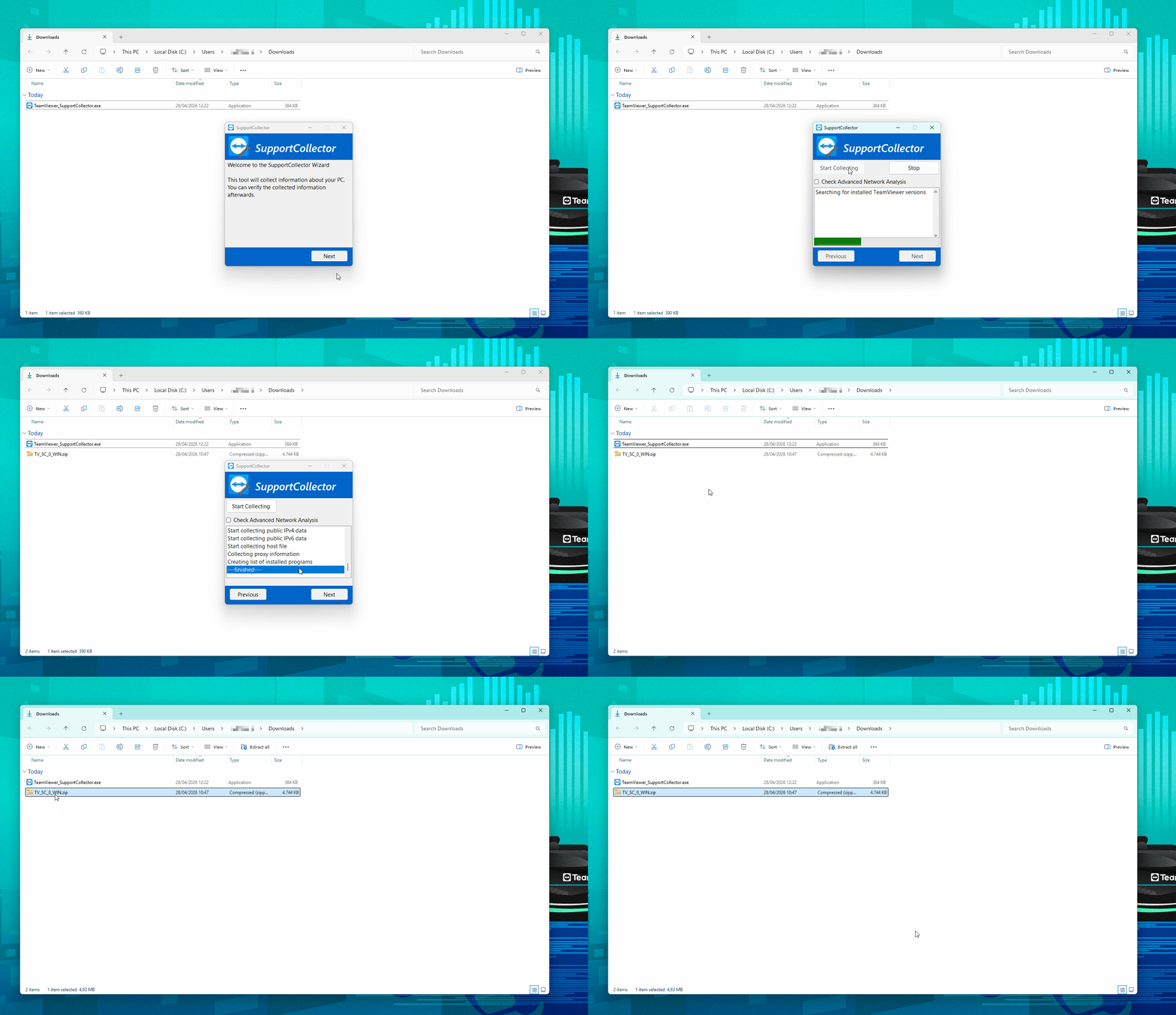
Download and install the Support Collector.
Once the installation is done, open the Support Collector by double-clicking the TeamViewer_SupportCollector.exe file.
Click Next.
Click Start Collecting and wait until the collecting process finishes. This can take several minutes.
Note: If your issue is network/connectivity related, please tick the Check advanced network analysis option before clicking Start Collecting.When it’s done, click Next.
If you are interested, you can check the summary. Click Next again.
Click Show zip file and locate the generated log file on your device.
Expected result files
For Windows: TV_SC_#########_WIN.zip
Saved in the same folder where you ran the tool.
For macOS: TeamViewer_SupportCollectorResults_OSX.zip
Saved on the desktop.
Send the log files to TeamViewer Support
After the Support Collector finishes, send the .zip file to TeamViewer Support.
You can do one of the following:
Reply to the support email and attach the .zip file.
- Upload the .zip file directly to your open support ticket in the Ticket Portal:
TeamViewer Ticket Portal → select View all tickets → open your ticket → upload the file.
Note: To sign in to the ticket portal, you must use a licensed TeamViewer account.
Special case: Linux
There is no Support Collector available for Linux.
If you use Linux, collect the log files manually and send them to TeamViewer Support.
To learn where to find your log files, please read the Linux section of our article: Find your log files