
Knowledge Base
Portable
Last Modified 30 апр. 2026 г.
TeamViewer (Classic) Portable is for the on-the-go tech that needs access from any machine they may be using. TeamViewer (Classic) Portable provides the same functionality as the full version of TeamViewer - but enables you to have your TeamViewer (Classic) installation (incl. settings) move with you on a USB stick or other media.
This article applies to all TeamViewer customers with a Premium, Corporate, or Tensor license.
How to download TeamViewer (Classic) Portable
TeamViewer (Classic) Portable can be downloaded from our website under www.teamviewer.com ➜ Download ➜ TeamViewer ➜ TeamViewer Portable or under https://download.teamviewer.com/download/TeamViewerPortable.zip
How to assign your license to TeamViewer (Classic) Portable
TeamViewer (Classic) 13 and above
The TeamViewer license has to be activated on the TeamViewer account. The license can not be activated within the .ini file of the TeamViewer (Classic) Portable. Learn more about how to activate your license on your account here: License Activation Guides - Overview
TeamViewer (Classic) 12 and below
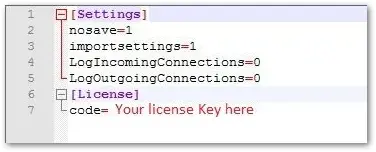
To license TeamViewer (Classic) Portable, please edit the TeamViewer.ini file (found in the root folder) and replace the dummy license key in the License section with your own license key.
Apply settings from an installed version
You also have the ability to apply settings to the portable version from a full version by exporting them from your installed full version at your workstation.
To apply settings to TeamViewer (Classic) portable, follow these steps:
- Change the value of the importsetting variable in the TeamViewer.ini to 1.
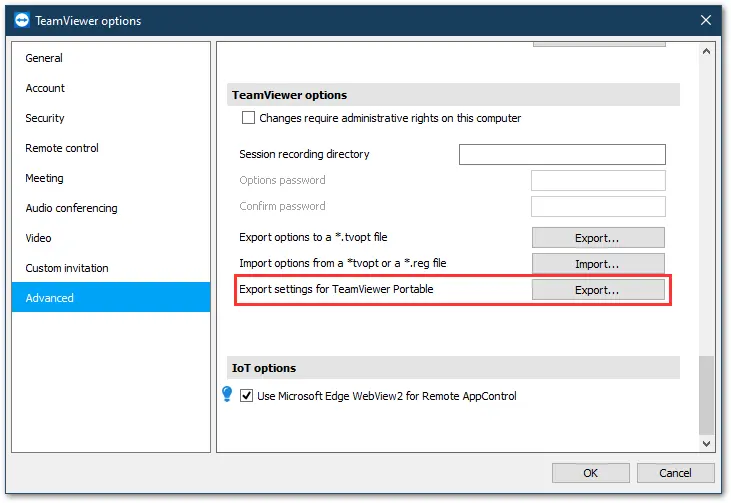
- Open the settings of the installed full version under Menu ➜ Options ➜ Advanced and select Export settings for TeamViewer Portable.
- Save the exported file to the root folder of TeamViewer (Classic) Portable (where the TeamViewer.ini is stored).
TeamViewer (Classic) Portable is ready to support you to connect wherever you go.
Additional reading
If you have more questions, please look at the included readme file in the root folder of TeamViewer (Classic) Portable.