
Knowledge Base
Android Host
Last Modified 8 мая 2026 г.
The TeamViewer Host app for Android allows for remote control of unattended Android devices. A connection is possible even when the device is not being actively used.
The Android Host app is ideal for smartphones & tablets, as well as for points of sales (POS), ATMs, public displays, vending machines, and more.
This article applies to Android users and experts supporting Android devices.
Difference between QuickSupport and Host app
Both the TeamViewer QuickSupport app and the TeamViewer Host app allow remote access of Android devices. Additionally, both can be installed at the same time. Depending on your use case, you can decide which app you prefer.
The main difference is how you connect; the QuickSupport app requires confirmation of access from the remote user, the Host app allows for unattended access.
The Host app only allows for connections from the account the device is assigned to. A connection via TeamViewer ID or service case is not possible - for this, please choose the QuickSupport app.
Specifications of the Android Host
The Android Host has the following specifications and features
- Remote Control (check compatibility here)
- Real-time screen sharing
- Eco Mode capabilities
- Deployment of the app (Learn more here: Deploy TeamViewer Host for Android and assign the devices to a TeamViewer account)
- The Dashboard view for more information regarding the Android device in the connection.
- CPU, RAM, Battery
- Storage
- device information (manufacturer, Model, Serial number, Operating system, Version, IMEI, UUID, Resolution, Language)
- Network information (WiFi, Network SSID, IP address, MA address)
- Bluetooth
- Secured connection with 256-bit AES session encoding
- Bi-directional file transfer
How to download
You can download the Host app for Android on Google Play, on the TeamViewer Website, or even download the apk here directly.
Compatibility
Operating system
- For the TeamViewer Host app Android, 5.1 or later is required. Learn more about Which Operating Systems are Supported.
Devices
- Control of remote Android devices is dependent upon the manufacturer of the device; not all devices can be controlled (some may only allow screen-sharing). Please read this article to learn more about compatible devices for remote control: Supported manufacturers for remotely controlling Android devices. Please keep in mind that the Universal Add-On is not available for the Host.
Deployment
- Read more about Mass deployment for TeamViewer Host for Android
Deployment per MDM
- Appconfig is supported for deployment per MDM: Deploy TeamViewer Host for Android and assign the devices to a TeamViewer account
First steps
After downloading and installing the Host app, you must assign the device to a TeamViewer account.
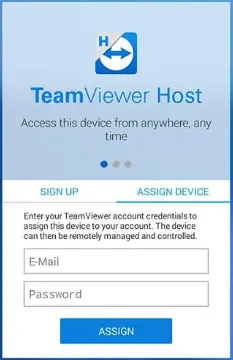
After that, the app shows the assigned account and a quick guide at the top on how to connect to the app:
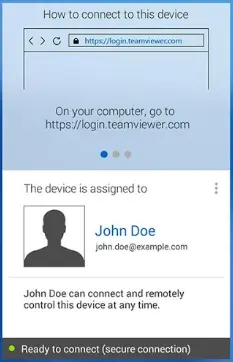
To connect to the Android device, please log in to your Computers & Contacts list on your Windows or Mac device or log into the Management Console and choose the device from your list. Click Connect.
What is the Eco Mode?
The Android Eco Mode feature of TeamViewer will help conserve the device's battery life and mobile data (3G or LTE) when TeamViewer is active on the device. If activated, the devices will show as offline; you will still be able to start the app remotely, however, from within the Computers & Contacts list and connect to it.
After closing the TeamViewer connection, the app will return to Eco Mode after 10 minutes.
You can use Eco Mode on devices running Android 5 or higher.