
Knowledge Base
Remote Management Policies
Last Modified 2025. aug. 13.
Policies play a vital role in ensuring the smooth and secure operation of TeamViewer Remote Management. By providing a structured framework, policies set the foundation for consistency and clarity, guiding behavior, decisions, and actions for your services. This framework establishes and enforces specific rules, configurations, and security measures within the environment. The following article discusses these policies and how to utilize them.
This article applies to all TeamViewer Remote Management customers
Remote Management Policies
Remote Management policies are settings that are customized and sent to the endpoints upon installation. They allow you to define and control various aspects of the respective service's functionality and behavior, ensuring consistent and efficient remote management practices. They contain all the necessary information on how the service will:
• Remotely manage the device
• Alert the user if something is not working properly
• Setup thresholds and parameters
• Send e-mail notifications
How to create a Remote Management policy
Step 1
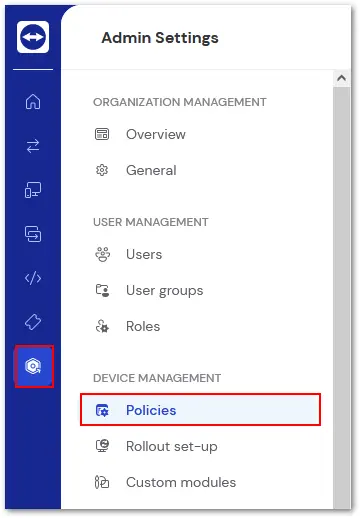
Open TeamViewer Remote or log in to the web app and click Admin Settings on the left. Select Policies underneath Device Management.
Step 2
Click + Create new policy in the upper right corner.

Step 3
Name the policy in the space provided at the top. Select which TeamViewer service you wish to create a policy for.
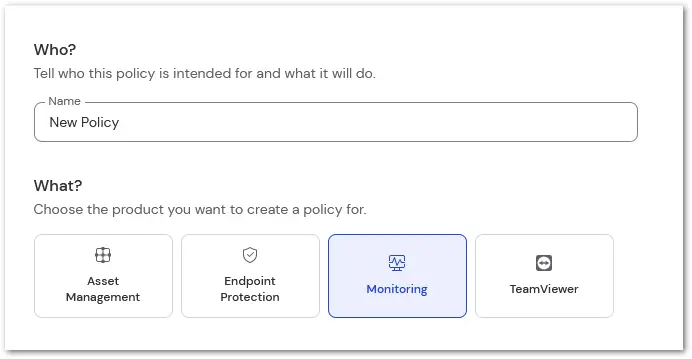
Once done, click Save in the upper right corner.
How to assign a policy via the Policies tab
To assign a policy via the Policies tab, please follow the instructions below:
- Click the Company button on the left-hand side of TeamViewer Remote's interface.
- Click on Policies.
- Select the policy you want to assign to your devices.
- Click on Assign.
- Select the individual devices or the device groups you want to assign.
- Click on Assign.
You have successfully assigned a policy to your devices.
How to assign a policy via a device group
To assign a policy via a device group, please follow the instructions below:
- Click the Devices button on the left-hand side of TeamViewer Remote's interface.
- Select the device group you want to assign the policy to.
- Click on Edit group and Edit group information.
- Within the Overview, under TeamViewer policy, select the policy you want to assign to the device group and click Save.
You have successfully assigned a policy to your device group.
How policy inheritance works
In TeamViewer, devices can inherit policies from their assigned groups. However, simply assigning a policy to a group is not sufficient. Each device must be explicitly set to inherit a policy from one of the groups it belongs to.
Note: A single device can belong to multiple groups simultaneously. In such cases, it is necessary to define from which group the device should inherit the policy.
This gives both device managers and group managers the flexibility to determine whether a device should use:
- A directly assigned policy, or
- A policy inherited from a specific group.
Example
Let's say the device "Demo laptop - MacBook Air" is part of two groups: Demo group 1 and Demo group 2. Each group has its own policy. You want the MacBook Air to use the policy from Demo group 1, which is named Update policy.
To assign the inherited policy, please follow the instructions below:
- Go to Devices.
- Go to All managed devices and locate the desired device.
- Click on the device and then click Edit to access the device's properties.
- Under TeamViewer policies, open the drop-down menu.
- Select the desired group policy from the Inherit policy from group section - in this case, Demo group 1 (Update policy).
- Click Save.
You have successfully assigned the policy of Demo group 1 to the device. The selected policy will now be displayed in the device’s properties under:
Device information ➜ TeamViewer policy
Remote Management Policies
To learn more about Remote Management policies, please select your relative service below:
Note: Mobile Device Management policy settings can be found here.