Knowledge Base
Universal add-on for Android
Last Modified 28 Ağu 2025
To control an Android device remotely, you need
- the TeamViewer QuickSupport or TeamViewer Host
- a dedicated add-on for each device/manufacturer installed on the Android device.
To control Android devices remotely that do not have such an add-on, you can use the Universal add-on, which has been created to cover all devices with no dedicated add-on.
Notes:
- Unattended access is not available when TeamViewer Host is installed on the Android device, as the app will always ask the end-user for confirmation.
- The Universal add-on is only available for devices running the TeamViewer QuickSupport and Android 7 (or newer).
Learn more here: Supported manufacturers for remotely controlling Android devices
This article applies to TeamViewer users using QuickSupport to remotely control Android devices running Android 7 or newer.
Background information
Some Android devices show the message. This device supports screen sharing only.
This is because not all Android device manufacturers are/ were compatible with our remote control solution, as a tailor-made add-on is required for each device/manufacturer. You will find additional information regarding this topic in our Knowledge Base article: Supported manufacturers for remotely controlling Android devices.
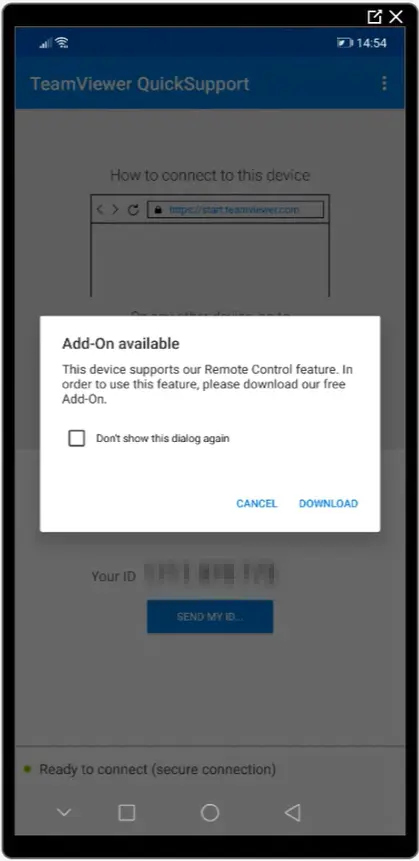
In case there is an add-on available for the Android device you want to control remotely using QuickSupport, the device will ask you to download the add-on, which will allow you to remote control the device.
The Universal add-on has been created to cover the devices with no dedicated add-on in terms of remote control compatibility and to allow you to remotely control these devices.
How to download and install the Universal add-on
To activate the Universal add-on on your device, please follow these steps:
1. Download the TeamViewer QuickSupport from the Play Store.
Note: You can also download the apps directly from our website on the Android device you want to control remotely:
TeamViewer QuickSupport (APK Download)
2. Launch the app
If the device manufacturer has no dedicated add-on, a prompt will appear to advise you to download the Universal add-on. Click Download to proceed.
3. When prompted, click Enable to install the Universal add-on.
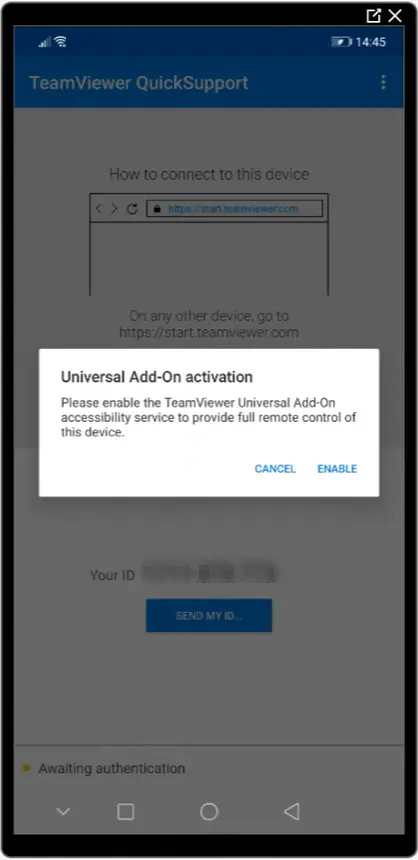
4. Once installed the add-on, navigate to the Accessibility menu of the Android device and enable the Universal add-on accessibility service.

Once completed, the device is ready to be used with TeamViewer.
Download the Universal add-on APK
To download the Universal add-on APK, please click the link below: