• Contact salesafdeling
    • Open web-app
    • Beheerconsole
    • Ticket
    • Klantenportaal
TeamViewer
  • Persoonlijk gebruik en SMB TeamViewer Remote

    Snelle en veilige toegang en IT-ondersteuning op afstand.

    Meer informatie

    • Ondersteuning op afstand Directe, veilige ondersteuning
    • Beheer op afstand Apparaten bewaken en beheren
    Bekijk schema’s en prijzen

    Enterprise TeamViewer Tensor

    Connectiviteit op afstand, gericht op veilige operaties.

    Meer informatie

    • IT-ondersteuning op afstand Veilig, flexibel, geïntegreerd
    • Operationele technologie Werkvloertoegang op afstand

    Realtime probleemoplossing TeamViewer DEX

    Los problemen op, voordat ze invloed hebben op gebruikers.

    Meer informatie

    • Eindpuntprobleemoplossing Problemen identificeren en oplossen
    • Eindpuntautomatisering IT-routinetaken automatiseren

    Verbonden werknemer TeamViewer Frontline

    Hogere efficiëntie met industriële aangevulde realiteit.

    Meer informatie

    • Logistiek en magazijnopslag Handsfree materiaalverwerking
    • Opleiding en onboarding Snelle onboarding en bijscholing
    AI-mogelijkheden zoals gezien in de TeamViewer-client

    TeamViewer ONE

    Ontvang de volledige kracht van TeamViewer, verenigd in één platform.

    • Meer informatie

    Belangrijke integraties

    • Microsoft Intune

    • ServiceNow

    • Freshworks

    • Jira

    • Salesforce

    • Slack

    • Microsoft Teams

    Alle integraties bekijken
  • TeamViewer ONE-platform

    Uw digitale werkplaats proactief beheren en optimaliseren gecombineerd in één platform.

    • Voor gestroomlijnde IT-teams Proactief apparaatbeheer
    • Wrijvingsloze ervaring Vlotte en ononderbroken digitale ervaring
    • Naadloze IT-activiteiten Proactieve herstelmaatregelen en voortreffelijke service
    • Praat met ons team Klaar om te transformeren?
    Ontdek het platform

    Kernmogelijkheden

    • TeamViewer AI
    • Digitale werknemerservaring
    • Ondersteuning en controle op afstand
    • Asset- en patchbeheer
    Bekijk alle mogelijkheden

    Gartner Report 2025

    TeamViewer uitgeroepen tot leider in DEX

    TeamViewer uitgeroepen tot leider in 2025 Gartner® Magic Quadrant™ DEX-tools.

    Belangrijke integraties

    • Microsoft Intune

    • ServiceNow

    • Freshworks

    • Jira

    • Salesforce

    • Zendesk

    • Slack

    • Microsoft Teams

    Bekijk alle integraties
  • Populaire gebruiksscenario’s

    • Toegang en ondersteuning op afstand Personen, apparaten en applicaties beheren—vanaf overal.
    • QuickSupport Krijg ondersteuning op afstand voor uw computers en mobiele apparaten.

    Andere gebruiksscenario’s

    • Toegang op afstand Veilige verbinding voor betere toegang
    • Controle op afstand Onafhankelijk van platform
    • Desktop op afstand De productiviteit vanaf overal verbeteren
    • Wake-on-LAN Apparaten op afstand activeren
    • Schermdeling Realtime visuele communicatie
    • Smart Service Aftersales-activiteiten stroomlijnen

    Op behoefte Populaire oplossingen voor verschillende teams

    • Persoonlijk gebruik Overal toegang tot apparaten
    • Kleine bedrijven Eenvoudige toegang en ondersteuning op afstand
    • Grote bedrijven IT van grote ondernemingen opschalen en beveiligen
    • Beheerde serviceproviders Client-IT beheren en behouden
    • OEM's Ondersteuning en bedrijfsvoering stroomlijnen
    • Non-profitorganisaties en onderwijs 30% korting op TeamViewer-technologie

    Per branches Populaire oplossingen gesorteerd per branche

    • Automotive
    • Landbouw
    • Logistiek
    • Productie
    • Detailhandel
    • Gezondheidszorg
    • Bankwezen en financiën

    Praat met ons verkoopteam

    Hebt u hulp nodig om de juiste oplossing te kiezen, een bestelling te plaatsen of uw licentie te upgraden?

    • Spreek met ons
  • Voor grote ondernemingen
  • Meer informatie over TeamViewer

    • Hulp en contact Bekijk artikelen of neem contact op met ons team.
    • Een partner worden Neem deel aan ons globale partnerprogramma TeamUP.
    • Over TeamViewer Personen, plaatsen en dingen veilig verbinden.
    • Succesverhalen Ontdek resultaten bereikt door TeamViewer-klanten.
    NIEUWS

    TeamViewer doet verslag van snelle klantaanpassing aan haar Al-aanbod.

    Bronnen

    • Nieuws en inzichten
    • Succesverhalen
    • Evenementen en webinars
    • Trust Center

    Partner

    • Een partner worden
    • Een partner zoeken
    • Integratiepartners

    Ondersteuning

    • Hulp en contact
    • Handleidingen
    • Kennisbank
    • Systeemstatus
    • Aangepaste modules
    • Voor ontwikkelaars
    • Community

    Bedrijf

    • Over TeamViewer
    • Werken bij TeamViewer
    • Investeerders
    • Newsroom
    • Leiderschap
    • Sport-partnerschappen
    • Duurzaamheid en CSR
  • Prijzen

Knowledge Base

  • TeamViewer ONE
  • TeamViewer Remote
  • TeamViewer (Classic)
  • TeamViewer Tensor
  • TeamViewer Tensor (Classic)
  • TeamViewer Frontline
  • Other products
Back to support overview
  • Get started
    • Get started with TeamViewer Remote
    • TeamViewer Remote FAQ
    • Management Console integrated into TeamViewer's admin settings
    • Switch to the new interface
    • Customize your navigation in TeamViewer
    • Use TeamViewer Remote's latest version
    • Enhanced accessibility during TeamViewer remote sessions on Windows
    • The TeamViewer deployment and configuration guide
  • Account
    • Create your account
    • Sign in with your account
    • Two-factor authentication for your account
    • Change your account information
    • Reset your account password
    • Delete your account
    • Account verification requirement
  • Download and Installation
    • Download and install TeamViewer
    • Uninstall TeamViewer
    • Supported operating systems for TeamViewer
    • Download older TeamViewer versions
    • TeamViewer insider builds
    • Use TeamViewer on Windows servers
    • Use TeamViewer on cloned systems
    • Linux
      • Install TeamViewer (Classic) on Linux
      • Install TeamViewer (Classic) on Linux without graphical user interface
      • Install TeamViewer (Classic) on Red Hat and CentOS
      • Install TeamViewer (Classic) on SUSE Enterprise 15 SP2
      • Install TeamViewer (Classic) on Ubuntu
      • Install TeamViewer (Classic) on other Linux distributions
      • Install older TeamViewer (Classic) versions on Linux
      • Solve incoming connection problems on Fedora 29 and newer
      • System Tray, StatusNotifier and TeamViewer (Classic) for Linux
      • Use the TAR package for Linux
  • Update
    • Update TeamViewer
    • Update TeamViewer via policy
  • Modules
    • Full client
    • QuickSupport and custom QuickSupport
    • Host and custom Host
  • Remote control
    • Connect via device dock
    • Connect via ID and password
    • Provide attended remote support
    • Provide unattended remote support
    • Remote control a Mac
    • Troubleshoot IT Issues with Tia (TeamViewer Intelligent Agent)
    • Use TeamViewer Remote in LAN
    • Use TeamViewer Remote on Windows servers
    • Connect to a contact
    • Connect via Windows Authentication to control UAC during a TeamViewer session
    • Access the command prompt via Remote terminal connection
    • TeamViewer VPN
    • Where to find my ID and password?
    • Open a file transfer session
    • Share files with the file box
    • Remote session toolbar
    • Paste the clipboard as keystrokes during a remote session
    • Wake up a device remotely
    • Add a virtual monitor to your remote device
    • Generate session summaries with Session Insights
    • Save the chat history of a TeamViewer session
    • Forward local key input with the direct keyboard mode
    • Control clipboard sync during remote support sessions
  • Company and users
    • Create a company
    • Add users to your company
    • Manage your users
    • Export your users
    • User roles
    • User role permissions - Overview
    • Company settings
    • Create user groups
  • Devices
    • The new device management system explained
    • Automatic device migration explained
    • Add a new device to your account and your company
    • Add a device via link
    • Add a device via a remote session
    • Add a device via rollout configuration
    • Create, edit and delete a device group
    • Assign user groups to device groups and devices
    • Assign managers to device groups or devices
    • Edit manager permissions on devices
    • Apply manager permissions at group level
    • Move devices to a group and apply a policy
    • Delete a device
    • Bookmarked vs. managed devices
    • Device groups explained
    • Add and remove existing devices from groups
    • Understanding how manager permissions work
    • Find the best view to display your devices and device groups
    • Expand device overview and filter devices
    • Navigate and connect using Global Search
    • Use device custom fields
    • Policies
    • Policy rules
  • Deployment
    • Deploy TeamViewer on device groups via Microsoft Intune
    • TeamViewer deployment - User guide
      • Create your company (with a primary account) - 1/8
      • Add your users to your company - 2/8
      • Create your module - 3/8
      • Create your policy - 4/8
      • Create a device group - 5/8
      • Create a rollout configuration - 6/8
      • Download the installer - 7/8
      • Deploy TeamViewer (Host or full client) - 8/8
      • Assign existing TeamViewer installations via command line
      • Grant Easy access to your devices and device groups
  • Mobile
    • Provide attended remote support for mobile
    • Enhance iOS remote support with Visual Guidance
    • Set up remote control for Samsung Knox devices via your MDM
    • Remotely control a Sony Bravia TV
  • Security
    • Increase your security posture with the Security Center
    • Expert Identity
    • Security Statement - How secure is TeamViewer?
    • Trust devices via push notification
    • Block and allowlist
    • Connection reports
    • TeamViewer and scamming
    • Enforce two-factor authentication for your company members
    • Enable Screen sharing indicator for your remote sessions
    • TeamViewer Black Screen
  • Licenses
    • Activate and set up your Remote Access license
    • Get started with your TeamViewer Business license
    • Get started with your TeamViewer Premium or Corporate license
    • Activate your Tensor license
    • Licenses and Features
      • All TeamViewer licenses - Feature overview
      • Free license - Feature overview
      • Remote Access license - Feature overview
      • Business license - Feature overview
      • Premium license - Feature overview
      • Corporate license - Feature overview
      • Tensor license - Feature overview
      • FAQ on Remote Access license
    • TeamViewer Customer Portal
  • Service management
    • Service Desk
    • Manage service cases with Service Queue
    • Service Portals
  • Remote Management
    • Get started with TeamViewer Remote Management
    • Supported operating systems for Remote Management
    • Activate your Remote Management License
    • Remote Management Policies
    • Uninstall Remote Management services
    • TeamViewer Monitoring
      • Get started with TeamViewer Monitoring
      • Rule-based task automation
      • Event log check
      • Add and create scripts
      • Execute scripts remotely
      • Advanced Monitoring using 1E technology
    • TeamViewer Asset Management
      • Get started with TeamViewer Asset Management
      • Deploying missing patches and new software
      • Asset Management reporting
      • Troubleshooting Asset Management installations
    • TeamViewer Endpoint Protection
      • Get started with TeamViewer Endpoint Protection
      • Get started with TeamViewer Endpoint Detection and Response
      • Endpoint Protection settings
      • Managed Detection and Response
      • Managed Threat Hunting
      • Network access and firewall settings for Endpoint Protection
    • TeamViewer Backup
      • Get started with TeamViewer Backup
    • TeamViewer Mobile Device Management
      • Mobile Device Management - Overview
      • Set up the MDM environment
      • Mobile Apps Catalog
      • Mobile Device Management configurations
      • Mobile Device Management policies
      • Mobile Device Management users
      • Mobile Device Management User groups
      • Mobile Device Management devices
      • Mobile Device Management Device groups
      • Connect to a device via TeamViewer MDM
      • Connect to a device via TeamViewer MDM - QuickStart Guide
      • Mobile Device Management - Android Bulk Enrollment
    • TeamViewer Monitoring & Asset Management (Classic)
      • TeamViewer Monitoring & Asset Management (Classic) - Overview
      • Get started with TeamViewer Monitoring (Classic)
      • Event Log Check
      • Add & create scripts
      • Execute scripts remotely
      • Get started with Asset Management (Classic)
  • TeamViewer DEX Essentials
    • Get started with TeamViewer DEX Essentials
  • Meeting
    • Create and join a meeting
  • For developers
    • Use the TeamViewer API
    • Build a TeamViewer integration
    • Command line parameters
  • Troubleshooting
    • Ports and URLs used by TeamViewer
    • Black screen after starting a connection
    • Company logo not displayed within QuickSupport
    • Error message: Reason Unknown
    • Fix connectivity issues - Partner did not connect to router
    • Log file reading - Incoming connection
    • Not ready. Please check your connection
    • Resolve High CPU usage
    • Solve an aborted file transfer
    • TeamViewer Status - Is TeamViewer Down?
    • Time limitation on licensed connections
    • Troubleshoot after a Backup or OS update on MAC
    • Troubleshoot connection issues using killernetworking driver
    • Troubleshoot remote printing
    • Use TeamViewer (Classic) on headless systems
  • Contact Support
    • Submit a ticket
    • Run Support Collector
    • Find your log files
    • Join our User Focus Program
    • Password for TeamViewer server
  • TeamViewer EULA and DPA
  • Management Console integrated into TeamViewer's admin settings

    Last Modified: 11 aug. 2025

All the powerful features of the Management Console are now built directly into TeamViewer. Instead of switching to a separate web portal, administrators can now manage users, devices, policies, and more, right from the Admin settings in the TeamViewer Remote desktop app or via the browser.

This article applies to all administrators of Premium, Corporate, or Tensor licenses.

Access the admin settings in TeamViewer

You can now access all admin tools directly in the TeamViewer Remote desktop app or via the browser.

To access the admin settings, please follow the instructions below:

  1. Sign in with your TeamViewer admin account into the TeamViewer client or via https://web.teamviewer.com/.
  2. On the bottom-left, you’ll find the Admin settings.
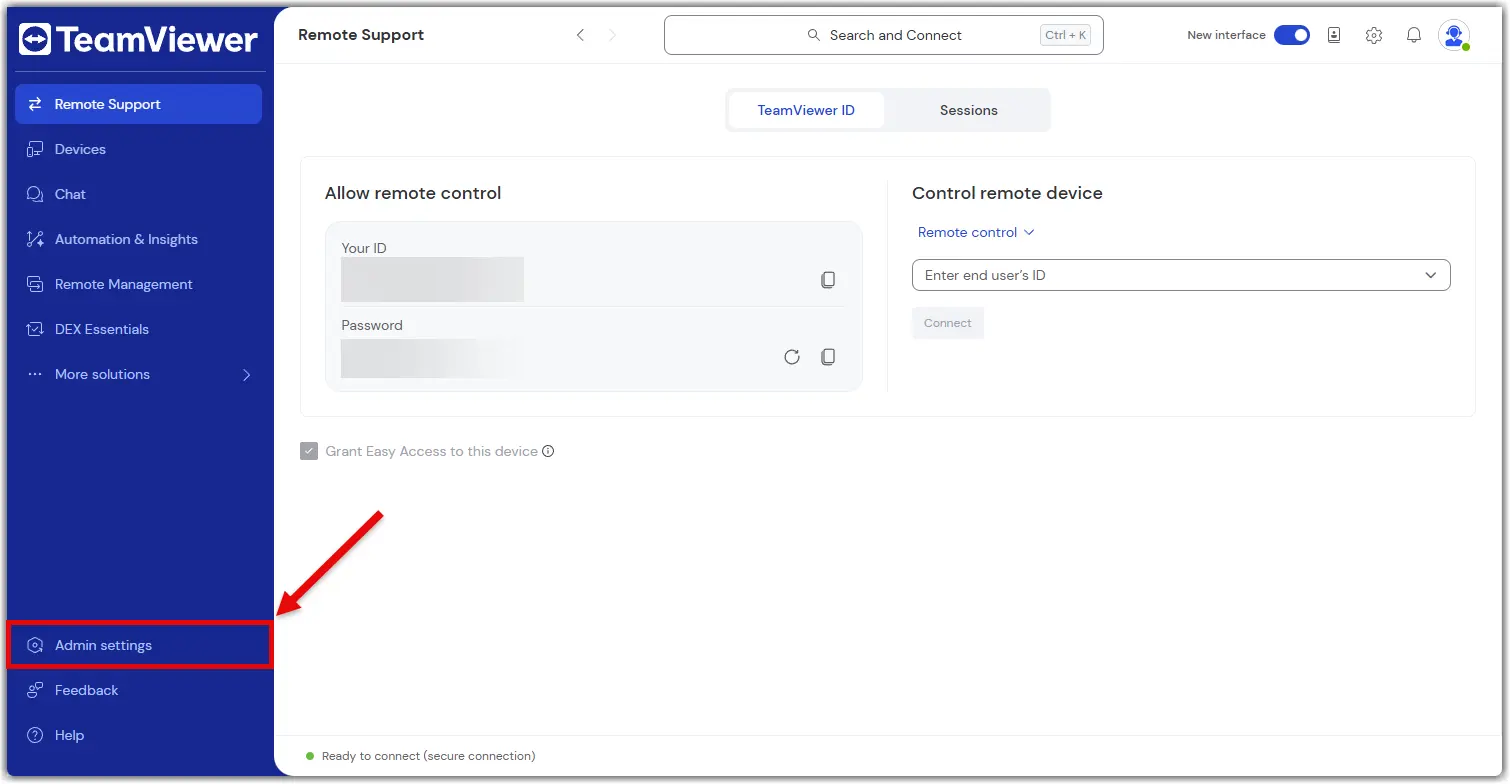
What you can do in the admin settings

The Admin settings give you everything you need to manage your TeamViewer environment, just like you did in the Management Console.

Here’s what you can do:

Create and apply policies

Set up security and access policies, then apply them to devices or groups.

Learn more here.

Manage devices

View all your company devices, assign them to users, and apply policies.

Learn more here.

Manage users

Add or remove users, assign roles, and organize them into groups.

Learn more here.

View connection reports

Track who connected to what, when, and for how long.

Learn more here.

Create custom modules

Build QuickSupport or Host modules with your branding and settings.

Learn more here.

Set up rollout configurations

Automate deployment with pre-configured settings for large-scale rollouts.

Learn more here.

Control company settings

Manage licenses, security settings, and integrations.

Learn more here.

Everything is in one place—no switching tabs, no extra logins.

Selecteer uw regio

Het selecteren van een regio verandert de taal en/of inhoud op teamviewer.com


AANBEVOLEN REGIO

  • Americas

    • Americas - English
    • América Latina - Español
    • Brasil - Português
    • Canada - English
    • Canada - Français
    • United States - English
  • Asia Pacific

    • Asia Pacific - English
    • Australia - English
    • 中国 - 中⽂(简体)
    • 香港 - 繁體中文
    • India - English
    • 日本 - ⽇本語
    • New Zealand - English
    • 대한민국 - 한국어
    • 台灣-繁體中文
    • ประเทศไทย - ภาษาไทย
    • Việt Nam - Tiếng Việt
  • Commonwealth of Independent States

    • CIS - English
    • СНГ - Русский
  • Europe

    • Europe - English
    • Belgique - Français
    • België - Nederlands
    • Bulgaria - English
    • Croatia - English
    • Cyprus - English
    • Czechia - Čeština
    • Denmark - English
    • Deutschland - Deutsch
    • España - Español
    • Estonia - English
    • Finland - English
    • France - Français
    • Greece - English
    • Ireland - English
    • Italia - Italiano
    • Latvia - English
    • Liechtenstein - Deutsch
    • Liechtenstein - Français
    • Liechtenstein - Italiano
    • Lithuania - English
    • Luxembourg - Français
    • Magyarország - Magyar
    • Malta - English
    • Nederland - Nederlands
    • Norway - English
    • Österreich - Deutsch
    • Polska - Polski
    • Portugal - Português
    • Romania - English
    • Schweiz - Deutsch
    • Suisse - Français
    • Svizzera - Italiano
    • Slovakia - English
    • Slovenia - English
    • Sweden - English
    • Türkiye - Türkçe
    • United Kingdom - English
  • Middle East Africa

    • Middle East Africa - English
    • Middle East Africa - Français
  • Producten
    • TeamViewer Remote
    • TeamViewer Tensor
    • TeamViewer DEX
    • TeamViewer Frontline
    • Prijzen
  • ONE-platform
    • TeamViewer ONE
    • Praat met ons team
  • Oplossingen
    • Per branches
    • Per gebruiksscenario’s
    • Per rollen
    • Voor grote ondernemingen
  • Partners
    • Een partner worden
    • Een partner zoeken
    • Integratiepartners
  • Bronnen
    • Nieuws en inzichten
    • Succesverhalen
    • Trust Center
  • Ondersteuning
    • Hulp en contact
    • Handleidingen
    • Kennisbank
    • Systeemstatus
    • Aangepaste modules
    • Voor ontwikkelaars
    • Community
  • Bedrijf
    • Over TeamViewer
    • Werken bij TeamViewer
    • Investeerders
    • Newsroom
    • Leiderschap
    • Sport-partnerschappen
    • Duurzaamheid en CSR
  • Aanvullende links
    • Contact salesafdeling
    • TeamViewer User Focus Program
    • Find Your Better
    • Newsletter
  • Privacy en cookies (EN)
  • Contact
  • EULA / DPA (EN)
  • Product Descriptions
  • Impressum
Cookie-instellingen