• ติดต่อทีมขาย
    • เปิดแอปเว็บ
    • คอนโซลการบริหารจัดการ
    • ใบแจ้งปัญหา
    • พอร์ทัลลูกค้า
TeamViewer
  • การใช้ส่วนบุคคลและ SMB TeamViewer Remote

    การเข้าถึงและการสนับสนุนไอทีระยะไกลอย่างรวดเร็วและปลอดภัย

    เรียนรู้เพิ่มเติม

    • การสนับสนุนระยะไกล ให้การสนับสนุนได้อย่างปลอดภัยในทันที
    • การจัดการระยะไกล ควบคุมและจัดการอุปกรณ์
    ดูแผนและราคา

    องค์กร TeamViewer Tensor

    การเชื่อมต่อระยะไกลที่สร้างขึ้นเพื่อการดำเนินงานที่ปลอดภัย

    เรียนรู้เพิ่มเติม

    • สนับสนุนด้านไอทีระยะไกล ปลอดภัย อิสระ รวมในตัว
    • เทคโนโลยีเพื่อการดำเนินงาน การเข้าถึงชั้นร้านค้าที่อยู่ไกล

    การแก้ไขปัญหาแบบเรียลไทม์ TeamViewer DEX

    แก้ไขปัญหาก่อนที่จะส่งผลกระทบต่อผู้ใช้

    เรียนรู้เพิ่มเติม

    • การแก้ไขอุปกรณ์ปลายทาง ระบุและแก้ไขปัญหา
    • การทำให้อุปกรณ์ปลายทางทำงานโดยอัตโนมัติ ทำให้งานไอทีประจำวันทำงานโดยอัตโนมัติ

    เชื่อมต่อผู้คน TeamViewer Frontline

    ขับเคลื่อนประสิทธิภาพด้วยเทคโนโลยีความจริงเสริมทางอุตสาหกรรม

    เรียนรู้เพิ่มเติม

    • โลจิสติกส์และคลังสินค้า การจัดการวัสดุแบบแฮนด์ฟรี
    • การฝึกอบรมและการฝึกเริ่มต้นทำงาน การแนะนำวิธีทำงานและการเพิ่มทักษะอย่างรวดเร็ว
    ขุมพลังแห่ง AI ที่เห็นในไคลเอนต์ของ TeamViewer

    TeamViewer ONE

    รับพลังของ TeamViewer เต็มรูปแบบ รวมทั้งหมดไว้ในแพลตฟอร์มเดียว

    • เรียนรู้เพิ่มเติม

    การผสานรวมที่สำคัญ

    • Microsoft Intune

    • ServiceNow

    • Freshworks

    • Jira

    • Salesforce

    • Slack

    • Microsoft Teams

    ดูการผสานรวมทั้งหมด
  • TeamViewer ONE Platform

    จัดการและเพิ่มประสิทธิภาพสถานที่ทำงานดิจิทัลของคุณอย่างรอบด้านโดยรวมอยู่ในแพลตฟอร์มเดียว

    • สำหรับทีมไอทีแบบคล่องตัว การจัดการอุปกรณ์เชิงรุก
    • ประสบการณ์ที่ไม่สะดุด ประสบการณ์ดิจิทัลที่ราบรื่นและไม่หยุดชะงัก
    • การทำงานด้านไอทีอย่างไร้รอยต่อ การแก้ไขเชิงรุกและบริการเหนือชั้น
    • พูดคุยกับทีมของเรา พร้อมจะเปลี่ยนหรือยัง
    สำรวจแพลตฟอร์ม

    ความสามารถหลัก

    • TeamViewer AI
    • Digital Employee Experience
    • การสนับสนุนและควบคุมจากระยะไกล
    • การจัดการสินทรัพย์และแพตช์
    ดูความสามารถทั้งหมด

    รายงาน Gartner 2025

    TeamViewer ได้รับการเสนอชื่อให้เป็นผู้นำใน DEX

    TeamViewer ได้รับการเสนอชื่อให้เป็นผู้นำในเครื่องมือ Gartner® Magic Quadrant™ DEX ปี 2025

    การผสานรวมที่สำคัญ

    • Microsoft Intune

    • ServiceNow

    • Freshworks

    • Jira

    • Salesforce

    • Zendesk

    • Slack

    • Microsoft Teams

    ดูการผสานรวมทั้งหมด
  • กรณีการใช้งานยอดนิยม

    • การเข้าถึงและการสนับสนุนจากระยะไกล จัดการผู้คน อุปกรณ์ และแอปพลิเคชันต่างๆ ได้จากทุกที่
    • Digital Employee Experience (DEX) แก้ไขปัญหาไอทีในเชิงรุกได้ก่อนที่จะส่งผลกระทบต่อประสิทธิภาพ

    กรณีการใช้งานอื่นๆ

    • การเข้าถึงระยะไกล ปรับปรุงการเข้าถึงระยะไกลด้วยการเชื่อมต่อที่ปลอดภัย
    • การควบคุมระยะไกล ควบคุมอุปกรณ์ที่ไม่ต้องพึ่งพาแพลตฟอร์ม
    • เดสก์ท็อประยะไกล เพิ่มประสิทธิภาพการทำงานได้จากทุกที่
    • Wake-on-LAN เปิดใช้งานอุปกรณ์ได้จากระยะไกล
    • การแชร์หน้าจอ การสื่อสารด้วยภาพแบบเรียลไทม์
    • บริการ Smart Service ทำให้งานบริการหลังการขายคล่องตัว

    ตามความต้องการ โซลูชันยอดนิยมสำหรับทีมต่างๆ

    • การใช้ส่วนบุคคล เข้าถึงอุปกรณ์ได้จากทุกที่
    • ธุรกิจขนาดเล็ก ทำให้การเข้าถึงและการสนับสนุนระยะไกลง่ายขึ้น
    • ธุรกิจขนาดใหญ่ ปรับขนาดไอทีระดับองค์กรและทำให้ปลอดภัย
    • ฟรีแลนซ์และผู้ใช้ดิจิทัลทำงานได้จากทุกที่ ทำงานอย่างปลอดภัยจากที่ใดก็ได้
    • ผู้ให้บริการที่มีการจัดการ จัดการและรักษาไอทีของไคลเอ็นต์
    • OEM ปรับปรุงการสนับสนุนและการดำเนินการ
    • องค์กรไม่แสวงหากำไรและการศึกษา ส่วนลด 30% สำหรับเทคโนโลยี TeamViewer

    ตามอุตสาหกรรม โซลูชันยอดนิยมที่จัดเรียงตามอุตสาหกรรม

    • ยานยนต์
    • เกษตรกรรม
    • โลจิสติกส์
    • อุตสาหกรรมการผลิต
    • การค้าปลีก
    • สุขภาพ
    • การธนาคารและการเงิน
    • ภาครัฐ

    พูดคุยกับทีมขายของเรา

    ต้องการความช่วยเหลือในการเลือกโซลูชันที่เหมาะสม การสั่งซื้อ หรือการอัปเกรดใบอนุญาตของคุณหรือไม่

    • พูดคุยกับเรา
  • สำหรับองค์กร
  • ดูข้อมูลเพิ่มเติมเกี่ยวกับ TeamViewer

    • เกี่ยวกับ TeamViewer เชื่อมต่อผู้คน สถานที่ และสิ่งต่างๆ ได้อย่างปลอดภัย
    • ติดต่อฝ่ายสนับสนุน เรียกดูบทความสนับสนุนหรือติดต่อทีมงานของเรา
    • มาเป็นพาร์ทเนอร์ เข้าร่วมโปรแกรมพาร์ทเนอร์ระดับโลกของเรา TeamUP
    • เรื่องราวความสำเร็จ สำรวจผลลัพธ์ที่ลูกค้า TeamViewer ได้รับ
    ข่าวสาร

    TeamViewer รายงานว่าลูกค้ามีการนำข้อเสนอ Al ไปใช้อย่างรวดเร็ว

    ทรัพยากร

    • ข่าวสารและข้อมูลเชิงลึก
    • เรื่องราวความสำเร็จ
    • กิจกรรมและเว็บสัมมนา
    • ศูนย์ความน่าเชื่อถือ

    พันธมิตร

    • มาเป็นพาร์ทเนอร์
    • ค้นหาพาร์ทเนอร์
    • พันธมิตรด้านการบูรณาการ

    การสนับสนุน

    • ติดต่อฝ่ายสนับสนุน
    • คำแนะนำและคู่มือ
    • ฐานความรู้
    • สถานะระบบ
    • โมดูลที่กำหนดเอง
    • สำหรับนักพัฒนา
    • ชุมชน

    บริษัท

    • เกี่ยวกับ TeamViewer
    • อาชีพ
    • นักลงทุน
    • ห้องข่าวสาร
    • ความเป็นผู้นำ
    • พาร์ทเนอร์ด้านกีฬา
    • ความยั่งยืนและ CSR
  • ราคา
  • ดาวน์โหลดฟรี

Knowledge Base

  • TeamViewer ONE
  • TeamViewer Remote
  • TeamViewer (Classic)
  • TeamViewer Tensor
  • TeamViewer Tensor (Classic)
  • TeamViewer Frontline
  • Other products
Back to support overview
  • Get started
    • Get started with TeamViewer Remote
    • TeamViewer Remote FAQ
    • Management Console integrated into TeamViewer's admin settings
    • Switch to the new interface
    • Customize your navigation in TeamViewer
    • Use TeamViewer Remote's latest version
    • Enhanced accessibility during TeamViewer remote sessions on Windows
    • The TeamViewer deployment and configuration guide
  • Account
    • Create your account
    • Sign in with your account
    • Two-factor authentication for your account
    • Change your account information
    • Reset your account password
    • Delete your account
    • Account verification requirement
  • Download and Installation
    • Download and install TeamViewer
    • Uninstall TeamViewer
    • Supported operating systems for TeamViewer
    • Download older TeamViewer versions
    • TeamViewer insider builds
    • Use TeamViewer on Windows servers
    • Use TeamViewer on cloned systems
    • Linux
      • Install TeamViewer (Classic) on Linux
      • Install TeamViewer (Classic) on Linux without graphical user interface
      • Install TeamViewer (Classic) on Red Hat and CentOS
      • Install TeamViewer (Classic) on SUSE Enterprise 15 SP2
      • Install TeamViewer (Classic) on Ubuntu
      • Install TeamViewer (Classic) on other Linux distributions
      • Install older TeamViewer (Classic) versions on Linux
      • Solve incoming connection problems on Fedora 29 and newer
      • System Tray, StatusNotifier and TeamViewer (Classic) for Linux
      • Use the TAR package for Linux
  • Update
    • Update TeamViewer
    • Update TeamViewer via policy
  • Modules
    • Full client
    • QuickSupport and custom QuickSupport
    • Host and custom Host
  • Remote control
    • Connect via device dock
    • Connect via ID and password
    • Provide attended remote support
    • Provide unattended remote support
    • Remote control a Mac
    • Troubleshoot IT Issues with Tia (TeamViewer Intelligent Agent)
    • Use TeamViewer Remote in LAN
    • Use TeamViewer Remote on Windows servers
    • Connect to a contact
    • Connect via Windows Authentication to control UAC during a TeamViewer session
    • Access the command prompt via Remote terminal connection
    • TeamViewer VPN
    • Where to find my ID and password?
    • Open a file transfer session
    • Share files with the file box
    • Remote session toolbar
    • Paste the clipboard as keystrokes during a remote session
    • Wake up a device remotely
    • Add a virtual monitor to your remote device
    • Generate session summaries with Session Insights
    • Save the chat history of a TeamViewer session
    • Forward local key input with the direct keyboard mode
    • Control clipboard sync during remote support sessions
  • Company and users
    • Create a company
    • Add users to your company
    • Manage your users
    • Export your users
    • User roles
    • User role permissions - Overview
    • Company settings
    • Create user groups
  • Devices
    • The new device management system explained
    • Automatic device migration explained
    • Add a new device to your account and your company
    • Add a device via link
    • Add a device via a remote session
    • Add a device via rollout configuration
    • Create, edit and delete a device group
    • Assign user groups to device groups and devices
    • Assign managers to device groups or devices
    • Edit manager permissions on devices
    • Apply manager permissions at group level
    • Move devices to a group and apply a policy
    • Delete a device
    • Bookmarked vs. managed devices
    • Device groups explained
    • Add and remove existing devices from groups
    • Understanding how manager permissions work
    • Find the best view to display your devices and device groups
    • Expand device overview and filter devices
    • Navigate and connect using Global Search
    • Use device custom fields
    • Policies
    • Policy rules
  • Deployment
    • Deploy TeamViewer on device groups via Microsoft Intune
    • TeamViewer deployment - User guide
      • Create your company (with a primary account) - 1/8
      • Add your users to your company - 2/8
      • Create your module - 3/8
      • Create your policy - 4/8
      • Create a device group - 5/8
      • Create a rollout configuration - 6/8
      • Download the installer - 7/8
      • Deploy TeamViewer (Host or full client) - 8/8
      • Assign existing TeamViewer installations via command line
      • Grant Easy access to your devices and device groups
  • Mobile
    • Provide attended remote support for mobile
    • Enhance iOS remote support with Visual Guidance
    • Set up remote control for Samsung Knox devices via your MDM
    • Remotely control a Sony Bravia TV
  • Security
    • Increase your security posture with the Security Center
    • Expert Identity
    • Security Statement - How secure is TeamViewer?
    • Trust devices via push notification
    • Block and allowlist
    • Connection reports
    • TeamViewer and scamming
    • Enforce two-factor authentication for your company members
    • Enable the screen sharing indicator for your remote sessions
    • TeamViewer Black Screen
  • Licenses
    • Activate and set up your Remote Access license
    • Get started with your TeamViewer Business license
    • Get started with your TeamViewer Premium or Corporate license
    • Activate your Tensor license
    • Activate your TeamViewer ONE license
    • Licenses and Features
      • All TeamViewer licenses - Feature overview
      • Free license - Feature overview
      • Remote Access license - Feature overview
      • Business license - Feature overview
      • Premium license - Feature overview
      • Corporate license - Feature overview
      • Tensor license - Feature overview
      • FAQ on Remote Access license
    • TeamViewer Customer Portal
  • Service management
    • Service Desk
    • Manage service cases with Service Queue
    • Service Portals
  • Remote Management
    • Get started with TeamViewer Remote Management
    • Supported operating systems for Remote Management
    • Activate your Remote Management License
    • Remote Management Policies
    • Uninstall Remote Management services
    • TeamViewer Monitoring
      • Get started with TeamViewer Monitoring
      • Rule-based task automation
      • Event log check
      • Add and create scripts
      • Execute scripts remotely
      • Advanced Monitoring using 1E technology
    • TeamViewer Asset Management
      • Get started with TeamViewer Asset Management
      • Deploying missing patches and new software
      • Asset Management reporting
      • Troubleshooting Asset Management installations
    • TeamViewer Endpoint Protection
      • Get started with TeamViewer Endpoint Protection
      • Get started with TeamViewer Endpoint Detection and Response
      • Endpoint Protection settings
      • Managed Detection and Response
      • Managed Threat Hunting
      • Network access and firewall settings for Endpoint Protection
    • TeamViewer Backup
      • Get started with TeamViewer Backup
    • TeamViewer Mobile Device Management
      • Mobile Device Management - Overview
      • Set up the MDM environment
      • Mobile Apps Catalog
      • Mobile Device Management configurations
      • Mobile Device Management policies
      • Mobile Device Management users
      • Mobile Device Management User groups
      • Mobile Device Management devices
      • Mobile Device Management Device groups
      • Connect to a device via TeamViewer MDM
      • Connect to a device via TeamViewer MDM - QuickStart Guide
      • Mobile Device Management - Android Bulk Enrollment
    • TeamViewer Monitoring & Asset Management (Classic)
      • TeamViewer Monitoring & Asset Management (Classic) - Overview
      • Get started with TeamViewer Monitoring (Classic)
      • Event Log Check
      • Add & create scripts
      • Execute scripts remotely
      • Get started with Asset Management (Classic)
  • TeamViewer DEX Essentials
    • Get started with TeamViewer DEX Essentials
  • Meeting
    • Create and join a meeting
  • For developers
    • Use the TeamViewer API
    • Build a TeamViewer integration
    • Command line parameters
  • Troubleshooting
    • Ports and URLs used by TeamViewer
    • Black screen after starting a connection
    • Company logo not displayed within QuickSupport
    • Error message: Reason Unknown
    • Fix connectivity issues - Partner did not connect to router
    • Log file reading - Incoming connection
    • Not ready. Please check your connection
    • Resolve High CPU usage
    • Solve an aborted file transfer
    • TeamViewer Status - Is TeamViewer Down?
    • Time limitation on licensed connections
    • Troubleshoot after a Backup or OS update on MAC
    • Troubleshoot connection issues using killernetworking driver
    • Troubleshoot remote printing
    • Use TeamViewer (Classic) on headless systems
  • Contact Support
    • Submit a ticket
    • Run Support Collector
    • Find your log files
    • Join our User Focus Program
    • Password for TeamViewer server
  • TeamViewer EULA and DPA
  • Management Console integrated into TeamViewer's admin settings

    Last Modified: 11 ส.ค. 2025

All the powerful features of the Management Console are now built directly into TeamViewer. Instead of switching to a separate web portal, administrators can now manage users, devices, policies, and more, right from the Admin settings in the TeamViewer Remote desktop app or via the browser.

This article applies to all administrators of Premium, Corporate, or Tensor licenses.

Access the admin settings in TeamViewer

You can now access all admin tools directly in the TeamViewer Remote desktop app or via the browser.

To access the admin settings, please follow the instructions below:

  1. Sign in with your TeamViewer admin account into the TeamViewer client or via https://web.teamviewer.com/.
  2. On the bottom-left, you’ll find the Admin settings.
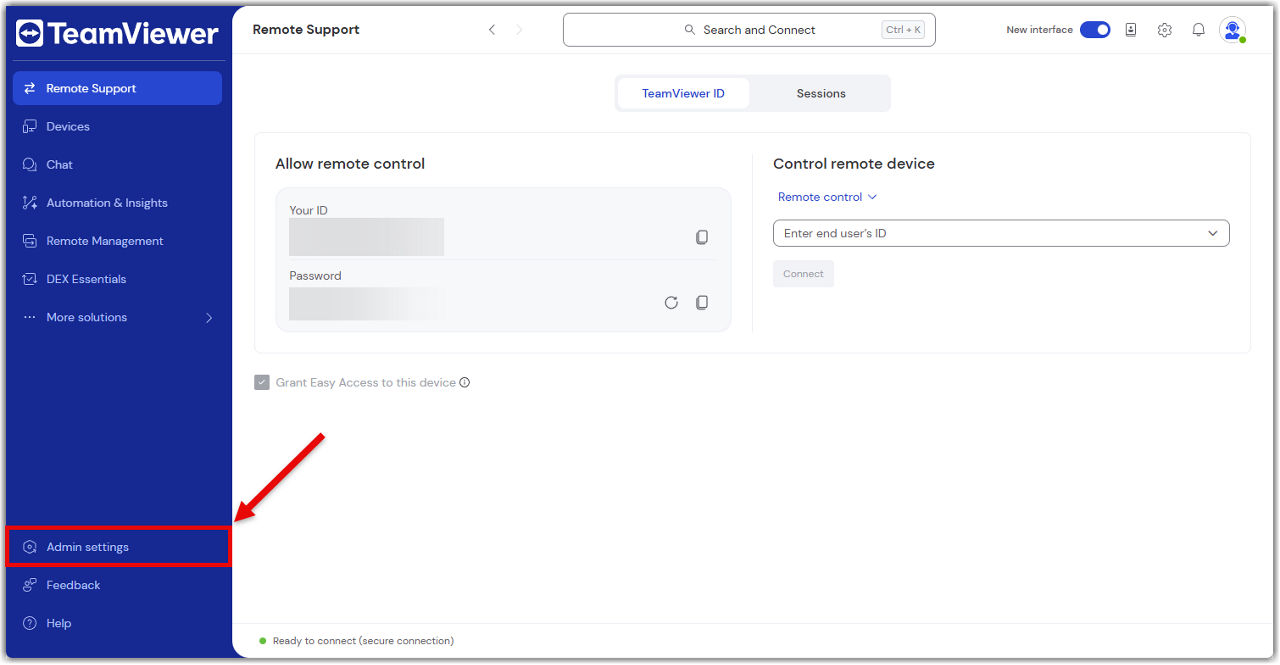
What you can do in the admin settings

The Admin settings give you everything you need to manage your TeamViewer environment, just like you did in the Management Console.

Here’s what you can do:

Create and apply policies

Set up security and access policies, then apply them to devices or groups.

Learn more here.

Manage devices

View all your company devices, assign them to users, and apply policies.

Learn more here.

Manage users

Add or remove users, assign roles, and organize them into groups.

Learn more here.

View connection reports

Track who connected to what, when, and for how long.

Learn more here.

Create custom modules

Build QuickSupport or Host modules with your branding and settings.

Learn more here.

Set up rollout configurations

Automate deployment with pre-configured settings for large-scale rollouts.

Learn more here.

Control company settings

Manage licenses, security settings, and integrations.

Learn more here.

Everything is in one place—no switching tabs, no extra logins.

โปรดเลือกภูมิภาคของคุณ

การเลือกภูมิภาคจะเปลี่ยนภาษาและ/หรือเนื้อหาใน teamviewer.com


ภูมิภาคที่แนะนํา

  • Americas

    • Americas - English
    • América Latina - Español
    • Brasil - Português
    • Canada - English
    • Canada - Français
    • United States - English
  • Asia Pacific

    • Asia Pacific - English
    • Australia - English
    • 中国 - 中⽂(简体)
    • 香港 - 繁體中文
    • India - English
    • 日本 - ⽇本語
    • New Zealand - English
    • 대한민국 - 한국어
    • 台灣-繁體中文
    • ประเทศไทย - ภาษาไทย
    • Việt Nam - Tiếng Việt
  • Commonwealth of Independent States

    • CIS - English
    • СНГ - Русский
  • Europe

    • Europe - English
    • Belgique - Français
    • België - Nederlands
    • Bulgaria - English
    • Croatia - English
    • Cyprus - English
    • Czechia - Čeština
    • Denmark - English
    • Deutschland - Deutsch
    • España - Español
    • Estonia - English
    • Finland - English
    • France - Français
    • Greece - English
    • Ireland - English
    • Italia - Italiano
    • Latvia - English
    • Liechtenstein - Deutsch
    • Liechtenstein - Français
    • Liechtenstein - Italiano
    • Lithuania - English
    • Luxembourg - Français
    • Magyarország - Magyar
    • Malta - English
    • Nederland - Nederlands
    • Norway - English
    • Österreich - Deutsch
    • Polska - Polski
    • Portugal - Português
    • Romania - English
    • Schweiz - Deutsch
    • Suisse - Français
    • Svizzera - Italiano
    • Slovakia - English
    • Slovenia - English
    • Sweden - English
    • Türkiye - Türkçe
    • United Kingdom - English
  • Middle East Africa

    • Middle East Africa - English
    • Middle East Africa - Français
  • ผลิตภัณฑ์
    • TeamViewer Remote
    • TeamViewer Tensor
    • TeamViewer DEX
    • TeamViewer Frontline
    • ราคา
  • แพลตฟอร์ม ONE
    • TeamViewer ONE
    • พูดคุยกับทีมของเรา
  • โซลูชัน
    • ตามอุตสาหกรรม
    • ตามกรณีการใช้งาน
    • ตามบทบาท
    • สำหรับองค์กร
  • พันธมิตร
    • มาเป็นพาร์ทเนอร์
    • ค้นหาพาร์ทเนอร์
    • พันธมิตรด้านการบูรณาการ
  • ทรัพยากร
    • ข่าวสารและข้อมูลเชิงลึก
    • เรื่องราวความสำเร็จ
    • ศูนย์ความน่าเชื่อถือ
  • การสนับสนุน
    • ติดต่อฝ่ายสนับสนุน
    • คำแนะนำและคู่มือ
    • ฐานความรู้
    • สถานะระบบ
    • โมดูลที่กำหนดเอง
    • สำหรับนักพัฒนา
    • ชุมชน
  • บริษัท
    • เกี่ยวกับ TeamViewer
    • อาชีพ
    • นักลงทุน
    • ห้องข่าวสาร
    • ความเป็นผู้นำ
    • พาร์ทเนอร์ด้านกีฬา
    • ความยั่งยืนและ CSR
  • ลิงก์เพิ่มเติม
    • ติดต่อทีมขาย
    • TeamViewer User Focus Program
    • Make work work better
    • จดหมายข่าว
  • ข้อตกลงการใช้งาน (EN)
  • Product Descriptions
  • ประทับ
  • นโยบายความเป็นส่วนตัว (EN)
  • ติดต่อ
การตั้งค่าคุกกี้