• Contatta il team vendite
    • Apri web app
    • Management Console
    • Ticket
    • Portale Cliente
TeamViewer
  • Uso privato e SMB TeamViewer Remote

    Accesso remoto sicuro e supporto IT.

    Scopri di più

    • Supporto remoto Supporto remoto istantaneo
    • Gestione remota Monitoraggio e gestione dei dispositivi
    Vedi piani e prezzi

    Enterprise TeamViewer Tensor

    Connettività remota per operazioni in sicurezza.

    Scopri di più

    • Supporto remoto IT Sicuro, flessibile, integrato
    • Operational technology Accesso remoto ai reparti produttivi

    Risoluzione dei problemi TeamViewer DEX

    Risolvi le problematiche prima che impattino gli utenti.

    Scopri di più

    • Risoluzione dei problemi degli endpoint Identifica e risolvi ogni problema
    • Automazione degli endpoint Automatizza le attività di routine

    Lavoratori connessi TeamViewer Frontline

    Aumenta l'efficienza con la nostra realtà aumentata industriale.

    Scopri di più

    • Logistica e stoccaggio Gestione hands-free del lavoro
    • Training e formazione Formazione e upskilling facilitati
    Funzionalità AI nel client TeamViewer

    TeamViewer ONE

    Sfrutta il pieno potenziale di TeamViewer, in un'unica piattaforma.

    • Scopri di più

    Integrazioni chiave

    • Microsoft Intune

    • ServiceNow

    • Freshworks

    • Jira

    • Salesforce

    • Slack

    • Microsoft Teams

    Vedi tutte le integrazioni
  • Piattaforma TeamViewer ONE

    Gestisci e ottimizza proattivamente il tuo ambiente di lavoro digitale da una singola piattaforma.

    • Per team IT moderni Gestione proattiva dei dispositivi
    • Esperienza intuitiva Esperienza digitale fluida e senza interruzioni
    • Operazioni IT senza limitazioni Risoluzioni proattive dei problemi e servizi d'eccezione
    • Parla con il nostro team Pronto per la trasformazione?
    Scopri la piattaforma

    Funzionalità chiave

    • TeamViewer AI
    • Digital Employee Experience
    • Supporto e controllo remoto
    • Gestione delle risorse e delle patch
    Vedi tutte le funzionalità

    Gartner Report 2025

    TeamViewer premiato come leader DEX

    TeamViewer premiato come leader del Gartner® Magic Quadrant™ 2025 per gli strumenti DEX.

    Integrazioni chiave

    • Microsoft Intune

    • ServiceNow

    • Freshworks

    • Jira

    • Salesforce

    • Zendesk

    • Slack

    • Microsoft Teams

    Vedi tutte le integrazioni
  • Casi d'uso popolari

    • Accesso e supporto remoto Gestione di utenti, dispositivi e applicazioni, da ovunque.
    • QuickSupport Ricevi supporto remoto per i tuoi computer e dispositivi mobili.

    Altri casi d'uso

    • Accesso remoto Migliora il tuo accesso con connessioni in sicurezza
    • Controllo remoto Controlla dispositivi remoti tra diversi sistemi operativi
    • Desktop remoto Resta produttivo da ovunque tu sia
    • Wake-on-LAN Avvia da remoto i dispositivi
    • Condivisione schermo Comunicazione visiva in tempo reale
    • Smart Service Semplifica i servizi post-vendita

    Per necessità Soluzioni popolari per diversi team

    • Uso privato Accedi da ovunque ai tuoi dispositivi
    • Piccole imprese Semplifica accesso e supporto remoto
    • Grandi imprese Scala in sicurezza la tua gestione IT
    • Managed service providers Gestisci e mantieni i tuoi client IT
    • OEM Semplifica operazioni e supporto
    • Istruzione e aziende non-profit 30% di sconto sulle tecnologie TeamViewer

    Per settore Soluzioni poplari divise per settore

    • Automotive
    • Agricoltura
    • Logistica
    • Manifattura
    • Retail
    • Sanità
    • Banche e finanza

    Parla con il nostro team

    Hai bisogno di supporto nel trovare la soluzione ideale per te, inserire un ordine o effettuare un upgrade?

    • Parla con noi
  • Clienti enterprise
  • Scopri di più su TeamViewer

    • A proposito di TeamViewer Connettere persone, luoghi e dispositivi, in piena sicurezza.
    • Contatta il supporto Consulta i nostri articoli di supporto oppure contatta il nostro team.
    • Diventa partner Unisciti al nostro partner program TeamUP.
    • Storie di successo Scopri i risultati dei clienti TeamViewer.
    NEWS

    TeamViewer rileva una rapida adozione della propria offerta AI tra i clienti.

    Risorse

    • News e insight
    • Storie di successo
    • Eventi e webinar
    • Trust Center

    Partner

    • Diventa partner
    • Trova un partner
    • Partner di integrazione

    Supporto

    • Contatta il supporto
    • Guide e manuali
    • Base di conoscenze
    • Stato del sistema
    • Personalizza i moduli
    • Per gli sviluppatori
    • Community

    Azienda

    • A proposito di TeamViewer
    • Lavora con noi
    • Investitori
    • News
    • Leadership
    • Sport partnership
    • Sostenibilità e CSR
  • Prezzi

Knowledge Base

  • TeamViewer ONE
  • TeamViewer Remote
  • TeamViewer (Classic)
  • TeamViewer Tensor
  • TeamViewer Tensor (Classic)
  • TeamViewer Frontline
  • Other products
Back to support overview
  • Get started
    • Get started with TeamViewer Remote
    • TeamViewer Remote FAQ
    • Management Console integrated into TeamViewer's admin settings
    • Switch to the new interface
    • Customize your navigation in TeamViewer
    • Use TeamViewer Remote's latest version
    • Enhanced accessibility during TeamViewer remote sessions on Windows
    • The TeamViewer deployment and configuration guide
  • Account
    • Create your account
    • Sign in with your account
    • Two-factor authentication for your account
    • Change your account information
    • Reset your account password
    • Delete your account
    • Account verification requirement
  • Download and Installation
    • Download and install TeamViewer
    • Uninstall TeamViewer
    • Supported operating systems for TeamViewer
    • Download older TeamViewer versions
    • TeamViewer insider builds
    • Use TeamViewer on Windows servers
    • Use TeamViewer on cloned systems
    • Linux
      • Install TeamViewer (Classic) on Linux
      • Install TeamViewer (Classic) on Linux without graphical user interface
      • Install TeamViewer (Classic) on Red Hat and CentOS
      • Install TeamViewer (Classic) on SUSE Enterprise 15 SP2
      • Install TeamViewer (Classic) on Ubuntu
      • Install TeamViewer (Classic) on other Linux distributions
      • Install older TeamViewer (Classic) versions on Linux
      • Solve incoming connection problems on Fedora 29 and newer
      • System Tray, StatusNotifier and TeamViewer (Classic) for Linux
      • Use the TAR package for Linux
  • Update
    • Update TeamViewer
    • Update TeamViewer via policy
  • Modules
    • Full client
    • QuickSupport and custom QuickSupport
    • Host and custom Host
  • Remote control
    • Connect via device dock
    • Connect via ID and password
    • Provide attended remote support
    • Provide unattended remote support
    • Remote control a Mac
    • Troubleshoot IT Issues with Tia (TeamViewer Intelligent Agent)
    • Use TeamViewer Remote in LAN
    • Use TeamViewer Remote on Windows servers
    • Connect to a contact
    • Connect via Windows Authentication to control UAC during a TeamViewer session
    • Access the command prompt via Remote terminal connection
    • TeamViewer VPN
    • Where to find my ID and password?
    • Open a file transfer session
    • Share files with the file box
    • Remote session toolbar
    • Paste the clipboard as keystrokes during a remote session
    • Wake up a device remotely
    • Add a virtual monitor to your remote device
    • Generate session summaries with Session Insights
    • Save the chat history of a TeamViewer session
    • Forward local key input with the direct keyboard mode
    • Control clipboard sync during remote support sessions
  • Company and users
    • Create a company
    • Add users to your company
    • Manage your users
    • Export your users
    • User roles
    • User role permissions - Overview
    • Company settings
    • Create user groups
  • Devices
    • The new device management system explained
    • Automatic device migration explained
    • Add a new device to your account and your company
    • Add a device via link
    • Add a device via a remote session
    • Add a device via rollout configuration
    • Create, edit and delete a device group
    • Assign user groups to device groups and devices
    • Assign managers to device groups or devices
    • Edit manager permissions on devices
    • Apply manager permissions at group level
    • Move devices to a group and apply a policy
    • Delete a device
    • Bookmarked vs. managed devices
    • Device groups explained
    • Add and remove existing devices from groups
    • Understanding how manager permissions work
    • Find the best view to display your devices and device groups
    • Expand device overview and filter devices
    • Navigate and connect using Global Search
    • Use device custom fields
    • Policies
    • Policy rules
  • Deployment
    • Deploy TeamViewer on device groups via Microsoft Intune
    • TeamViewer deployment - User guide
      • Create your company (with a primary account) - 1/8
      • Add your users to your company - 2/8
      • Create your module - 3/8
      • Create your policy - 4/8
      • Create a device group - 5/8
      • Create a rollout configuration - 6/8
      • Download the installer - 7/8
      • Deploy TeamViewer (Host or full client) - 8/8
      • Assign existing TeamViewer installations via command line
      • Grant Easy access to your devices and device groups
  • Mobile
    • Provide attended remote support for mobile
    • Enhance iOS remote support with Visual Guidance
    • Set up remote control for Samsung Knox devices via your MDM
    • Remotely control a Sony Bravia TV
  • Security
    • Increase your security posture with the Security Center
    • Expert Identity
    • Security Statement - How secure is TeamViewer?
    • Trust devices via push notification
    • Block and allowlist
    • Connection reports
    • TeamViewer and scamming
    • Enforce two-factor authentication for your company members
    • Enable Screen sharing indicator for your remote sessions
    • TeamViewer Black Screen
  • Licenses
    • Activate and set up your Remote Access license
    • Get started with your TeamViewer Business license
    • Get started with your TeamViewer Premium or Corporate license
    • Activate your Tensor license
    • Licenses and Features
      • All TeamViewer licenses - Feature overview
      • Free license - Feature overview
      • Remote Access license - Feature overview
      • Business license - Feature overview
      • Premium license - Feature overview
      • Corporate license - Feature overview
      • Tensor license - Feature overview
      • FAQ on Remote Access license
    • TeamViewer Customer Portal
  • Service management
    • Service Desk
    • Manage service cases with Service Queue
    • Service Portals
  • Remote Management
    • Get started with TeamViewer Remote Management
    • Supported operating systems for Remote Management
    • Activate your Remote Management License
    • Remote Management Policies
    • Uninstall Remote Management services
    • TeamViewer Monitoring
      • Get started with TeamViewer Monitoring
      • Rule-based task automation
      • Event log check
      • Add and create scripts
      • Execute scripts remotely
      • Advanced Monitoring using 1E technology
    • TeamViewer Asset Management
      • Get started with TeamViewer Asset Management
      • Deploying missing patches and new software
      • Asset Management reporting
      • Troubleshooting Asset Management installations
    • TeamViewer Endpoint Protection
      • Get started with TeamViewer Endpoint Protection
      • Get started with TeamViewer Endpoint Detection and Response
      • Endpoint Protection settings
      • Managed Detection and Response
      • Managed Threat Hunting
      • Network access and firewall settings for Endpoint Protection
    • TeamViewer Backup
      • Get started with TeamViewer Backup
    • TeamViewer Mobile Device Management
      • Mobile Device Management - Overview
      • Set up the MDM environment
      • Mobile Apps Catalog
      • Mobile Device Management configurations
      • Mobile Device Management policies
      • Mobile Device Management users
      • Mobile Device Management User groups
      • Mobile Device Management devices
      • Mobile Device Management Device groups
      • Connect to a device via TeamViewer MDM
      • Connect to a device via TeamViewer MDM - QuickStart Guide
      • Mobile Device Management - Android Bulk Enrollment
    • TeamViewer Monitoring & Asset Management (Classic)
      • TeamViewer Monitoring & Asset Management (Classic) - Overview
      • Get started with TeamViewer Monitoring
      • Event Log Check
      • Add & create scripts
      • Execute scripts remotely
      • Get started with Asset Management (Classic)
  • TeamViewer DEX Essentials
    • Get started with TeamViewer DEX Essentials
  • Meeting
    • Create and join a meeting
  • For developers
    • Use the TeamViewer API
    • Build a TeamViewer integration
    • Command line parameters
  • Troubleshooting
    • Ports and URLs used by TeamViewer
    • Black screen after starting a connection
    • Company logo not displayed within QuickSupport
    • Error message: Reason Unknown
    • Fix connectivity issues - Partner did not connect to router
    • Log file reading - Incoming connection
    • Not ready. Please check your connection
    • Resolve High CPU usage
    • Solve an aborted file transfer
    • TeamViewer Status - Is TeamViewer Down?
    • Time limitation on licensed connections
    • Troubleshoot after a Backup or OS update on MAC
    • Troubleshoot connection issues using killernetworking driver
    • Troubleshoot remote printing
    • Use TeamViewer (Classic) on headless systems
  • Contact Support
    • Submit a ticket
    • Run Support Collector
    • Find your log files
    • Join our User Focus Program
    • Password for TeamViewer server
  • TeamViewer EULA and DPA
  • Management Console integrated into TeamViewer's admin settings

    Ultima modifica: 11 ago 2025

All the powerful features of the Management Console are now built directly into TeamViewer. Instead of switching to a separate web portal, administrators can now manage users, devices, policies, and more, right from the Admin settings in the TeamViewer Remote desktop app or via the browser.

This article applies to all administrators of Premium, Corporate, or Tensor licenses.

Access the admin settings in TeamViewer

You can now access all admin tools directly in the TeamViewer Remote desktop app or via the browser.

To access the admin settings, please follow the instructions below:

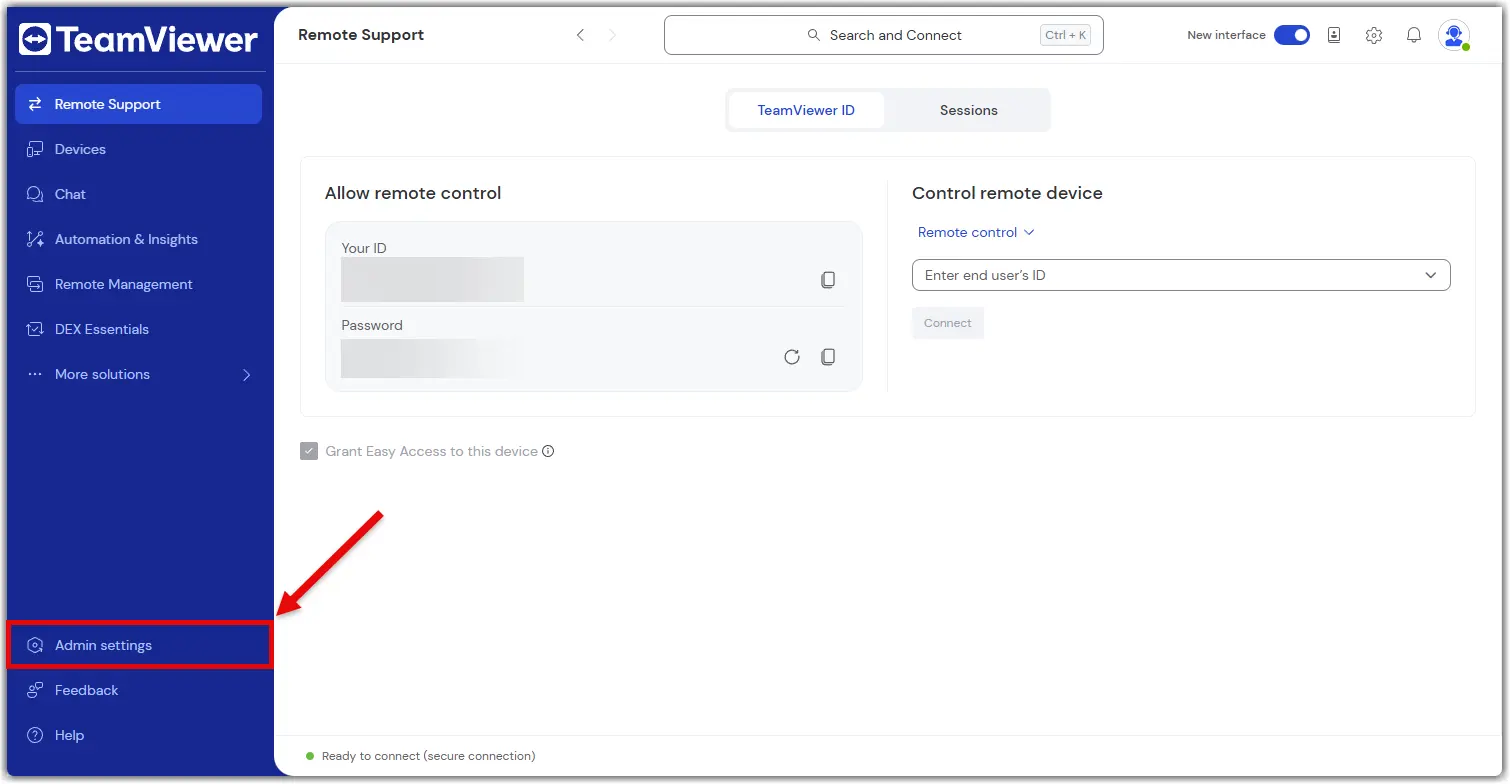
  1. Sign in with your TeamViewer admin account into the TeamViewer client or via https://web.teamviewer.com/.
  2. On the bottom-left, you’ll find the Admin settings.
What you can do in the admin settings

The Admin settings give you everything you need to manage your TeamViewer environment, just like you did in the Management Console.

Here’s what you can do:

Create and apply policies

Set up security and access policies, then apply them to devices or groups.

Learn more here.

Manage devices

View all your company devices, assign them to users, and apply policies.

Learn more here.

Manage users

Add or remove users, assign roles, and organize them into groups.

Learn more here.

View connection reports

Track who connected to what, when, and for how long.

Learn more here.

Create custom modules

Build QuickSupport or Host modules with your branding and settings.

Learn more here.

Set up rollout configurations

Automate deployment with pre-configured settings for large-scale rollouts.

Learn more here.

Control company settings

Manage licenses, security settings, and integrations.

Learn more here.

Everything is in one place—no switching tabs, no extra logins.

Scegli la tua regione

La selezione di una regione cambia la lingua e/o il contenuto di teamviewer.com


REGIONE SUGGERITA

  • Americas

    • Americas - English
    • América Latina - Español
    • Brasil - Português
    • Canada - English
    • Canada - Français
    • United States - English
  • Asia Pacific

    • Asia Pacific - English
    • Australia - English
    • 中国 - 中⽂(简体)
    • 香港 - 繁體中文
    • India - English
    • 日本 - ⽇本語
    • New Zealand - English
    • 대한민국 - 한국어
    • 台灣-繁體中文
    • ประเทศไทย - ภาษาไทย
    • Việt Nam - Tiếng Việt
  • Commonwealth of Independent States

    • CIS - English
    • СНГ - Русский
  • Europe

    • Europe - English
    • Belgique - Français
    • België - Nederlands
    • Bulgaria - English
    • Croatia - English
    • Cyprus - English
    • Czechia - Čeština
    • Denmark - English
    • Deutschland - Deutsch
    • España - Español
    • Estonia - English
    • Finland - English
    • France - Français
    • Greece - English
    • Ireland - English
    • Italia - Italiano
    • Latvia - English
    • Liechtenstein - Deutsch
    • Liechtenstein - Français
    • Liechtenstein - Italiano
    • Lithuania - English
    • Luxembourg - Français
    • Magyarország - Magyar
    • Malta - English
    • Nederland - Nederlands
    • Norway - English
    • Österreich - Deutsch
    • Polska - Polski
    • Portugal - Português
    • Romania - English
    • Schweiz - Deutsch
    • Suisse - Français
    • Svizzera - Italiano
    • Slovakia - English
    • Slovenia - English
    • Sweden - English
    • Türkiye - Türkçe
    • United Kingdom - English
  • Middle East Africa

    • Middle East Africa - English
    • Middle East Africa - Français
  • Prodotti
    • TeamViewer Remote
    • TeamViewer Tensor
    • TeamViewer DEX
    • TeamViewer Frontline
    • Prezzi
  • Piattaforma ONE
    • TeamViewer ONE
    • Parla con il nostro team
  • Soluzioni
    • Per settore
    • Per caso d'uso
    • Per ruolo
    • Clienti enterprise
  • Partner
    • Diventa partner
    • Trova un partner
    • Partner di integrazione
  • Risorse
    • News e insight
    • Storie di successo
    • Trust Center
  • Supporto
    • Contatta il supporto
    • Guide e manuali
    • Base di conoscenze
    • Stato del sistema
    • Personalizza i moduli
    • Per gli sviluppatori
    • Community
  • Aziende
    • A proposito di TeamViewer
    • Lavora con noi
    • Investitori
    • News
    • Leadership
    • Sport partnership
    • Sostenibilità e CSR
  • Link aggiuntivi
    • Contatta il team vendite
    • TeamViewer User Focus Program
    • Migliora te stesso
    • Newsletter
  • Privacy Policy (EN)
  • Contatto
  • EULA (EN)
  • Product Descriptions
  • Imprint
Impostazioni dei cookie