• 영업팀에 문의하기
    • 웹 앱 열기
    • 관리 콘솔
    • 티켓
    • 고객 포털
TeamViewer
  • 개인 및 중소기업 TeamViewer Remote

    빠르고 안전한 원격 액세스 및 IT 지원.

    더 알아보기

    • 원격 지원 즉각적이고 안전한 지원 제공
    • 원격 관리 장치 모니터링 및 관리
    플랜 및 가격 보기

    대기업 TeamViewer Tensor

    안전한 운영을 위해 구축된 원격 연결.

    더 알아보기

    • 원격 IT 지원 안전성, 유연성, 통합성
    • 운영 기술 작업 현장 원격 액세스

    실시간 문제 해결 TeamViewer DEX

    사용자에게 영향을 미치기 전에 문제를 해결합니다.

    더 알아보기

    • 엔드포인트 문제 해결 문제 식별 및 해결
    • 엔드포인트 자동화 일상적인 IT 작업 자동화

    연결된 작업자 TeamViewer Frontline

    산업용 증강현실로 효율성을 증대합니다.

    더 알아보기

    • 물류 및 창고 핸즈프리 자재 취급처리
    • 교육 및 온보딩 빠른 온보딩 및 업스킬링
    TeamViewer 클라이언트에 표시된 AI 기능

    TeamViewer ONE

    하나의 플랫폼에 통합된 TeamViewer의 모든 기능을 활용해 보세요.

    • 더 알아보기

    주요 통합

    • Microsoft Intune

    • ServiceNow

    • Freshworks

    • Jira

    • Salesforce

    • Slack

    • Microsoft Teams

    모든 통합 보기
  • TeamViewer ONE 플랫폼

    하나의 플랫폼에 통합된 디지털 업무 공간을 선제적으로 관리하고 최적화하세요.

    • 소규모 IT 팀용 사전 예방적 장치 관리
    • 마찰 없는 경험 원활하고 중단 없는 디지털 경험
    • 원활한 IT 운영 사전 예방적 수정 및 탁월한 서비스
    • 담당 팀에 문의 바뀔 준비가 되셨나요?
    플랫폼 살펴보기

    핵심 기능

    • TeamViewer AI
    • 디지털 직원 경험
    • 원격 지원 및 제어
    • 자산 및 패치 관리
    모든 기능 보기

    2025년 Gartner 보고서

    TeamViewer, DEX 부문 리더로 선정

    TeamViewer가 2025 Gartner® Magic Quadrant™ DEX 도구 부문에서 리더로 선정되었습니다.

    주요 통합

    • Microsoft Intune

    • ServiceNow

    • Freshworks

    • Jira

    • Salesforce

    • Zendesk

    • Slack

    • Microsoft Teams

    모든 통합 보기
  • 인기 있는 사용 사례

    • 원격 액세스 및 지원 어디서나 사람, 장치, 애플리케이션을 관리.
    • QuickSupport 언제든지 필요할 때 컴퓨터 및 모바일 장치에 대한 원격 지원을 받으세요.

    기타 사용 사례

    • 원격 액세스 보안 연결로 액세스 개선
    • 원격 제어 플랫폼에 관계 없이 장치 제어
    • 원격 데스크톱 어디서나 생산성 향상
    • Wake-on-LAN 원격 장치 활성화 켜기
    • 화면 공유 실시간 비주얼 커뮤니케이션
    • Smart Service 판매 후 운영 간소화

    요구사항 별 다양한 팀을 위한 인기 솔루션

    • 개인용 어디서나 장치에 액세스
    • 중소기업 원격 액세스 및 지원 단순화
    • 대기업용 기업 IT 확장 및 보안
    • 관리형 서비스 제공자 클라이언트 IT 관리 및 유지보수
    • OEM 지원 및 운영 간소화
    • 비영리 단체 및 교육기관 TeamViewer 기술 30% 할인

    산업별 산업별로 분류된 인기 솔루션

    • 자동차
    • 농업
    • 물류
    • 제조
    • 리테일
    • 헬스케어
    • 은행 및 금융

    영업팀에 문의

    올바른 솔루션을 선택하고, 주문을 넣고, 라이선스를 업그레이드하는 데 도움이 필요하신가요?

    • 문의하기
  • 대기업용
  • TeamViewer에 대해 더 알아보기

    • TeamViewer 소개 사람, 장소, 사물을 안전하게 연결합니다.
    • 지원 팀에 문의 지원 문서를 찾아보거나 지원 팀에 문의하세요.
    • 파트너 되기 글로벌 파트너 프로그램인 TeamUP에 참여하세요.
    • 고객 성공 사례 TeamViewer 고객이 달성한 성과를 살펴보세요.
    뉴스

    TeamViewer는 AI 제품을 도입하는 고객이 빠르게 늘고 있다고 밝혔습니다.

    리소스

    • 뉴스 및 인사이트
    • 고객 성공 사례
    • 이벤트 및 웨비나
    • 트러스트 센터

    파트너

    • 파트너 되기
    • 파트너 찾기
    • 통합 파트너

    지원

    • 지원 팀에 문의
    • 가이드 및 매뉴얼
    • 기술 문서 데이터베이스
    • 시스템 상태
    • 사용자 지정 모듈
    • 개발자용
    • 커뮤니티

    회사

    • TeamViewer 소개
    • 채용
    • 투자자
    • 뉴스룸
    • 리더십
    • 스포츠 파트너십
    • 지속 가능성 및 CSR
  • 가격

Knowledge Base

  • TeamViewer ONE
  • TeamViewer Remote
  • TeamViewer (Classic)
  • TeamViewer Tensor
  • TeamViewer Tensor (Classic)
  • TeamViewer Frontline
  • Other products
Back to support overview
  • Get started
    • Get started with TeamViewer Remote
    • TeamViewer Remote FAQ
    • Management Console integrated into TeamViewer's admin settings
    • Switch to the new interface
    • Customize your navigation in TeamViewer
    • Use TeamViewer Remote's latest version
    • Enhanced accessibility during TeamViewer remote sessions on Windows
    • The TeamViewer deployment and configuration guide
  • Account
    • Create your account
    • Sign in with your account
    • Two-factor authentication for your account
    • Change your account information
    • Reset your account password
    • Delete your account
    • Account verification requirement
  • Download and Installation
    • Download and install TeamViewer
    • Uninstall TeamViewer
    • Supported operating systems for TeamViewer
    • Download older TeamViewer versions
    • TeamViewer insider builds
    • Use TeamViewer on Windows servers
    • Use TeamViewer on cloned systems
    • Linux
      • Install TeamViewer (Classic) on Linux
      • Install TeamViewer (Classic) on Linux without graphical user interface
      • Install TeamViewer (Classic) on Red Hat and CentOS
      • Install TeamViewer (Classic) on SUSE Enterprise 15 SP2
      • Install TeamViewer (Classic) on Ubuntu
      • Install TeamViewer (Classic) on other Linux distributions
      • Install older TeamViewer (Classic) versions on Linux
      • Solve incoming connection problems on Fedora 29 and newer
      • System Tray, StatusNotifier and TeamViewer (Classic) for Linux
      • Use the TAR package for Linux
  • Update
    • Update TeamViewer
    • Update TeamViewer via policy
  • Modules
    • Full client
    • QuickSupport and custom QuickSupport
    • Host and custom Host
  • Remote control
    • Connect via device dock
    • Connect via ID and password
    • Provide attended remote support
    • Provide unattended remote support
    • Remote control a Mac
    • Troubleshoot IT Issues with Tia (TeamViewer Intelligent Agent)
    • Use TeamViewer Remote in LAN
    • Use TeamViewer Remote on Windows servers
    • Connect to a contact
    • Connect via Windows Authentication to control UAC during a TeamViewer session
    • Access the command prompt via Remote terminal connection
    • TeamViewer VPN
    • Where to find my ID and password?
    • Open a file transfer session
    • Share files with the file box
    • Remote session toolbar
    • Paste the clipboard as keystrokes during a remote session
    • Wake up a device remotely
    • Add a virtual monitor to your remote device
    • Generate session summaries with Session Insights
    • Save the chat history of a TeamViewer session
    • Forward local key input with the direct keyboard mode
    • Control clipboard sync during remote support sessions
  • Company and users
    • Create a company
    • Add users to your company
    • Manage your users
    • Export your users
    • User roles
    • User role permissions - Overview
    • Company settings
    • Create user groups
  • Devices
    • The new device management system explained
    • Automatic device migration explained
    • Add a new device to your account and your company
    • Add a device via link
    • Add a device via a remote session
    • Add a device via rollout configuration
    • Create, edit and delete a device group
    • Assign user groups to device groups and devices
    • Assign managers to device groups or devices
    • Edit manager permissions on devices
    • Apply manager permissions at group level
    • Move devices to a group and apply a policy
    • Delete a device
    • Bookmarked vs. managed devices
    • Device groups explained
    • Add and remove existing devices from groups
    • Understanding how manager permissions work
    • Find the best view to display your devices and device groups
    • Expand device overview and filter devices
    • Navigate and connect using Global Search
    • Use device custom fields
    • Policies
    • Policy rules
  • Deployment
    • Deploy TeamViewer on device groups via Microsoft Intune
    • TeamViewer deployment - User guide
      • Create your company (with a primary account) - 1/8
      • Add your users to your company - 2/8
      • Create your module - 3/8
      • Create your policy - 4/8
      • Create a device group - 5/8
      • Create a rollout configuration - 6/8
      • Download the installer - 7/8
      • Deploy TeamViewer (Host or full client) - 8/8
      • Assign existing TeamViewer installations via command line
      • Grant Easy access to your devices and device groups
  • Mobile
    • Provide attended remote support for mobile
    • Enhance iOS remote support with Visual Guidance
    • Set up remote control for Samsung Knox devices via your MDM
    • Remotely control a Sony Bravia TV
  • Security
    • Increase your security posture with the Security Center
    • Expert Identity
    • Security Statement - How secure is TeamViewer?
    • Trust devices via push notification
    • Block and allowlist
    • Connection reports
    • TeamViewer and scamming
    • Enforce two-factor authentication for your company members
    • Enable Screen sharing indicator for your remote sessions
    • TeamViewer Black Screen
  • Licenses
    • Activate and set up your Remote Access license
    • Get started with your TeamViewer Business license
    • Get started with your TeamViewer Premium or Corporate license
    • Activate your Tensor license
    • Licenses and Features
      • All TeamViewer licenses - Feature overview
      • Free license - Feature overview
      • Remote Access license - Feature overview
      • Business license - Feature overview
      • Premium license - Feature overview
      • Corporate license - Feature overview
      • Tensor license - Feature overview
      • FAQ on Remote Access license
    • TeamViewer Customer Portal
  • Service management
    • Service Desk
    • Manage service cases with Service Queue
    • Service Portals
  • Remote Management
    • Get started with TeamViewer Remote Management
    • Supported operating systems for Remote Management
    • Activate your Remote Management License
    • Remote Management Policies
    • Uninstall Remote Management services
    • TeamViewer Monitoring
      • Get started with TeamViewer Monitoring
      • Rule-based task automation
      • Event log check
      • Add and create scripts
      • Execute scripts remotely
      • Advanced Monitoring using 1E technology
    • TeamViewer Asset Management
      • Get started with TeamViewer Asset Management
      • Deploying missing patches and new software
      • Asset Management reporting
      • Troubleshooting Asset Management installations
    • TeamViewer Endpoint Protection
      • Get started with TeamViewer Endpoint Protection
      • Get started with TeamViewer Endpoint Detection and Response
      • Endpoint Protection settings
      • Managed Detection and Response
      • Managed Threat Hunting
      • Network access and firewall settings for Endpoint Protection
    • TeamViewer Backup
      • Get started with TeamViewer Backup
    • TeamViewer Mobile Device Management
      • Mobile Device Management - Overview
      • Set up the MDM environment
      • Mobile Apps Catalog
      • Mobile Device Management configurations
      • Mobile Device Management policies
      • Mobile Device Management users
      • Mobile Device Management User groups
      • Mobile Device Management devices
      • Mobile Device Management Device groups
      • Connect to a device via TeamViewer MDM
      • Connect to a device via TeamViewer MDM - QuickStart Guide
      • Mobile Device Management - Android Bulk Enrollment
    • TeamViewer Monitoring & Asset Management (Classic)
      • TeamViewer Monitoring & Asset Management (Classic) - Overview
      • Get started with TeamViewer Monitoring (Classic)
      • Event Log Check
      • Add & create scripts
      • Execute scripts remotely
      • Get started with Asset Management (Classic)
  • TeamViewer DEX Essentials
    • Get started with TeamViewer DEX Essentials
  • Meeting
    • Create and join a meeting
  • For developers
    • Use the TeamViewer API
    • Build a TeamViewer integration
    • Command line parameters
  • Troubleshooting
    • Ports and URLs used by TeamViewer
    • Black screen after starting a connection
    • Company logo not displayed within QuickSupport
    • Error message: Reason Unknown
    • Fix connectivity issues - Partner did not connect to router
    • Log file reading - Incoming connection
    • Not ready. Please check your connection
    • Resolve High CPU usage
    • Solve an aborted file transfer
    • TeamViewer Status - Is TeamViewer Down?
    • Time limitation on licensed connections
    • Troubleshoot after a Backup or OS update on MAC
    • Troubleshoot connection issues using killernetworking driver
    • Troubleshoot remote printing
    • Use TeamViewer (Classic) on headless systems
  • Contact Support
    • Submit a ticket
    • Run Support Collector
    • Find your log files
    • Join our User Focus Program
    • Password for TeamViewer server
  • TeamViewer EULA and DPA
  • Management Console integrated into TeamViewer's admin settings

    Last Modified: 2025. 8. 11.

All the powerful features of the Management Console are now built directly into TeamViewer. Instead of switching to a separate web portal, administrators can now manage users, devices, policies, and more, right from the Admin settings in the TeamViewer Remote desktop app or via the browser.

This article applies to all administrators of Premium, Corporate, or Tensor licenses.

Access the admin settings in TeamViewer

You can now access all admin tools directly in the TeamViewer Remote desktop app or via the browser.

To access the admin settings, please follow the instructions below:

  1. Sign in with your TeamViewer admin account into the TeamViewer client or via https://web.teamviewer.com/.
  2. On the bottom-left, you’ll find the Admin settings.
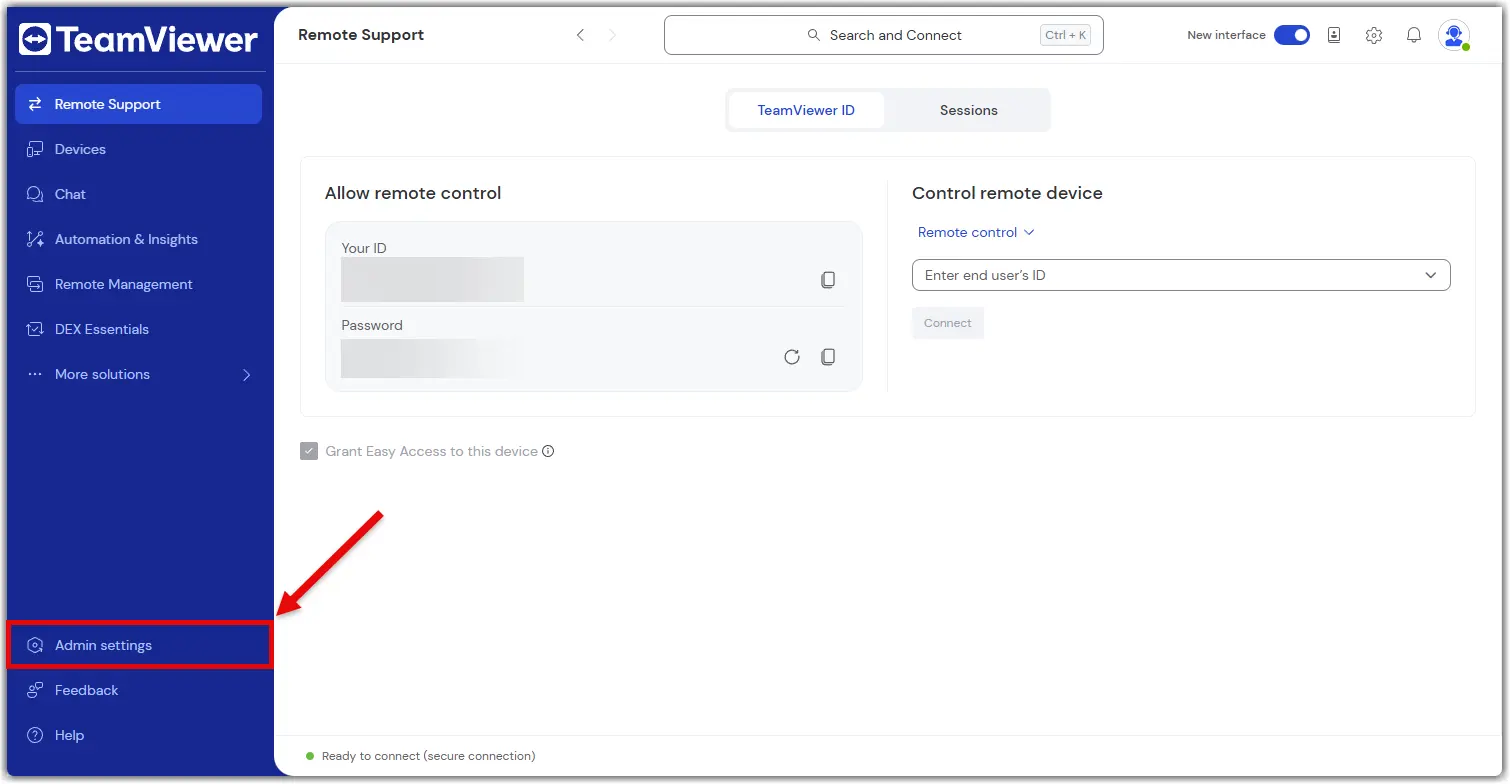
What you can do in the admin settings

The Admin settings give you everything you need to manage your TeamViewer environment, just like you did in the Management Console.

Here’s what you can do:

Create and apply policies

Set up security and access policies, then apply them to devices or groups.

Learn more here.

Manage devices

View all your company devices, assign them to users, and apply policies.

Learn more here.

Manage users

Add or remove users, assign roles, and organize them into groups.

Learn more here.

View connection reports

Track who connected to what, when, and for how long.

Learn more here.

Create custom modules

Build QuickSupport or Host modules with your branding and settings.

Learn more here.

Set up rollout configurations

Automate deployment with pre-configured settings for large-scale rollouts.

Learn more here.

Control company settings

Manage licenses, security settings, and integrations.

Learn more here.

Everything is in one place—no switching tabs, no extra logins.

지역을 선택하세요

지역을 선택하면 teamviewer.com 의 언어 및/또는 콘텐츠가 변경됩니다


제안된 지역

  • Americas

    • Americas - English
    • América Latina - Español
    • Brasil - Português
    • Canada - English
    • Canada - Français
    • United States - English
  • Asia Pacific

    • Asia Pacific - English
    • Australia - English
    • 中国 - 中⽂(简体)
    • 香港 - 繁體中文
    • India - English
    • 日本 - ⽇本語
    • New Zealand - English
    • 대한민국 - 한국어
    • 台灣-繁體中文
    • ประเทศไทย - ภาษาไทย
    • Việt Nam - Tiếng Việt
  • Commonwealth of Independent States

    • CIS - English
    • СНГ - Русский
  • Europe

    • Europe - English
    • Belgique - Français
    • België - Nederlands
    • Bulgaria - English
    • Croatia - English
    • Cyprus - English
    • Czechia - Čeština
    • Denmark - English
    • Deutschland - Deutsch
    • España - Español
    • Estonia - English
    • Finland - English
    • France - Français
    • Greece - English
    • Ireland - English
    • Italia - Italiano
    • Latvia - English
    • Liechtenstein - Deutsch
    • Liechtenstein - Français
    • Liechtenstein - Italiano
    • Lithuania - English
    • Luxembourg - Français
    • Magyarország - Magyar
    • Malta - English
    • Nederland - Nederlands
    • Norway - English
    • Österreich - Deutsch
    • Polska - Polski
    • Portugal - Português
    • Romania - English
    • Schweiz - Deutsch
    • Suisse - Français
    • Svizzera - Italiano
    • Slovakia - English
    • Slovenia - English
    • Sweden - English
    • Türkiye - Türkçe
    • United Kingdom - English
  • Middle East Africa

    • Middle East Africa - English
    • Middle East Africa - Français
  • 제품
    • TeamViewer Remote
    • TeamViewer Tensor
    • TeamViewer DEX
    • TeamViewer Frontline
    • 가격
  • ONE 플랫폼
    • TeamViewer ONE
    • 담당 팀에 문의
  • 솔루션
    • 산업별
    • 사용 사례별
    • 역할별
    • 대기업용
  • 파트너
    • 파트너 되기
    • 파트너 찾기
    • 통합 파트너
  • 리소스
    • 뉴스 및 인사이트
    • 고객 성공 사례
    • 트러스트 센터
  • 지원
    • 지원 팀에 문의
    • 가이드 및 매뉴얼
    • 기술 문서 데이터베이스
    • 시스템 상태
    • 사용자 지정 모듈
    • 개발자용
    • 커뮤니티
  • 회사소개
    • TeamViewer 소개
    • 채용
    • 투자자
    • 뉴스룸
    • 리더십
    • 스포츠 파트너십
    • 지속 가능성 및 CSR
  • 추가 링크
    • 영업팀에 문의하기
    • TeamViewer User Focus Program
    • Find Your Better
    • Newsletter
  • 개인정보 보호정책 (EN)
  • 문의
  • EULA / DPA (EN)
  • Product Descriptions
  • 기재사항
쿠키 설정

팀뷰어싱가포르 피티이엘티디 한국지점 대표이사: 올리버스타일, 이소정사업자등록번호: 602-84-01595사업장주소: 서울특별시 강남구 영동대로 517, 30층 (삼성동, 아셈타워)문의: [email protected]

www.teamviewer.com 웹사이트는 TeamViewer Germany GmbH (Bahnhofsplatz 2, 73033 Göppingen, Germany)에서 운영합니다.
대표자: Oliver Steil, Michael Wilkens, Mei Dent, Mark Banfield.
TeamViewer Germany GmbH는 독일 울름 지방 법원 에 No. HRB 534075로 등록되어 있습니다.