• Satış İletişimi
    • Web uygulamasını aç
    • Yönetim Konsolu
    • Bilet
    • Müşteri Portalı
TeamViewer
  • Kişisel kullanım ve SMB TeamViewer Remote

    Hızlı ve güvenli uzaktan erişim ve BT desteği.

    Daha fazla bilgi alın

    • Uzaktan destek Anında ve güvenli destek verin
    • Uzaktan yönetim Cihazları izleyin ve yönetin
    Planları ve fiyatlandırmayı görün

    Kurumsal TeamViewer Tensor

    Güvenli operasyon için uzak bağlantılar.

    Daha fazla bilgi alın

    • Uzaktan BT desteği Güvenli, esnek, entegre
    • Operasyonel teknoloji Uzaktan atölye erişimi

    Gerçek zamanlı sorun giderme TeamViewer DEX

    Sorunları kullanıcılar etkilenmeden çözün.

    Daha fazla bilgi alın

    • Uç nokta sorun giderme Sorunları tanımlayın ve çözün
    • Uç nokta otomasyonu Rutin BT görevlerini otomatikleştirin

    Bağlantılı çalışan TeamViewer Frontline

    Endüstriyel artırılmış gerçeklik ile verimliliği sürdürün.

    Daha fazla bilgi alın

    • Lojistik ve depolama Dokunmadan malzeme işleme
    • Eğitim ve oryantasyon Hızlı oryantasyon ve beceri geliştirme
    TeamViewer istemcisinde görüldüğü şekliyle yapay zeka özellikleri

    TeamViewer ONE

    TeamViewer’ın tüm gücünü, tek platformda birleşik olarak edinin.

    • Daha fazla bilgi alın

    Temel entegrasyonlar

    • Microsoft Intune

    • ServiceNow

    • Freshworks

    • Jira

    • Salesforce

    • Slack

    • Microsoft Teams

    Tüm entegrasyonları görüntüleyin
  • TeamViewer ONE Platformu

    Tek bir platformda birleşik dijital çalışma alanınızı proaktif olarak yönetin ve optimize edin.

    • Yalın BT ekipleri için Proaktif cihaz yönetimi
    • Sürtüşmesiz deneyim Pürüzsüz ve kesintisiz dijital deneyim
    • Sorunsuz BT operasyonu Proaktif düzeltme ve olağanüstü hizmet
    • Ekibimizle konuşun Dönüşüme hazır mısınız?
    Platformu keşfedin

    Temel Özellikler

    • TeamViewer AI
    • Dijital çalışan deneyimi
    • Uzaktan destek ve kontrol
    • Varlık ve yama yönetimi
    Tüm özellikleri görüntüleyin

    Gartner Report 2025

    TeamViewer, bir DEX lideri seçildi

    Gartner® Magic Quadrant™ DEX araçlarında, TeamViewer 2025’de lider seçildi.

    Temel Entegrasyonlar

    • Microsoft Intune

    • ServiceNow

    • Freshworks

    • Jira

    • Salesforce

    • Zendesk

    • Slack

    • Microsoft Teams

    Tüm entegrasyonları görüntüleyin
  • Popüler kullanım durumları

    • Uzaktan erişim ve destek Kişileri, cihazları ve uygulamaları İstediğiniz yerden yönetin.
    • Dijital çalışan deneyimi (DEX) BT sorunlarını, henüz üretkenliği etkilenmeden önce çözün.

    Diğer kullanım durumları

    • Uzaktan erişim Güvenli bağlantı ile erişimi iyileştirin
    • Uzaktan kontrol Platformdan bağımsız olarak cihazları kontrol edin
    • Uzak masaüstü Üretkenliği istediğiniz yerden geliştirin
    • LAN’da uyandırma Uzak cihaz aktivasyonunu etkinleştirin
    • Ekran paylaşma Gerçek zamanlı görsel iletişim
    • Smart Service Satış sonrası hizmetleri aksaksız kılın

    İhtiyaca göre Farklı ekipler için popüler çözümler

    • Kişisel kullanım Cihazlara her yerden erişin
    • Küçük işletmeler Uzaktan erişimi ve desteği basitleştirin
    • Büyük işletmeler Kurumsal BT’yi genişletin ve güvenli kılın
    • Serbest çalışanlar ve dijital göçebeler Herhangi bir konumdan güvenle çalışın
    • Yönetilen hizmetler sağlayıcıları İstemci BT’yi yönetin ve sürdürün
    • OEM’ler Destek ve operasyonları aksaksız kılın
    • Kar amacı gütmeyen kuruluş ve eğitim kurumu TeamViewer teknolojisi %30 indirimli

    Sektörlere göre Sektörlere göre sıralanmış popüler çözümler

    • Otomotiv
    • Tarım
    • Lojistik
    • Üretim
    • Perakende
    • Sağlık
    • Bankacılık ve finans
    • Kamu sektörü

    Satış ekibimizle konuşun

    Doğru çözümü seçmek, sipariş vermek veya lisansınızı yükseltmek konularında yardım mı gerekiyor?

    • Anlatın bize
  • Kurumsal
  • TeamViewer hakkında daha fazla bilgi edinin

    • TeamViewer Hakkında Güvenli şekilde bağlantılı kişiler, yerler ve nesneler.
    • İş ortağımız olun Global iş ortağı programı TeamUP’a katılın.
    • Destek ekibine ulaşın Destek makalelerinde gezinin veya ekibimize ulaşın.
    • Başarı öyküleri TeamViewer müşterilerinin elde ettikleri sonuçları keşfedin.
    HABERLER

    TeamViewer, müşterilerin AI teklifine hızlı adapte olduğunu bildiriyor.

    Kaynaklar

    • Haberler ve içgörüler
    • Başarı öyküleri
    • Etkinlikler ve web seminerleri
    • Güven Merkezi

    Ortak

    • İş ortağımız olun
    • Bir iş ortağı bulun
    • Entegrasyon iş ortakları

    Destek

    • Destek ekibine ulaşın
    • Rehberler ve kılavuzlar
    • Bilgi Tabanı
    • Sistem durumu
    • Özel modüller
    • Geliştiriciler için
    • Topluluk

    Firma

    • TeamViewer Hakkında
    • Kariyer
    • Yatırımcılar
    • Haber odası
    • Liderlik
    • Spor iş ortaklığı
    • Sürdürülebilirlik ve CSR
  • Fiyatlar
  • Ücretsiz İndirin

Knowledge Base

  • TeamViewer ONE
  • TeamViewer Remote
  • TeamViewer (Classic)
  • TeamViewer Tensor
  • TeamViewer Tensor (Classic)
  • TeamViewer Frontline
  • Other products
Back to support overview
  • Get started
    • Get started with TeamViewer Remote
    • TeamViewer Remote FAQ
    • Management Console integrated into TeamViewer's admin settings
    • Switch to the new interface
    • Customize your navigation in TeamViewer
    • Use TeamViewer Remote's latest version
    • Enhanced accessibility during TeamViewer remote sessions on Windows
    • The TeamViewer deployment and configuration guide
  • Account
    • Create your account
    • Sign in with your account
    • Two-factor authentication for your account
    • Change your account information
    • Reset your account password
    • Delete your account
    • Account verification requirement
  • Download and Installation
    • Download and install TeamViewer
    • Uninstall TeamViewer
    • Supported operating systems for TeamViewer
    • Download older TeamViewer versions
    • TeamViewer insider builds
    • Use TeamViewer on Windows servers
    • Use TeamViewer on cloned systems
    • Linux
      • Install TeamViewer (Classic) on Linux
      • Install TeamViewer (Classic) on Linux without graphical user interface
      • Install TeamViewer (Classic) on Red Hat and CentOS
      • Install TeamViewer (Classic) on SUSE Enterprise 15 SP2
      • Install TeamViewer (Classic) on Ubuntu
      • Install TeamViewer (Classic) on other Linux distributions
      • Install older TeamViewer (Classic) versions on Linux
      • Solve incoming connection problems on Fedora 29 and newer
      • System Tray, StatusNotifier and TeamViewer (Classic) for Linux
      • Use the TAR package for Linux
  • Update
    • Update TeamViewer
    • Update TeamViewer via policy
  • Modules
    • Full client
    • QuickSupport and custom QuickSupport
    • Host and custom Host
  • Remote control
    • Connect via device dock
    • Connect via ID and password
    • Provide attended remote support
    • Provide unattended remote support
    • Remote control a Mac
    • Troubleshoot IT Issues with Tia (TeamViewer Intelligent Agent)
    • Use TeamViewer Remote in LAN
    • Use TeamViewer Remote on Windows servers
    • Connect to a contact
    • Connect via Windows Authentication to control UAC during a TeamViewer session
    • Access the command prompt via Remote terminal connection
    • TeamViewer VPN
    • Where to find my ID and password?
    • Open a file transfer session
    • Share files with the file box
    • Remote session toolbar
    • Paste the clipboard as keystrokes during a remote session
    • Wake up a device remotely
    • Add a virtual monitor to your remote device
    • Generate session summaries with Session Insights
    • Save the chat history of a TeamViewer session
    • Forward local key input with the direct keyboard mode
    • Control clipboard sync during remote support sessions
  • Company and users
    • Create a company
    • Add users to your company
    • Manage your users
    • Export your users
    • User roles
    • User role permissions - Overview
    • Company settings
    • Create user groups
  • Devices
    • The new device management system explained
    • Automatic device migration explained
    • Add a new device to your account and your company
    • Add a device via link
    • Add a device via a remote session
    • Add a device via rollout configuration
    • Create, edit and delete a device group
    • Assign user groups to device groups and devices
    • Assign managers to device groups or devices
    • Edit manager permissions on devices
    • Apply manager permissions at group level
    • Move devices to a group and apply a policy
    • Delete a device
    • Bookmarked vs. managed devices
    • Device groups explained
    • Add and remove existing devices from groups
    • Understanding how manager permissions work
    • Find the best view to display your devices and device groups
    • Expand device overview and filter devices
    • Navigate and connect using Global Search
    • Use device custom fields
    • Policies
    • Policy rules
  • Deployment
    • Deploy TeamViewer on device groups via Microsoft Intune
    • TeamViewer deployment - User guide
      • Create your company (with a primary account) - 1/8
      • Add your users to your company - 2/8
      • Create your module - 3/8
      • Create your policy - 4/8
      • Create a device group - 5/8
      • Create a rollout configuration - 6/8
      • Download the installer - 7/8
      • Deploy TeamViewer (Host or full client) - 8/8
      • Assign existing TeamViewer installations via command line
      • Grant Easy access to your devices and device groups
  • Mobile
    • Provide attended remote support for mobile
    • Enhance iOS remote support with Visual Guidance
    • Set up remote control for Samsung Knox devices via your MDM
    • Remotely control a Sony Bravia TV
  • Security
    • Increase your security posture with the Security Center
    • Expert Identity
    • Security Statement - How secure is TeamViewer?
    • Trust devices via push notification
    • Block and allowlist
    • Connection reports
    • TeamViewer and scamming
    • Enforce two-factor authentication for your company members
    • Enable the screen sharing indicator for your remote sessions
    • TeamViewer Black Screen
  • Licenses
    • Activate and set up your Remote Access license
    • Get started with your TeamViewer Business license
    • Get started with your TeamViewer Premium or Corporate license
    • Activate your Tensor license
    • Activate your TeamViewer ONE license
    • Licenses and Features
      • All TeamViewer licenses - Feature overview
      • Free license - Feature overview
      • Remote Access license - Feature overview
      • Business license - Feature overview
      • Premium license - Feature overview
      • Corporate license - Feature overview
      • Tensor license - Feature overview
      • FAQ on Remote Access license
    • TeamViewer Customer Portal
  • Service management
    • Service Desk
    • Manage service cases with Service Queue
    • Service Portals
  • Remote Management
    • Get started with TeamViewer Remote Management
    • Supported operating systems for Remote Management
    • Activate your Remote Management License
    • Remote Management Policies
    • Uninstall Remote Management services
    • TeamViewer Monitoring
      • Get started with TeamViewer Monitoring
      • Rule-based task automation
      • Event log check
      • Add and create scripts
      • Execute scripts remotely
      • Advanced Monitoring using 1E technology
    • TeamViewer Asset Management
      • Get started with TeamViewer Asset Management
      • Deploying missing patches and new software
      • Asset Management reporting
      • Troubleshooting Asset Management installations
    • TeamViewer Endpoint Protection
      • Get started with TeamViewer Endpoint Protection
      • Get started with TeamViewer Endpoint Detection and Response
      • Endpoint Protection settings
      • Managed Detection and Response
      • Managed Threat Hunting
      • Network access and firewall settings for Endpoint Protection
    • TeamViewer Backup
      • Get started with TeamViewer Backup
    • TeamViewer Mobile Device Management
      • Mobile Device Management - Overview
      • Set up the MDM environment
      • Mobile Apps Catalog
      • Mobile Device Management configurations
      • Mobile Device Management policies
      • Mobile Device Management users
      • Mobile Device Management User groups
      • Mobile Device Management devices
      • Mobile Device Management Device groups
      • Connect to a device via TeamViewer MDM
      • Connect to a device via TeamViewer MDM - QuickStart Guide
      • Mobile Device Management - Android Bulk Enrollment
    • TeamViewer Monitoring & Asset Management (Classic)
      • TeamViewer Monitoring & Asset Management (Classic) - Overview
      • Get started with TeamViewer Monitoring (Classic)
      • Event Log Check
      • Add & create scripts
      • Execute scripts remotely
      • Get started with Asset Management (Classic)
  • TeamViewer DEX Essentials
    • Get started with TeamViewer DEX Essentials
  • Meeting
    • Create and join a meeting
  • For developers
    • Use the TeamViewer API
    • Build a TeamViewer integration
    • Command line parameters
  • Troubleshooting
    • Ports and URLs used by TeamViewer
    • Black screen after starting a connection
    • Company logo not displayed within QuickSupport
    • Error message: Reason Unknown
    • Fix connectivity issues - Partner did not connect to router
    • Log file reading - Incoming connection
    • Not ready. Please check your connection
    • Resolve High CPU usage
    • Solve an aborted file transfer
    • TeamViewer Status - Is TeamViewer Down?
    • Time limitation on licensed connections
    • Troubleshoot after a Backup or OS update on MAC
    • Troubleshoot connection issues using killernetworking driver
    • Troubleshoot remote printing
    • Use TeamViewer (Classic) on headless systems
  • Contact Support
    • Submit a ticket
    • Run Support Collector
    • Find your log files
    • Join our User Focus Program
    • Password for TeamViewer server
  • TeamViewer EULA and DPA
  • Management Console integrated into TeamViewer's admin settings

    Last Modified: 11 Ağu 2025

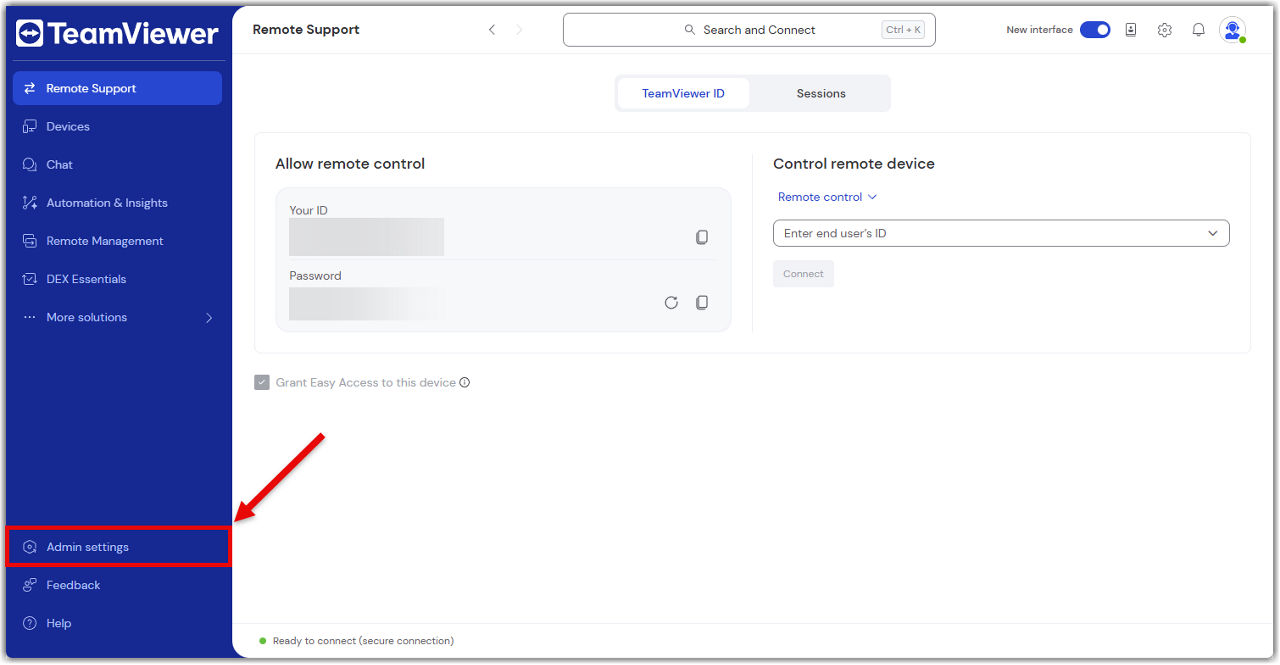
All the powerful features of the Management Console are now built directly into TeamViewer. Instead of switching to a separate web portal, administrators can now manage users, devices, policies, and more, right from the Admin settings in the TeamViewer Remote desktop app or via the browser.

This article applies to all administrators of Premium, Corporate, or Tensor licenses.

Access the admin settings in TeamViewer

You can now access all admin tools directly in the TeamViewer Remote desktop app or via the browser.

To access the admin settings, please follow the instructions below:

  1. Sign in with your TeamViewer admin account into the TeamViewer client or via https://web.teamviewer.com/.
  2. On the bottom-left, you’ll find the Admin settings.
What you can do in the admin settings

The Admin settings give you everything you need to manage your TeamViewer environment, just like you did in the Management Console.

Here’s what you can do:

Create and apply policies

Set up security and access policies, then apply them to devices or groups.

Learn more here.

Manage devices

View all your company devices, assign them to users, and apply policies.

Learn more here.

Manage users

Add or remove users, assign roles, and organize them into groups.

Learn more here.

View connection reports

Track who connected to what, when, and for how long.

Learn more here.

Create custom modules

Build QuickSupport or Host modules with your branding and settings.

Learn more here.

Set up rollout configurations

Automate deployment with pre-configured settings for large-scale rollouts.

Learn more here.

Control company settings

Manage licenses, security settings, and integrations.

Learn more here.

Everything is in one place—no switching tabs, no extra logins.

Lütfen bölgenizi seçin

Bir bölge seçmek, teamviewer.com'daki dili ve/veya içeriği değiştirir


ÖNERİLEN BÖLGE

  • Americas

    • Americas - English
    • América Latina - Español
    • Brasil - Português
    • Canada - English
    • Canada - Français
    • United States - English
  • Asia Pacific

    • Asia Pacific - English
    • Australia - English
    • 中国 - 中⽂(简体)
    • 香港 - 繁體中文
    • India - English
    • 日本 - ⽇本語
    • New Zealand - English
    • 대한민국 - 한국어
    • 台灣-繁體中文
    • ประเทศไทย - ภาษาไทย
    • Việt Nam - Tiếng Việt
  • Commonwealth of Independent States

    • CIS - English
    • СНГ - Русский
  • Europe

    • Europe - English
    • Belgique - Français
    • België - Nederlands
    • Bulgaria - English
    • Croatia - English
    • Cyprus - English
    • Czechia - Čeština
    • Denmark - English
    • Deutschland - Deutsch
    • España - Español
    • Estonia - English
    • Finland - English
    • France - Français
    • Greece - English
    • Ireland - English
    • Italia - Italiano
    • Latvia - English
    • Liechtenstein - Deutsch
    • Liechtenstein - Français
    • Liechtenstein - Italiano
    • Lithuania - English
    • Luxembourg - Français
    • Magyarország - Magyar
    • Malta - English
    • Nederland - Nederlands
    • Norway - English
    • Österreich - Deutsch
    • Polska - Polski
    • Portugal - Português
    • Romania - English
    • Schweiz - Deutsch
    • Suisse - Français
    • Svizzera - Italiano
    • Slovakia - English
    • Slovenia - English
    • Sweden - English
    • Türkiye - Türkçe
    • United Kingdom - English
  • Middle East Africa

    • Middle East Africa - English
    • Middle East Africa - Français
  • Ürünler
    • TeamViewer Remote
    • TeamViewer Tensor
    • TeamViewer DEX
    • TeamViewer Frontline
    • Fiyatlar
  • ONE platformu
    • TeamViewer ONE
    • Ekibimizle konuşun
  • Çözümler
    • Sektörlere göre
    • Kullanım alanlarına göre
    • Rollere göre
    • Kurumsal
  • Ortaklar
    • İş ortağımız olun
    • Bir iş ortağı bulun
    • Entegrasyon iş ortakları
  • Kaynaklar
    • Haberler ve içgörüler
    • Başarı öyküleri
    • Güven Merkezi
  • Destek
    • Destek ekibine ulaşın
    • Rehberler ve kılavuzlar
    • Bilgi Tabanı
    • Sistem durumu
    • Özel modüller
    • Geliştiriciler için
    • Topluluk
  • Firma
    • TeamViewer Hakkında
    • Kariyer
    • Yatırımcılar
    • Haber odası
    • Liderlik
    • Spor iş ortaklığı
    • Sürdürülebilirlik ve CSR
  • Ekstra Bağlantılar
    • Satış İletişimi
    • TeamViewer User Focus Program
    • Make work work better
    • Haber bülteni
  • SKLA (EN)
  • Product Descriptions
  • Künye
  • Gizlilik ve Tanımlama Bilgileri (EN)
  • İletişim
Tanımlama Bilgisi Ayarları