Knowledge Base
Trusted Devices
Last Modified: Feb 5, 2026
Trusted Devices provide an extra layer of security for your TeamViewer account. As a preventive measure to ensure your account's security, you need to authorize new devices on which you sign in to your TeamViewer Account for the first time.
This article applies to all TeamViewer (Classic) users.
Add a Trusted Device
To add a Trusted Device, please follow the instructions in the video below:
To add your device to your Trusted Devices, please follow these steps:
1. After signing in to the TeamViewer Account credentials on a new device for the first time, the following pop-up appears:
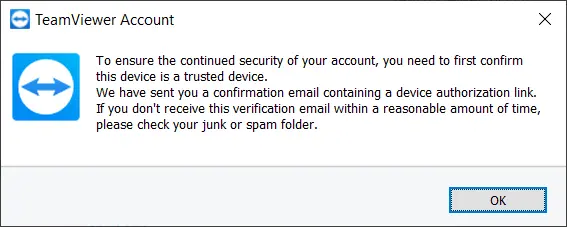
2. A device authorization email is sent to the email address of your TeamViewer account.
Note: The link in this email is only valid for 24 hours. If the link expires, you will need to sign in to your account once more on the new device, so that a new authorization email can be generated
3. Click on the link within the email to authorize the device. You will be forwarded to the TeamViewer Management Console. Here, you can complete the authorization process by choosing the kind of trust scope you would like to grant, followed by clicking on the blue button Trust.
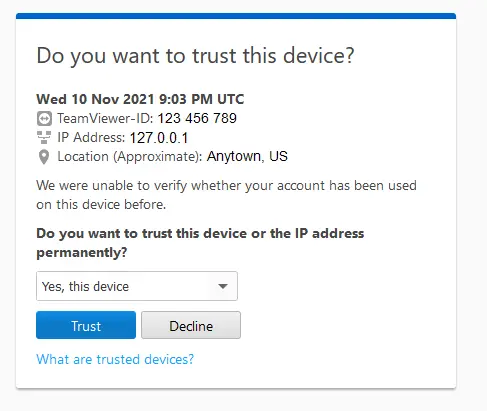
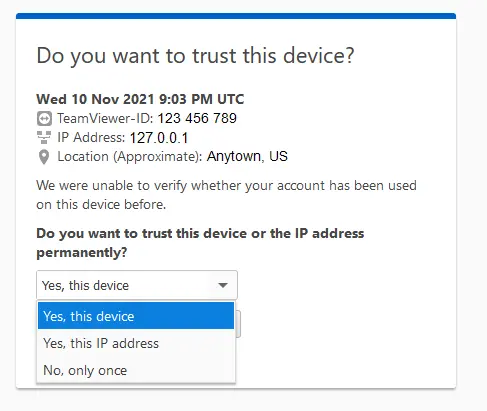
4. Please choose from the drop-down menu whether you would like to trust this specific device or the IP address permanently or whether you would like to trust this device only once:
5. A message is displayed in the Management Console informing you that the new device is now a Trusted Device.
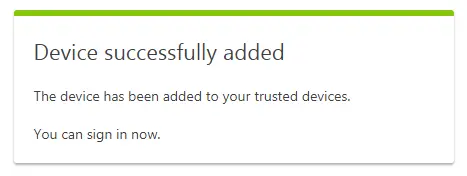
Once you complete the authorization process, you can sign in on the new device with your TeamViewer account credentials.
Trust Scope
Trust device
You are setting the trust for the specific device.
Note: There is more than one trust per device due to technical reasons. You must set separate trusts for the TeamViewer client, the Management Console (per browser), and each TeamViewer (Classic) application.
The browser's trust will be lost when the cookies are deleted.
Trust IP address
You can decide whether you would like to trust a single device only or if you would like to trust the IP address. Your account's trust is extended to all other devices in the same local network. You can now log in with all devices/instances that log in from the trusted IP address.
When the IP address changes, you will get the trusted device mail only for new devices that haven't signed in before the IP address has changed.
Trust only once
This trust scope can be used when you only want to login in to the device once (on a device from your customer, in an Internet cafe, etc). It is only valid for one login on the device.
The trust will be deleted after you log in from the trusted device. When you try to re-login you will get the trusted device message again.
Trust Management for Trusted devices
As an addition to the Trusted Device feature, you can now manage your Trusted Devices within the TeamViewer (Classic) Management Console.
Please read this article for more information: Trust Management for Trusted Devices
Alternative to Trusted Devices
Two-factor authentication
As an alternative to the Trusted Devices authorization process, you can enable two-factor authentication on your account instead. If you are using Two-Factor Authentication, then the Trusted Devices authorization email won’t be required anymore when you sign in to your account on a new device.
Learn which Security codes and apps you can use for your two-factor authentication.
You can find more information about the activation and deactivation of two-factor authentication here.