• 聯絡銷售人員
    • 開啟網頁應用程式
    • 管理主控台
    • 工單
    • 客戶入口網站
TeamViewer
  • 個人使用與中小型企業 TeamViewer Remote

    安全快速的遠端存取與 IT 支援。

    瞭解更多

    • 遠端支援 提供即時、安全的支援
    • 遠端管理 監控和管理裝置
    查看方案與價格

    企業 TeamViewer Tensor

    為安全運作而創建的遠端連線功能。

    瞭解更多

    • 遠端 IT 支援 安全、靈活、整合
    • 運營技術 遠端車間存取

    即時故障排除 TeamViewer DEX

    在使用者受到影響前解決問題。

    瞭解更多

    • 端點故障排除 識別並解決問題
    • 端點自動化 自動執行常規 IT 任務

    連線工作者 TeamViewer Frontline

    工業擴增實境極大提升工作效率。

    瞭解更多

    • 物流與倉儲 無人物料搬運
    • 訓練和入職 快速完成入職訓練,實現技能提升
    TeamViewer 用戶端顯示的 AI 功能

    TeamViewer ONE

    於一個平台暢享 TeamViewer 的全部功能。

    • 瞭解更多

    關鍵整合功能

    • Microsoft Intune

    • ServiceNow

    • Freshworks

    • Jira

    • Salesforce

    • Slack

    • Microsoft Teams

    檢視所有整合功能
  • TeamViewer ONE 平台

    所有功能整合於一個平台中,主動管理並優化您的數位工作空間。

    • 適用於精簡的 IT 團隊 前瞻式裝置管理
    • 無縫體驗 順暢連續的數位化體驗
    • 無縫 IT 運作 前瞻式修復與卓越的服務
    • 請聯絡我們的團隊 準備好轉型了嗎?
    探索此平台

    Core 功能

    • TeamViewer AI
    • 數位員工體驗
    • 遠端支援與控制
    • 資產與修補程式管理
    檢視所有功能

    2025 年 Gartner 報告

    TeamViewer 被評為 DEX 工具領域的領導者

    TeamViewer 被評為 2025 年 Gartner® Magic Quadrant™ DEX 工具領域的領導者。

    關鍵整合功能

    • Microsoft Intune

    • ServiceNow

    • Freshworks

    • Jira

    • Salesforce

    • Zendesk

    • Slack

    • Microsoft Teams

    檢視所有整合功能
  • 熱門使用案例

    • 遠端存取與支援 隨時隨地管理人員、裝置與應用程式。
    • 數位員工體驗 (DEX) 前瞻式解決 IT 問題,避免影響工作效率。

    其他使用案例

    • 遠端存取 透過安全連線改進存取
    • 遠端控制 跨平台對裝置進行控制
    • 遠端桌面 隨時隨地提升工作效率
    • Wake-on-LAN(遠端喚醒) 啟用遠端裝置啟動
    • 螢幕共用 即時視覺化通訊
    • 智慧服務 簡化售後運作

    按照需求 不同團隊的熱門解決方案

    • 個人用途 您可從任何地點存取裝置
    • 小型企業 簡化遠端存取與支援
    • 大型企業 擴展並保障企業 IT 安全
    • 自由工作者與數位遊民 隨時隨地安全工作
    • 託管服務供應商 管理與維護客戶 IT 系統
    • 原始設備製造商 簡化支援與運作
    • 非營利及教育行業 TeamViewer 技術享 30% 優惠

    按照行業 按行業分類的熱門解決方案

    • 汽車
    • 農業
    • 物流
    • 製造業
    • 零售
    • 醫療保健
    • 銀行與金融
    • 公共領域

    請聯絡我們的銷售團隊

    需要協助選擇理想的解決方案、下單或升級授權嗎?

    • 請聯絡我們
  • 企業版
  • 瞭解關於 TeamViewer 的詳情

    • 關於 TeamViewer 安全地連線到他人、地點與物聯網。
    • 聯絡支援團隊 瀏覽支援文章或聯絡我們的團隊。
    • 成為合作夥伴 加入我們的全球合作夥伴計劃 TeamUP。
    • 成功案例 探索 TeamViewer 客戶取得的成果。
    新聞

    TeamViewer 報告稱,其 Al 服務獲得客戶廣泛採用。

    資源

    • 新聞與洞見
    • 成功案例
    • 活動與網路研討會
    • 信任中心

    合作夥伴

    • 成為合作夥伴
    • 尋找合作夥伴
    • 整合合作夥伴

    支援

    • 聯絡支援團隊
    • 指南和手冊
    • 知識庫
    • 系統狀態
    • 自訂模組
    • 針對開發人員
    • 社群

    公司

    • 關於 TeamViewer
    • 工作機會
    • 投資商
    • 新聞中心
    • 領導層
    • 體育行業夥伴關係
    • 可持續發展及企業社會責任
  • 價格
  • 免費下載

Knowledge Base

  • TeamViewer ONE
  • TeamViewer Remote
  • TeamViewer (Classic)
  • TeamViewer Tensor
  • TeamViewer Tensor (Classic)
  • TeamViewer Frontline
  • Other products
Back to support overview
  • Get started
    • Get started with TeamViewer Remote
    • TeamViewer Remote FAQ
    • Management Console integrated into TeamViewer's admin settings
    • Switch to the new interface
    • Customize your navigation in TeamViewer
    • Use TeamViewer Remote's latest version
    • Enhanced accessibility during TeamViewer remote sessions on Windows
    • The TeamViewer deployment and configuration guide
  • Account
    • Create your account
    • Sign in with your account
    • Two-factor authentication for your account
    • Change your account information
    • Reset your account password
    • Delete your account
    • Account verification requirement
  • Download and Installation
    • Download and install TeamViewer
    • Uninstall TeamViewer
    • Supported operating systems for TeamViewer
    • Download older TeamViewer versions
    • TeamViewer insider builds
    • Use TeamViewer on Windows servers
    • Use TeamViewer on cloned systems
    • Linux
      • Install TeamViewer (Classic) on Linux
      • Install TeamViewer (Classic) on Linux without graphical user interface
      • Install TeamViewer (Classic) on Red Hat and CentOS
      • Install TeamViewer (Classic) on SUSE Enterprise 15 SP2
      • Install TeamViewer (Classic) on Ubuntu
      • Install TeamViewer (Classic) on other Linux distributions
      • Install older TeamViewer (Classic) versions on Linux
      • Solve incoming connection problems on Fedora 29 and newer
      • System Tray, StatusNotifier and TeamViewer (Classic) for Linux
      • Use the TAR package for Linux
  • Update
    • Update TeamViewer
    • Update TeamViewer via policy
  • Modules
    • Full client
    • QuickSupport and custom QuickSupport
    • Host and custom Host
  • Remote control
    • Connect via device dock
    • Connect via ID and password
    • Provide attended remote support
    • Provide unattended remote support
    • Remote control a Mac
    • Troubleshoot IT Issues with Tia (TeamViewer Intelligent Agent)
    • Use TeamViewer Remote in LAN
    • Use TeamViewer Remote on Windows servers
    • Connect to a contact
    • Connect via Windows Authentication to control UAC during a TeamViewer session
    • Access the command prompt via Remote terminal connection
    • TeamViewer VPN
    • Where to find my ID and password?
    • Open a file transfer session
    • Share files with the file box
    • Remote session toolbar
    • Paste the clipboard as keystrokes during a remote session
    • Wake up a device remotely
    • Add a virtual monitor to your remote device
    • Generate session summaries with Session Insights
    • Save the chat history of a TeamViewer session
    • Forward local key input with the direct keyboard mode
    • Control clipboard sync during remote support sessions
  • Company and users
    • Create a company
    • Add users to your company
    • Manage your users
    • Export your users
    • User roles
    • User role permissions - Overview
    • Company settings
    • Create user groups
  • Devices
    • The new device management system explained
    • Automatic device migration explained
    • Add a new device to your account and your company
    • Add a device via link
    • Add a device via a remote session
    • Add a device via rollout configuration
    • Create, edit and delete a device group
    • Assign user groups to device groups and devices
    • Assign managers to device groups or devices
    • Edit manager permissions on devices
    • Apply manager permissions at group level
    • Move devices to a group and apply a policy
    • Delete a device
    • Bookmarked vs. managed devices
    • Device groups explained
    • Add and remove existing devices from groups
    • Understanding how manager permissions work
    • Find the best view to display your devices and device groups
    • Expand device overview and filter devices
    • Navigate and connect using Global Search
    • Use device custom fields
    • Policies
    • Policy rules
  • Deployment
    • Deploy TeamViewer on device groups via Microsoft Intune
    • TeamViewer deployment - User guide
      • Create your company (with a primary account) - 1/8
      • Add your users to your company - 2/8
      • Create your module - 3/8
      • Create your policy - 4/8
      • Create a device group - 5/8
      • Create a rollout configuration - 6/8
      • Download the installer - 7/8
      • Deploy TeamViewer (Host or full client) - 8/8
      • Assign existing TeamViewer installations via command line
      • Grant Easy access to your devices and device groups
  • Mobile
    • Provide attended remote support for mobile
    • Enhance iOS remote support with Visual Guidance
    • Set up remote control for Samsung Knox devices via your MDM
    • Remotely control a Sony Bravia TV
  • Security
    • Increase your security posture with the Security Center
    • Expert Identity
    • Security Statement - How secure is TeamViewer?
    • Trust devices via push notification
    • Block and allowlist
    • Connection reports
    • TeamViewer and scamming
    • Enforce two-factor authentication for your company members
    • Enable the screen sharing indicator for your remote sessions
    • TeamViewer Black Screen
  • Licenses
    • Activate and set up your Remote Access license
    • Get started with your TeamViewer Business license
    • Get started with your TeamViewer Premium or Corporate license
    • Activate your Tensor license
    • Activate your TeamViewer ONE license
    • Licenses and Features
      • All TeamViewer licenses - Feature overview
      • Free license - Feature overview
      • Remote Access license - Feature overview
      • Business license - Feature overview
      • Premium license - Feature overview
      • Corporate license - Feature overview
      • Tensor license - Feature overview
      • FAQ on Remote Access license
    • TeamViewer Customer Portal
  • Service management
    • Service Desk
    • Manage service cases with Service Queue
    • Service Portals
  • Remote Management
    • Get started with TeamViewer Remote Management
    • Supported operating systems for Remote Management
    • Activate your Remote Management License
    • Remote Management Policies
    • Uninstall Remote Management services
    • TeamViewer Monitoring
      • Get started with TeamViewer Monitoring
      • Rule-based task automation
      • Event log check
      • Add and create scripts
      • Execute scripts remotely
      • Advanced Monitoring using 1E technology
    • TeamViewer Asset Management
      • Get started with TeamViewer Asset Management
      • Deploying missing patches and new software
      • Asset Management reporting
      • Troubleshooting Asset Management installations
    • TeamViewer Endpoint Protection
      • Get started with TeamViewer Endpoint Protection
      • Get started with TeamViewer Endpoint Detection and Response
      • Endpoint Protection settings
      • Managed Detection and Response
      • Managed Threat Hunting
      • Network access and firewall settings for Endpoint Protection
    • TeamViewer Backup
      • Get started with TeamViewer Backup
    • TeamViewer Mobile Device Management
      • Mobile Device Management - Overview
      • Set up the MDM environment
      • Mobile Apps Catalog
      • Mobile Device Management configurations
      • Mobile Device Management policies
      • Mobile Device Management users
      • Mobile Device Management User groups
      • Mobile Device Management devices
      • Mobile Device Management Device groups
      • Connect to a device via TeamViewer MDM
      • Connect to a device via TeamViewer MDM - QuickStart Guide
      • Mobile Device Management - Android Bulk Enrollment
    • TeamViewer Monitoring & Asset Management (Classic)
      • TeamViewer Monitoring & Asset Management (Classic) - Overview
      • Get started with TeamViewer Monitoring (Classic)
      • Event Log Check
      • Add & create scripts
      • Execute scripts remotely
      • Get started with Asset Management (Classic)
  • TeamViewer DEX Essentials
    • Get started with TeamViewer DEX Essentials
  • Meeting
    • Create and join a meeting
  • For developers
    • Use the TeamViewer API
    • Build a TeamViewer integration
    • Command line parameters
  • Troubleshooting
    • Ports and URLs used by TeamViewer
    • Black screen after starting a connection
    • Company logo not displayed within QuickSupport
    • Error message: Reason Unknown
    • Fix connectivity issues - Partner did not connect to router
    • Log file reading - Incoming connection
    • Not ready. Please check your connection
    • Resolve High CPU usage
    • Solve an aborted file transfer
    • TeamViewer Status - Is TeamViewer Down?
    • Time limitation on licensed connections
    • Troubleshoot after a Backup or OS update on MAC
    • Troubleshoot connection issues using killernetworking driver
    • Troubleshoot remote printing
    • Use TeamViewer (Classic) on headless systems
  • Contact Support
    • Submit a ticket
    • Run Support Collector
    • Find your log files
    • Join our User Focus Program
    • Password for TeamViewer server
  • TeamViewer EULA and DPA
  • Management Console integrated into TeamViewer's admin settings

    Last Modified: 2025年8月11日

All the powerful features of the Management Console are now built directly into TeamViewer. Instead of switching to a separate web portal, administrators can now manage users, devices, policies, and more, right from the Admin settings in the TeamViewer Remote desktop app or via the browser.

This article applies to all administrators of Premium, Corporate, or Tensor licenses.

Access the admin settings in TeamViewer

You can now access all admin tools directly in the TeamViewer Remote desktop app or via the browser.

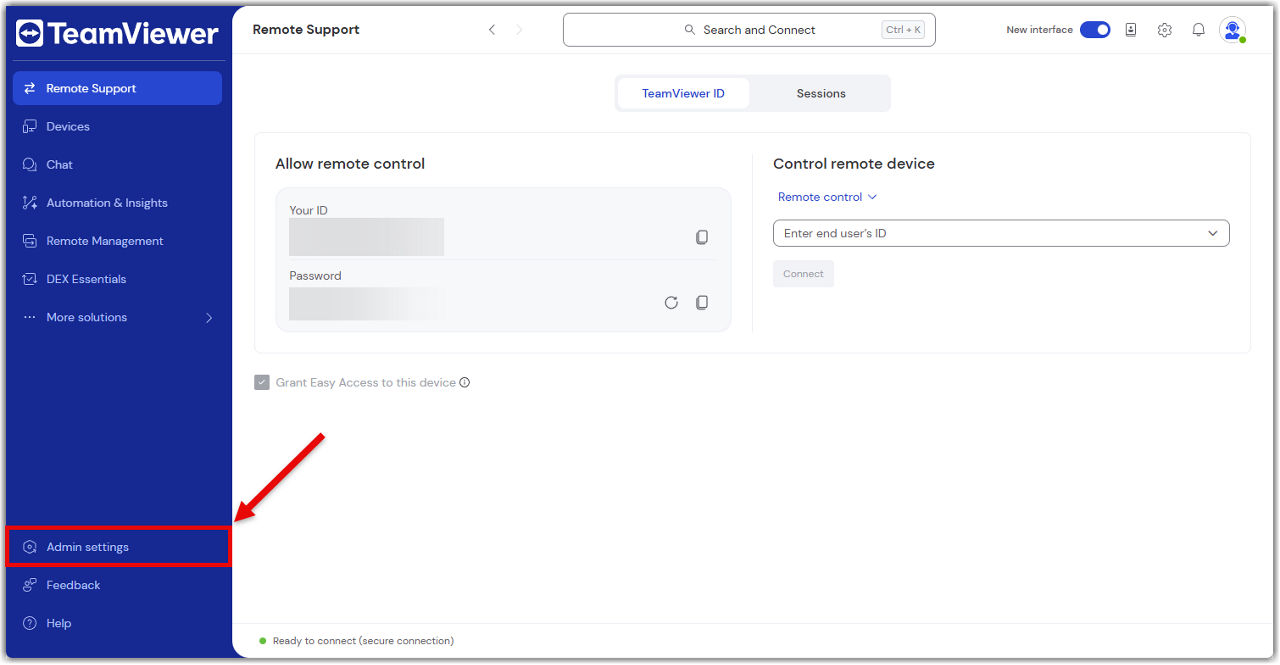
To access the admin settings, please follow the instructions below:

  1. Sign in with your TeamViewer admin account into the TeamViewer client or via https://web.teamviewer.com/.
  2. On the bottom-left, you’ll find the Admin settings.
What you can do in the admin settings

The Admin settings give you everything you need to manage your TeamViewer environment, just like you did in the Management Console.

Here’s what you can do:

Create and apply policies

Set up security and access policies, then apply them to devices or groups.

Learn more here.

Manage devices

View all your company devices, assign them to users, and apply policies.

Learn more here.

Manage users

Add or remove users, assign roles, and organize them into groups.

Learn more here.

View connection reports

Track who connected to what, when, and for how long.

Learn more here.

Create custom modules

Build QuickSupport or Host modules with your branding and settings.

Learn more here.

Set up rollout configurations

Automate deployment with pre-configured settings for large-scale rollouts.

Learn more here.

Control company settings

Manage licenses, security settings, and integrations.

Learn more here.

Everything is in one place—no switching tabs, no extra logins.

請選擇您所在的地區

選擇區域會更改 teamviewer.com 上的語言和/或內容


建議區域

  • Americas

    • Americas - English
    • América Latina - Español
    • Brasil - Português
    • Canada - English
    • Canada - Français
    • United States - English
  • Asia Pacific

    • Asia Pacific - English
    • Australia - English
    • 中国 - 中⽂(简体)
    • 香港 - 繁體中文
    • India - English
    • 日本 - ⽇本語
    • New Zealand - English
    • 대한민국 - 한국어
    • 台灣-繁體中文
    • ประเทศไทย - ภาษาไทย
    • Việt Nam - Tiếng Việt
  • Commonwealth of Independent States

    • CIS - English
    • СНГ - Русский
  • Europe

    • Europe - English
    • Belgique - Français
    • België - Nederlands
    • Bulgaria - English
    • Croatia - English
    • Cyprus - English
    • Czechia - Čeština
    • Denmark - English
    • Deutschland - Deutsch
    • España - Español
    • Estonia - English
    • Finland - English
    • France - Français
    • Greece - English
    • Ireland - English
    • Italia - Italiano
    • Latvia - English
    • Liechtenstein - Deutsch
    • Liechtenstein - Français
    • Liechtenstein - Italiano
    • Lithuania - English
    • Luxembourg - Français
    • Magyarország - Magyar
    • Malta - English
    • Nederland - Nederlands
    • Norway - English
    • Österreich - Deutsch
    • Polska - Polski
    • Portugal - Português
    • Romania - English
    • Schweiz - Deutsch
    • Suisse - Français
    • Svizzera - Italiano
    • Slovakia - English
    • Slovenia - English
    • Sweden - English
    • Türkiye - Türkçe
    • United Kingdom - English
  • Middle East Africa

    • Middle East Africa - English
    • Middle East Africa - Français
  • 產品
    • TeamViewer Remote
    • TeamViewer Tensor
    • TeamViewer DEX
    • TeamViewer Frontline
    • 價格
  • ONE 平台
    • TeamViewer ONE
    • 請聯絡我們的團隊
  • 解決方案
    • 按照行業
    • 按照使用案例
    • 按照角色
    • 企業版
  • 合作夥伴
    • 成為合作夥伴
    • 尋找合作夥伴
    • 整合合作夥伴
  • 資源
    • 新聞與洞見
    • 成功案例
    • 信任中心
  • 支援
    • 聯絡支援團隊
    • 指南和手冊
    • 知識庫
    • 系統狀態
    • 自訂模組
    • 針對開發人員
    • 社群
  • 公司簡介
    • 關於 TeamViewer
    • 工作機會
    • 投資商
    • 新聞中心
    • 領導層
    • 體育行業夥伴關係
    • 可持續發展及企業社會責任
  • 額外連結
    • 聯絡銷售人員
    • TeamViewer User Focus Program
    • Make work work better
    • 電子通訊
  • 使用者授權合約 (EN)
  • Product Descriptions
  • 版權標記
  • 隱私權政策 (EN)
  • 聯絡方式
Cookie 設置