
知识库
适用于IBM MaaS360的TeamViewer入门指南
上次修改时间: 2024年3月12日
本文适用于直接通过 IBM购买 TeamViewer 终端的所有 MaaS360用户。
MaaS360中的TeamViewer 集成配置
📌注意:如需购买IBM MaaS360的TeamViewer 集成,请联系您的IBM销售代表。
如需启用TeamViewer 集成服务,请登录您的MaaS360门户并前往设置 ➜ 服务。 在“远程支持移动设备和台式机/笔记本电脑”选项下,您将能够启用服务,如下图所示。

您需要勾选该复选框并使用您预分配的TeamViewer 账户登录。 您需要输入与您的TeamViewer 账户关联的电子邮件地址,单击“授权”,然后输入您的TeamViewer 账户用户名/密码来完成集成。
如果您尚未购买TeamViewer 集成,则将自动开始30天的试用期。 如果您没有TeamViewer 账户,则可以通过https://login.teamviewer.com/LogOn#register免费创建一个。
MaaS360中的TeamViewer 访问支持
TeamViewer 与MaaS360的集成支持安全的TeamViewer 值守访问,允许管理员根据最终用户的批准按需控制设备。许多平台均支持该功能。它要求在终端设备上使用TeamViewer QuickSupport App或TeamViewer Host(主机)应用程序,并在支持者(管理员)计算机上使用TeamViewer 完整版本。
受访问支持的端点平台:iOS,Android,Windows Phone 10,Windows Desktops 7+和macOS设备。
支持者可以从以下任何类型的设备进行连接,以进行有人值守和无人值守连接:Windows,macOS,iOS和Android。
如需下载TeamViewer 完整版本或QuickSupport App,请访问:TeamViewer下载页面
有关如何在MaaS360中启用TeamViewer 访问的说明,请访问IBM 知识库。
您还可以访问IBM Learning Academy获取有关以下内容的视频:
- 如何在门户中启用TeamViewer 服务
- 在管理员和用户设备之间发起会话
- 使用TeamViewer 查看用户的设备进行故障排除
- 远程查看iOS设备
- 或者访问TeamViewer 集成网站。
💡提示: *** 文末下方的“支持的制造商”表中列出了支持远程控制和远程查看的Android设备。
MaaS360中的TeamViewer 无人值守访问支持
TeamViewer 与MaaS360的集成支持安全的TeamViewer 无人值守访问,使管理员可以配置对远程设备的永久访问,而无需任何最终用户干预。
此功能需要在支持者(管理员)计算机上使用TeamViewer 完整版本,并在最终用户设备上使用Android Host(主机)应用程序。
无人参与访问支持的端点平台:Android和Windows 10。
支持的无人参与访问支持平台:Windows Desktops 7 +,macOS,Android和iOS。
如需直接从TeamViewer 网站下载TeamViewer 完整版或TeamViewer Host(主机),请访问:TeamViewer 下载页面
有关如何在MaaS360中启用TeamViewer 无人参与访问的说明,请访问IBM 知识库或TeamViewer 集成网站。
💡提示: *** 文末下方的“支持的制造商”表中列出了支持远程控制和远程查看的Android设备。
设备应用插件
如需进行远程控制、文件传输或将设置推送到Android 5.0或更高版本的设备,请确保该设备为受支持的设备。在某些情况下,此功能需要在最终用户的Android设备上安装TeamViewer 插件应用程序。 请注意,使用Knox API的三星设备不需要安装插件。
插件不是独立的应用程序,必须与Host(主机)应用程序一起安装(最低版本13.2)。在受支持的设备上,可以通过Google Play商店的Host(主机) App自动获取此插件。
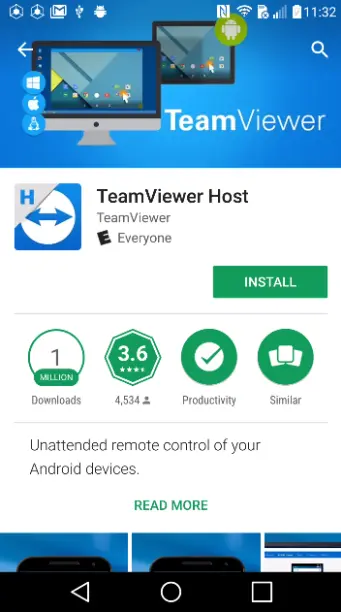
应用插件下载
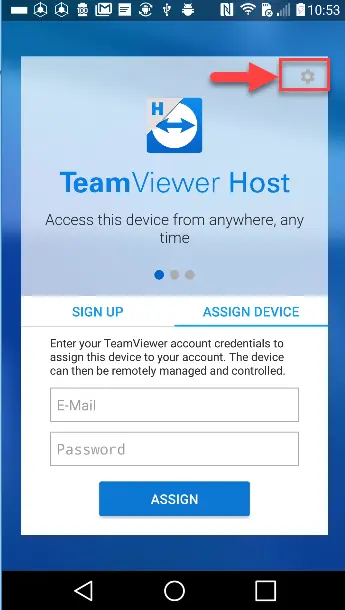
如果Play商店中没有附加组件,则客户需要通过提交工单并附加来自Android设备的TeamViewer 日志文件,向我们的一位移动设备专家请求.APK。您可以通过点击齿轮图标然后选择日志文件来找到它:
如果您在此处未找到您的设备制造商并希望提交功能请求,请提交工单联系我们。
支持的制造商
在下面,您将找到同时支持有人值守和无人值守访问功能的制造商设备的列表。如果您的设备未在Google Play商店中列出,则需要与支持人员联系以获取APK。
| Name | Google Play | Unattended access | Attended access |
|---|---|---|---|
Acer | ✅ | Remote control | Remote control |
Alcatel | ✅ | Remote control | Remote control |
Allview | ✅ | Remote control | Remote control |
Android Open Source Project (AOSP) | Please contact support. | Remote control | Remote control |
Archos | ✅ | Remote control | Remote control |
Asus | Please contact support. | Remote control | Remote control |
Blackberry | ✅ | Remote control | Remote control |
Bluebird | ✅ | Remote control | Remote control |
BQ | ✅ | Remote control | Remote control |
Casio | Please contact support. | Remote control | Remote control |
Caterpillar/CAT | ✅ | Remote control | Remote control |
CipherLab | ✅ | Remote control | Remote control |
Copper | Please contact support. | Remote control | Remote control |
Crosscall | ✅ | Remote control | Remote control |
Doro | ✅ | Remote control | Remote control |
Gemini | ✅ | Remote control | Remote control |
Getac | Please contact support. | Remote control | Remote control |
Gigaset | ✅ | Remote control | Remote control |
Handheld | ✅ | Remote control | Remote control |
Honeywell | Not all add-ons are available in the Play Store. Please contact support. | Remote control | Remote control |
HP (Hewlett-Packard) | ✅ | Remote control | Remote control |
HTC | ✅ | Remote control | Remote control |
Huawei | ✅ | Remote control | Remote control |
Intel | ✅ | Remote control | Remote control |
james | ✅ | Remote control | Remote control |
Janam | ✅ | Remote control | Remote control |
Kivi | ✅ | Remote control | Remote control |
Kyocera | ✅ | Remote control | Remote control |
LB Technology | ✅ | Remote control | Remote control |
Lenovo | Not all add-ons are available in the Play Store. Please contact support. | Remote control | Remote control |
LG | ✅ | Remote control | Remote control |
M3 Mobile | Please contact support. | Remote control | Remote control |
Medion | ✅ | Remote control | Remote control |
Mio | ✅ | Remote control | Remote control |
Nauto | Please contact support. | Remote control | Remote control |
NCR | ✅ | Remote control | Remote control |
ODG | Please contact support. | Remote control | Remote control |
OnePlus | ✅ | Remote control | Remote control |
Opticon | ✅ | Remote control |
|
Panasonic | ✅ | Remote control | Remote control |
Pixel | ✅ | View Only | View Only |
Pointmobile | ✅ | Remote control | Remote control |
Posiflex | Please contact support. | Remote control | Remote control |
Prestigio | Not all add-ons are available in the Play Store. Please contact support. | Remote control | Remote control |
RugGear | ✅ | Remote control | Remote control |
Safran | Please contact support. | Remote control | Remote control |
Samsung | ✅ | Remote control | Remote control |
Seuic | ✅ | Remote control | Remote control |
Sharp | Please contact support. | Remote control | Remote control |
Sonim | ✅ | Remote control | Remote control |
Technicolor | ✅ | Remote control | Remote control |
Teclast | ✅ | Remote control | Remote control |
TomTom | Please contact support. | Remote control | Remote control |
TPVision (Philips Android TVs) | Not all add-ons are available in the Play Store. Please contact support. | Remote control | Remote control |
Trimble | Please contact support. | Remote control | Remote control |
Unitech | Not all add-ons are available in the Play Store. Please contact support. | Remote control | Remote control |
Vestel | ✅ | Certain models supported | Remote control |
Via | Please contact support. | Remote control | Remote control |
ViewSonic | ✅ | Remote control | Remote control |
Vuzix | Please contact support. | Remote control | Remote control |
Wiko | ✅ | Remote control | Remote control |
ZTE | ✅ | Remote control | Remote control |