• Contact Sales
    • Open web app
    • Management Console
    • Ticket
    • Customer Portal
TeamViewer
  • Personal use and SMB TeamViewer Remote

    Fast and secure remote access and IT support.

    Learn more

    • Remote support Deliver instant, secure support
    • Remote management Monitor and manage devices
    View plans and pricing

    Enterprise TeamViewer Tensor

    Remote connectivity built for secure operations.

    Learn more

    • Remote IT support Secure, flexible, integrated
    • Operational technology Remote shop floor access

    Real-time troubleshooting TeamViewer DEX

    Resolve issues before they affect users.

    Learn more

    • Endpoint Troubleshooting Identify and resolve issues
    • Endpoint Automation Automate routine IT tasks

    Connected worker TeamViewer Frontline

    Drive efficiency with industrial augumented reality.

    Learn more

    • Logistics and warehousing Hands-free material handling
    • Training and onboarding Fast onboarding and upskilling
    AI capabilities as seen in the TeamViewer client

    TeamViewer ONE

    Get the full power of TeamViewer, unified in one platform.

    • Learn more

    Key integrations

    • Microsoft Intune

    • ServiceNow

    • Freshworks

    • Jira

    • Salesforce

    • Slack

    • Microsoft Teams

    View all integrations
  • TeamViewer ONE Platform

    Proactively manage and optimize your digital workplace combined in one platform.

    • For lean IT teams Proactive device management
    • Frictionless experience Smooth and uninterrupted digital experience
    • Seamless IT operations Proactive remediations and exceptional service
    • Talk to our team Ready to transform?
    Explore the platform

    Core capabilities

    • TeamViewer AI
    • Digital Employee Experience
    • Remote support and control
    • Asset and patch management
    View all capabilities

    Gartner Report 2025

    TeamViewer named a leader in DEX

    TeamViewer named leader in 2025 Gartner® Magic Quadrant™ DEX tools.

    Key integrations

    • Microsoft Intune

    • ServiceNow

    • Freshworks

    • Jira

    • Salesforce

    • Zendesk

    • Slack

    • Microsoft Teams

    View all integrations
  • Popular use cases Most popular TeamViewer use cases

    • Remote access and support Manage people, devices, and applications – from anywhere.
    • Digital Employee Experience (DEX) Proactively solve IT issues before they impact productivity.

    Other use cases Popular solutions for further use cases

    • Remote access Improve access with secure connection
    • Remote control Control device platform-independent
    • Remote desktop Enhance productivity from anywhere
    • Wake-on-LAN Enable remote device activation
    • Screen sharing Real-time visual communication
    • Smart Service Streamline after-sales operations

    By need Popular solutions for different requirements

    • Personal use Access devices from anywhere
    • Small businesses Simplify remote access and support
    • Large businesses Scale and secure enterprise IT
    • Freelancers and digital nomads Work securely from any location
    • Managed service providers Manage and maintain client IT
    • OEMs Streamline support and operations
    • Non-profit and education 30% discount on TeamViewer technology

    By industries Popular solutions sorted by industry

    • Automotive
    • Agriculture
    • Logistics
    • Manufacturing
    • Retail
    • Healthcare
    • Banking and finance
    • Public sector

    Talk to our sales team

    Need help choosing the right solution, placing and order, or upgrading your license?

    • Talk to us
  • Enterprise
  • Find out more about TeamViewer

    • About TeamViewer Connecting people, places, and things securely.
    • Contact Support Browse support articles or contact our team.
    • Become a Partner Join our global partner TeamUP program
    • Success Stories Explore results achieved by TeamViewer customers.
    NEWS

    TeamViewer reports rapid customer adoption of its Al offering.

    Resources

    • News and Insights
    • Success Stories
    • Events and Webinars
    • Trust Center
    • Why TeamViewer

    Partner

    • Become a Partner
    • Find a Partner
    • Integration Partners

    Support

    • Contact Support
    • Guides & Manuals
    • Knowledge Base
    • System Status
    • Custom Modules
    • For Developers
    • Community

    Company

    • About TeamViewer
    • Careers
    • Investors
    • Newsroom
    • Leadership
    • Sports Partnerships
    • Sustainability and CSR
  • Pricing
  • Free Download

Knowledge Base

  • TeamViewer ONE
  • TeamViewer Remote
  • TeamViewer (Classic)
  • TeamViewer Tensor
  • TeamViewer Tensor (Classic)
  • TeamViewer Frontline
  • Other products
Back to support overview
  • Frontline Help & Learning
  • Frontline Command Center
    • Dashboard
    • Assist
      • Dashboard
      • Call History
      • Service Report
      • Call Templates
      • Phonebook
      • Call Management
      • User Types
      • Mobile Browser
      • Incoming and Outgoing Calls
      • Live Video Features
      • Multi-Stream Calls
      • Whiteboard
      • Show Info
      • Chat
      • Show Files
      • Transcription
      • Call Settings
    • Inspect / Make
      • Task List
      • Templates
      • Workflow Approval
      • Live Screen View
      • Scanners
      • Code Generator
    • Pick
      • Templates
      • Picking Orders
      • Article Image Upload
      • Article Image Gallery
      • Picking KPIs
      • Live Screen View
      • Scanners
      • Code Generator
      • Gamification
    • Vision Picking Workflow
      • Introduction
      • Set-Up Guide
      • Workflow Configuration
      • Custom Translations
      • Execution on Smart Glasses
    • Creator
      • Home Screen
      • Workspace Overview
      • Creator Basics
      • Step Templates
      • Component Catalogue
      • Extra Components
      • Transitions
      • Expression Editor
      • Reporting
      • Preview Workflows
      • Keyboard Shortcuts
    • Administration
      • Introduction
      • User Management
      • Application Management
      • Roles and permissions
      • Device Management
      • Live Screen View
      • Scanners
      • Wi-Fi QR Codes
      • System Information
      • Audit Trail
      • System Preferences
      • Custom Themes
      • Licenses
      • Third Party Copyrights
      • Error Reporting
      • Code Generator
  • Frontline Workplace
    • Frontline Workplace App for Smart Glasses
    • Frontline Workplace App for iOS
    • Frontline Workplace App for Android Smartphone
  • Frontline Spatial
    • Starting With Frontline Spatial
    • Spatial Editor
      • Sign in Page and Home Screen
      • Workspace Overview
      • Menu Bar
      • Scene Explorer
      • Scene
      • Connector
      • Inspector
      • Spatial References
      • Transformation Gizmos
      • Pins: Pin, Quiz Pin, Line
      • Connecting the Pins
      • Scene State
      • Barcode
      • Scripting and RBOP
      • Navigation and Shortcuts
      • Task Reporting and Log Files
    • Spatial Workplace
    • Quick Guide
      • Spatial Onboarding Introduction
      • The Frontline Spatial Software
      • Downloading the Editor
      • Loading a 3D Model
      • Using Scene States to Make the Model Visible
      • Placing Pins
      • Downloading Spatial Workplace
      • Uploading and Viewing a Workflow
    • Spatial Capture
      • Frontline Spatial Capture
      • File Manager
    • Data Encryption Overview
    • Troubleshooting
      • Spatial Editor Troubleshooting
      • Spatial Workplace Troubleshooting
  • Installation and Configuration
    • Frontline Architecture
    • Frontline System Requirements
    • System Requirements
      • Frontline Command Center Requirements
      • Frontline Spatial Requirements
      • Frontline Workplace Requirements
      • Network Requirements
      • Assist Requirements
      • Pick Bandwidth Requirements
    • Frontline Command Center
      • Prerequisites
      • Installation Guide
      • Configuration
      • Configuration Properties
      • Updating
    • Frontline Connector
      • Windows
      • Linux
      • Multiple Domain Setup
      • Vision Picking Workflow - On Prem Setup
      • Properties
    • Frontline Workplace
      • xSetup
      • Connecting to Wi-Fi & Setting Up Frontline Workplace
      • Google Glass Enterprise Edition 2
      • RealWear Navigator 500 Series
      • Vuzix M400 / M4000
      • Rokid X-Craft
      • Hyco W563
      • Discovery Mini
      • Zebra ZQ620
      • Inspectron Devices - Borescope Cameras
      • ProGlove Mark Display Templates
      • iPhone
      • Android Smartphone
    • Frontline Spatial
      • Spatial Editor
      • Spatial Workplace
      • Siemens Teamcenter Integration Documentation for Frontline Spatial
    • Third party integrations
      • SAP FSM Assist extension
        • SAP Field Service Manager Assist Technical Product Profile
        • Installation Guide
        • User Guide
      • SAP SAM Inspect/Assist extension
        • Technical Product Profile
        • Installation
        • User Guide
    • Downloads
  • Release Notes
    • Hotfix | Frontline 4.37.1
    • Release Notes | Frontline 4.37 | Autumn Release
    • Hotfix | Frontline 4.36.1
    • Release Notes | Frontline 4.36 | Summer Release
    • Release Notes | Frontline 5.1
    • Hotfix | Frontline 4.35.1
    • Release Notes | Frontline 4.35
    • Release Notes | Frontline 4.34
    • Release Notes | Frontline 4.33
    • Release Notes | Frontline 4.32
    • Release Notes | Frontline 4.31
    • Release Notes | Frontline 4.30
    • Release Notes | Frontline 4.29
    • Release Notes | Frontline 4.28
    • Release Notes | Frontline 4.27
    • Release Notes | Frontline 4.26
    • Release Notes | Frontline 4.25
    • Release Notes | Frontline 4.24
    • Release Notes | Frontline 4.23
    • Release Notes | Frontline 4.22
    • Release Notes | Frontline 4.21
    • Release Notes | Frontline 4.20
    • Release Notes | Frontline 4.19
    • Release Notes | Frontline 4.18
    • Release Notes | Frontline 4.17
    • Release Notes | Frontline 4.16
    • Release Notes | Frontline 4.15
    • Release Notes | Frontline 4.14
    • Release Notes | Frontline 4.13
    • Release Notes | Frontline 4.12
    • Release Notes | Frontline 4.11
    • Release Notes | Frontline 4.10
    • Release Notes | Frontline 4.9
    • Release Notes | Frontline 4.8
    • Release Notes | Frontline 4.7
    • Release Notes | Frontline 4.6
    • Hotfix | Frontline 4.5.1
    • Release notes | Frontline 4.5
    • Release notes | Frontline 4.4
    • Release notes | Frontline 4.3
    • Release notes | Frontline 4.2
    • Release notes | Frontline 4.1
    • Release notes | Frontline 4.0
    • Release notes | Frontline 3.0.15
    • Release notes | Frontline 3.0.14
    • Release notes | Frontline 3.0.13
    • Release notes | Frontline 3.0.12
    • Release notes | Frontline 3.0.11
    • Release notes | Frontline 3.0.10
    • Release notes | Frontline 3.0.9
    • Release notes | Frontline 3.0.8
    • Release notes | Frontline 3.0.7
    • Release notes | Frontline 3.0.6
    • Release notes | Frontline 3.0.4
    • Release notes | Frontline 3.0
  • Video Guide
    • Frontline Command Center
    • Assist
    • Frontline Creator
    • Make / Inspect
    • Pick
    • Frontline Workplace
    • Frontline Spatial
  • Developer Guide | Creator Developer Training
    • Introduction to Creator Developer Training
    • Component Structure
    • Scopes and Referencing
    • Context Variables
    • Rules and Expressions
    • JavaScript & Functions
    • Layouts and Mapping
    • Component Configuration
    • Handlers
    • Translation
    • Cheat Sheet
  • Developer Guide | Workflow Engine Reference
    • Actions
      • Transitions
      • UI
      • Speech
      • Sound
      • General
      • External Device
      • Camera
      • Picking
      • Data Integration
      • xAssist Related
    • Handlers
      • General
      • Picking
    • UI
      • Elements
      • UI Concept
      • Color Map
      • Layout Sharing
    • Component Configuration
      • Input Types
      • Sharing Configuration Parameter
      • Configuration Helpers
      • Grouping Configuration Parameters
    • Resources
      • Media
      • Barcode Settings
  • Developer Guide | Backend Integration
    • Frontline Connector Template
    • Integration Examples
      • Task Details API
      • Login API
      • xAssist Call Creation
  • Troubleshooting
  • Service & Support
  • Release Notes | Frontline 4.36 | Summer Release

    Last Modified: Jul 21, 2025

Spatial Editor

  • Highlight: Grouping model parts into a collection

Imported models aren’t always structured in a way that makes grouping easy. You can now collect parts from different branches into one group and use them in scene states or animations (see GIF). Collections are saved and reusable across the project.

Benefits
No need to select the same parts again and again. Group once, reuse anywhere.

Value
Speeds up content creation and cuts down on repetitive work.

  • Added: AI-driven spatial workflow creation based on PDF input
  • Improved: CAD parts can now have their pivot point set to any position via the scripting API

Spatial Workplace 

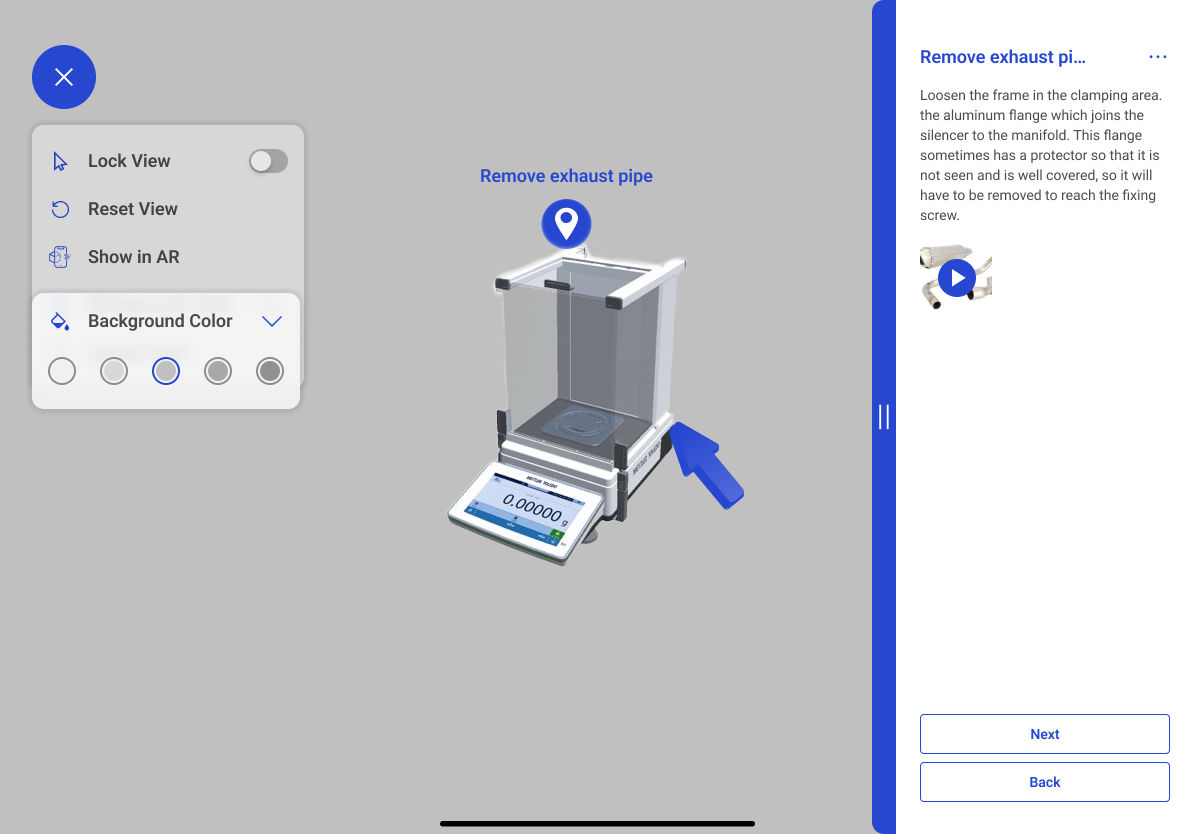
  • Highlight: Changing background color in 3D view (iOS, Android, Desktop)

The 3D view lets you explore content without needing physical assets. Sometimes, objects blend into the background, so you can now choose different background colors. Your choice is saved locally and stays across workflows until changed.

Benefits
Improves visibility of 3D objects for easier viewing.

Value
A clearer view means a better experience and more frequent app use.
  • Improved: Open settings button added to camera and mic access popups for easier permission handling
  • Deprecated: Spatial Workplace support for HoloLens 2 ends with Frontline 4.36. Customers using HoloLens 2 will not be able to upgrade the Spatial Editor beyond 4.36 as well

Creator

  • Improved: Performance and property panel
  • Fixed: Issue where PDF zoom resets in Advanced Mode when turning pages 

Please choose your region

Selecting a region changes the language and/or content on teamviewer.com


SUGGESTED REGION

  • Americas

    • Americas - English
    • América Latina - Español
    • Brasil - Português
    • Canada - English
    • Canada - Français
    • United States - English
  • Asia Pacific

    • Asia Pacific - English
    • Australia - English
    • 中国 - 中⽂(简体)
    • 香港 - 繁體中文
    • India - English
    • 日本 - ⽇本語
    • New Zealand - English
    • 대한민국 - 한국어
    • 台灣-繁體中文
    • ประเทศไทย - ภาษาไทย
    • Việt Nam - Tiếng Việt
  • Commonwealth of Independent States

    • CIS - English
    • СНГ - Русский
  • Europe

    • Europe - English
    • Belgique - Français
    • België - Nederlands
    • Bulgaria - English
    • Croatia - English
    • Cyprus - English
    • Czechia - Čeština
    • Denmark - English
    • Deutschland - Deutsch
    • España - Español
    • Estonia - English
    • Finland - English
    • France - Français
    • Greece - English
    • Ireland - English
    • Italia - Italiano
    • Latvia - English
    • Liechtenstein - Deutsch
    • Liechtenstein - Français
    • Liechtenstein - Italiano
    • Lithuania - English
    • Luxembourg - Français
    • Magyarország - Magyar
    • Malta - English
    • Nederland - Nederlands
    • Norway - English
    • Österreich - Deutsch
    • Polska - Polski
    • Portugal - Português
    • Romania - English
    • Schweiz - Deutsch
    • Suisse - Français
    • Svizzera - Italiano
    • Slovakia - English
    • Slovenia - English
    • Sweden - English
    • Türkiye - Türkçe
    • United Kingdom - English
  • Middle East Africa

    • Middle East Africa - English
    • Middle East Africa - Français
  • Products
    • TeamViewer Remote
    • TeamViewer Tensor
    • TeamViewer DEX
    • TeamViewer Frontline
    • Pricing
  • ONE Platform
    • TeamViewer ONE
    • Talk to our team
  • Solutions
    • By Industries
    • By Use Cases
    • By Roles
    • Enterprise
  • Partner
    • Become a Partner
    • Find a Partner
    • Integration Partners
  • Resources
    • News and Insights
    • Success Stories
    • Events and Webinars
    • Trust Center
    • Why TeamViewer
  • Support
    • Contact Support
    • Guides & Manuals
    • Knowledge Base
    • System Status
    • Custom Modules
    • For Developers
    • Community
  • Company
    • About TeamViewer
    • Careers
    • Investors
    • Newsroom
    • Leadership
    • Sports Partnerships
    • Sustainability and CSR
  • Additional Links
    • Contact Sales
    • TeamViewer User Focus Program
    • Make work work better
    • Research Projects
    • Newsletter
  • Product Descriptions
  • Imprint
  • Contact
  • EULA / DPA
  • Privacy & Cookies
Cookie Settings