
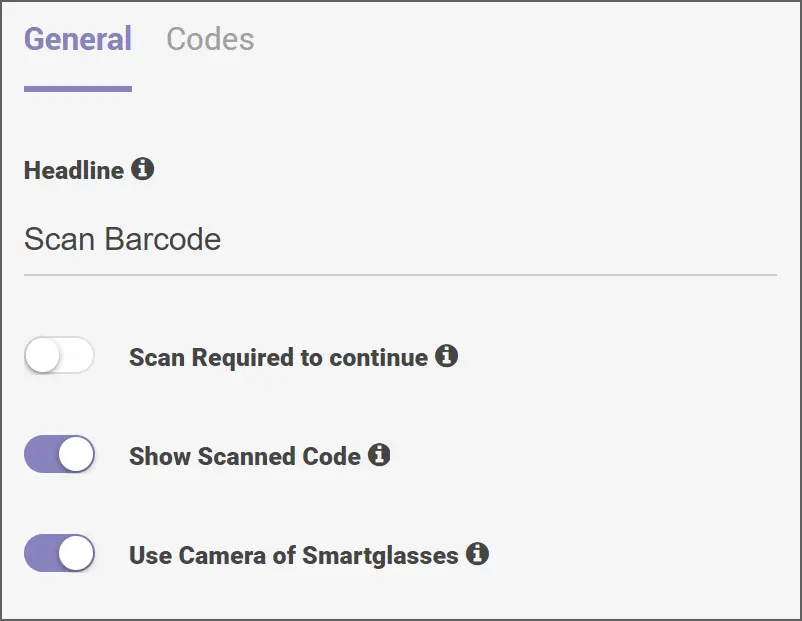
The Barcode Scan component can be used with the smart glasses camera or with an external camera. It can scan different types of codes. If the device fails to scan, the value can be entered manually with a keyboard (physical or virtual) or voice command.
The Barcode Scan component is used in workflows that are related to Logistics (manual order picking, checking incoming/outgoing goods, defining inventory deficiencies, sorting, and packing), Production (tool selection and identification, supporting material management), Maintenance, Repair and Operations (equipment or parts inspection, tool selection and identification), Health and Safety (identifying and selecting the chemicals, detection of labelled laboratory items) and Authorization.
Configurations
- General: The General tab is for users to configure the title. It also includes toggle options for scanning the required codes to continue, displaying the scanned code, and using the smart glasses camera.
- Codes: The Codes tab is for users to add and delete accepted barcode symbologies and define the regex of allowed values. The Results Settings subsection allows you to add and delete result variable names and use the toggle options to save results globally and enable reporting.
Output Values
- code: It will contain the scanned value of the barcode, QR or the ITF code after a successful scan.
- success: Checks whether the scan was successful or not. If the scan is successful, assign it as true. If the scan is not successful, assign it as false.
- result: It will contain a string of labelled groups of the scanned code.
