Workspace Overview
Workspace opens up when you create a new project or open an existing one with a model. This is how it looks:
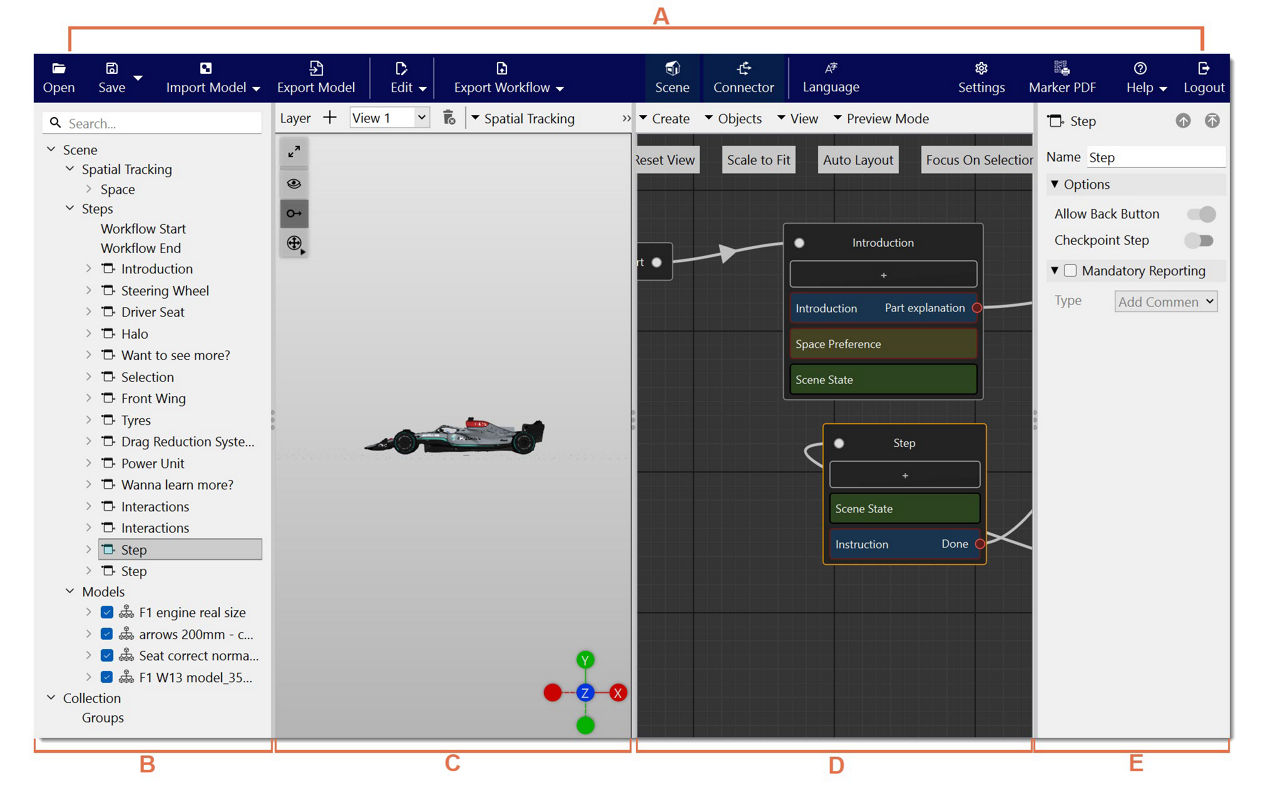
The workspace of Spatial Editor includes the following sections:
A. Menu Bar: Open, Save, Import Model, Export Model, Edit, Export Workflow, Scene, Connector, Language, Settings, Marker PDF, Help, Logout.
B. Scene Explorer: Search bar, Scene, Steps, Model, Spaces, Spatial Tracking, and Collection
C. Scene: Layer, the Plus button (Create New Layer), View, Delete, Spatial Tracking (Markers, Object, and the Surface Tracker), Objects, Select, Optimize, View, Display
D. Connector: Create, Objects, View, Preview Mode, Reset View, Scale to Fit, Auto Layout, Focus on Selection
E. Inspector: Steps (bar to search and navigate), Mandatory Reporting (menu for adding comments), Outports, Content, 3D Shapes, Lines