The Sensor ID Discovery Mini (also referred to as Partitalia Scanner) is a RFID reading device worn on the arm wrist. Its functionality is very similar to the xBand. It offers two buttons, one of which is freely customizable, and a vibration motor but no further sensorics.
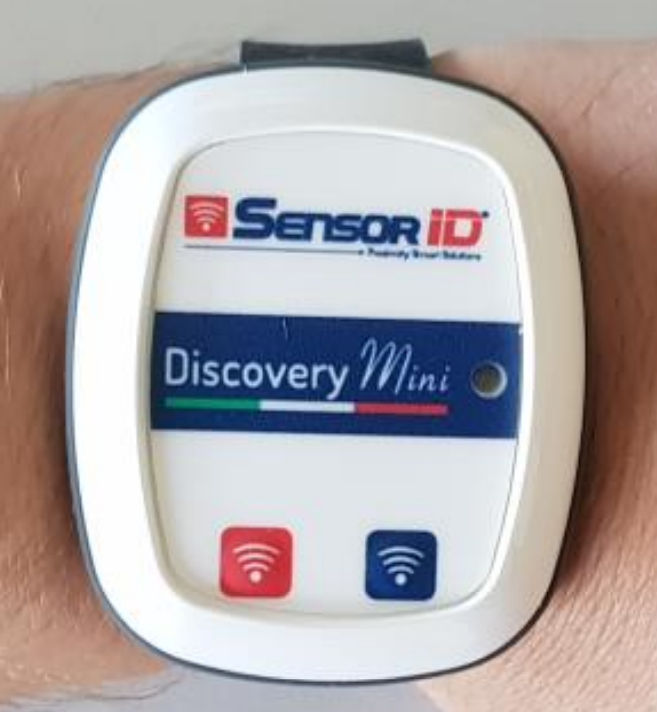
Turning the Scanner On and Off
To turn the Scanner On press the red button (left). The LED will flash red and the scanner will vibrate once.
To turn the Scanner Off press and hold the red button until the red LED turns off.
Battery and Charging
If the battery charge gets reaches 5%, the LED will light up red. It must be charged wirelessly, e.g. by a Anker PowerWave Pad.
Pairing
Contact your Customer Success Manager to pair the reader.
Initial Config
Input...Bluetooth...Devices:
    DiscoveryMini:
        Driver: de.ubimax.android.core.util.bluetooth.handler.discovery.DiscoveryMiniGattConnectionHandler
        Name: D-mini.*
        Type: XBand
        Config:
          InitialReaderPower: 1
          InitialReaderSensitivity: 1
          InitialReaderDistance: 1
          InitialReaderTimeout: 2
          ReadAsHex: true
          ObserveBattery: true
          ObserveBatteryDelay: 60000
          Feedback: true
          RSSIFeedback: true
          ButtonCommand: INFO
Above can be seen the default config of the device. It uses its own Handler due to a custom communication protocol. Further configuration parameters are explained beneath.
Control via workflow
Just as the xBand, the reader can be controlled via the workflow action "send_bluetooth_device_commands" (SendBluetoothDeviceCommands). Refer to the implemented commands in the following table.
Example
<actions>
    <send_external_device_commands id="send_external_device_power">
            <commands>
                <param name="P">80</param>
            </commands>
    </send_external_device_commands>
</actions>